• SONAR
  • Sonar X1 track MIDI Chn assignment?
2013/02/28 04:07:39
OldNick
This is probably something very basic that have forgotten. So how do I get Piano Roll-entered notes to automatically be placed to the MIDI channel of a track that the Piano roll is set to? Here is the trouble. Although the track is set to say, MIDI chn 3, every time I enter a new note event in the Piano Roll, it gets sent to Chn 1. I am trying to get to terms with TTS-1 and this requires that I assign multiple MIDI tracks to it. So I create a few tracks and assign them to the TTS-1. I then set each track to MIDI Chn 1,2,3,4 etc. I then set TTS-1 to different voices by either trying to insert a Patch from the Insert Menu, or by actually manually inserting one on the Event List, making sure that each track's patch change is set to the MIDI channel for that track. But when I use Piano roll to insert a note, it goes to Chn 1. TTS-1 then happily plays it with Chn 1's voice. Any help appreciated
2013/02/28 11:02:02
Cactus Music
Somehow old nick you've posted in the wrong forum. I wish they would change the name because there's nothing about it to indicate that this is NOT for x1 and 2. 

Sorry I don't have a clue why that would happen as it's sure doesn't do that for me, Been using Piano roll for years with all channels and TTs-1. 
Something strange has been toggled, one of those stupid hot keys? 
2013/02/28 17:54:08
OldNick
Thanksw for the reply. Yeah I am in the wrong forum. Rats. But hey, you are here now :D. Could you please let me know about the following? When you use TTS-1, do you have a track for each channel in TTS-1? When you enter a MIDI note in a track that has been assigned to a MIDI channel, what MIDI channel does that note go to? When you enter that note, does it play the right voice?ATM the ONLY way I can get the thing to remotely behave is by doing a Find/Change on all notes in each track and setting them to the right MIDI channel for that track. Then it _seems_ to work.
2013/02/28 18:01:08
OldNick
WOW! This screwed. Now I have opened a track that still has Piano 1 set as the voice. It plays OK, but when I scroll up and down the pianjo roll KB, I get this weird EG plunging the note as each one plays. tew tew tew....then the normal piano note if I sit one one key. I do not think TTS-1 HAS that power of synthing! This is scary.
2013/02/28 20:55:59
bitflipper
As long as you have a MIDI channel specified in the track header, all notes entered into that track will be sent to that channel regardless of their individual MIDI channel assignments. The only time that's not the case is when you have the MIDI channel set to "none". 

So it's not a matter of forcing MIDI channel assignments onto notes; SONAR does that for you when you select a MIDI channel for the track. Your problem may be simply you're not specifying a MIDI channel for the track.

The TTS-1 is kind of old-fashioned in that each voice is hard-wired to a MIDI channel. Because each of the 16 voices defaults to piano, any time you inadvertently send notes to the wrong channel you get that piano.

2013/02/28 21:32:03
OldNick
Thanks for dropping in. That's the trouble though. I am definitely assigning a channel to each track. In the Track Inspector I use the button that assigns channels and set a new MIDI channel for each track (remembering to go back and remove Chn 1 because the track ends up with 2 channels!). Then in Piano Roll I enter a new note. That note will play Channel 1's voice, no matter what track I am in, if it's the first note I enter for a session. However if I then edit that note and make its channel, say, 10, it will play the drums...no matter what track I am in! Any note I enter after that is set to Channel 10 and plays drums. Also, if I go to another track, with MIDI channel assigned, and enter a note, that note will have the same MIDI Chn assigned to it, and will play the voice of that channel...no matter what track I am in....So if X1 is supposed to send to the correct midi channel depending on track Chn assignment and not on note assignment (which is what I understood), something is wrong. Sorry to sound grumpy, but this has really played with my head and I just wish I was doing something wrong that someone can ID.
2013/03/01 00:07:55
RobertB

Nick, you have mentioned selecting channels, but the bank and patch settings are what really matter, and I am not entirely clear on how you are selecting those.
There is a hierarchy to patch settings, that I think has more to do with GM in general rather than TTS-1 in particular.
The Event list will override everything.
The MIDI track is where you usually want to specify your patch. It will fall prey to the Event list, but will override the synth GUI.
The synth GUI will fall to either of these.
The key element in getting TTS-1 to respond properly is setting your bank and patch in the track. It is vitally important to see the boxes that allow you to do that.
In the following view, you will se a button near the top labelled "All". This is not a default setting, but it must be selected to reveal your bank and patch fields.
When you make your selections here, you will see the TTS-1 GIU follow suit.
I would strongly urge you not to make changes in the Event List for now.
Case in point: When you selected Ch 10 in the Event List, any subsequent notes would be directed to Ch 10. The channel itself does not mean much. It just so happens that the default for Ch 10 is the Standard Drum Set.
Also, PRV may not necessarilly open to the track you think you are in. Verify your track.
PRV is not capable of redirecting notes to other tracks.
Study the screen shot. If something doesn't make sense, please ask.
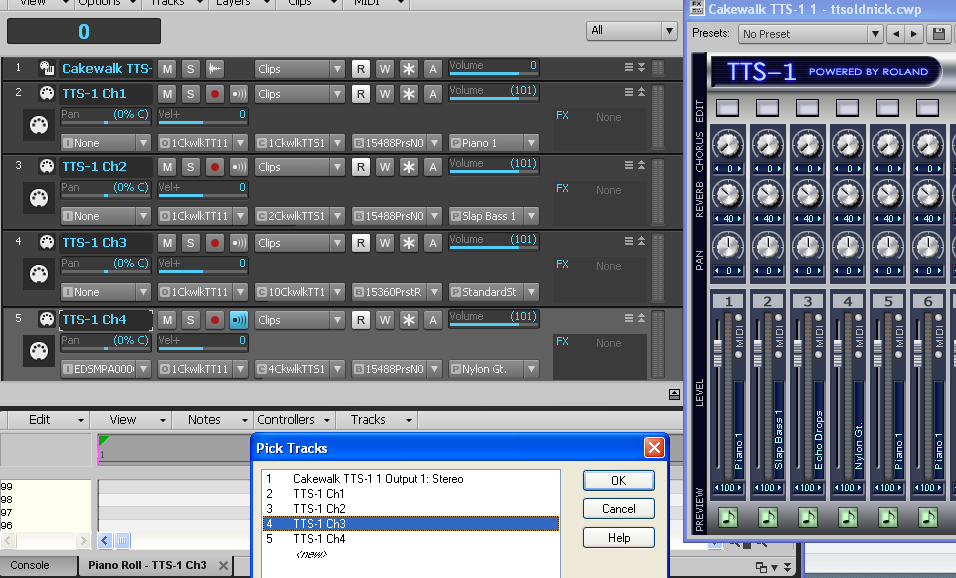
2013/03/01 00:52:53
bitflipper
Good call, Bob. It may not be an issue with MIDI channel assignments at all, but rather not specifying the patch. I haven't used the TTS-1 for so long I'd forgotten about that gotcha.
2013/03/01 01:08:54
OldNick
WOW! Thanks and now it is all clear. But no wonder I was confused. I cannot find anywhere that button to direct to the TTS-1 channel, other then by asking for All, then opening up the track depth to see it. I was working with MIDI Channels, which is all that is available in the Track Inspector AFAICS. This is all a lot different from the way things were in older Cakewalks/Sonars that I used. The only thing that puzzles me is that the PRV WAS sending MIDI events to other TTS-1 sections/parts, if the MIDI Channel of that event matched the MIDI channel of that other section/part. So if I placed a MIDI Channel 1 event in the PRV track that matched TTS-1 channel 10, it would play the voice that TTS-1had set in its #1 section/part. If I changed the event's MIDI Channel to 10, it would play the Channel 10 sound (drums)....anyway, now that I get the interface this is a MUCH better way to handle a multi-timbral synth than used to be there. So all is on order and thank you.
2013/03/01 01:12:34
OldNick
No, actually I was setting the patch, by 3 different methods: (1) Using the Patch Browser (2) Using the Menu Insert Bank/Patch Change (3) After all else failed to stick, using the Event List. The even list way was the only way it used to work back in my darkest memories. It was the TTS-1 section assignment I was not seeing.
12
© 2026 APG vNext Commercial Version 5.1

Use My Existing Forum Account

Use My Social Media Account