Bristol_Jonesey
Bristol_Jonesey
Personally, I wouldn't use the Pencil tool for that.
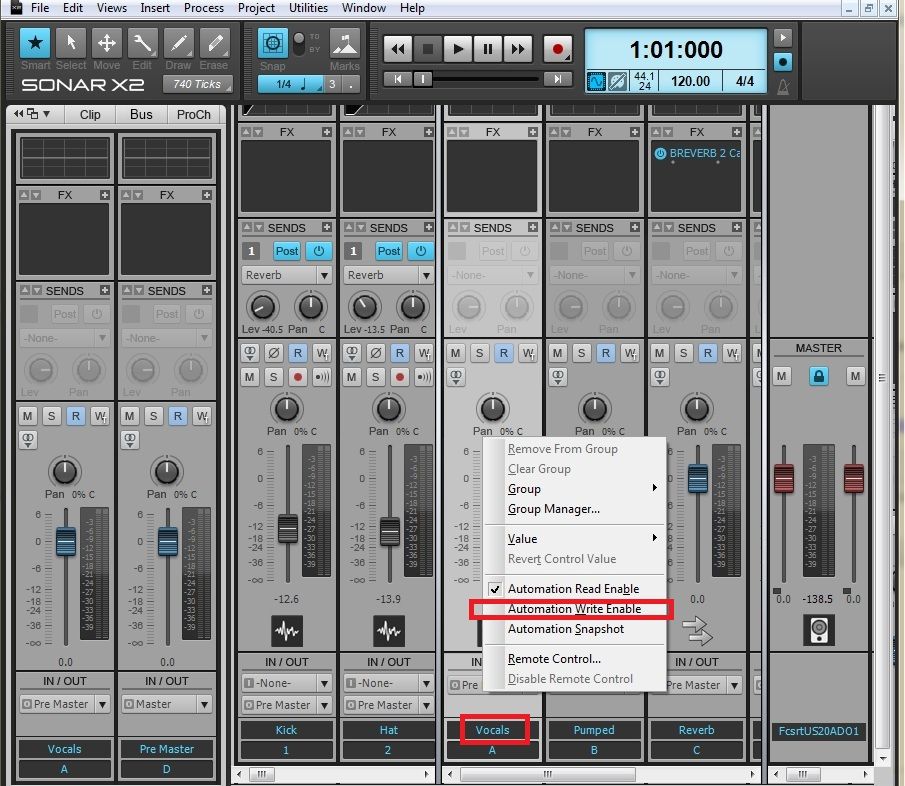
You'd be much better off automating the volume via the bus fader itself
Just write click the fader & select Automation Write Enable. Play your project back and adjust the fader in real time.
You'll have much finer control using the fader - better still - map it to a real fader or knob on your controller, if you have one.
Don't forget to switch Write Enable OFF when you've finished
Another good reason for mapping to a real controller is you should be using your ears, not your eyes, grab the fader and close your eyes while you're writing the envelope.
You can always go back in and edit your moves manually when you've finished
yes i have a control surface and use it for this but, when i mix vocals after comp and limit it still needs a quick tweek. i like the feeling of painting music levels, but have been using the faders since the paint or pencil too dont work.on a buss, but eather this is just one thing that crashed it the last week, some things like a direct drop in the middle of a live recording must be fixable. i trying i issues at a time to get some stability, belive me if i had the money i would just use a simpler dAW but i knee deep into sonar and need to stay positive and work threw these issues .thanks for the input so far.
her are a few setting to glance at for my stupidity. before i go further
these are basic setting i used on X1
input 2.4. 107
output 2.1 92
RT 4.5 199
playback at 256
playback I/0)512
record I/O512
ADBDepth 24