2013/02/06 22:31:07
Evnabby
 How do I use the step sequencer for different instruments? I'm not used to this view...you know how on FL studio theres rows and rows of step sequencers? And here when I go to step sequencer view its only for one instrument, how do I switch?
 
Btw are there are there like real drum instruments in X2 Essentials? I'm using trial right now and the only thing that's in the "add synth" tab is Cakewalk Soundcenter. I'd like something like SessionDrums
2013/02/07 02:36:52
Loptec
Evnabby


 How do I use the step sequencer for different instruments? I'm not used to this view...you know how on FL studio theres rows and rows of step sequencers? And here when I go to step sequencer view its only for one instrument, how do I switch?
 
Btw are there are there like real drum instruments in X2 Essentials? I'm using trial right now and the only thing that's in the "add synth" tab is Cakewalk Soundcenter. I'd like something like SessionDrums

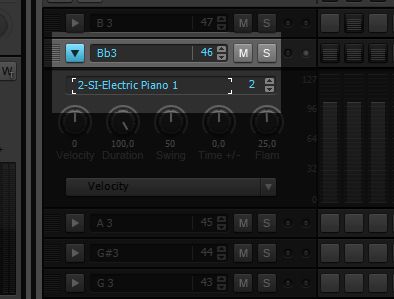
on each row in the step sequencer you've got an icon that looks kind of like a play button. press this to unfold the row.

here you can choose what instrument you want on a specific row, by double clicking where it says electric piano in my picture

unfortunately you've got nothing as good as session drummer in essentials.. =/

TTS-1 is a general midi synth, so here you've got some drum kits. but the quality isn't as good :/


2013/02/07 05:14:46
scook
X2 Essentials contains the Studio Instruments Suite. Studio Instruments contains the SI-Drum Kit, that would be your best bet for realistic drum sounds. It is essentially a lite version of Session Drummer.
2013/02/07 06:30:18
jb101
From reading your other thread I get the feeling you want to use the step sequencer on different tracks with different instruments.
 
Right click on the track and choose "View" - "Step Sequencer".
 
HTH.  If it's not what you meant, please post back.
2013/02/07 12:51:53
dubdisciple
I think loptec is on the right track as far as what OP is trying to do. Emulating fl studio workflow in sonar is a challenge because they are designed so radically different. Fl studio tracks defaults to a channel view that is basically a tightly integrated step sequencer and sampler with options for piano roll. The closest one could come to that is doing what Loptec posted and mapping each instrument as he described.
2013/02/07 18:41:26
Evnabby
jb101


From reading your other thread I get the feeling you want to use the step sequencer on different tracks with different instruments.
 
Right click on the track and choose "View" - "Step Sequencer".
 
HTH.  If it's not what you meant, please post back.

That is what I meant, thanks.
But now a new question. Why is the Step Sequencer (and somtimes other things like Piano Roll) grey? Is it because I originaly made it with the other view or something?
© 2026 APG vNext Commercial Version 5.1

Use My Existing Forum Account

Use My Social Media Account