• SONAR
  • Controller handles & selecting controllers - RESOLVED SORT OF. (p.3)
2011/09/16 16:50:40
FastBikerBoy
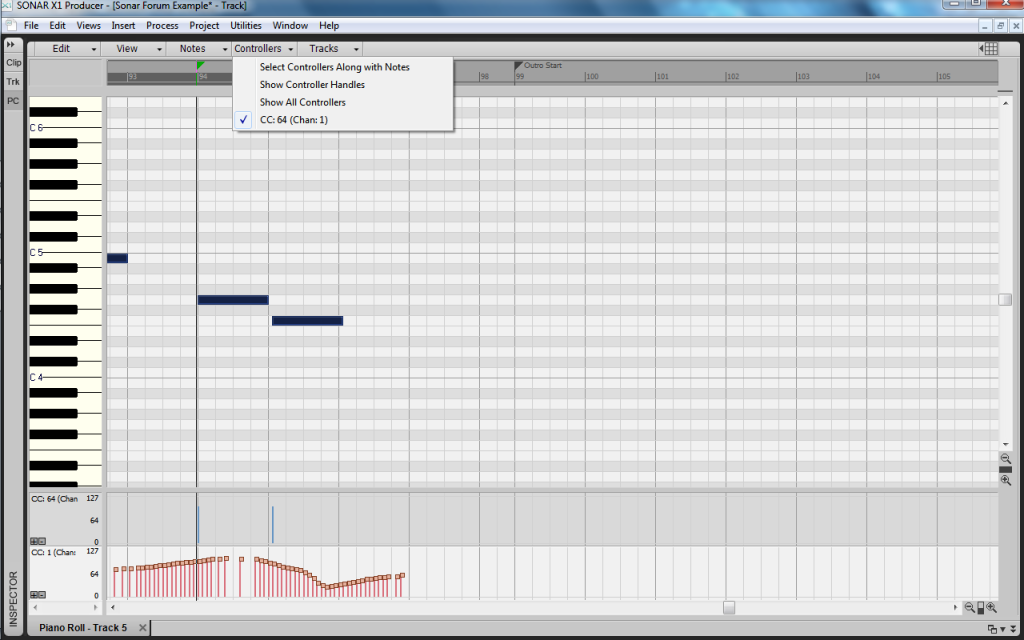
I think you're right John, I'm about to give up on this particular venture. Here's an absolutely crazy screenshot..........


As you can see I've got modulation data showing in the velocity lane, along with the pedal sustain data & the velocity lines, even though I've got show velocity deselected.

In the pedal sustain lane, I've just got modulation data?

Does that make any sense to anyone?

2011/09/16 17:15:11
brundlefly
Here's an absolutely crazy screenshot


Yeah. That's a real gem. But I'm holding out for a shot of a controller lane with lyrics in it. 
2011/09/16 17:18:17
John
Ah, can we agree there is a bug here? I think you and Brundlefly have found a most perplexing problem. This is an important finding in that one can not be sure as the the data in the form of CCs being inputted via the PRV.
2011/09/16 17:28:03
FastBikerBoy
I think there's several bugs....... There's the velocity data appearing willy nilly, controller handles showing depending on if they feel like it or not, and CC data showing up in which ever lane takes it's fancy.

Other than that it works perfectly.....

For the record the CC-64 data was recorded from my keyboard and the CC-1 data was hand drawn with the draw tool.

To make matters worse there doesn't seem to be a recipe to replicate it either.....

I'm not even sure what I'd put in the bug report. I really thought I had a recipe for the handles bug earlier but this bit of investigation has well and truly blown that idea into the weeds. It wouldn't surprise me if my report comes back unable to duplicate, cos I can't all the time but the screenshots must be some sort of evidence and I guess the project will do the same on a different system.

Anyway my brain aches so I'm taking a break from this particular problem. I'll have another dig around tomorrow.
2011/09/16 17:33:18
brundlefly
This is an important finding in that one can not be sure as the the data in the form of CCs being inputted via the PRV.


Input's not a problem. If you draw in any given lane, it will insert the correct controller type. Likewise, I don't think you can delete controllers from the wrong lane. It's just a graphical issue.
2011/09/16 17:42:26
GlennKay
Just a guess here, FBB, but if you've got two midi tracks assigned to the same midi out and midi channel, maybe it makes sense of a sort to see an 'active' CC#64 lane in one track and an 'inactive' CC#64 lane in the other track.

My theory being is that it might get too confusing if essentially the same data could be changed in both tracks, so therefore it can be edited in one of the tracks, but is only displayed in the other track.

Have you tried taking the Erase Tool and wiping out the markers in the CC#64 lane (i.e. the 'active' one, by which i mean the track whose lane does show the handles. If this does work, out of curiosity, what happens if you try the erase tool on the 'inactive' lane? I'd like to try this myself but i won't be back at Sonar again until tomorrow.)

Of course none of this speaks to the 'ghost' CC#1 data in your more recent screenshot...that's messed up.

Regards
Glenn
2011/09/16 18:23:26
brundlefly
My theory being is that it might get too confusing if essentially the same data could be changed in both tracks, so therefore it can be edited in one of the tracks, but is only displayed in the other track.


I think this is touching on part of the the truth of the situation. Below is a screenshot showing two identical MIDI clips (layered acoustic and electric pianos), but on different tracks with different channels (both embedded in the events, and forced at the track output).

The second track (MIDI Ch. 11) is being displayed in the PRV, but note that I am able to show CC64 controller lanes for both tracks, just by adding another lane and specifying the channel for the other track (Ch. 1).

I was unaware until now that you could show controller lanes for a track that is not the active track in the PRV. That actually doesn't seem right. It could be useful in some ways, but only if the controller lane title showed the track name/number as well as the channel.

As an aside, note that the CC64 controllers for the second track, appear "ghosted" in both the Inline PRV and the full PRV. I discovered that this happens when I select to show the controllers in the inline PRV in the Track View, and then switch back to Notes/Velocity (see the Edit Filter button text for the two tracks). The controllers continue to show as ghosts until I switch back to Clips and back to Notes/Velocity, at which point they disappear completely as they should. I'm not sure if this is a feature or a "feature".


2011/09/17 02:17:55
FastBikerBoy
Just a guess here, FBB, but if you've got two midi tracks assigned to the same midi out and midi channel, maybe it makes sense of a sort to see an 'active' CC#64 lane in one track and an 'inactive' CC#64 lane in the other track.

Thanks for the input GlennKay and I can certainly see the theory behind what you are saying. However I only really discovered the two track bit while trying to find out why I couldn't get controller data to display on one instance, unless of course another instance in a different screenset causes the same problem.

If that's the case that must be a bug surely? It wouldn't make any sense only being able to edit the MIDI cc data in one screenset, or not to me anyway.

I'll continue to delve further and see what I discover........

EDIT: Thinking a bit more about what you've said..... it doesn't explain why if I do open a different track in the same PRV I can't see the handles on that tracks data either, does that make sense?
2011/09/17 06:04:35
FastBikerBoy
Ok... Went back to basics this morning

My starting point is I have two PRVs open, same track and settings assigned at this stage, one is displaying controller handles correctly the other isn't.
 
I inserted a completely new MIDI track assigned it to a separate softsynth and then opened it in the 'non-handles' PRV. Drew some CC-1 data, and...dum dum dum... No handles show.
 
So I closed both instances of the PRV and then opened the track created above in a fresh PRV and...ta da... Success controller handles are showing.
 
Lock that PRV and open a different track/synth combo in another PRV, handles show again, which has just completely blown my "2 PRVs open at the same time is the bug key" theory. I thought I had the recipe for a minute but no, I'm more confused than ever now.
 
I've unchecked the "show controller handles" option and now I can't get it to NOT show the handles. See below..................


Note velocity data appears in cc64 data lane. At least that bug is consistent.

I'm going to scream........ close the PRV and record all my controller data in future.........
2011/09/17 18:33:24
GlennKay
Just a guess here, FBB, but if you've got two midi tracks assigned to the same midi out and midi channel, maybe it makes sense of a sort to see an 'active' CC#64 lane in one track and an 'inactive' CC#64 lane in the other track.

Hmmm....i just did a VSTi track in which i recorded some aftertouch filter sweeps along with the midi notes. Then i created a standalone midi track, pointed it at the same VSTi, and CTRL-C/CTRL-V'd everything into it from the first track.

In this case, handles were visible in the controller lanes of both tracks, which i don't think would have happened if my theory were true, so i'm at a loss.  (I vaguely recall a tip from one of the Sonar X1 videos that used two midi tracks pointing at the same device, so this isn't academic by any means).

I just noticed that in both of my tracks, velocity bars are duplicated in the AT controller lanes....very confusing, because all controller bars are the same colour in one of the tracks. This is kind of like what's going on in the picture shown in post #28 above, FBB, but in reverse.

I'm going to send in a bug report about this.

Regards
Glenn
© 2026 APG vNext Commercial Version 5.1

Use My Existing Forum Account

Use My Social Media Account