• SONAR
  • Can't bounce MIDI into audio, using soft synths only flat audio lines appear (p.3)
2013/01/07 16:32:26
Sara95
  And when you press "play" the MIDI is played by Sound Center with the sounds of your choice --> Yes I can choose piano/synth/clarinet etc but when you select both of the tracks (Tracks, not clips), MIDI and audio, and bounce or export, you only get a silent flat line? --> correct Or, if you select nothing, it's the same as selecting all (if there only is this one soft synth track.) --> correct And the output of the MIDI track is Sound Center, and the input of the audio track is Sound Center? --> i select the MIDI track and the sound center track and press bounce to tracks, then in a new track (destination track)a audio clip is created but it has only flat audio lines.. SO in the end I have 3 tracks MIDI soft synth and the new audio track (which contains no data)
2013/01/07 16:38:51
Kalle Rantaaho
SO in the end I have 3 tracks MIDI soft synth and the new audio track (which contains no data)


How come you have three MIDI tracks...a typo? There should be the original MIDI track which includes the MIDI notes you see in PRV and the audio track that plays back the MIDI via Sound Center, and the destination audio track containing the bounced audio. What are the 3 MIDI tracks you mention?
2013/01/08 00:49:37
Sara95
Im very sorry did not mean to say that. I meant: i have 3 tracks : one M
2013/01/08 00:57:37
Sara95
OK amswering with my iPhone is not a very good idea.. Im very sorry but i meant to say: i have 3 tracks: one MIDI track, one Soft synth track and one new audio track. There is missing something like a , or a : in my previous message. But i have just what you said..three tracks
2013/01/08 12:08:41
57Gregy
Do you record your MIDI, whether by keyboard or mousing the notes in the PRV or staff, before you insert the synth, or do you insert the synth and then do the recording?
If the latter, you should have the 'Create MIDI Source Track' box checked. This will insert a new MIDI track with the output already set to the synth, and the synth audio track. Record your MIDI in the new track.
What is the output of the synth track? If it's the UA, change it to a bus; name the bus Master if there isn't a Master already. Make sure the bus is ouput to the UA.
Then in the export menu, select Tracks/Buses as the source.
You might try increasing the width of the Track Pane by grabbing the right side and dragging it to the right. See if that exposes the Freeze button.
2013/01/08 13:41:11
Sara95
  I import a midi file (it opens several MIDI tracks) I deleted them all exept one. So I have a MIDI track with MIDI in it (you can see the notes in PRV) The out put of the synth track is master No I can't find a freeze button I have a printscreen of the alt-0 (overall screen) of my sonar with the song in the attachement.. In this picture i have selected the two tracks i want to bounce to tracks thanks for all the suggestions :) I hope my problem will be solved soon, that will only happen if you keep thinking and name things thankyou!

Attached Image(s)

2013/01/08 13:57:24
Kalle Rantaaho
Greg, we've been going through this step by step, and I can't figure it out.
And note: She can use/bounce/export EZDrummer without problems.

I don't have Sound Center. Maybe you can spot something. I'm out of ideas. Could the solution be in the type or something in the MIDI tracks themselves. I've never used ready made MIDI.
2013/01/08 14:19:15
RobertB
I think I see something.
In your selected MIDI track, there is a bank and patch selection showing(in the track inspector).
These are not available if the MIDI track output is set to Sound Center, but they are available if the output is going to the MS Wavetable Synth. 
So the sound you are hearing is not really coming from Sound Center.
Sound Center is not receiving any input, and is not producing sound, so you get a bounced track with only silence.  
Expand your MIDI track so you can see the output selection.
If the MIDI track is properly associated with the Sound Center audio track, you should see something like this:
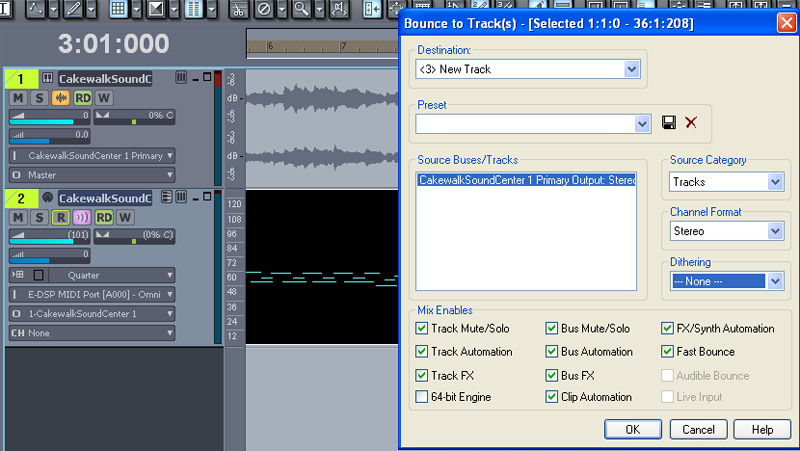

You won't see the waveform in your synth audio track. The waveform preview is not available in LE.
This screen shot is from 8.3 Studio.

Also, the freeze button would appear in the blank space next to the Solo button in the Synth Rack if it were available.
It appears that LE does not have that option.


2013/01/08 15:22:41
Kalle Rantaaho
I really hope you spotted it ! If that's it, this is again a good example of how rational and accurate one must be in describing the problem workflow.

Then again, how could she select/change instruments in Sound Center (as I understand she's done) and hear the changes, if it's actually Wavetable synth she's using.  

My posts #20 and Saras answer # 21  gave me the impression that routing is correct. But, to be very precise,, Sara did not write "yes, MIDI tracks output is Sound Center."

But I really hope the quest is over! The OP has been very, very patient. No ranting, no frustrated rage. Admirable, actually!

2013/01/08 16:28:24
Kalle Rantaaho
Sorry, double


© 2026 APG vNext Commercial Version 5.1

Use My Existing Forum Account

Use My Social Media Account