• SONAR
  • Can't bounce MIDI into audio, using soft synths only flat audio lines appear (p.4)
2013/01/08 16:56:52
RobertB
Kalle Rantaaho

Then again, how could she select/change instruments in Sound Center (as I understand she's done) and hear the changes, if it's actually Wavetable synth she's using. 


That's a very good question, Kalle.
The more I look at it, that whole project raises some questions.
Which track is actually Sound Center?
Was it inserted as a Simple Instrument Track?
Is there more than one instance?
How are tracks 19 through 25 configured?
Has Sound Center been inserted in the FX bin of a normal audio track?( I have discovered that this does not give the freeze option).
Check this out:
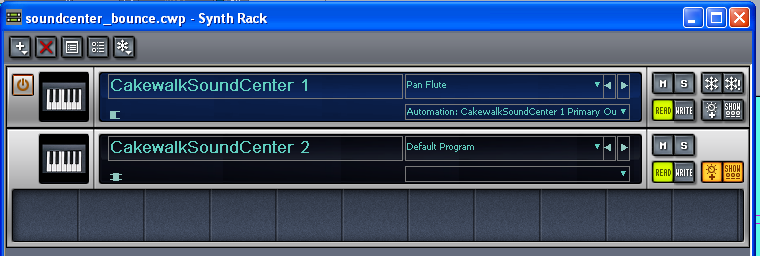

Sound Center 1 was inserted via the Insert>Softsynth dialogue.
Sound Center 2 was inserted in the FX bin of a normal audio track. 
It's possible that you actually do have the freeze option, although LE only supports a limited number of soft synths, so it's hard to say how much that will really help you.


Sara, can you give us more detail on exactly what you have done?
ie, how are you inserting Sound Center? How are you selecting the sounds?
Please expand those tracks so you can see what they are really doing.
I agree with Kalle, you have been great through this process. Let's bring this home.

2013/01/08 17:54:38
RobertB
Kalle Rantaaho
    
My posts #20 and Saras answer # 21  gave me the impression that routing is correct. But, to be very precise,, Sara did not write "yes, MIDI tracks output is Sound Center." 


Until I saw the screen shot, I was under that impression as well.
It's a small but critical detail. And it is a super easy trap to fall into, because the MIDI file will seek out an available GM synth (the MS Wavetable synth) with no action from the user, if no other options are available when the file is opened.
2013/01/09 16:11:41
Sara95
hello thankyou very much for your replies! I was not sure if i have/will answer all your questions well. So it took me a while(finding the right software and resolution etc) but i made a short video of my screen. In this video you see my project, i hide all the other tracks and you see only the MIDI the soft synth and the new audio track. The midi track i want to bounce. You see play back the song (no audio) and after that bouncing it.. Maybe this helps.. the link is: http://www.youtube.com/wa...cWYLU&feature=youtu.be
2013/01/09 16:12:54
Sara95
(don't mind the red letters i couldnt find better free software)
2013/01/09 23:22:52
57Gregy
Are you using Cakewalk SoundCenter in the video or a synth called Piano Synth?
 
 
Try camstudio; free and works pretty well. For me.
2013/01/10 01:23:30
Sara95
Sound center! I re-named it! 
2013/01/10 01:30:43
Sara95
@robert  post#16 says how I have inserted the soft synth 
2013/01/10 14:18:12
Kalle Rantaaho
Well done with the video!
This beats me...The only tiny details that caught my eye is that the synth audio track # 19 has "none" as input. Shouldn't it be "Piano synth 2"? But then again, the track played fine through to the Master bus. BTW, turn dithering off when bouncing to tracks. You only need it when you are lowering the sample rate when you export. 

Have you tried with something else than "none" as the input of the destination track #26?

If you have several instances of Sound Center open, make sure the routing applies to the correct instance.
2013/01/11 09:57:29
57Gregy
I think I see the problem.
It appears like your supposed synth track (19) is a MIDI track. It shouldn't have parameters listed like Velocity, Channel, Patch, etc. It should look like an audio track, like this:


MIDI track on top; synth track below that.
On the right of a MIDI track, the level is listed in velocity; in an audio track the level is listed in decibels.
2013/01/12 07:05:58
Kalle Rantaaho
Doh... I should have realised that when I mentioned the track #19 input setting!!! How could an empty audio track produce sound if the input is "none" :o). I got confused by the symbols. Or is that symbol (half MIDI plug/half keyboard) on track #19 , in front of track name, the symbol of Simple Instrument Tracks (I've never used them and I'm not at DAW now)? 

Mysterious to me, though: how do you get an insertion like this if you use "Insert soft synth" dialogue?? 

Could it be, Sara, that you imported the MIDI file, then inserted Sound Center/Simple Instrument track, but forgot to move the MIDI on the correct SITrack??

That would explain the fact that you did not have problems using EZDrummer.
© 2026 APG vNext Commercial Version 5.1

Use My Existing Forum Account

Use My Social Media Account