• SONAR
  • Can't bounce MIDI into audio, using soft synths only flat audio lines appear (p.5)
2013/01/12 13:03:30
RobertB

Yes, track 19 is a Simple Instrument Track. 19 through 25 are all Simple Instrument Tracks.
This is probably not the best choice in this scenario.
When inserting the synth (post #16), select First Synth Audio Output instead.

Since the synths are already inserted as SITs, you can split them into separate MIDI/Audio tracks. This will make it much easier to follow your signal path.
Right click in the Track Pane of track 19.
Select Split Instrument Track from the dropdown menu.
Track 19 will change into a normal MIDI track, and a new Synth Audio Track will be created(track 20).
At this point, you have several options.
The easiest will be to drag the MIDI clip from track 5 to track 19.
Select tracks 19 and 20, and try to bounce to a NEW track. You don't need to create an audio track first.
That should work.

Now, the big question. What caused the silent bounce?
I'm not entirely sure, but I have been able to recreate it.
It seems to be related to that bank/patch showing in track 5. The patch shown, Mini Piano (hall), is actually from SC, but it is displayes as if it were a General MIDI patch. This is not normal behavior for Sound Center.
It showed up because the track was originally associated with a GM synth. In my case, it was the MS Wavetable Synth.
After changing the output to Sound Center, it seems that the signal path got confused.
The synth played fine, but the bounce routine did not work properly.
I changed the patch setting to None, and was able to get a good bounce.

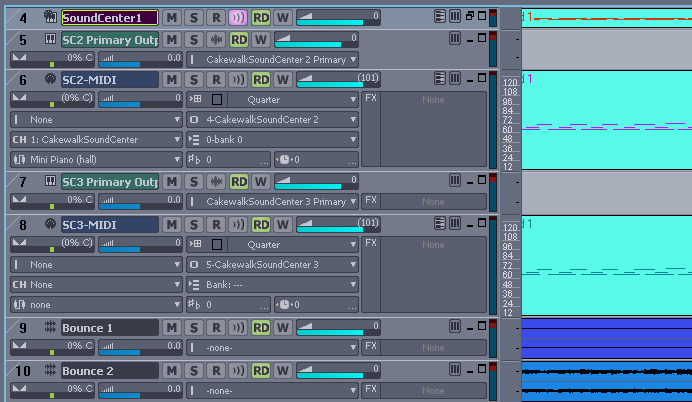
In the view below, track 4 is a Simple Instrument Track.
Track 6 is a MIDI track with the odd patch setting.
Track 8 is a MIDI track with normal Sound Center behavior.
Note: Tracks 7 and 8 were inserted by selecting MIDI Source Track and First Synth Audio Output. The MIDI clip was copied to this track.
Track 9 is the silent bounce created when track 6 was selected along with SC2.
Track 10 is a good bounce from tracks 7 and 8.
Sorry for such a long post, but this is a very strange situation.

2013/01/12 13:20:55
Kalle Rantaaho
Seems like that's it, then! Finally.
Really a good example of how carefully you need to describe the workflow in order to be sure that you and the one answering your questions are talking about the same thing.

All we need now is a final  "all OK" -confirmation from Sara :o)
2013/01/12 22:51:33
57Gregy
Yeah, Kalle, that's why I asked about the output of the MIDI track being 'piano synth', or whatever it was.
She said she renamed it.
I know you can rename tracks and buses; some synths allow you to rename patches, but rename a synth?
Anyway, I paid closer attention to the video and it was 2 or 3 viewings before the light went off.
Hey! That's a MIDI track!
 
2013/01/13 13:47:10
Sara95
Hello Kalle, Greg and Robert I'm sorry that I took so long to answer, very busy these days. I see you find the solution YEEEY:D BUTT: i really don't understand it..:$ - what are SIT's? - I tried what RObert said: "Right click in the Track Pane of track 19. Select Split Instrument Track from the dropdown menu. Track 19 will change into a normal MIDI track, and a new Synth Audio Track will be created(track 20). At this point, you have several options. The easiest will be to drag the MIDI clip from track 5 to track 19. Select tracks 19 and 20, and try to bounce to a NEW track. You don't need to create an audio track first. " but i still get a silent bounce:(
2013/01/13 14:16:56
Kalle Rantaaho
Did you try changing the patch in the track header of the MIDI track to "None" as RobertB had to do to get the bounce work?

SIT= Simple Instrument Track.
2013/01/13 15:19:27
Sara95
I also tried this: http://www.youtube.com/wa...VUYnA&feature=youtu.be New file, i paste the midi clip but still doesnt work, can you please decribe me, with much detail, step by step what I must do to get it right?
2013/01/13 16:59:12
Kalle Rantaaho
You seem to be doing everything correctly, as far as I can see. The strange thing in your latest video is that there is no response in the synths audio track when the midi is playing (I assume the silence is in your PC, too, not only in Youtube?).

One thing to try is checking the MIDI channels. I don't know if you can adjust Midi Channel in SoundCenter, but the MIDI track CH  should be set to the same number that SoundCenter is using.

I don't know enough about different features of MIDI files themselves, as this MIDI is imported. The more knowledgeable forumites perhaps can show some light there.
Maybe you might be able to drop off the possible extra commands included in the MIDI by opening
Piano Roll View and copying the notes there, instead of copying the whole clip (???)

Try exactly what you did in your latest video, but instead of pasting the MIDI file, insert or play (if you have a MIDI keyboard) some notes in the piano roll to see if you can hear and bounce them. If you can, the solution is in the imported MIDI itself.

As I said, you seem to be doing everything correctly, but please confirm, that exactluy this same procedure with EZDrummer gives you sound and bounce (to be sure your soundcard settings are OK).
2013/01/14 00:29:36
57Gregy
Start a new project.
Select Blank, No Tracks for the template.
Once you've done that, right-click in the empty, gray track pane on the left and select Insert MIDI Track.
Import your MIDI file into that track.
Then Insert>Soft Synths>Sound Center and uncheck the box Create MIDI Source Track.
Set your patch in the SC mixer window.
Set the output of the MIDI track to SC.
2013/01/17 09:56:32
Sara95
The solution is in the imported MIDI file, when I make some notes with my mouse in the PRV i get a bounce with sound.
2013/01/17 10:03:11
Sara95
@ Greg what is the patch in the SC mixer window? I did everything you said I think but also no playback on the soft synth so also silent bounce
© 2026 APG vNext Commercial Version 5.1

Use My Existing Forum Account

Use My Social Media Account