• SONAR
  • Console view SOLVED w/ caveat...
2013/01/14 09:02:52
jshep0102
I have never been able to get  Sonar to 'look' just like I want it to in Track/Console view. I can set everything the way I want it, unlock/relock the screenset (see Pic1). But, if I load any other screenset and reload #1, it looks like (see Pic 2). is it possible? I have tried enable/disable float to no avail. Yeah, it's a little thing, but i have to move it every time to fully see it. Thanks, Shep


2013/01/14 11:29:28
Chappel
I haven't used screensets yet, but don't you have to save a modified screenset if you want it to stay that way?
2013/01/14 11:46:40
John
I can't see any difference. 

Screensets can not be saved. They are project dependent and are saved with the project. You can copy a screenset from one project to another though. 
2013/01/14 11:57:58
jshep0102
Yes, John that's correct. But this is in the same project. I saved it by unlocking/relocking it. I then copied it to # 0 as well. If I change to any other preset, even the copy of this one, the console top drops, partially covering the trim control. Maybe FBB can shed some light. he's pretty screenset saavy. The other side of this is that I can save the project with the console height correct. When I re-open it, the top has dropped. Kinda weird and annoying.
2013/01/14 12:04:18
John
Now I see it. Yes I can understand your frustration. 
2013/01/14 12:31:33
karma1959
Same thing happens to me - it's been happening for years, for several versions.  I contacted Cakewalk support about it years ago - they couldn't figure it out, so I just dropped it. 
2013/01/14 12:54:38
Chappel
John


...Screensets can not be saved. They are project dependent and are saved with the project. You can copy a screenset from one project to another though. 

Thanks, I'll keep that in mind if I ever try to use them. So far I've been doing okay without them. Of course, I have trouble learning new things so the older methods I'm already used to are probably going to work best for me.
2013/01/14 15:28:35
FastBikerBoy
When you say you unlocking and locking are you making the changes when it's locked? If so the changes won't stick, they only stick when unlocked.

That looks to me like you have the CV undocked from the multidock, is that the case? I rarely use it that way but I do see that behaviour as well if I do, in the multidock I don't.
2013/01/14 21:48:58
jshep0102
Thanks much, FBB. I guess I'll deal with it then. I hate the multidock, I never use it. I change screensets exclusively. I guess it won't function like the 8.5.3 era because of the multidock. Damn.
2013/01/15 03:15:50
FastBikerBoy
Sounds like that might be the issue.

Any particular reason that you don't use the multidock? There's not much difference between the CV in a full screen multidock and it in a fullscreen floating window. Except the D and shift D shortcuts don't work on the floating version and it's just the one view as opposed to mulitiple views in the same space.

Here is the CV docked on my system *
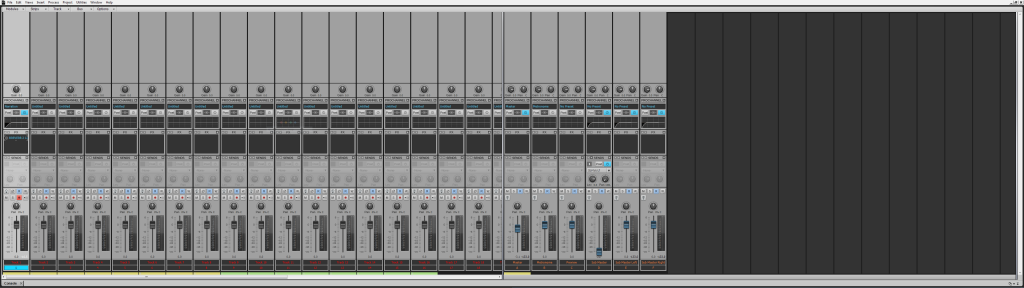


and the same CV floating * .............
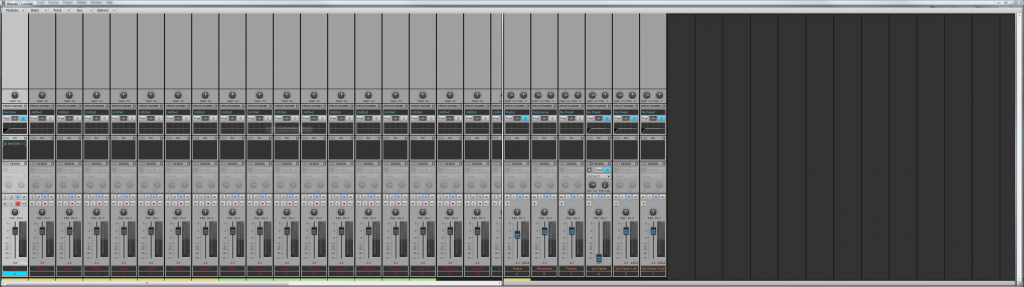


* For conspiracy theorists - note that the screenshots have not been doctored, resized, or altered in any way.
12
© 2026 APG vNext Commercial Version 5.1

Use My Existing Forum Account

Use My Social Media Account