• SONAR
  • Recurring problem with recording - If I can drag anyone away from the wake....
2017/11/23 14:30:38
richardskeltmusic
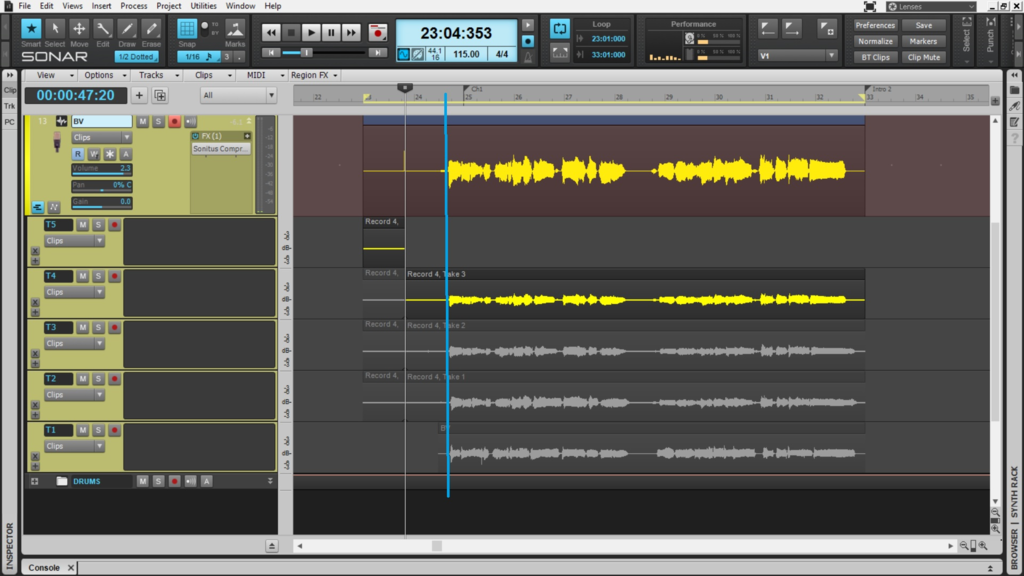
Every now and again I get this problem when recording: the takes get wrongly distributed over the take lanes.  In the example below each take should look like A: so the start of the singing is at bar 24.3. It all looks OK while I am recording, but after I hit the stop button to stop the recording and look at the takes, the singing starts at about 27.3 (the offset varies - it isn't normally 3 bars), so instead of starting at point B it starts at point C.   If I go to preferences and re-apply the drivers,  go back to the microphone to do some fresh takes, it works properly as shown in the second picture. 
 
This has been happening off and on since I migrated from 8.5 to SPLAT Lifetime (Ha !), but recently it seems to have been getting more frequent.  It's very irritating, because I don't always remember to re-apply the audio preferences each time I do a take - and most of the time I don't need to - except when this happens....
 
Has anyone had this and successfully cured it PERMANENTLY? 
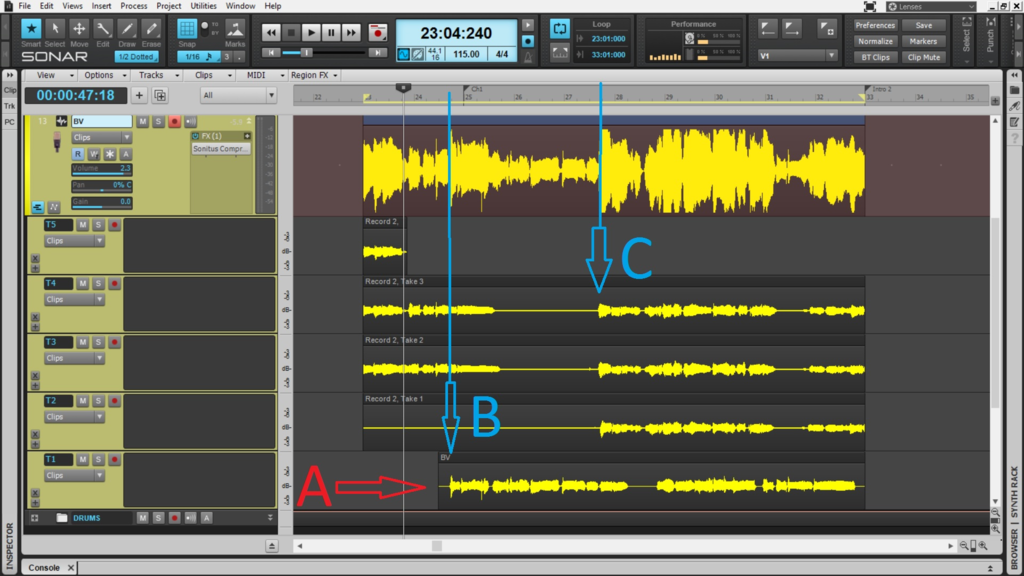


BTW Big thank you to anyone on the forum who has helped me in the past. 
2017/11/24 07:06:19
richardskeltmusic
Photobucket no longer supports 3rd party so here are the pics from IMGUR.   BTW Win 8 current update and Steinberg UR44 with current driver.  Hasn't been affected +vely or -vely by windows updates.


2017/11/24 10:29:51
Karyn
Latency compensation issue maybe?
 
 
2017/11/24 14:46:25
richardskeltmusic
Wouldn't that be continuous?  This sometimes just happens, perhaps half an hour into a previously good session of vocal recording.  Sometimes it never happens.  The variability is what drives me nuts - it also tends to happen after a really good take - making it unusable.
2017/11/24 14:55:20
Unknowen
Look like you had loop on... and it looks like [A] track stated where you had the now position was set where you stated to record on that track...
2017/11/24 15:10:52
richardskeltmusic
Track A was recorded in an ealier session - I was coming back to do some unison. 
 
Recording ALWAYS starts from the start of the loop as I need time to physically walk from the laptop to the microphone and I need a count in to get me comfortable with the timing.  ALWAYS the same proceedure.  9 times out of 10, maybe 19 times out of 20 it works as it should (second pcture) - until it doesn't (first picture).  There was no difference in proceedure between the set of takes in the first picture and the second, except that after the first set crapped out I went to preferences>settings and hit the apply button on the audio tab before re-recording.  Can you create multiple takes with out the loop on?
2017/11/24 15:25:09
Cactus Music
Seems like it is something to do with using loop recording to me as well. I use a wireless keyboard so I can stand 10' away. 
2017/11/24 17:54:38
richardskeltmusic
But surely the whole point of take lanes/comping is that you use loop points?  That's what it says in the manual - and it's how other DAWs do it. 
© 2025 APG vNext Commercial Version 5.1

Use My Existing Forum Account

Use My Social Media Account