• SONAR
  • Solved Can i export a drums simple instrument track into a multiple drums set up and how?
2017/11/18 10:57:42
paul jenkins
Yep ive created a an awesome drum track but its as a single audio and midi track.......how do I change it to multiple drums separated out in addictive drums after I'm hours into my project?
2017/11/18 11:28:46
chuckebaby
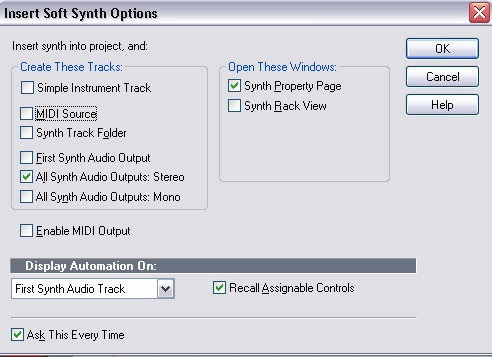
open a new instance of AD 2 and on the insert soft synth options, select- All synth audio outputs: Stereo
 
Grab your old SIT Midi track and drag it to the new AD2 midi track.
Then your going to have to go in to the AD2 GUI and set it up for single channel.
2017/11/18 11:51:10
scook
If you are using Addictive Drums 2 this may help understand how to use the plug-in. There is an AD2 multi-output track template linked to the blog.
2017/11/18 13:30:44
paul jenkins
hey, how do I change to single channel?
 
chuckebaby
open a new instance of AD 2 and on the insert soft synth options, select- All synth audio outputs: Stereo

 
Grab your old SIT Midi track and drag it to the new AD2 midi track.
Then your going to have to go in to the AD2 GUI and set it up for single channel.


2017/11/18 13:39:25
paul jenkins
and thanx scook...that's awesome too......
 
2017/11/18 13:56:55
paul jenkins
Grab your old SIT Midi track and drag it to the new AD2 midi track.
Then your going to have to go in to the "AD2 GUI and set it up for single channel"..........thanx chuck, but how/where?......I searched but couldn't find
2017/11/18 19:23:28
chuckebaby
The Direct out bottom on the AD2 strips
https://www.youtube.com/watch?v=L5dxcBxFIWo
 
and heres another from Cakewalk
https://www.youtube.com/watch?v=gnzJaqtLARI
 
paul jenkins
I searched but couldn't find

 
Find a new search engine  A lot of these questions can be answered with Google.
2017/11/19 01:05:05
paul jenkins
awesome thanx chuck and spook
© 2025 APG vNext Commercial Version 5.1

Use My Existing Forum Account

Use My Social Media Account