This came up in another thread somewhere. A couple of things have changed very slightly.
First the indicator for whether a clip is a MIDI clip or step sequencer clip has changed so it's not quite as immediately obvious what type the clip is. A MIDI clip has slightly less dashes in the top right corner, as indicated by the highlight and arrow in the screenshot. The one beneath it is a Step Sequencer clip.
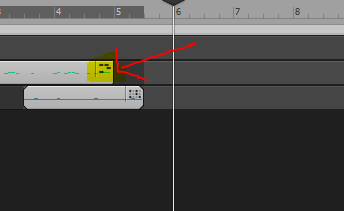
Secondly clip type automatically changes depending on the default editor setting. As before if you view a step sequencer clip in the PRV it is impossible to select and edit the data there. You either need to bounce the clip (as before) or change the default editor which effectively bounces the clip for you.
That new behaviour is compounded by the new clip type graphics. I find now I know about it it's just as easy as before but was very confusing until then.
HTH