• SONAR
  • Not too happy with X2 (p.13)
2012/10/07 03:35:49
Anderton
Beepster


Somewhat off topic but it really annoys me that in this day and age we have to watch out for video card mayhem when working with audio. It just shouldn't be a concern in my mind. I'm not playing friggen' Halo or whatever the heck kids are up to these days.

I hear you. My biggest problems with performance (not just Cakewalk by any means) have involved sound card issues. I tested an audio interface from a very reputable company and it was unusable until I upgraded my video card drivers. The PC Audio Labs guys recommended the nVidia card I'm using, and overall stability is much better than when I was using an ati.


I think one reason why Sonar performs well for me is because of all the stuff I review. When multiple things start misbehaving, I HAVE to figure out a fix. If I mostly used only Sonar and it started screwing up, I'd assume it was Sonar-related. But I've also had occasions where Sonar would seem "buggy," then running some other program would result in an epic fail. When I fixed what caused the epic fail with the other program, Sonar became less buggy.


It's times like that I understand why people buy Macs  But then I run Sonar simultaneously with Vegas Pro and HyperCam, with another instance of Vegas rendering in the background, and I'm reminded why I use Windows for most of my music and video work...
2012/10/07 03:49:43
robert_e_bone
Yeah - I think the Mac has a superior operating system in many regards, but I hate them as a company for something they did many years back when they left a bunch of folks out in the cold on support of a buggy motherboard (Apple IIe).

Anyways, Windows has grown up quite a bit and I am loving Windows 7.

I do agree with you that hardware for Windows PC's does not sometimes play nicely with other hardware - your example in point.

Hopefully, between everybody we can help Timidi get his system stabilized.

Bob Bone
2012/10/07 04:08:38
Danny Danzi
timidi


BTW, there are other considerations: 
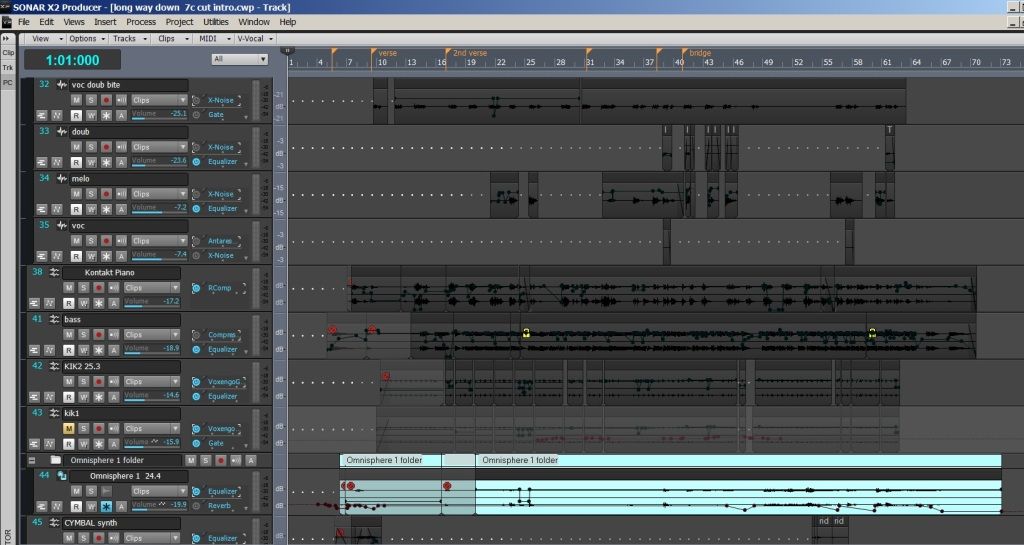


Tim, I know what this is with the color of the clips. Are you using an X1 or 8.5 color scheme inside of X2 that you imported? If so, that's what it is man. I have the same exact look as you do! As a matter of fact, I'm having someone take a look at my issue in about 5 minutes. That all black clip thing as well as your grey/blue border all through out is what I'm getting also....but it's only when I use an imported Sonar X1 scheme.
 
When I switch to one of the X2 schemes, my clip colors change, my border somewhat changes....beige and that grey/blue mixed. If I do not import my X1 scheme, I get straight beige all through the borders. As soon as that X1 scheme gets imported though, it must over-write something somewhere because that grey/blue is there for life. I tried every color option to change it and it simply will not change.
 
I even went to all colors, clicked the first color, held down shift and then clicked on the last color option so they were all hi-lited, and the changed them to purple. Restarted Sonar and that border was still grey/blue like you and on the borders of the clips. So something is screwy somewhere. I even decided to try and change every color option just to see if I could find that...and it will not change manually.
 
I know you have other issues that you're sorting out, but the all black clips with the grey/blue border...I have on this end too.
 
-Danny
2012/10/07 07:50:05
Freddie H
Anderton


Beepster


Somewhat off topic but it really annoys me that in this day and age we have to watch out for video card mayhem when working with audio. It just shouldn't be a concern in my mind. I'm not playing friggen' Halo or whatever the heck kids are up to these days.

I hear you. My biggest problems with performance (not just Cakewalk by any means) have involved sound card issues. I tested an audio interface from a very reputable company and it was unusable until I upgraded my video card drivers. The PC Audio Labs guys recommended the nVidia card I'm using, and overall stability is much better than when I was using an ati.


I think one reason why Sonar performs well for me is because of all the stuff I review. When multiple things start misbehaving, I HAVE to figure out a fix. If I mostly used only Sonar and it started screwing up, I'd assume it was Sonar-related. But I've also had occasions where Sonar would seem "buggy," then running some other program would result in an epic fail. When I fixed what caused the epic fail with the other program, Sonar became less buggy.


It's times like that I understand why people buy Macs  But then I run Sonar simultaneously with Vegas Pro and HyperCam, with another instance of Vegas rendering in the background, and I'm reminded why I use Windows for most of my music and video work...
 
Yes its because on MACs no one can or have the ability to disable things or screw up the system doing tweaks that they shouldn't do in the first place.
That is why it work better for some of the users that don't have the know how..but still think they do.
Overall system, OS X is not near Windows 7, 8 in performance.
2012/10/07 08:50:25
timidi
Thanks Danny. I think I have that worked out. There's another pic above that shows where I got to.
But yes, you're probably right about using a previous version template screwing things up.

Hey FREDDIE. Pretty sure that Aero is ON. I'll look again. Thanks.
2012/10/07 14:04:59
Anderton
timidi


Thanks Danny. I think I have that worked out. There's another pic above that shows where I got to.
But yes, you're probably right about using a previous version template screwing things up.

Hey FREDDIE. Pretty sure that Aero is ON. I'll look again. Thanks.

People say Aero shouldn't make a difference with most programs, but I was doing some album assembly on a laptop in Studio One Pro's mastering page and with Aero enabled, the audio engine would often quit, and the overall performance was very sluggish. As soon as I turned off Aero, it worked as it was supposed to.

I also recall doing a Pro Tools update where the "read me" stated specifically that you HAD to turn off Aero for it to work properly...I think it was PT9, but that might also have carried over into PT10.

And since I'm ranting about graphics cards and drivers...it's always disturbing to see that a new driver is available for a graphics card, but under the list of changes, see something like "now handles non-blurfled accelerated GPU functionality in head-slicing with 'Invaders from Planet Doom' when running at frame rates between 75 and 80 frames per second on systems using bifurcated fractal resolution." So...should I download the new driver, or not?
2012/10/07 14:08:10
timidi
So...should I download the new driver, or not?


I've been pondering the same...
2012/10/07 14:38:49
arachnaut
timidi


Thanks arachnaut. Yea, the Realtech LAN. I'll disable that. Is the "Realtech PXE Oprom" part of that? I mean should that be disabled? What is an Oprom anyway...? I just know that anything "Realtech" is probably suspect.

If you disable the LAN you won't need to worry about the OPROM. Enabling that shows the boot prom startup mesages. It is just decoration unless you have some special startup needs.
2012/10/07 14:45:35
arachnaut
robert_e_bone


If your system has a parallel port you can disable that, as well.  I think that the newest motherboards are starting to do away with those, but unless you are using a line-printer from way back when, you will not be using the parallel port.

You can also review services that are running to see which you can alter to not automatically start.  For example, if you do not have a printer hooked up to this computer, you could turn off the Print Spooler service.  There are a bunch of network sharing ones too, that are used to broadcast your computer to the network and that sort of thing.  Your audio-tweaked computer is likely not going to need those either.  There is a Black Viper link out on the web that talks about which services you can safely turn off and which ones are needed for normal Windows processing.  I think I saw it go by in one of the posts in this thread.  That has good info in it.  I think it is: www.blackviper.com

If you run into problems with services after turning them off, you can always start in safe mode and undo the carnage - just make sure to note which services you had tweaked and set them back.

Good luck,

Bob Bone

I second that on the old serial/parallel/legacy support in BIOS - get rid of them all.
Also second that on Black Viper's site.


Also, as said, this stuff is probably not going to change your problem - it looks like a bad install to me.


I have had practically no problems with X1D and no problems yet after the X2 308 fix. I've made a lot of changes to my installation after X2 - moving all the samples around, removing the DXI functions, changing VST paths from 64 to 32-bit were appropriate, etc., etc. So my installation is not very normal - but still, I have no problems at all, so a 'normal' install should be 'better'.

Little glitches here and there, maybe, but no crashes or audio-impacting events.


2012/10/07 14:58:45
arachnaut


timidi


So...should I download the new driver, or not?


I've been pondering the same...

The NVIDIA forums have been down for a while so I can't link to my posts there.
What I discovered is that when I upgraded to a new video driver, it caused severe audio distortion on my Firewire card.

Going back and forth a few times proved to me it was the newer driver. When I posted this on the NVIDIA user forum I discovered others had a similar thing happen. The discussion revolved around latency in the various older drivers and I tried the last few. 

Eventually I found an excellent older driver that had superb latency performance and I've stuck with that.

Same thing with the Focusrite driver - I keep an older version because it seems better and I use the standard (not legacy) Windows Firewire driver - even though Focusrite recommends the legacy - I prefer the standard.

Nothing beats trying things out for yourself - unlike Apple systems which are all the same - no two Windows systems are alike.


© 2026 APG vNext Commercial Version 5.1

Use My Existing Forum Account

Use My Social Media Account