Re MIDI ‘OUTPUT to MIDI OUT A’ – I’ve assumed that this refers to B- Control 1 (I’m given two options, B- Control 1 and B- Control 2) I'm assuming that the B-Control has more than one set of MIDI in/outs. Mine only has one.
Select the one that your Nanopiano is connected to.
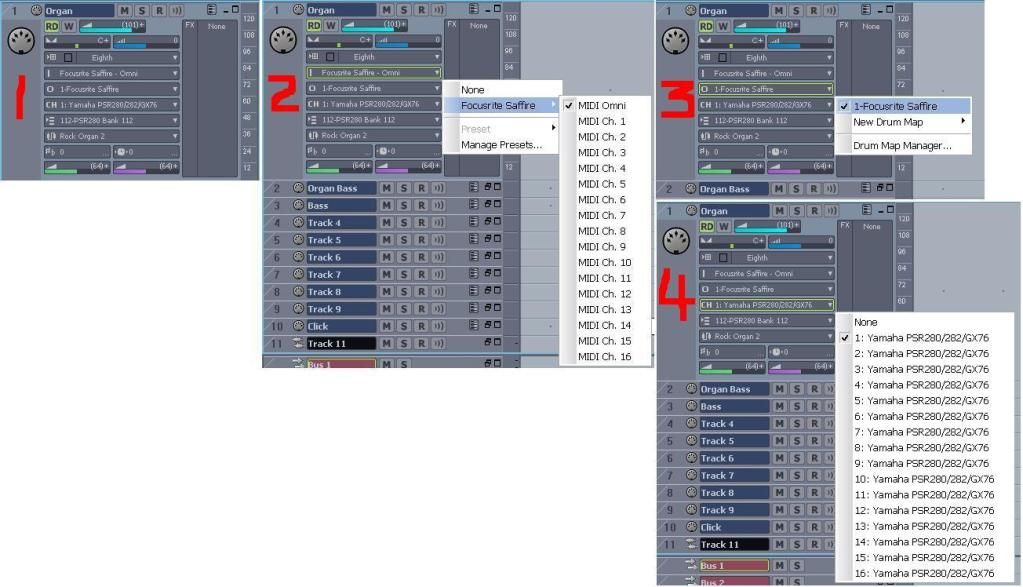
 Match the output channel to the channel the Nanopiano is set to receive on - I don’t understand this.
Is the ‘output channel’ simply the MIDI Channel, i.e. termed ‘1: nanopiano’ in Sonar HS4?
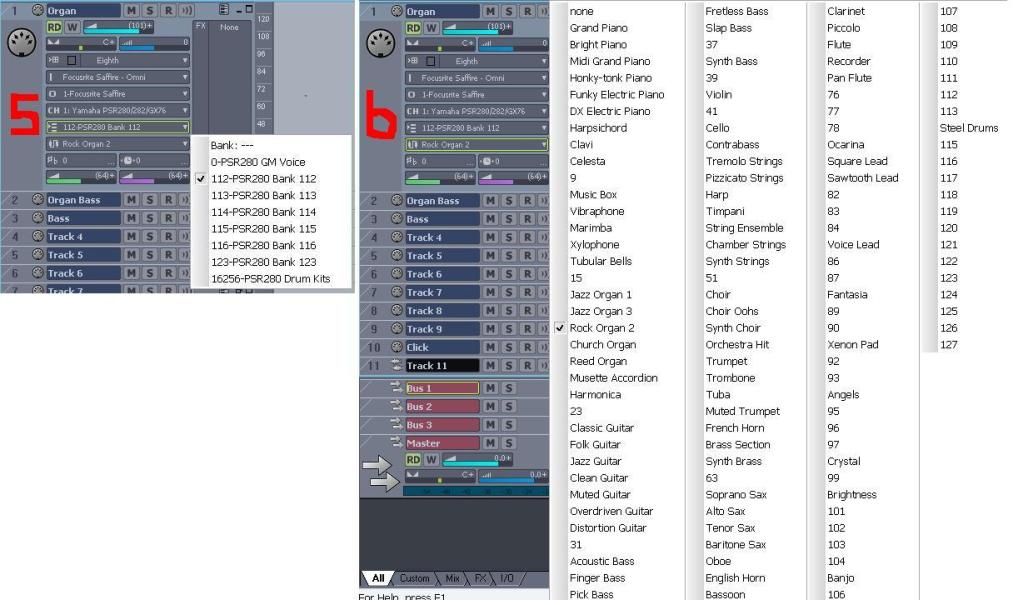
I assume that now I assign preferences for Bank (i.e. Bank 1: sounds 0-127 in the Nanopiano and Bank 2:
sounds 128 - 256 in the Nanopiano) and Patch (the specific sound within these Banks).
I don't know about the 'matching the output channel to the channel the piano is set to recieve on' part. It may recieve on all channels; my Yamaha does.
The output is what you send the MIDI to, of course. The channel selection is just below the output box. If you don't select different channels for each MIDI track going to the same output, the MIDI tracks will all play the same patch, regardless of what patch you choose.
Most Instrument Definitions will have multiple banks containing multiple patches, while General MIDI (GM) has just one bank with 128 patches.
#2 shows the input, my Saffire and MIDI Omni, which recieves from all channels. #3 shows my output, also the Saffire which is connected to my Yamaha keyboard, on channel 1 and the ID for the Yamaha, #5 and #6 the banks and patches for that bank.
 Re AUDIO
Set the Input to the B-Control Line In – I’m offered one option: B - Control ASIO (4in, 4out) and I
opt for stereo B-Control 1.
That should work. Just make sure you plug the audio cables into that input on the B-Control.
Set the Output to your soundcard, or preferably your Master Bus. – I’ve opted for Master.
Yes, and make sure the Master's output is to a valid B-Control output.
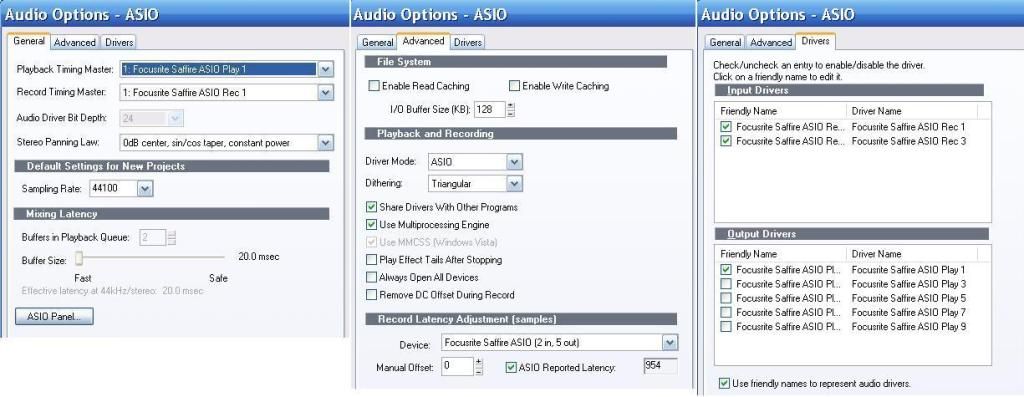
As you can see in the Drivers image below, I have 10 outputs available with the Saffire, but I only have 1 selected. Each of the 5 outputs is a stereo out, so 1 is 1 and 2, 3 is 3 and 4, etc. The last one, 9, is the S/PDIF digital output. I could potentially create a 7.1 surround sound mix.
OPTIONS
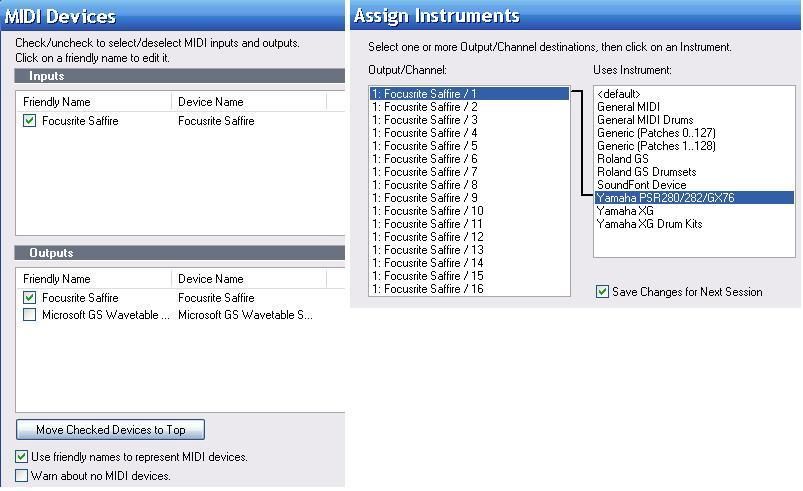
‘In SHS4, go to Options>MIDI Devices and make sure all of the B-Control MIDI I/O ports are selected’ –
in INPUTS I have one B-Control device selected, in OUTPUTS, two B-Control devices (1 and 2)
That should work.
Hopefully, your Options menus will look something like these from SONAR Home Studio 6. I have all my MIDI channels assigned to the Yamaha ID.
Also in Options>Audio select the B-Control Line In as an Input.’ In AUDIO OPTIONS – ASIO > DRIVERS I
have selected all available B-Control INPUT and OUTPUT drivers (4 in each).
While it doesn't hurt to select ins and outs you may never use, it can add another level of selection you don't have to go through when recording or playing back the project. If some of your ins and outs are digital S/PDIF (for instance) and you don't have anything connected to your digital ports, having them on the list of possible choices could be confusing. I just select the ones that I use so the list isn't too long and to lessen the chance of misselecting an in or out, resulting in me thinking the program or audio interface broke and spending hours troubleshooting and cursing because nothing I do will fix it then posting a plea for help in the forums only to have someone write "check your in/out settings".

OPTIONS > ASSIGN INSTRUMENTS
OUTPUT/CHANNEL
Make sure each track that's playing through the NP are using different channels - In this category
I’m offered ‘OUTPUT 1:B-Control/ Ch 1 to Ch 16’ and ‘OUTPUT 2:B-Control Ch 1 to Ch16’. - Should I
hightlight ‘OUTPUT 1:B-Control/ Ch 1 or more or all 16 channels?
If you want to use the Instrument Definition on all channels, select them all. I would (did). If the B-Control Output 2 is another MIDI port and you later connect another MIDI keyboard/sound module, you can add that ID and select output 2 to use MIDI channels 1-16 for that keyboard.
See the first image.
USES INSTRUMENT
I’m offered a selection, including NanoPiano. I obviously choose NanoPiano. Good. What other choices do you have? Microsoft GS Wavetable Synth and a bunch of devices you don't have? The MS GS synth is okay to learn MIDI on, but it doesn't sound too good. Your Nanopiano and most software synthesizers will sound much better.