Here's what I want to do. With an existing MIDI track I want to select a time span during which that I want to consecutively (automatically) record several takes. I want playback for each new take to begin before the start of the record start time and continue playing a short time after the record end time - then loop back and do it all again. I do not want to hear the source or previous takes during each record of a new take.
To do this, I set up loop points. Within the loop, set up punch in and punch out points. My selected record settings are:
Sound on Sound
Auto Punch
Mute Previous Takes
Store Takes in a single Track
Create New Lanes on Overlap
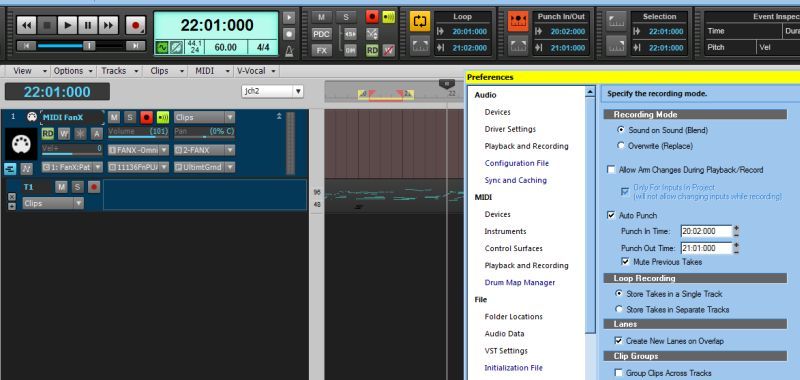
When I record several takes everything happens mechanically pretty much as expected - Loops loop good, the recording starts and stops with the auto punch points, and I get a new lane with each take. But here's more:
- The notes of source track (Take Lane 1) in the Auto Punch time seem to be muted when I hit Record, which seems good.
- As takes are recorded, the previous tracks not muted, which is bad.
- The notes of source track (Take Lane 1) that seemed be muted (which stay that way even if I delete all the new take takes) - well, I can't un-mute them, which is bad.
So this approach is not suitable because 1) previous takes are playing away while I'm trying to record the current take, and 2) I don't see how to get back the original, muted (if they are actual "muted") notes.
So now I change from Sound on Sound to
Overwrite to see what happens.
Again, mechanically, everything happens as expected. But here's more:
- The notes of source track (Take Lane 1) in the Auto Punch time are deleted when I hit Record.
- Previous tracks are silent (not muted) while recording subsequent tracks, which is good.
So this works good, except that I've lost my source track notes in the Auto Punch time. Knowing this I guess I could dup the track prior to all this, then I'd have all my bases covered.
I have a faint recollection from the past that the problem has to do with the fact I'm here dealing with MIDI tracks, and for some reason they fall short here, while audio tracks don't. I can't find a reference to that in manual, and the two videos I have for X2 approach this subject with audio tracks while not mentioning MIDI.
So - is there a combination of setting that will give me all I could want - silent original material and previous takes while recording, and keeping the original material? Or does someone know if can't do this?