2012/09/21 23:22:50
underakskies
Hello folks! I am desperately attempting to use my dm6 as triggers in Sonar 8, but i just can not make it work. I can see the drums show up under midi options, and i selected them but still can not figure this out. Can someone please help me? I am pretty new to this and kinda frustrated. It seems like it shouldnt be this difficult, but alas i can not figure it out. Any help at all would be much appreciated.
2012/09/22 00:37:59
57Gregy
Welcome to the forum.
Set the DM 6 as the input in a MIDI track.
Insert a software synthesizer.
Set the output of the MIDI track to the soft synth.
That's the simple version.
What else have you tried?
2012/09/22 01:31:54
underakskies
i dont think that my drums are registering in sonar for some reason. It says in the manual that the task bar icon will flash a red light, and mine is not flashing at all. How can I make sure that its picking up my signal?
2012/09/22 01:47:28
57Gregy
Sometimes when connecting with a USB cable, you have to select that USB device in the Audio options, too... I think.
Are any drivers requred to use the DM6? If so, did you download the latest drivers?
2012/09/22 02:04:58
underakskies
well i dont think so, it works just fine with garage band and fruity loops studio. But for whatever reason i cant make it work on sonar!?!?
2012/09/22 02:06:46
57Gregy
Another guy here uses a DM 6, too.
I'll send him a meassage to see what he can offer.
2012/09/22 02:10:53
underakskies
heres a screenshot. up at the top it says ACT midi controller, Does that have anything to do with it? http://imgur.com/wo59h
2012/09/22 02:21:00
chuckebaby
heres the tutorial i wrote pretty much in a nutshell for sonar x1

http://forum.cakewalk.com/tm.aspx?m=2573328

read this whole thing and you ll be on your way.

id explain it here but theres alot to it if your trying to acomplish mtc.

i do it all the time where when i hit play in sonar it controls my drum machine and starts playback using sonars controls not the drum machines.

work it.
 
ps- dont listen to some of these guys that are swearing this doesnt work,i was baffled,i do it all the time.
all the time !!!
2012/09/22 11:19:11
RobertB
The really important thing we can't see is your inputs.
You should see something like this:
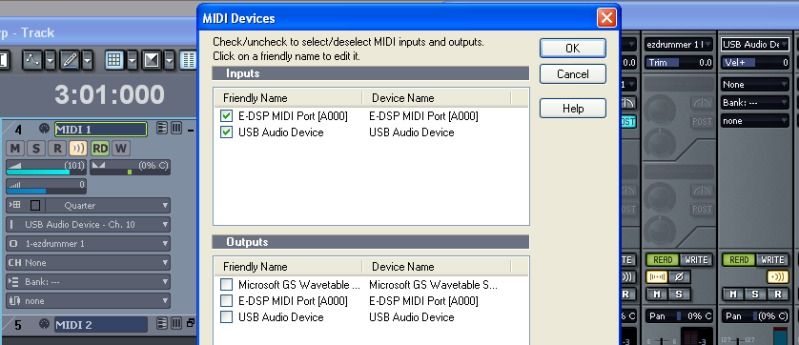


The DM-6 shows up by default as USB Audio Device.
Make sure it is checked in the Inputs box.
Don't worry about the outputs.
There are no special drivers, and you don't need to mess with ACT.
If you can show another screenshot with the inputs, that would be very helpful.
2012/09/22 15:26:16
underakskies
under inputs it just says e-drum
© 2026 APG vNext Commercial Version 5.1

Use My Existing Forum Account

Use My Social Media Account