• SONAR
  • using alesis dm6 (p.3)
2012/09/22 21:50:47
RobertB
underakskies


just changed my driver mode to asio, and am now registering on the track! But I dont hear anything!

Your built-in Realtek sound card does not support ASIO.
Do you have an interface?
2012/09/22 21:52:20
underakskies
Its working but i cant get any sound! http://imgur.com/sg0Uc
2012/09/22 21:58:47
underakskies
no interface. just straight from the brain to the laptop.
2012/09/22 22:08:35
RobertB
That's a move in the right direction. At least Sonar is reading the DM6.
What do you have checked in Options>MIDI Devices?
Again, the Realtek does not support ASIO. If that is selected, you will get no sound from Sonar. Sonar supports it, the Realtek does not.
Try WDM, MME, or WASAPI. You will need to run the Wave Profiler after selecting any of these modes, and you may need to restart Sonar afterwards.
Keep going, man. You are close.
2012/09/22 22:18:10
RobertB
On a side note, get yourself a proper interface.
You have invested in Sonar, and a dedicated laptop. The built-in chip(Realtek) is crap. It is a major weak link in an otherwise good system. A proper sound card/interface is especially important if you are working with soft synths.
2012/09/22 22:52:50
underakskies
i tried all of those, but still cant hear any playback. So close, but still so far!
2012/09/22 23:23:52
underakskies
Now I can hear playback, but i cant change the sounds, just hear what the brain is using, not anything from sonar. And only when i play it back, its like theres no monitoring or what ever you want to call it.
2012/09/23 00:02:33
57Gregy
Thanks, Bob.
What is the output of the MIDI track you're playing the drums set to?
If it's set to the same as the input, that sends the MIDI data back to the drum set for it's synthesizer to play.
You'll need to Insert a software synthesizer (do you have TTS-1 or Session Drummer 2?) and set the MIDI track's output to that synth to hear SONAR play the MIDI. And click the Input Echo button.
Don't be surprised at the latency (delay) from the time you hit the drum until you hear it; that's part of using soft synths with stock sound cards. You will need to get an audio interface designed for recording to hear the sound without (noticable) delay.
2012/09/23 23:31:08
RobertB
underakskies


Now I can hear playback, but i cant change the sounds, just hear what the brain is using, not anything from sonar. And only when i play it back, its like theres no monitoring or what ever you want to call it.

To hear sounds directly from the DM6 brain, you would have to have your headphones plugged into the headphone out of the DM6, or have the Line Out from the DM6 connected to the Line In of your laptop. If neither of these is true, you are, in fact, hearing sound from Sonar.
I'm going to sidetrack for a minute.
You have jumped into the deep end of the pool. Sonar is a very complex program, which I am sure you have realized at this point. Don't worry. it is comprised of many small components that are easier to understand if you try to absorb it in smaller bites.
Greg, myself, and others can attest to the fierce learning curve, especially in the first few weeks.
It will have you pulling your hair out, and hurling colorful language at your computer. Just ride it out. Stuff will start to click. Things that are blowing you out of the water now will become easy tasks. Trust me on this. Been there, done that.
It's an incredibly powerful tool, once you get the hang of it.
Back to our regularly scheduled program.
I believe Sonar8PE included Session Drummer 3, or possibly Session Drummer 2. Either of these would offer better drum sounds than TTS-1.
That said, you have chosen to work with TTS-1, so let's run with that.
When you insert a soft synth, any soft synth, select the following:
MIDI Source Track ( I see you have that)
First Synth Audio Output (This is critical. It is how the sound from the synth is returned to Sonar)
Synth Properties Page(This is the synth GUI, and in most cases, you will need to see this).
Synth Track Folder( Not absolutely essential, but very handy for keeping things tidy)
Here is a screen shot showing a TTS-1 setup for drums.
Once you have the bank selected, you can select any of the named patches for variations in the sound.
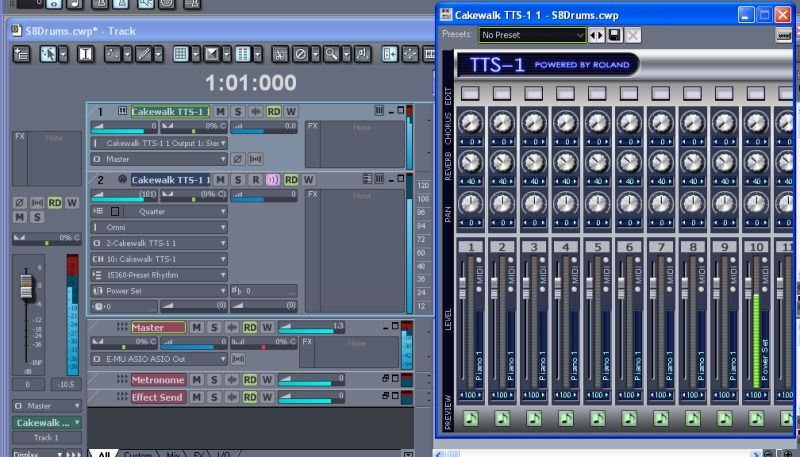
I'm sure you will have more questions.
Please ask.
We are here to help you get the most from Sonar. 
ps. Greg, I saw the reference in this thread, then I got your PM.  
Hopefully we can get young Obi-wan sorted out.


2012/09/23 23:53:42
57Gregy
Arigato, Kushi.
© 2026 APG vNext Commercial Version 5.1

Use My Existing Forum Account

Use My Social Media Account