• SONAR
  • Sonar 8 mixing desk
2012/07/30 05:41:38
rainbow219
Hi, i am new to this program, previously a user of Cubase.
 
Is there a section where i can alter the Volume, Bass, Treble of the channels? There does not seem to be an easy to use section for this as was in Cubase which was displayed as a mixing desk.
 
Many thanks, Andy.
2012/07/30 06:19:18
Bristol_Jonesey
View > Console

To alter the EQ, enable the Pro Channel on each channel.

Or..... in track view, just make sure the Inspector is visible ('i'  is the shortcut to toggle on/off) and you'll find everything there
2012/07/30 09:36:23
rainbow219
thank you very much
2012/07/30 09:55:23
rainbow219
still having problems, me being thick. any chance of a sceenshot as what to do.

Not sure how to enable the pro channel.

does it not display the volume/bass/treble as volume controls in a row as on a mixing desk?
2012/07/30 10:12:22
Bristol_Jonesey
If you've got the Inspector open, you can access the Pro Channel from there - at the top are 3 buttons labelled 'Clip', 'Track' and 'Pro Channel'

You can guess what they do........

I'd post a screenshot but I'm miles away from my studio
2012/07/30 11:07:55
57Gregy
Jonesey, is ProChannel available in SONAR 8?
Rainbow, there are no 'tone' controls. like treble and bass, but you can use EQ to boost or cut the highs and lows.
Click Views at the top and select Console. There may also be a mixer icon in the toolbars above the track view that you can click. You should get something like this:


Press M on the computer keyboard to choose which tracks to see. Double-click the track names to change them to something other than "Track 1" etc. Right-click where I have the instrument pictures to insert an instrument icon. There is another icon on the left to narrow/widen the channel strips.
2012/07/30 13:50:57
rainbow219
Thanks, I still coundn't find it so I presumed it was not available.

many thanks.
2012/07/30 14:27:32
Bristol_Jonesey
o Greg, PC isn't in 8.5 


Sometimes I forget my own name as well.


you need to insert an EQ plug like the Sonitus in the Fx bin, circled in red:


2012/07/30 23:52:04
RobertB
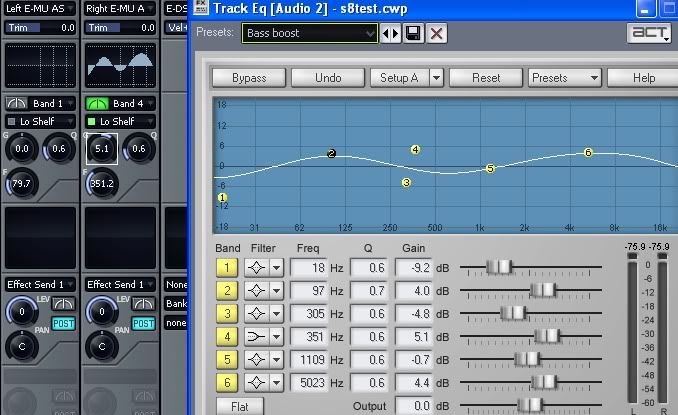
Actually, the Sonitus EQ is built into the Console view in Sonar 8(and SHS6)
In this view, the EQ is inactive for the left channel input track, but has been turned on for the right channel ( by clicking on the VU meter icon).
If you click on the grid panel, it opens the full view shown to the right.
For the purpose of illustration, I have created a somewhat unrealistic curve.
It's not as simple as a bass/treble control, but gives you vastly more control.

Hope that helps.
2012/07/31 15:42:43
rainbow219
excellent

thank you all
12
© 2026 APG vNext Commercial Version 5.1

Use My Existing Forum Account

Use My Social Media Account