• SONAR
  • Bakers, I think I came up with an easy upgrade for the staff view page. (FR link inside)
2017/08/22 19:19:34
trtzbass
Lately I have been working with Samplitude and I was really impressed by the simplicity of its midi / score editor.
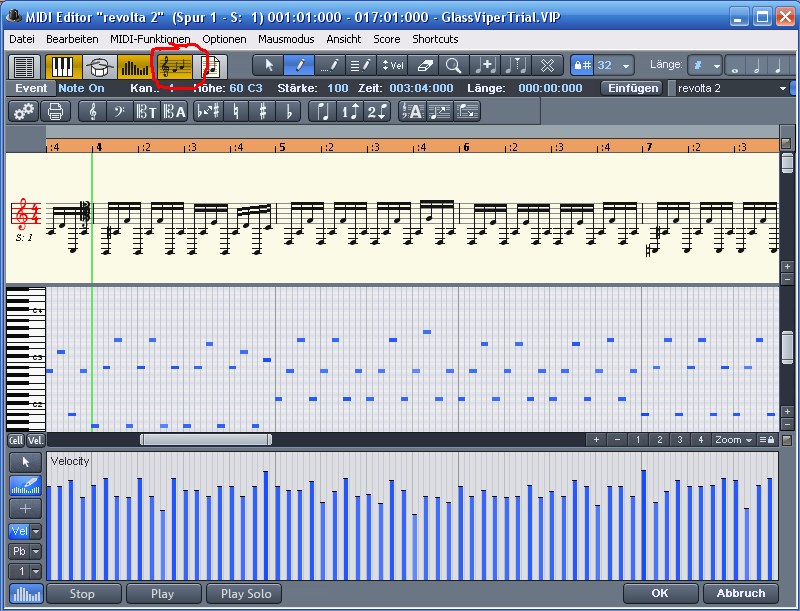


Basically the whole thing is on one page and scrolls in parallel. You can input notes and then modify the length by operating on the piano roll.
How feasible would it be to implement a screenset with the score view open on top of the piano roll (kinda like when you have the main arranger page and the piano roll together), but their zoom, position and scrolling is synced?
That way the notes on the piano roll would always be aligned with the score editor.
I tried rolling my own by creating a screenset, but it's very fiddly to work without the windows mirroring each other.
What do you think?
 
UPDATE: I submitted a feature request here
https://bakery.cakewalk.c...grated-Midi-Score-view
Please vote if you're liking it.
2017/08/22 19:38:21
EyjolfurG
This looks great
2017/08/22 21:10:52
Bristol_Jonesey
How well does it fare with dotted notes, triplets, rests etc?
2017/08/22 22:26:14
trtzbass
Bristol_Jonesey
How well does it fare with dotted notes, triplets, rests etc?


I have used it a bit and didn't disappoint. It's a very smooth workflow and I was pleasantly surpised that you can independently move notes between the two clefs of a grand staff, so you can produce piano scores straight from the DAW. It's a bit rough around the edges, but it hasn't given me any grief
2017/08/23 02:05:53
noynekker
Kinda neat . . . so it's just stacking the Staff View and Piano Roll View (with Controller View) all in one window.
For my workflow it would certainly make the continual switching between Staff and PRV unnecessary.
I have keyboard shortcuts, but one window to rule them all would be a welcome workflow boost.
 
It's true, screensets don't quite work to accomplish this . . . Cakewalk would have to program some kind of Staff/ PRV combo window. It's a great idea, you should try to submit it as a feature request.
2017/08/23 09:36:23
Kev999
trtzbass
...Basically the whole thing is on one page and scrolls in parallel...

 
Your example shows the notes having equal value and the two views lining up perfectly. But normally notes on a stave are of different values and their spacing is not proportional to their values. Is the Staff View distorted to make every note (and rest) line up with the PRV grid? Or does the PRV display the vertical grid lines that are unequally spaced in order to match up with the notes in SV? Or is there some third alternative that I have not considered?
2017/08/23 10:20:06
trtzbass
Kev999
 
 
Your example shows the notes having equal value and the two views lining up perfectly. But normally notes on a stave are of different values and their spacing is not proportional to their values. Is the Staff View distorted to make every note (and rest) line up with the PRV grid? Or does the PRV display the vertical grid lines that are unequally spaced in order to match up with the notes in SV? Or is there some third alternative that I have not considered?


Yes, the staff view distorts the note layout so it is evenly spaced to match the PRV grid.
There is an extra "score view" page where the note spacing is proportional, but that doesn't display the piano roll.
2017/08/23 10:21:54
trtzbass
noynekker
Kinda neat . . . so it's just stacking the Staff View and Piano Roll View (with Controller View) all in one window.
For my workflow it would certainly make the continual switching between Staff and PRV unnecessary.
I have keyboard shortcuts, but one window to rule them all would be a welcome workflow boost.
 
It's true, screensets don't quite work to accomplish this . . . Cakewalk would have to program some kind of Staff/ PRV combo window. It's a great idea, you should try to submit it as a feature request.


Just submitted!
2017/08/23 11:15:46
Jesse Screed
Mr. Brown, very creative!  I will go to the feature request page and follow it there too.
 
Jesse Q. Screed
2017/08/23 16:39:37
joden
Bristol_Jonesey
How well does it fare with dotted notes, triplets, rests etc?


Yep, I'd llike to "see" how it displays those as well as ties and other thengs. and also how well these translate to the lower screen before I vote for it. That example above is a very simple display of notes that are the same value and meter. Lets see something mroe intricate!
12
© 2025 APG vNext Commercial Version 5.1

Use My Existing Forum Account

Use My Social Media Account