• SONAR
  • Home Studio and WASAPI
2016/11/30 10:57:58
Cactus Music
ADD note  Dec 1st- When I wrote this only Home Studio had the WASAPI support. Now all versions have it. 
 
I bought Home Studio the other day as I wanted to see if it might be what I'm looking for as a simple, plain DAW, and it's  Sonar. I've messed around with a few other DAW's and most are way less complicated than our beloved Splat, but each will fall short somewhere along the line and I will stay put for now. One use I'll have for HS is live multitrack playback at gigs. I think it will be perfect as it include the Playlist -but no lyric view :(
I also installed it on a laptop I have taken to work ( log term care facility -Activities)  and this is where I noticed it used WASAPI drivers. Then I read that this is a new feature. An attempt to allow running Sonar sans our beloved Audio interface which is what I'll be doing with the laptop at work. 
Well my testing using the loopback recording to test the drivers reporting latency to Sonar shows WASAPI is certainly not going replace ASIO. ( edit) -At least not under Windows 7. 
 

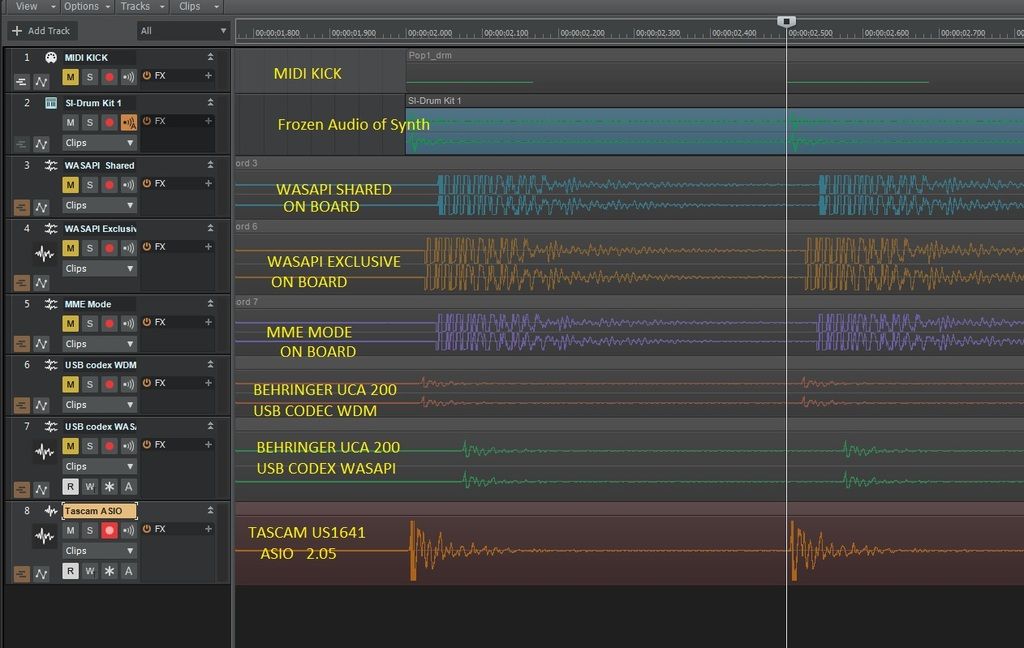
WASAPI has 2  choices in Sonar first is Shared- the other is Exclusive. Exclusive gives you a few more in/ out choices  if your sound card has them,  as well as it performed a tiny bit better on the loopback test as you can see. Use it for better performance. This test is on a 2008 dual core Sony Laptop W7 64bit using on board audio.
Track 7 and 8   used a Behringer UCA 200 interface,
Track 9 my Tascam us1641. running driver 2.05.  
Screenshot results: 
Track 1- MIDI kick on quarter notes 
Track 2- SI drums frozen audio track 
Track 3- WASAPI shared - note it is about 1/8 note late , unexeptable
Track 4- WASAPI ecxclusive- about 1/16 note late, better but not good enough
Track 5- MME mode same as WASAPI shared @ 1/8 note late
Track 6- WDM mode- didn't work pink noise,, 
Track 7- Behringer USB codex - WDM ( it's default)  mode best so far but still 1/32 late 
Track 8- Behringer USB codex WASAPI- worst so far 
Track 9 Tascam ASIO mode - perfect timing , say no more. 
 
Not under WASAPI with my Tascam you only get 8 inputs and no SPDIF. 
I'm curious to try asio4all? should I dare? 
 
Note, tried this test on another machine, HP Pavilion i7 3.2 quad. 
Could not get it to work, WASAPI would not recognise any of the 3 inputs correctly so could not record input. 
2016/11/30 11:33:54
mettelus
I was led to believe the WASAPI improvements were related to Win10 only. I am not sure if this assumption is correct though. I think you had also tried similar with 3 Win7 machines. It is also unclear how the computer hardware factors into WASAPI (I.e., specific architectures/CPUs). I have not researched the details of these, but clarification of the Win10 part may be necessary to put WASAPI in perspective.
2016/11/30 12:10:48
Cactus Music
Good point and I do intend to run the loopback on as many computers as possible. My main DAW is W 10 but it does not have on board audio so I can't use that. But my office computer is also Windows 10 with on board , but this requires installing CCC and Home studio so takes time and bandwidth. 
 
So if anybody else reading this has bought HS and is running Windows 10 could you please try the test. 
Here's how:
Disconnect your audio interface and test your on board audio is active and working. 
Open a blank project, no effects etc. 
Go to Preferences / Audio / Playback and recording and set to WASAPI shared. Mine defaulted to this automatically.  
Insert a midi drum track kick or snare at 1/4 notes for a few measures. 
Insert TTS-1 or SI drums and freeze the midi track to create an audio track. 
Insert a few audio tracks. Set output to NONE, do not use input echo. 
Take a 1/8" TRS to 1/8" TRS cable and jump the on board audio output back to the input. 
Select the audio track input, set in record ready, play and adjust volume, I had to use my speaker volume control and even that was pretty hot. Don't worry, louder the better the image. 
Now record the loopback. 
Repeat this test using more tracks and try all the different driver settings, reconnect your audio interface and select ASIO and try that. This might require re start of Sonar. 
Try as many interfaces as you dare. 
 
I would also love it is someone with a Mac tried this with Core Audio and on board :) 
 
2016/11/30 12:41:27
Anderton
mettelus
I was led to believe the WASAPI improvements were related to Win10 only. I am not sure if this assumption is correct though.


You are correct, the major improvements appear only with Windows 10 when using onboard audio. Think of the new WASAPI drivers conceptually as a replacement for ASIO4ALL.
 
I have not measured timing yet; SONAR reports 3 ms latency. However when I use the virtual onscreen controller, the response seems instantaneous so I believe it. However, note that this appears ulalterable so running at, for example, 96 kHz doesn't decrease the latency; it just uses more sample buffers to end up with 3 ms of latency.
2016/11/30 12:55:14
JonD
I have to admit I thought this was a legacy product when I saw the screenshot. I have Music Creator 7 and wasn't aware of any other similar CW product at that price-point.
 
Turns out Home Studio was just released! Though you wouldn't know it from the CW website or shop: As of two minutes ago, it's not showing up in the CW product line-up. I had to Google it and find the direct link.
 
I'm interested to see how it compares to MC7.  They seem awfully similar.  Is HS replacing MC7?  Who can tell? 
2016/11/30 12:57:34
Anderton
Yes, it's replacing Music Creator. 
2016/11/30 13:20:07
Cactus Music
They certainly seem slow at updating the website, maybe they are too busy baking the bakery :) 
 
I could not find much about it and without the link provided in the other thread you won't be able to even purchase it. 
 
http://www.cakewalk.com/Products/SONAR-Home-Studio
 
I'll report about my experience working with it so far when I get a chance. 
 
2016/11/30 13:26:31
scook
It is has been on the Cakewalk website main page for about a week.
It is also on the side bar at the Bakery.
2016/11/30 13:44:17
JonD
scook
It is has been on the Cakewalk website main page for about a week.


You are correct.  And if someone is browsing at the home page, then he would surely see it.
 
I typically go straight to CW's Product page or the Shop when looking for items.  Currently, Home Studio is not showing up in either place.
2016/11/30 14:53:48
Slugbaby
I was confused - Home Studio 2 was the product i started with in 2003/2004.  I was shocked to read (incorrectly) about someone using an OLDER version with Windows 10.
 
© 2025 APG vNext Commercial Version 5.1

Use My Existing Forum Account

Use My Social Media Account