• Coffee House
  • [SOLVED - Post #19] Networking Weirdness - see pic in OP
2013/10/22 16:43:37
bapu
So my home network has been the same for over a year now. One laptop W7 Home Premium, one desktop W7 Professional.
 
Both are X64. Both have fixed IP addresses (as does my NAS).
 
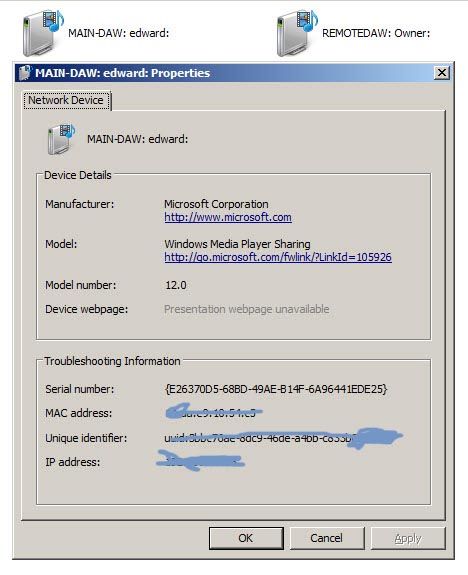
Lately (maybe three weeks or so) the laptop does not recognize computer devices on the network properly. The network tree in Windows Explorer will not expand. Howeber if I click on the network node in WE both the laptop and the DAW are media "files". In WE if I click on the DAW (from the laptop) WMP says it's an invalid file. The icon for the DAW and the LAPTOP (from WE on the laptop) have that WMP image on the device. If that's not clear I'll post a pic of it when I get home.
 
The DAW however is fine. I can access the laptop from the network tree.
 
I used to transfer files, while on the laptop, to the DAW all the time.... until recently.
 
I thought that I once used the refresh command in WE and the computers became accessible network devices again but I have not been able to reproduce that behavior. Reboot does not make it go away.
 
Any ideas what is causing this?
 
<edit> here is a screen shot of the "properties" of my network devices from the laptop.
2013/10/22 16:59:20
paulo
Mebbe something has become shamelessly un-plugged ?
2013/10/22 17:02:35
SteveStrummerUK
 
Coincidentally, I invented a new computer game today.
 
The main character has to make as many people as he can feel uncomfortable by standing very close to them...
 
I'm calling it Personal Space Invaders.
2013/10/22 17:05:10
bapu
paulo
Mebbe something has become shamelessly un-plugged ?


Right now I blame my primate Daryk for not having anything new to plug right now. I mean he has tracks and all. WTF?
2013/10/22 17:12:54
paulo
SteveStrummerUK
 
Coincidentally, I invented a new computer game today.
 
The main character has to make as many people as he can feel uncomfortable by standing very close to them...
 
I'm calling it Personal Space Invaders.


I have long been concerned by the amount of time that children waste on computer games. When my twins were born, I called them Player 1 and Player 2. That should save them some set-up time on new games.
2013/10/22 17:19:31
craigb
Meebee you've accidentally turned Netnotworking on?
2013/10/22 19:04:03
drewfx1
Given fixed IP addresses, I just map drives the old command prompt way:
 
net use t: \\192.168.1.x\share name
 
or optionally 
 
net use t: \\192.168.1.x\share_name password /user:username
 
and
 
net use t: /delete
2013/10/22 21:02:33
bapu
Work arounds. meh. If I have to yeah, but I'd really like to know what the root cause of this is.
 
As I've said for over (actually) two years now this hos not been a problem but cropped up recently. I feel like I'm a pretty orgranized guy and don't just install mish-mash of junk on my computers but maybe a M$ update happened? That's about the only thing I can think of. On the lappy I use M$ auto update but not ion the DAW. 
2013/10/23 00:43:41
bapu
see pic in OP.
2013/10/23 02:17:13
craigb
It's obvious that the problem is someone is scrawling all over the Troubleshooting Information!
 
(Sorry, wish I could help Ed - no ideas, have you searched Google?)
© 2026 APG vNext Commercial Version 5.1

Use My Existing Forum Account

Use My Social Media Account