2013/10/09 14:26:27
bayoubill
Does anyone know where I can get a file for sending chord forms to another guitarist? Right now all I have is a page of necks where I write in the fingerings but I have to scan it. Thanks for any help  
2013/10/09 15:45:08
gswitz
Create grids using a spreadsheet?
2013/10/10 00:29:59
57Gregy
Bill, all the Cakewalk software I have has thousands of guitar chord diagrams in them.
Did this in just a few minutes. You can also open a New Grid and write your own chord diagrams.

Attached Image(s)

2013/10/10 00:32:52
Leadfoot
That's cool! I never knew you could do that.
2013/10/10 00:41:12
bayoubill
Wow! I forgot all about that!  I have chronic amnesia and well you know....
THANKS GREG!
2013/10/10 08:31:53
dxp
and HOW do we do this?
I'm not sure what 'Open a new Grid' means.
This is cool, for sure.
 
 
2013/10/10 10:19:34
57Gregy
dxp
and HOW do we do this?
I'm not sure what 'Open a new Grid' means.
This is cool, for sure.


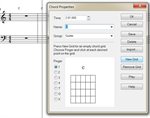
Open a MIDI track's Staff view.
Click the C (chord) tool above the staff.
Click above the staves and the C letter will appear. Right-click that to bring up the Chord Properties dialog.
You should be presented with a list of all the chords in the library and their diagrams.
On the right, you click New Grid and then you can click in the fingering you want.

Attached Image(s)
2013/10/10 11:17:49
Bristol_Jonesey
Who said Staff View sucks????????
2013/10/10 11:22:24
dxp
57Gregy
dxp
and HOW do we do this?
I'm not sure what 'Open a new Grid' means.
This is cool, for sure.


Open a MIDI track's Staff view.
Click the C (chord) tool above the staff.
Click above the staves and the C letter will appear. Right-click that to bring up the Chord Properties dialog.
You should be presented with a list of all the chords in the library and their diagrams.
On the right, you click New Grid and then you can click in the fingering you want.


Thank you Sir.
© 2026 APG vNext Commercial Version 5.1

Use My Existing Forum Account

Use My Social Media Account