• SONAR
  • SONAR Color Schemes (p.62)
2009/04/05 08:50:42
DW_Mike
ORIGINAL: marcus3

What do I need to create color schemes?

I'm not sure which Cakewalk products have the option but I do know that Sonar Producer 6, 7 & 8 (these are all that I've owned) all have the ability to change your color preference.
I believe it's under Options > Colors.

Mike
2009/04/07 09:08:32
Rothchild

ORIGINAL: marcus3

What do I need to create color schemes?


Simple instructions here:

http://sonartemplates.googlepages.com/saveandload

You need to go through the thread a bit to work out how to do the more detailed stuff that Buddy and the gang are up to.

New scheme from Karim going up later this evening, I'll keep you posted.

Ta
Child
2009/04/07 16:45:27
tmuss711
Thanks for forwarding the info on fixing the VU colors in console view.

Tim

2009/04/08 17:01:40
Rothchild
Hey all

Just to let you know that Karim's 'Modern-ProTools' scheme is now available at: http://sonartemplates.googlepages.com/lighttemplates it's remincent of Seths S8 scheme but looks very practical - could I be lured by the light side? ;-)

As ever if you have a colour scheme you'd like to share just mail it to me at popworks@gmail.com along with a couple of screen shots and I'll post it all up for you.

Cheers
Child
2009/04/10 01:55:35
stickman393
I try and come up with a new color scheme each version, but I'm liking my current 8.3 scheme a lot, perhaps I'll stay with it from now on:

Click on the picture for a larger version:
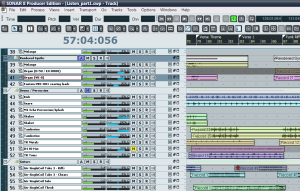

Extra large full screen image

Here's the scheme:
Prodigal_831.clr.txt
When you save the clr file, just remove the .txt extension from the file name.

Caveat: I am using a customized resource file to lighten the grey of the MSR buttons, and also tweaked cakewalk.ini according to the instructions in the help file.

[UPDATE:]
This zip file includes the res.dll and some notes on the cakewalk.ini tweaking.
2009/04/11 10:54:59
Rothchild
Hi All

Tim M has very kindly contributed his high contrast scheme, it's now available at: http://sonartemplates.googlepages.com/lighttemplates

Cheers
Child
2009/04/11 14:19:20
fooman
Anyone know if it's possible to make the track name font smaller or unbold?
2009/04/11 17:36:55
stickman393

ORIGINAL: fooman

Anyone know if it's possible to make the track name font smaller or unbold?


For the TrackView, yes it is. Read the help file under "Cakewalk.ini". It's all there.
2009/04/11 18:30:45
fooman

ORIGINAL: stickman393


ORIGINAL: fooman

Anyone know if it's possible to make the track name font smaller or unbold?


For the TrackView, yes it is. Read the help file under "Cakewalk.ini". It's all there.

Sweet! Thanks. I've never really read up nor have I opened the .ini file.
2009/04/21 04:04:32
legobeats
Buddy, many thanks for the rounded faders and your goobase scheme! I admit I still miss the look of Cubase al little bit... But now I have a Sonabase and am very happy with what I see! Using the Windows Royale Remixed theme it all has that touch of 21st century I was missing

Best!
Wolfgang
© 2025 APG vNext Commercial Version 5.1

Use My Existing Forum Account

Use My Social Media Account