• SONAR
  • SONAR Color Schemes (p.74)
2009/09/20 14:59:18
Buddy110
Hi chef, I've double-checked here again...they work fine. just make sure they are in the same directory and should be good. no need to rename anything...as the patchers target the same TTSRes17.dll file (sonar 8.3).
2009/09/20 18:43:38
DW_Mike
Hey Buddy,

I'm still not doing something right. I'm a little handicapped when it comes to this sort of thing.
What I'm doing is, I put the patcher for the faders into the folder and run it, then I put the patcher for the meters in and run that. For some reason when I open Sonar the faders are correct but the meters don't change.

Could you please break it down to a step by step as if you were explaining it to 3rd grader?
Here's a screenshot of my Sonar folder if it helps you see what I'm doing.
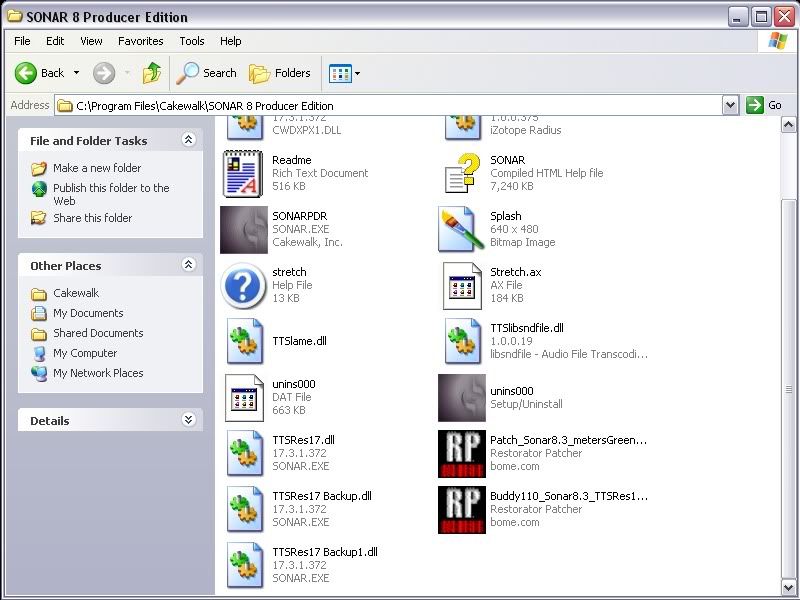


Sorry to be such a pain in the ass with this. I really do appreciate the help.

Mike
2009/09/20 18:56:08
DW_Mike
DOH!

Please ignore the previous post, I ran the meter one before the fader one and the faders would overwrite the meters.
I tried one more time after the last post and ran the fader one first and it worked.
Once again sorry to be such a pain. It's just that I really like what you have done here and wanted to use it.

Thanks again.
Mike
2009/09/20 19:15:30
Buddy110
Oh hey...Glad you got it sorted. Don't worry, these kind of things can be tricky sometimes. I'll update my rounded faders soon (so they won't have any meter changes in there). This modular way is probably best so people can pick and mix what they prefer.
2009/09/20 21:35:46
Buddy110
Ok, tweaked the "Cool Blues" (now version with red peak indicators and slightly lighter blue (ahem...John!) xD


- "Cool Blues v2"
2009/09/21 01:33:58
BluesMeister
I'm not wearing a hat, but if I was I'd take it off to you, Buddy110.

May I ask you how to change the background colour of the buttons on the toolbars? I couldn't see anywhere in the Color Schemes dialogue box that allows me to do that. My S5PE has almost white background to the buttons, and I find the dark grey of S8 less than attractive.
2009/09/21 07:07:19
Buddy110
Thanks BluesMeister! About the buttons themselves, they can't be changed on-the-fly in any of the sonar versions (as far as i know). the only way to change them is to pull out the graphics, edit and replace them.
2009/09/21 07:25:51
Blades
Wouldn't it be nice if Cakewalk made this stuff all more accessible in editing - even something like the way the new VSTs are done would be nice...like SD2 can be reskinned.

Buddy, I appreciate the work that goes into making these graphics (hoops to jump through) in addition to just FINDING the proper graphics to change.  Not having the ability to write individual patches like you are doing without a software investment is a drag.  I can edit the .dll, but I can't create patch files, just a whole file replacement.
2009/09/21 07:51:11
Buddy110
I can see a great tag line now....

"Everyone is unique...and so is Sonar!"


Would be great if we had a few more choices in the UI side of things.
2009/09/21 10:07:11
Jon Con
here's my attempt on some orange meters from patching.


Edited - I used a trial version of restorator and as a result all the tabs in the sonar menu and all windows had the restorator title at the top. It changed how the menu appeared as well so as I result I decided to revert back to the original file and then patch buddys faders and blue meters. If anyone wants to do a patch of orange/gold faders, feel free to use the images below.

http://dl.getdropbox.com/u/877390/1406.bmp
http://dl.getdropbox.com/u/877390/1407.bmp
http://dl.getdropbox.com/u/877390/2744.bmp


Also here's a colour scheme I've made since getting sonar 8.5. I actually quite liked the clip colours Cake did for this version of Sonar but preferred the settings I had from the dark london colour scheme on Rothchilds page. The differences between the 2 are that non segmented meters in the colour schemes are either blue or orange so if you have the track view with non segmented meters (because they can be smaller and save space) and the console view with segmented meters they have similar colours to each other.

Roth if you want add anything to your page, feel free

New Sonar 8.5 Scheme with blue (non segmented) faders

New Sonar 8.5 scheme with orange (non segmented) faders


(see full size)

© 2025 APG vNext Commercial Version 5.1

Use My Existing Forum Account

Use My Social Media Account