• SONAR
  • SONAR Color Schemes (p.87)
2010/02/07 09:59:19
DW_Mike
Buddy, 
I just DL'd the 8.5 pack.
Is there a different way to run these now?

The file has changed from when I installed v.8.
See picture below.

The top one is the old patcher, the bottom one is what I've just downloaded.
How do I run the new patcher?
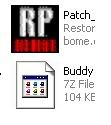


Thanks again for everything.
Mike  
2010/02/07 11:12:50
thomasabarnes
That is a compressed file you download. You use a a compressed file utility such as WinRAR to unpack that file. Then, you will see the patch which you can move to the correct directory and execute it.
 
Here's a link to a free utility that can unpack .7z files: http://www.7-zip.org/
2010/02/07 12:17:12
DW_Mike
Hmmm, I have winZip and usually compressed files have the WinZip logo on them.
I'll give it a shot. Thanks Tom

Mike
2010/02/07 12:24:37
DW_Mike
Nope, that's not it. 


I tried downloading it 4 times, each time it's the same thing.
I'm on XP Pro 32 bit.
Are these made for Windows 7 maybe?


Mike
2010/02/07 14:36:16
D K
Thanks Buddy - works like a charm
2010/02/07 14:46:09
thomasabarnes
chefmike:
 
I don't understand what you mean when you say "I tried downloading it 4 times, each time it's the same thing."

Download Buddy's patchpack from here: http://www.somhairle.com/SonarUItweaks.html

From the link I gave to 7 Zip, you should see this:


7-Zip is a file archiver with a high compression ratio.
Download 7-Zip 4.65 (2009-02-03) for Windows:
Link Type Windows Size Download .exe 32-bit 1 MB Download .msi x64 1 MB

Cliick on the Download for .exe 32 Bit. You should, then see this:

Your 7-Zip download will start shortly…


Rate this project: Thumbs UpThumbs Down


Problems with the download? Please use this direct link or try another mirror.

If your download doesn't start, click on the hypertext that says "direct link" without the quotes. The download should start. Then install 7 Zip, and after the installation, rightclick on the file that says " Buddy110_PatchPack_Sonar_8.5.2.222" and select select 7 Zip/Extraxt here and that should extract Buddy's patches to a folder that's named "Buddy110_PatchPack_Sonar_8.5.2.222"

The patch files should be in that folder.

2010/02/07 14:52:12
DW_Mike
OK so apparently a 7-zip file is different from a zip file.

For s***s and giggles I downloaded 7-zip and it worked.

Thanks all.
Mike 
2010/02/07 14:56:53
DW_Mike
Tom, I just saw your last post.
What I meant was that I tried down loading Buddys files 4 times.
Since WinZip couldn't open them I though they may have gotten corrupted somehow.

I never had a file WinZip couldn't un-zip before. So I wasn't sure what was going wrong.

Thanks for your help.

Mike
2010/02/07 14:58:09
thomasabarnes
The file you downloaded from Buddy's site has the ".7z" extension. That is different from a standard ".zip" extension. I usually use WinRAR to handle compressed files, and I'm not sure if WinZip has support for the ".7z" extension. That's why I included a download link for a free utility that can handle the ".7z" extension.

Glad you got it to work. :)
2010/02/07 16:21:24
Buddy110
Hey Mike, sorry you had those problems with the archive. Personally, I'm a big fan of WinRar, but in the past couple of years I started using 7-zip for the better compression it offers (especially the latest versions). If you do try it, try compressing a wav file with 7-zip's compression set to "ultra" and see what you think compared to winzip. That and it's OpenSource. That said, glad you got it sorted. xD
© 2025 APG vNext Commercial Version 5.1

Use My Existing Forum Account

Use My Social Media Account