guitz
Max Output Level: -86 dBFS

- Total Posts : 232
- Joined: 2004/12/26 18:29:42
- Status: offline

staff view suggestion
Trying another way in my years of not being able to get satisfactory drum results (too tedious, too complicated, etc,etc)....I figured if I looked at some pre-recorded drum tracks , written down on staff, I could get a better understanding of drumtrack creation, and, have a powerful way of writing my own drum parts...So I'm starting with a drumtrack from songster.com, written on staff...as I try to one by one draw in the kick/snare/hihat basics in Sonar X3, using addictive drums as the source, I am noticing that for some odd reason, click and dragging a note on a single staff line or space results in more than one sound!...I have to 'scroll thru' the 2 or 3 sounds to get one what I want...how do I edit so that each line/space has a single sound?
Also, and mainly, I have noticed that I VERY frequently goof where I put the note or it draws one where I didn't want, or draws one when I didn't want, using the start (supposedly 'smart' lol) editing icon....when I go to erase the goofs, I have to go down to the task bar and select the eraser....shouldn't there be a much quicker means of erasing? Like, shouldn't I be able to right click on the draw tool and erase? Can you make this an option? Thanks. :)
|
guitz
Max Output Level: -86 dBFS
- Total Posts : 232
- Joined: 2004/12/26 18:29:42
- Status: offline
Re: staff view suggestion
2016/05/01 19:59:15
(permalink)
another question...I can't seem to get SONAR to 'stretch out' the bars to accept what the original has,.....song is standard 4/4, 114 bps.....what do I need to tweak in SONAR to get the bars to accept as many beats as the original below? Thanks 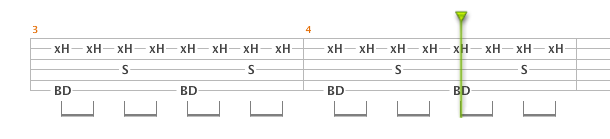 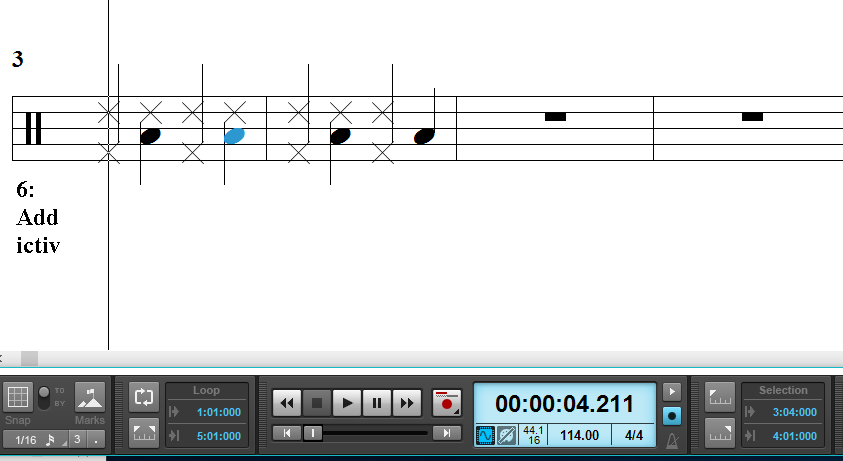
|
guitz
Max Output Level: -86 dBFS
- Total Posts : 232
- Joined: 2004/12/26 18:29:42
- Status: offline
Re: staff view suggestion
2016/05/01 20:05:09
(permalink)
Ok nevermind on the 2nd question...lol, I didn't see that you have to set the note resolution under the select icons...thought it was set in the 'snap' section ..that did it...but I still would like the erase to be a right click option!
|
tenfoot
Max Output Level: -53.5 dBFS

- Total Posts : 2186
- Joined: 2015/01/22 18:12:07
- Location: Qld, Australia
- Status: offline
Re: staff view suggestion
2016/05/01 21:34:25
(permalink)
Hi Guitz. I understand looking at examples to learn drum programming, and I presume you are talking about drum maps when you say that previous attempts were too tedious/complicated. Why not open your examples in Piano Roll View? It is far more flexible and easier to edit in than staff view.
Bruce. Sonar Platinum 2017-09, Studio One 3.5.3, Win 10 x64, Quad core i7, RME Fireface, Behringer X32 Producer, Behringer X32 Rack, Presonus Faderport, Lemure Software Controller (Android), Enttec DMXIS VST lighting controller, Xtempo POK.
|
guitz
Max Output Level: -86 dBFS
- Total Posts : 232
- Joined: 2004/12/26 18:29:42
- Status: offline
Re: staff view suggestion
2016/05/01 22:25:06
(permalink)
tenfoot
Hi Guitz. I understand looking at examples to learn drum programming, and I presume you are talking about drum maps when you say that previous attempts were too tedious/complicated. Why not open your examples in Piano Roll View? It is far more flexible and easier to edit in than staff view.
I hadn't thought of that...I just figured that if there were any fast or complex fills, etc, that drawing them in the staff view would be easisest, because they would snap to the correct timing and I could visually compare it to the original....the REAL easiest way, is if I could export the drum score and import it into sonar but I don't think I can export it in a way that SONAR could read/open.
|
promidi
Max Output Level: -66 dBFS

- Total Posts : 1220
- Joined: 2014/11/21 18:46:39
- Location: South Australia
- Status: offline
Re: staff view suggestion
2016/05/02 05:41:01
(permalink)
I would also use the PRV to edit drum patterns over the Staff view (mid you, the step editor is handy for drums as well).
IMHO, that best sounding drum patterns do have tiny timing and velocity imperfections that a human drummer would introduce. This would make them sound more natural. The PRV has the ability to shift drum notes back and forward in time by tiny amounts of time. Using the staff view restricts you to exact timings. Of course you can use a humanising MIDI FX to vary the timing slightly - but the PRV gives you more control.
To see what I mean by imperfections, pull up a pattern from Addictive Drums 2 and view them in the PRV and you will see some of the drum notes are ever so slightly offset in time.
As an example, I have done a lot of Carlos Santana covers as MIDIs using the PRV , including his complex drum patterning, and I could not have achieved the timing realism that his tracks require if I used the staff view only.
Windows 10 64bit fully patched, 16 gig ram . PCR-800 Controller. (Working in Win 10 1809 64bit)CPU: i5 4670. Video: Nvidia GTX560ti (latest drivers). Audio IF: Focusrite 2i2 2nd Gen
Internet always on.
Software: Cakewalk by Bandlab (2018.09 B29)
ASIO mode. 24bit 48khz 256 samples Rapture Pro, AAS GS2, VS-3, EP-4, VA-2, Chromophone 2, Z3TA+ 2, Addictive drums 2, Addictive Keys, Mpowersynth (latest), Iris 2, GPO5, Sampletank 3,
|
riojazz
Max Output Level: -64 dBFS

- Total Posts : 1337
- Joined: 2004/02/26 13:23:02
- Location: Mid-Hudson Valley, NY
- Status: offline
Re: staff view suggestion
2016/05/03 10:42:06
(permalink)
PROMIDI, I know we used to use CAL for this, but do you have an example of a reasonably-priced effect for what you mentioned, "humanizing MIDI FX"? Thanks.
Software: Cakewalk by Bandlab; Adobe Audition; Band-in-A-Box audiophile; Izotope Ozone; Encore; Melodyne; Win 10 Pro, 64-bit. Hardware: Focusrite Scarlett 18i20 2nd; Roland Integra-7; TCE Finalizer; Presonus Central Station, Behringer X-Touch. Home built i7 with 16 GB RAM, SSDs.
|
JonD
Max Output Level: -39 dBFS

- Total Posts : 3617
- Joined: 2003/12/09 11:09:10
- Location: East of Santa Monica
- Status: offline
Re: staff view suggestion
2016/05/03 11:06:38
(permalink)
riojazz
PROMIDI, I know we used to use CAL for this, but do you have an example of a reasonably-priced effect for what you mentioned, "humanizing MIDI FX"? Thanks.
http://www.midi-plugins.de/#Plugins The "humanize" plugin is part of a suite. $35.
SonarPlat/CWbBL, Win 10 Pro, i7 2600K, Asus P8Z68 Deluxe, 16GB DDR3, Radeon HD5450, TC Electronic Impact Twin, Kawai MP11 Piano, Event ALP Monitors, Beyerdynamic DT770 Pro, Too Many Plugins, My lucky hat.
|