jerotas
Max Output Level: -82 dBFS

- Total Posts : 439
- Joined: 2006/07/01 22:44:22
- Location: Seattle, WA
- Status: offline
Mastering in 16-bit?
Hi, I've got a compilation of songs from 7 different artists, and I've been assigned to master them all - (not full mastering), basically to achieve a similar volume among all the tracks. Most of the have already been mastered by the artists. But some of them are in 16-bit format. I remember hearing from several people that you always want to master in 24-bit or higher.
Should I have any problems using 16-bits? Actually it's going to be a mix-and-match of 16 and 24 bit songs.
|
ohhey
Max Output Level: 0 dBFS

- Total Posts : 11676
- Joined: 2003/11/06 16:24:07
- Location: Fort Worth Texas USA
- Status: offline

RE: Mastering in 16-bit?
2008/02/06 13:49:48
(permalink)
ORIGINAL: jerotas
Hi, I've got a compilation of songs from 7 different artists, and I've been assigned to master them all - (not full mastering), basically to achieve a similar volume among all the tracks. Most of the have already been mastered by the artists. But some of them are in 16-bit format. I remember hearing from several people that you always want to master in 24-bit or higher.
Should I have any problems using 16-bits? Actually it's going to be a mix-and-match of 16 and 24 bit songs.
Well, there is nothing you can do about it unless they have a 24bit copy, at this point all you can do is best effort. Check the fades at the end of the songs with headphones each time you make a gain change (up) and see if you can hear anything nastly happening. In some cases I've had to make a decision to fade a little quicker if it starts getting grainy. Try not to go more then 2 db up if you can. It would be better to bring the other songs down if the 16bit ones start sounding bad.
|
dlogan
Max Output Level: -50 dBFS

- Total Posts : 2544
- Joined: 2006/02/17 09:34:16
- Location: Kansas City, Missouri
- Status: offline
RE: Mastering in 16-bit?
2008/02/06 14:03:06
(permalink)
24-bit would be ideal, but I doubt your typical listener is going to be able to tell the difference. Depending on a lot of other factors, a 16-bit recording done well could sound better than a poorly recorded 24-bit recording.
Dave
|
pdarg
Max Output Level: -52.5 dBFS

- Total Posts : 2265
- Joined: 2004/03/26 17:52:53
- Status: offline
RE: Mastering in 16-bit?
2008/02/06 14:12:18
(permalink)
Well actually, I think that you can open this in Sonar specifying the bit rate at 24. This approach does not change the fact that the actual original recording was done in 16 bit, but it may help to master in 24 bits and then dither it back. The benefits would probably be minimal, but it is possible.
I have found that switching sample rates (i.e., 44.1 kHz to 96 kHz) = a big deal
but switching bit rate to a higher rate (i.e., 16 to 24 bit) = not really a big deal
|
mose
Max Output Level: -80 dBFS

- Total Posts : 513
- Joined: 2007/12/02 23:08:17
- Location: Nebraska
- Status: offline
RE: Mastering in 16-bit?
2008/02/06 14:59:19
(permalink)
ORIGINAL: pdarg
switching bit rate to a higher rate (i.e., 16 to 24 bit) = not really a big deal It's like having a 16oz cup and then you put an 8oz extension on top to make it a 24oz cup. If all you ever do is keep 16oz of something in the cup, nothing has changed. Only the container is bigger. If you decide to add 1oz of something (e.g. volume) to the cup, the cup will still hold it without any problems. When you switch to the 16oz cup at the end, the contents will have to be dithered to make it fit back into a 16oz cup. Of course, there are more details, but that's the general picture.
|
pdarg
Max Output Level: -52.5 dBFS
- Total Posts : 2265
- Joined: 2004/03/26 17:52:53
- Status: offline
RE: Mastering in 16-bit?
2008/02/06 15:10:35
(permalink)
To quote myself:
"The benefits would probably be minimal"
However, if the priority is to master at 24 bits, then it can be done - and it is easier and less damaging to do than switching sample rates. Some have suggested that 24 bits is better for processing mastering applications. Perhaps. If so, the option is there.
|
strungdown
Max Output Level: -79 dBFS

- Total Posts : 573
- Joined: 2007/04/12 13:15:26
- Status: offline
RE: Mastering in 16-bit?
2008/02/06 15:44:54
(permalink)
I am assuming you are going to Compact Disk which is 16bits. It's not so much how many bits but how noisy the recording is, regardless of its bit depth. If it was recorded at a decent level but your concern is that it is a 16-bit recording (rather than 24), you can for sure still master it, hell even 10 bits can be enough.
|
jerotas
Max Output Level: -82 dBFS
- Total Posts : 439
- Joined: 2006/07/01 22:44:22
- Location: Seattle, WA
- Status: offline
RE: Mastering in 16-bit?
2008/02/06 16:15:14
(permalink)
Yeah, it's going to compact disc. I think there is not much noise as most of the artists know what they're doing.
|
DonM
Max Output Level: -34 dBFS

- Total Posts : 4129
- Joined: 2004/04/26 12:23:12
- Location: Pittsburgh
- Status: offline
RE: Mastering in 16-bit?
2008/02/06 19:02:11
(permalink)
ORIGINAL: jerotas
Hi, I've got a compilation of songs from 7 different artists, and I've been assigned to master them all - (not full mastering), basically to achieve a similar volume among all the tracks.
Should I have any problems using 16-bits? Actually it's going to be a mix-and-match of 16 and 24 bit songs.
Fortunately what you are doing (achieving a similar volume) is not mastering, so 16 bit files will be fine. Below is a screen capture from Sony's CD Architect that represents a few 16 bit files with an appropriate volume envelop allowing for the change in each file's output. 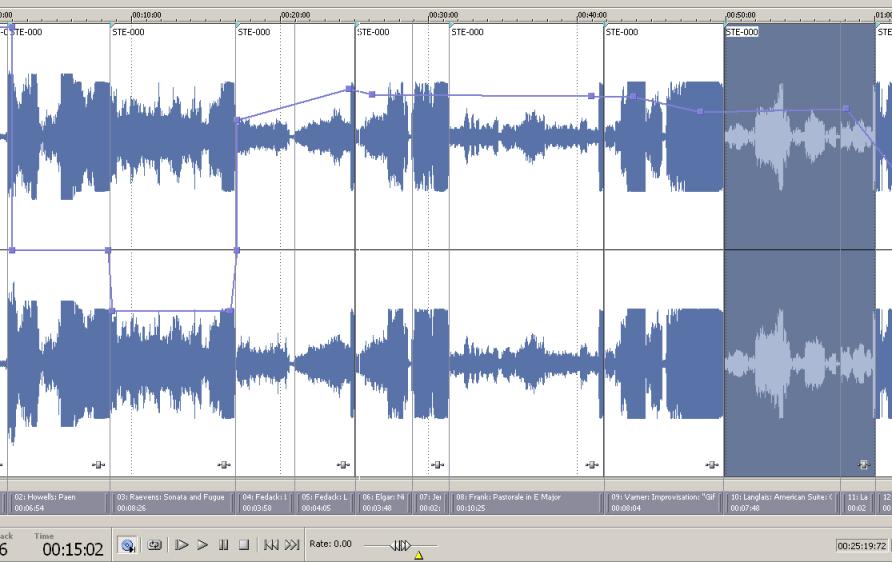 While I will conclude in the short form of my answer that 16 bit files in your situation can be manageable if all you are going to do is adjust the inter-file loudness - assuming that are all similar in their peak to average. Now to an answer that is more in my-speak. There is no volume, there is only the representative rms and peak energy in a file. Managing that crest between average and peak is one of the aspects of mastering. So my point in this paragraph, while you are able to place volume envelopes in tools like CD Architect and now Sonar 7 would do the same duty since it can burn CD's - you are banking on the skills of the mastering engineer(s) who are providing you with the files for a good final product. I have only had to do one mastering project that was from multiple mix studios - I wasn't a happy camper during that week. -D
|
Mr. Ease
Max Output Level: -71 dBFS

- Total Posts : 960
- Joined: 2003/11/24 18:44:01
- Location: West Sussex, UK
- Status: offline
RE: Mastering in 16-bit?
2008/02/06 19:12:50
(permalink)
There seems to me to be some misunderstanding here. Even though the input files may be 16 bit, in Sonar they should be processed as 32 bit or 64 bit floats to maximise the quality of any effects or volume changes that you apply in the mastering process. This will mean that any effect tails will render smoothly even though the input files are 16 bit.
When the process is complete then appropriate dither should be selected and applied as the output files will now render in full resolution within Sonar. This will give the best results by far.
Otherwise why would we even bother with 32 bit or 64 bit floats when the inputs never exceed 24 bit anyway.
|
DonM
Max Output Level: -34 dBFS
- Total Posts : 4129
- Joined: 2004/04/26 12:23:12
- Location: Pittsburgh
- Status: offline
RE: Mastering in 16-bit?
2008/02/06 19:45:27
(permalink)
ORIGINAL: Mr. Ease
There seems to me to be some misunderstanding here. Even though the input files may be 16 bit, in Sonar they should be processed as 32 bit or 64 bit floats to maximise the quality of any effects or volume changes that you apply in the mastering process. This will mean that any effect tails will render smoothly even though the input files are 16 bit.
When the process is complete then appropriate dither should be selected and applied as the output files will now render in full resolution within Sonar. This will give the best results by far.
Otherwise why would we even bother with 32 bit or 64 bit floats when the inputs never exceed 24 bit anyway.
No, do not dither the 16 bit files. IF the OP intends to do the volume matching in Sonar, that is to say, line up all of the audio regions into one over several linear tracks and burn a CD in Sonar 7 there is no need to apply dither regardless of the projects internal word length - the files will remain in the original word length. If you look at the list of audio files in the Project Audio Files list, you will see that Sonar retains the original word length (if you set your global options to do so as should be done in this example) especially if the only process being done is a volume envelope!) -D
|
Mr. Ease
Max Output Level: -71 dBFS
- Total Posts : 960
- Joined: 2003/11/24 18:44:01
- Location: West Sussex, UK
- Status: offline
RE: Mastering in 16-bit?
2008/02/07 11:38:00
(permalink)
ORIGINAL: DonM
No, do not dither the 16 bit files. IF the OP intends to do the volume matching in Sonar, that is to say, line up all of the audio regions into one over several linear tracks and burn a CD in Sonar 7 there is no need to apply dither regardless of the projects internal word length - the files will remain in the original word length. If you look at the list of audio files in the Project Audio Files list, you will see that Sonar retains the original word length (if you set your global options to do so as should be done in this example) especially if the only process being done is a volume envelope!)
-D
I don't think I agree with you on this. Even if you only apply a volume envelope to a 16 bit file, a multiply operation is required. Any multiply will increase the number of significant bits in the answer (multiplying 2 16 bit numbers will give 32 significant bits unless the result is either rounded or truncated). With real 64 or real 32 bit processing, no such (or with real32's minimal) truncation is necessary or in fact desirable - i.e. keep ALL processing in real 64's. This means that the final re-mastered output will contain full real 64 numbers and should therefore be dithered. It is only the input files that will remain at 16 bit resolution.
post edited by Mr. Ease - 2008/02/07 11:40:56
|
John
Forum Host

- Total Posts : 30467
- Joined: 2003/11/06 11:53:17
- Status: offline
RE: Mastering in 16-bit?
2008/02/07 11:49:51
(permalink)
You know there was a time when we all mastered in 16 bits.
|
Mr. Ease
Max Output Level: -71 dBFS
- Total Posts : 960
- Joined: 2003/11/24 18:44:01
- Location: West Sussex, UK
- Status: offline
RE: Mastering in 16-bit?
2008/02/07 12:02:53
(permalink)
ORIGINAL: John
You know there was a time when we all mastered in 16 bits.
There was also a time we mastered in analogue! :<)
|
ohhey
Max Output Level: 0 dBFS
- Total Posts : 11676
- Joined: 2003/11/06 16:24:07
- Location: Fort Worth Texas USA
- Status: offline
RE: Mastering in 16-bit?
2008/02/07 12:14:02
(permalink)
ORIGINAL: John
You know there was a time when we all mastered in 16 bits.
Yeah.. you hear stats about how many hits were recorded in ProTools and most of them are from when ProTools was 16bit only. The really old stuff was put on a Sony PCM tape for production but not mastered (edited) in the digital domain it was just a analog to digital transfer.
|
rumleymusic
Max Output Level: -60 dBFS

- Total Posts : 1533
- Joined: 2006/08/23 18:03:05
- Location: California
- Status: offline
RE: Mastering in 16-bit?
2008/02/07 12:29:50
(permalink)
I agree with Mr. Ease on this one. If you so much as blink at a piece of audio in a DAW, you have increased the bit depth, and you should treat the material as if you have a 32bit or 64 bit file. I makes no difference if the source is 16 bits or 16 bit converted to 24 bits, the math will be the same in Sonar's 64 bit environment. So if you start with 16 bits, there is no point in changing that before beginning to master the material in the DAW. You know there was a time when we all mastered in 16 bits. And not many people complained either. There is no problem with 16 bit audio as long as it is recorded well. I actually prefer the sound of my old Sony DAT machine over some newer high resolution recorders. There was also a time we mastered in analogue! :<) Thank God for progress.
|
DonM
Max Output Level: -34 dBFS
- Total Posts : 4129
- Joined: 2004/04/26 12:23:12
- Location: Pittsburgh
- Status: offline
RE: Mastering in 16-bit?
2008/02/07 17:30:27
(permalink)
Great debate - thanks for the replies - Maybe I wasn't as clear as I could have been in my reasoning behind the don't dither suggestion.
If you are using Sonar, I would suggest importing that audio at original bit depth into a 16 bit project. You are not gaining anything with regard to Signal to Noise ratio by changing either the project word length or the audio word length - or both for that matter.
You are correct that you will be doing a multiply with regard to gain changes - but you will not be doing any mixing or summing so increasing the word length for any reason doesn't buy you a thing, nor will applying dither to 16 bit files with 8 bits of null.
Keep in mind 24 bit files are really just keeping you out of trouble in the signal to noise category and providing you with a more granular representation of exactly the same dynamic range as 16 bit. (-inf to 0DBFS) - in other words just more grays in the tones.
I'd suggest this discussion that has focused on my reasoning for the math equally be discussed with regard to any sonic benefit of adding 8 null bits for the sole purpose of dithering - I'd truncate that sample myself...
Comments........
-D
|
Mr. Ease
Max Output Level: -71 dBFS
- Total Posts : 960
- Joined: 2003/11/24 18:44:01
- Location: West Sussex, UK
- Status: offline
RE: Mastering in 16-bit?
2008/02/07 19:24:31
(permalink)
ORIGINAL: DonM
Great debate - thanks for the replies - Maybe I wasn't as clear as I could have been in my reasoning behind the don't dither suggestion.
If you are using Sonar, I would suggest importing that audio at original bit depth into a 16 bit project. You are not gaining anything with regard to Signal to Noise ratio by changing either the project word length or the audio word length - or both for that matter.
I quite agree that importing a 16 bit file as 24 bit gains absolutely nothing.
You are correct that you will be doing a multiply with regard to gain changes - but you will not be doing any mixing or summing so increasing the word length for any reason doesn't buy you a thing, nor will applying dither to 16 bit files with 8 bits of null.
But as soon as you apply ANY processing you will no longer have 8 bits of null. The higher resolution of the processing will give more accurate output. No it will not improve the S - N ratio of anything but if you simply write to a 16 bit file you will be rounding (or worse truncating) the additional bits. The whole point of dither is to improve this process and I maintain that dither should be applied. Lets use real numbers in a simple example - Sample 1 signal level 5, attenuation .7 = Output 3.5 rounded output = 4 Sample 2 signal level 6, attenuation .7 = Output 4.2 rounded output = 4 Sample 3 signal level 7, attenuation .7 = Output 4.9 rounded output = 5 Sample 4 signal level 6, attenuation .7 = Output 4.2 rounded output = 4 Sample 5 signal level 5, attenuation .7 = Output 3.5 rounded output = 4 Sample 6 signal level 4, attenuation .7 = Output 2.8 rounded output = 3 The rounded output actually loses some of the detail included in the original resolution.... Dither is actually an attempt to maintain some of this resolution. Indeed, why would we even bother with dither algorithms if rounding or truncation worked just as well? Rounding or truncation is MUCH simpler to implement.
Keep in mind 24 bit files are really just keeping you out of trouble in the signal to noise category and providing you with a more granular representation of exactly the same dynamic range as 16 bit. (-inf to 0DBFS) - in other words just more grays in the tones.
This is not relevant to the point I have raised.
I'd suggest this discussion that has focused on my reasoning for the math equally be discussed with regard to any sonic benefit of adding 8 null bits for the sole purpose of dithering - I'd truncate that sample myself...
Comments........
-D
I have only commented on one point you raised in response to my post. I believe your point to be incorrect.
post edited by Mr. Ease - 2008/02/07 19:49:33
|
robby 
Max Output Level: -17 dBFS

- Total Posts : 5819
- Joined: 2006/05/13 15:53:45
- Status: offline
RE: Mastering in 16-bit?
2008/02/07 19:36:15
(permalink)
"I quite agree that importing a 16 bit file as 24 bit gains absolutely nothing. "
Yes, it's like dressing your wife up in one of those racy numbers from Victoria's Secret? I mean, that's ok and all, but it's not going to make her look like Giselle Bundchen... All good points Ease.
|
DonM
Max Output Level: -34 dBFS
- Total Posts : 4129
- Joined: 2004/04/26 12:23:12
- Location: Pittsburgh
- Status: offline
RE: Mastering in 16-bit?
2008/02/07 19:45:16
(permalink)
The rounded output actually loses some of the detail included in the original resolution.... Dither is actually an attempt to maintain some of this resolution. Indeed, why would we even bother with dither algorithms if rounding or truncation worked just as well? Rounding or truncation is MUCH simpler to implement.
Great - I do not debate anything you are saying about why to use dither - In fact a search on my post history will reveal my responses to how to apply it properly. With regard to dithering the 16 bits files which from the OP indicates the files are already mastered - then you'd be double dithering - right? Can you say hiss.... .7 attenuation does not change my view that the dither will be far far far down in the material. I seem to recall you mentioned reading all of the anti-dither threads over at 3db - my posts really are falling on the heels of being careful about the application of dither and equally important not applying it twice to the same material. -D
|
Mr. Ease
Max Output Level: -71 dBFS
- Total Posts : 960
- Joined: 2003/11/24 18:44:01
- Location: West Sussex, UK
- Status: offline
RE: Mastering in 16-bit?
2008/02/08 04:17:36
(permalink)
ORIGINAL: DonM
The rounded output actually loses some of the detail included in the original resolution.... Dither is actually an attempt to maintain some of this resolution. Indeed, why would we even bother with dither algorithms if rounding or truncation worked just as well? Rounding or truncation is MUCH simpler to implement.
Great - I do not debate anything you are saying about why to use dither - In fact a search on my post history will reveal my responses to how to apply it properly. With regard to dithering the 16 bits files which from the OP indicates the files are already mastered - then you'd be double dithering - right? Can you say hiss....
.7 attenuation does not change my view that the dither will be far far far down in the material. I seem to recall you mentioned reading all of the anti-dither threads over at 3db - my posts really are falling on the heels of being careful about the application of dither and equally important not applying it twice to the same material.
-D
I have not once suggested using dither on a 16 bit waveform! The point is that, as the OP indicated, that some processing IS required, even IF it only involves adjusting levels. Once ANY change is made to the original 16 bit file, it is no longer a 16 bit file. I repeat again, it is no longer a 16 bit file... This I have demonstrated. On ANY file that has more than 16 bits and needs to be reduced to 16 bits, dither is a valid process and preferable to truncation or rounding.
|
DonM
Max Output Level: -34 dBFS
- Total Posts : 4129
- Joined: 2004/04/26 12:23:12
- Location: Pittsburgh
- Status: offline
RE: Mastering in 16-bit?
2008/02/08 07:28:49
(permalink)
ORIGINAL: Mr. Ease
I have not once suggested using dither on a 16 bit waveform! The point is that, as the OP indicated, that some processing IS required, even IF it only involves adjusting levels.
Once ANY change is made to the original 16 bit file, it is no longer a 16 bit file. I repeat again, it is no longer a 16 bit file...
This I have demonstrated.
On ANY file that has more than 16 bits and needs to be reduced to 16 bits, dither is a valid process and preferable to truncation or rounding.
Let me try and understand what you are saying - sorry for the remedial level now but you say that a 16 bit file isn't a 16 bit file. I'm not sure about that - I don't know of any process in Sonar that changes the wordlength of a FILE other than an export to a higher or lower word length or an import that does not 'respect' the original wordlength. Let's agree that every process done to a 16 bit FILE will not change the wordlength of the FILE. Go ahead and perform a lot of processing and volume changes on 16 bit FILES, then look at the clip properties and you'll find the FILE is still 16bit - I repeat the FILE. I am not sure that your statement saying any changes made in Sonar means that a 16 bit file is no longer a 16 bit file. A very scary idea indeed. With regard to the internal processing of audio data within the Sonar audio engine all of the subsequent processing (including gain and attenuation) the files, as I understand it, enters the audio engine at it's original wordlength, is processed at 32 or 64 bit double precision float - and then returned to the project - from a conversation I had with Ron Kuper about this several years ago - we discovered that turning dither off even during the mixing process was a desirable status - and one of the reasons that through my suggestion on Sonar 6 and 7 the dither check box was moved to the export dialog box and not found exclusively in the audio options dialog box. I appreciated that they followed my suggestion. In short I understand the internal processing and the file as two different things, I also believe (and this is where I think you and I need to understand exactly what is happening to know whether dither application in 16 bit files is appropriate for any processing) the wordlength of the files and their summed export to a lower wordlength exclusively could benefit from dither rather than 16 bit source files passed through the Sonar audio engine and processed. From my conversation with Ron a while back I feel the dither choice in this case is not necessary. Great discussion thanks for the replies. -D
post edited by DonM - 2008/02/08 07:30:49
|
John
Forum Host
- Total Posts : 30467
- Joined: 2003/11/06 11:53:17
- Status: offline
RE: Mastering in 16-bit?
2008/02/08 07:36:26
(permalink)
I remember the dither threads very well. Don is right. If I remember Sonar is dithering before it "makes" the file internally as it "prints" to disk. This to my understanding is always on.
|
jsaras
Max Output Level: -49 dBFS

- Total Posts : 2642
- Joined: 2003/12/07 10:40:00
- Location: Pasadena, CA-The Center of the Universe!
- Status: offline
RE: Mastering in 16-bit?
2008/02/08 11:11:18
(permalink)
The best solution is to move the material to tape and make your adjustments there. The inherent hiss in the tape medium will help cover up the artifacts altering already dithered material and you'll get the nice sweet sound of tape.
If you're keeping it in the digital domain there is no great solution. You might want to make use of the simulated tape hiss in Cakewalk's Tape Sim.....though I remember that I had difficulty getting the hiss sound soft enough for my taste when I tried it in the past.
Alternately, you could just say, screw all the tech-heads and leave the material undithered. The MP3-addicted masses will likely never notice any difference.
|
John
Forum Host
- Total Posts : 30467
- Joined: 2003/11/06 11:53:17
- Status: offline
RE: Mastering in 16-bit?
2008/02/08 11:17:01
(permalink)
|
Mr. Ease
Max Output Level: -71 dBFS
- Total Posts : 960
- Joined: 2003/11/24 18:44:01
- Location: West Sussex, UK
- Status: offline
RE: Mastering in 16-bit?
2008/02/08 11:47:39
(permalink)
ORIGINAL: DonM
Let me try and understand what you are saying - sorry for the remedial level now but you say that a 16 bit file isn't a 16 bit file. I'm not sure about that - I don't know of any process in Sonar that changes the wordlength of a FILE other than an export to a higher or lower word length or an import that does not 'respect' the original wordlength. Let's agree that every process done to a 16 bit FILE will not change the wordlength of the FILE. Go ahead and perform a lot of processing and volume changes on 16 bit FILES, then look at the clip properties and you'll find the FILE is still 16bit - I repeat the FILE. I am not sure that your statement saying any changes made in Sonar means that a 16 bit file is no longer a 16 bit file. A very scary idea indeed. My apologies, my post was not clear here. What I meant is that if a 16 bit file is imported and ANY process carried out on it, if you then export it as say a 32 bit float, then there WILL be information related to the input file in the less significant bits than a 16 bit file could represent. In effect I was referring to any output file and NOT the original input file which of course is unaffected and still 16 bit.
With regard to the internal processing of audio data within the Sonar audio engine all of the subsequent processing (including gain and attenuation) the files, as I understand it, enters the audio engine at it's original wordlength, is processed at 32 or 64 bit double precision float - and then returned to the project - from a conversation I had with Ron Kuper about this several years ago - we discovered that turning dither off even during the mixing process was a desirable status - and one of the reasons that through my suggestion on Sonar 6 and 7 the dither check box was moved to the export dialog box and not found exclusively in the audio options dialog box. I appreciated that they followed my suggestion.
Exporting to a 32 or 64 bit float (depending on the 32/64 bit setting in Sonar's engine) would not require any dither to be applied and nor should it. I think the "new" place for applying dither is far more logical for many reasons but not for the case in point
In short I understand the internal processing and the file as two different things, I also believe (and this is where I think you and I need to understand exactly what is happening to know whether dither application in 16 bit files is appropriate for any processing) the wordlength of the files and their summed export to a lower wordlength exclusively could benefit from dither rather than 16 bit source files passed through the Sonar audio engine and processed.
Yes, again I apologise, the semantics of my post were lacking. The file and processing are indeed different things. As I have tried to explain, somewhat poorly by the evidence, is that ANY process (other than pure addition or subtraction, overflows excepted) by ANY audio engine with 32 or 64 bit float processing will create files (when exported at the full resolution of the engine) that WILL contain more significant bits than the original file (which should be intact!). This is the inevitable result of ANY process other than the two exceptions mentioned. Hence, a file exported with the full native resolution of the processing engine WILL contain significant bits that a 16 bit file CANNOT represent. In fact I may be able to perhaps prove this to you. Import a 16 bit file. Attenuate it by a dB or so. Export the file in full resolution. Import the file to a new project and examine using the "BIT" meter. (Rider!) I haven't really played with the bit meter but I hope it would be capable of showing if there are active bits below the 16 bits of the original file. If you were now to export to 16 bit, would you argue that the exported file should be rounded, truncated or dithered?
From my conversation with Ron a while back I feel the dither choice in this case is not necessary.
I am still trying to explain why this should not be the case!
Great discussion thanks for the replies.
-D
Ditto. I am still convinced I am right though! :<)
post edited by Mr. Ease - 2008/02/08 11:51:42
|
Mr. Ease
Max Output Level: -71 dBFS
- Total Posts : 960
- Joined: 2003/11/24 18:44:01
- Location: West Sussex, UK
- Status: offline
RE: Mastering in 16-bit?
2008/02/08 11:58:10
(permalink)
ORIGINAL: jsaras
Alternately, you could just say, screw all the tech-heads and leave the material undithered. The MP3-addicted masses will likely never notice any difference.
Here here! EDIT: Hold on I'm an engineer (electronic, not recording) so I guess that qualifies me as a "techead". Damn!
post edited by Mr. Ease - 2008/02/08 12:00:34
|
Mr. Ease
Max Output Level: -71 dBFS
- Total Posts : 960
- Joined: 2003/11/24 18:44:01
- Location: West Sussex, UK
- Status: offline
RE: Mastering in 16-bit?
2008/02/11 17:59:07
(permalink)
ORIGINAL: John
Don is right. This is your opinion I guess! :<) If it is intended as it is written, as a definitive statement, I think some backup would be in order.... Just jesting John! However I still disagree. To continue the debate with Don, I have been doing some tests where I imported a 16 bit file, set the track gain to -6dB and bounced the track. The new track is most definitely a float so NO DITHER WHATSOEVER is involved here. Now consider this, if I set the track gain to -13 dB I have effectively removed the 2 most significant bits from the output. More significantly I have also reduced the 2 LSB's (that contain all and any dither that may have been applied to the original file as dither only affects at maximum the 2 LSB's) to the point of insignificance with respect to a 16 bit file. If we now try to export this file, if we were to truncate or round, as Don suggests, then there is no dither whatsoever in the resulting attenuated file. Surely this cannot be advocated as the "optimum" solution.... Now look at it another way, if I were to say import a 16 bit file into an otherwise 24 bit project and again reduce the imported file (say a background to a narration). The 16 bit file will be attenuated as in the previous example, I then complete the mixing using my 24 bit soundcard and finally export to 16 bit for CD. Surely you would not advocate using no dither here. Why should the addition of the narration make a difference to your solution? Incidentally, while doing a few tests to confirm that Sonar did indeed perform as I expected I noticed several oddities with the bit meter. I had the 64 bit mix enabled but when I bounced the track I chose to disable the 64 bit option. At this point the bit meter performed quite oddly and indicated that 35 bits were in use!!!! Even if I allowed for the "implicit" 25th bit of the floating point mantissa and duplication of the sign bit it still makes no sense. I suspect something is also awry with the 16 and 24 bit options. The 16 bit and 24 bit options clearly show only the magnitude of the signal as otherwise the bit meter would be useless (as even with a tiny signal all bits will be active if sign is used). Of course if only the magnitude is used then the result will be only 15 bits but this is not what the bit meter indicates - all 16 bits seem to be active. Something very odd in both cases with the bit meter! Having said that, it was functional enough to confirm the results I expected.
post edited by Mr. Ease - 2008/02/11 18:20:39
|
space_cowboy
Max Output Level: 0 dBFS
- Total Posts : 9813
- Joined: 2007/07/20 14:49:31
- Location: Front and center behind these monitors
- Status: offline
RE: Mastering in 16-bit?
2008/02/11 18:16:54
(permalink)
I still remember something called ANALOG, but then I am probably older than most people on this forum. I seem to recall that there were NO bits and that they used TAPE if you can imagine that! ORIGINAL: John
You know there was a time when we all mastered in 16 bits.
Some people call me Maurice SPLAT Pro lifetime, ADK 6 core 3.6Ghz with 32 GB RAM, SSD 1TB system drive, 3 3TB regular drives for samples, recordings and misc. Behringer X Touch, UAD Apollo Quad. 2 UAD2 Quads PCI (i think - inside the box whatever that is), Console 1. More guitars (40??) and synths (hard and soft) than talent. Zendrum!!!
|
John
Forum Host
- Total Posts : 30467
- Joined: 2003/11/06 11:53:17
- Status: offline
RE: Mastering in 16-bit?
2008/02/11 18:31:11
(permalink)
Tape! Whats tape? Scotch is for drinking.
|