HotCoollMusicGirl
Max Output Level: -71 dBFS

- Total Posts : 991
- Joined: 2004/10/02 20:23:31
- Status: offline

Clip muting. Is this normal?
In Sonar 7.0.2, I've got a track with a bunch of layers, each layer with multiple audio clips. (These clips were originally looped takes, which I split at certain beats, and which I'm now comping.) One of the clips in one of the layers has part of its range muted. I'm finding that if I delete another clip that shares part of the same time range as the clip with partial range muting, then the clip with muting becomes entirely muted, as though I had used the clip mute tool (K) to drag across its entire range, and the entire waveform becomes outlined. In trying to figure out what was happening, I've also discovered that, depending on how the clip to be deleted overlaps with the muted range of the partially muted clip, deleting it will *unmute* the muted range of the other clip.
The muted clips and the deleted clips are not linked, and they were never part of a common larger clip -- they don't even reference the same wav file. The behavior seems to be based on how they overlap in the layer. The deleted clip and the muted clip don't need to be in adjacent layers, and it doesn't matter if there are clips in the layers between them -- deleting the one clip effects the mute state of the other clip.
I don't remember it ever working like this. It's possible I never had this type of alignment of clips before, though that seems unlikely. The behavior makes no sense. Something's not right, right? I tried exiting and relaunching, but no.
Sometimes you just have to decide what you will and what you will not take seriously.
|
John
Forum Host

- Total Posts : 30467
- Joined: 2003/11/06 11:53:17
- Status: offline

RE: Clip muting. Is this normal?
2008/03/21 23:09:58
(permalink)
Consider this a bounce. You have confused me to no end. It is not you. You have done a great job setting out the situation. I just can't follow it. 
|
HotCoollMusicGirl
Max Output Level: -71 dBFS
- Total Posts : 991
- Joined: 2004/10/02 20:23:31
- Status: offline
RE: Clip muting. Is this normal?
2008/03/22 00:02:59
(permalink)
ORIGINAL: John
You have confused me to no end. Yeah, I know. That's the story of my life. I know it's hard to follow. It's one of those "you had to be there" kinda things. How's this.... See the muted ranges on clips 9a and 9b, with clips 12a and 12b directly below them? 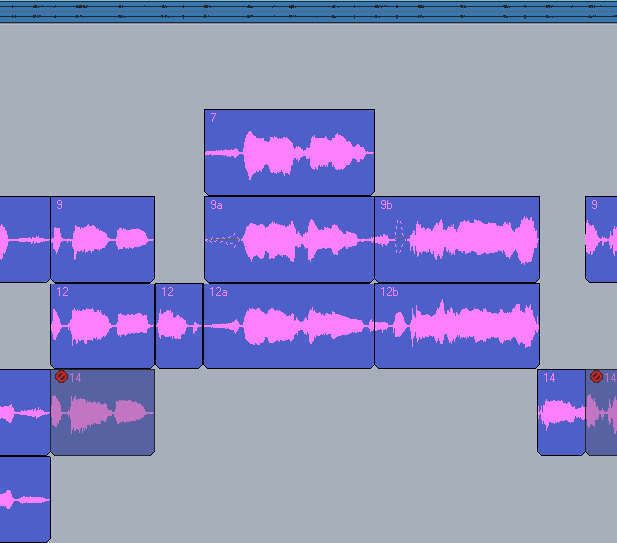 Before Before After deleting clips 12a and 12b, the muted range in 9a is extended, and the muted range in 9b is unmuted. Makes no difference whether 12a and 12b are deleted at the same time, or one after the other, or what order they're deleted. 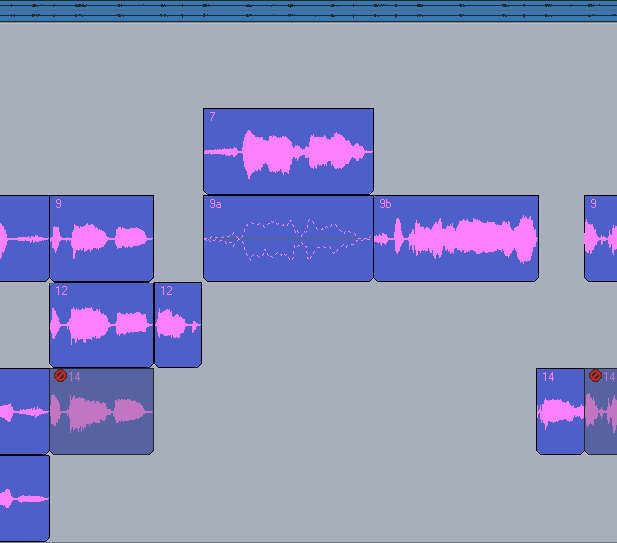 After After The difference in what happens to 9a and 9b seems to be a function of where in the clip's range the partial muting occurs: in 9a, it's on the edge; in 9b, it's within the clip. The '9' clips are unrelatated to the '12' clips, other than sharing the same time range. Deleting any of the other clips that aren't under 9a and 9b have no effect on the muted state of the 9's. It seem pretty consistent -- I was able to set up these screen caps simply by creating the appropriate condition. Is it me, or is something not right here? [Edited for typoes.]
post edited by HotCoollMusicGirl - 2008/03/22 00:22:53
Sometimes you just have to decide what you will and what you will not take seriously.
|
John
Forum Host
- Total Posts : 30467
- Joined: 2003/11/06 11:53:17
- Status: offline
RE: Clip muting. Is this normal?
2008/03/22 00:17:27
(permalink)
I don't think its you. You may have found a bug. BTW nice presentation. Even I can follow it.
So can't you just remute or unmute using the mute tool? It appears that none of those clips were linked, right? One last thing you have a very good handle on comping yet the tools in Sonar may have a little touchiness about them for this. It may prove useful to check out the vids on comping just so you haven't missed anything.
|
HotCoollMusicGirl
Max Output Level: -71 dBFS
- Total Posts : 991
- Joined: 2004/10/02 20:23:31
- Status: offline
RE: Clip muting. Is this normal?
2008/03/22 03:13:48
(permalink)
ORIGINAL: John
I don't think its you. You may have found a bug. BTW nice presentation. Even I can follow it.
Hey thanks. Does that mean you were able to reproduce it? So can't you just remute or unmute using the mute tool? Well yes. But it's actually pretty inconvenient to have to deal with a clip you're not otherwise really dealing with as far as workflow and concentration go. I've actually found another case where deleting a clip mutes a clip that doesn't appear to be otherwise partially muted (as was the case in my examples above.) As in my other examples, I have two clips on two layers that occupy the same time range. When I delete one of them, the entire waveform of the other one gets outlined as though it had been swiped with the mute tool (K). I Undo that -- which undeletes the clip and also unmutes the other clip. Then I run the mute tool along the full length of the upper half of the clip that got muted, to insure there are no hidden mute spots (even though I know there aren't, as I hadn't been doing much of that kind of muting.) But when I repeate the delete of the first clip, the other clip is remuted in its entirety. If I move the clip that gets muted to another layer, it still gets muted when I delete the other clip. But if I shift either that clip or the one to be deleted over a bit -- thus taking them out of alighment with each other -- the deletion doesn't mute the other clip. Whatever is causing it is making it quite inconvenient to delete time-aligned clips from a layer. It doesn't happen every time. But there appears to be some kind of weird relationship established between these clips based on their being in the same time range. I wonder if anyone else has seen this. It seems way too obvious a bug to not have been caught, since all I'm doing is simply deleting beat-aligned clips while comping parallel takes. (I'm inclined to add this to the growing list of oddities that makes me suspect there's something off with my installation.......) If I totally shut Sonar and reopen the project, the problem persists -- deleting that clip K-mutes the entire parallel clip. If I open the project in Sonar 6, it doesn't. It appears that none of those clips were linked, right? Definitely not. They're from totally different takes and reference completely different wave forms. It may prove useful to check out the vids on comping just so you haven't missed anything. Ah. I love comping tracks and am always trying to find new approaches to it. Where can I find these videos? Thanks! [Edited to add more information.]
post edited by HotCoollMusicGirl - 2008/03/22 03:51:25
Sometimes you just have to decide what you will and what you will not take seriously.
|
Saintom
Max Output Level: -58 dBFS

- Total Posts : 1749
- Joined: 2005/12/17 14:09:34
- Location: Portland Oregon
- Status: offline
RE: Clip muting. Is this normal?
2008/03/22 03:31:05
(permalink)
This sounds like a perfect time to contact Cakewalk, and give them a detailed report of your problem HERE You should report this to them so they can take a look "under the hood" and see if they can fix that. I have heard of similar reports of this behavior, I haven't had it happen to me(luckily) but I think you should fill out a problem report and send them a copy of the file that demonstrates this behavior. Tom
Sometimes we see the light, Sometimes we stare at the light, and wonder why it is so bright...
|
...wicked
Max Output Level: -1.5 dBFS

- Total Posts : 7360
- Joined: 2003/12/18 01:00:56
- Location: Seattle
- Status: offline
RE: Clip muting. Is this normal?
2008/03/22 04:13:05
(permalink)
Wow, good presentation!
Sounds like it could be a bug, I know other oddities that are so rare in appearance they've never been addressed.
Obviously the most important part is how to get you around this dilemma. Bouncing To Clips works, plus then you can manipulate the clips better as groove clips etc.
Although counter-productive to using the mute tool, you can just split and slip edit the clips. Sorry it's work, but it'll keep you moving.
=========== The Fog People =========== Intel i7-4790 16GB RAM ASUS Z97 Roland OctaCapture Win10/64 SONAR Platinum 64-bit billions VSTs, some of which work
|
John
Forum Host
- Total Posts : 30467
- Joined: 2003/11/06 11:53:17
- Status: offline
RE: Clip muting. Is this normal?
2008/03/22 12:43:39
(permalink)
Ah. I love comping tracks and am always trying to find new approaches to it. Where can I find these videos? They are in the sticky section at the top of the forum.
|
brundlefly
Max Output Level: 0 dBFS

- Total Posts : 14250
- Joined: 2007/09/14 14:57:59
- Location: Manitou Spgs, Colorado
- Status: offline
RE: Clip muting. Is this normal?
2008/03/22 13:27:40
(permalink)
I wonder if anyone else has seen this. It seems way too obvious a bug to not have been caught, since all I'm doing is simply deleting beat-aligned clips while comping parallel takes. I was unable to reproduce this in 6.21. I created two identical layers of multiple split clips, muted various sections of different layers, and then deleted/cut the overlapping clips in the opposite layer, and all mute regions were preserved as they were before the deletion/cut. I tried it both with and without groove-clipping enabled, but it made no difference. I'll try it with 7.02 in a bit. But I'm wondering if there's something else in the scenario that I'm missing. My layers were created manually, rather than by recording multiple takes. That might be one difference, but I don't know if that would matter. I must say that I saw a lot of strange buggy-looking behavior in the process of creating the second layer, though.  Edit: I could not reproduce this in 7.02, either. Muted regions were preserved as expected. Edit 2: Here's a screenshot from Sonar 6.21: 
post edited by brundlefly - 2008/03/22 13:51:10
SONAR Platinum x64, 2x MOTU 2408/PCIe-424 (24-bit, 48kHz) Win10, I7-6700K @ 4.0GHz, 24GB DDR4, 2TB HDD, 32GB SSD Cache, GeForce GTX 750Ti, 2x 24" 16:10 IPS Monitors
|
Infinite5ths
Max Output Level: -39 dBFS

- Total Posts : 3631
- Joined: 2005/05/08 16:46:11
- Location: USA
- Status: offline
RE: Clip muting. Is this normal?
2008/03/25 01:23:56
(permalink)
This sounds like another permutation of the Mute Tool Bug, which I've been chasing around since SONAR 4. It occurs most frequently in projects with rapid and/or dramatic tempo changes. So far, I've been able to reproduce it in each successive version of SONAR with my relatively simple bug recipe. I have high hopes that it will be addressed in SONAR 8. If you care to review the saga of this bug, just search for "mute tool bug" with the forum search tool. You'll see a lot of posts by me in the results. 
post edited by Infinite5ths - 2008/03/25 01:41:53
|