Dan DAmico
Max Output Level: -83 dBFS

- Total Posts : 381
- Joined: 2004/08/22 10:15:39
- Location: Utopia
- Status: offline
Gigabyte P35 motherboards and DPC
Has anyone else using a Gigabyte P35 motherboard experienced spikes in DPC Latency Checker? A web search has shown that this seems to be a widespread problem, and Gigabyte doesn't seem to want to address it. It doesn't affect Asus P35 boards, so it must not be a problem with the chipset. Here is what I'm referring to: 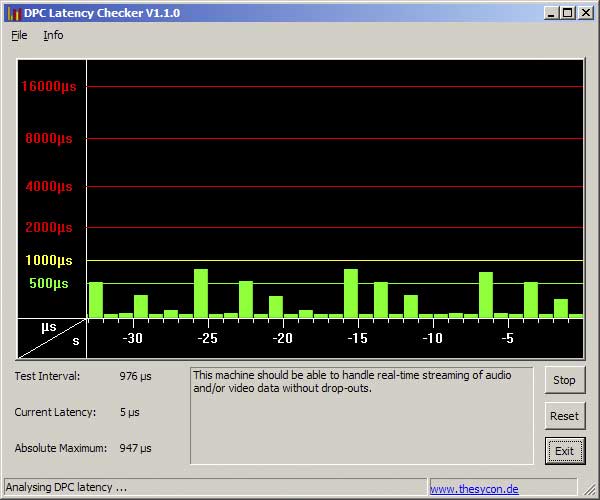
post edited by Dan DAmico - 2008/04/05 00:01:14
|
eikelbijter
Max Output Level: -70 dBFS

- Total Posts : 1002
- Joined: 2003/11/13 22:23:52
- Location: Sherman Oaks, CA
- Status: offline

RE: Gigabyte P35 motherboards and DPC
2008/04/04 23:48:46
(permalink)
I have a Gigabyte G33 based board and I'm seeing the same thing. It doesn't seem to affect my low latency operation anymore after switching to a MOTU PCI424 based setup!
Rico
Xeon E3-1231V3, 16GB RAM, 480GB 840EVO SSD, MOTU 2480MK3, 424PCI w/ Sonar PlatinumDell XPS 18, i5, 12GB RAM, 500GB SSD+128GB SSD, Roland VS-100 w/ Sonar Platinum
Dell XPS 13, i5, 8GB RAM, 256GB 840EVO SSD, Zoom UAC-2, Sonar Platinum
http://www.RicoBelled.com/
|
losguy
Max Output Level: -20 dBFS

- Total Posts : 5506
- Joined: 2003/12/18 13:40:44
- Location: The Great White North (MN, USA)
- Status: offline
RE: Gigabyte P35 motherboards and DPC
2008/04/05 00:51:47
(permalink)
You're not by chance running Vista are you?
|
Dan DAmico
Max Output Level: -83 dBFS
- Total Posts : 381
- Joined: 2004/08/22 10:15:39
- Location: Utopia
- Status: offline
RE: Gigabyte P35 motherboards and DPC
2008/04/05 01:31:19
(permalink)
ORIGINAL: losguy
You're not by chance running Vista are you?
No. I'm using XP Pro 32 bit.
|
SongCraft
Max Output Level: -36 dBFS

- Total Posts : 3902
- Joined: 2007/09/19 17:54:46
- Status: offline
RE: Gigabyte P35 motherboards and DPC
2008/04/05 02:07:38
(permalink)
Hi Dan
I use Gigabyte! I remember several years ago I noticed that too but it didn't effect latency and/or PC performance at all. Hmm!!
|
Dan DAmico
Max Output Level: -83 dBFS
- Total Posts : 381
- Joined: 2004/08/22 10:15:39
- Location: Utopia
- Status: offline
RE: Gigabyte P35 motherboards and DPC
2008/04/05 02:27:53
(permalink)
Hi SongCraft,
I just put together a new system, so I'm trying to see what it's capable of. Compared to my old system I can get very low latencies, but it would seem that the spikes must be limiting it from reaching it's full potential. Even my notebook (single core Pentium M 715) doesn't show these spikes.
What soundcard are you using and what latencies are you able to set?
|
KWILD
Max Output Level: -88 dBFS

- Total Posts : 123
- Joined: 2003/11/24 04:58:52
- Location: Borore (NU) - Italy
- Status: offline
RE: Gigabyte P35 motherboards and DPC
2008/04/05 05:18:09
(permalink)
I got exactly the same problems with my Gigabyte GA P35-S3g with an INTEL Q6600 quad core and XP SP 2.
Spikes in idle don't go over 850 but i remember my old MSI K8n Neo 2 with AMD X2 4200+ that remains a lot lower and
stable with no spikes at all!
I've try everything,turn off almost everything to see if spikes go lower (networking cards,cd rom,unused usbs,unused ide channels) nothing change!
|
SongCraft
Max Output Level: -36 dBFS
- Total Posts : 3902
- Joined: 2007/09/19 17:54:46
- Status: offline
RE: Gigabyte P35 motherboards and DPC
2008/04/05 06:44:22
(permalink)
ORIGINAL: Dan DAmico
Hi SongCraft,
I just put together a new system, so I'm trying to see what it's capable of. Compared to my old system I can get very low latencies, but it would seem that the spikes must be limiting it from reaching it's full potential. Even my notebook (single core Pentium M 715) doesn't show these spikes.
What soundcard are you using and what latencies are you able to set?
Back then I was using an M-Audio 24/96 pci card on a P3 running SONAR 4, I can't remember precisely what latency I had but there was no problem at all with latency although I was limited to the amount of tracks (18 to 20 audio tracks) due to my system being a P3 / 800 with 512 Ram. I did turn off all nonessential services and other apps whilst using SONAR but the spikes remained. Maybe with some Gigabyte boards there's an indication of activity in regards to the OS, systems files, interrupts and whatever as these could be what's causing the spikes, I'm not sure! Also I think that particular Gigabyte board may have some sort of security features built-in (could be that) but I can't be sure.
|
losguy
Max Output Level: -20 dBFS
- Total Posts : 5506
- Joined: 2003/12/18 13:40:44
- Location: The Great White North (MN, USA)
- Status: offline
RE: Gigabyte P35 motherboards and DPC
2008/04/05 16:22:01
(permalink)
Interesting issue. If the Asus P35 doesn't exhibit the DPC latency spikes then it must be something about the Gigabyte that's doing it. Question is, what? I'm curious...
|
Dan DAmico
Max Output Level: -83 dBFS
- Total Posts : 381
- Joined: 2004/08/22 10:15:39
- Location: Utopia
- Status: offline
RE: Gigabyte P35 motherboards and DPC
2008/04/05 16:53:51
(permalink)
I did a clean install of Windows XP without any chipset, audio or video drivers to see if the spikes remain. To my dismay, they are still there.
I had an Acronis backup of my full install so I just restored it.
I've read that the GA-P35-DS4 rev 1 early (before F6) BIOS did not have this problem, but the later ones do. My motherboard has only 3 available BIOS, and I've tried them all to no avail. Gigabyte must have changed something. I've sent them an email about it, but I'm told they have isolated it to the southbridge, but haven't had enough demand for a fix to do anything. I'm hoping that if enough people contact them, they will release a BIOS that fixes the problem.
|
SpanknCrank
Max Output Level: -90 dBFS

- Total Posts : 47
- Joined: 2007/11/30 10:33:42
- Location: The Shire
- Status: offline
RE: Gigabyte P35 motherboards and DPC
2008/04/05 17:10:40
(permalink)
I'm sure it has been looked into already but are you using the latest BIOS? Updating mine improved PCI performance drastically. (I'm using an ASUS P5k fwiw)
|
Lanceindastudio
Max Output Level: -29 dBFS

- Total Posts : 4604
- Joined: 2004/01/22 02:28:30
- Status: offline
RE: Gigabyte P35 motherboards and DPC
2008/04/05 17:21:18
(permalink)
Im getting some spikes as well, biggest one just past 500.
Rico had me check this a while back. Nice to have a good friend sonar user just down the street!
I must say this gigabyte rig runs awesome, OC'd from 1.8 to 3.0ghz
Still, I agree, ya wonder wut causes those spikes and do the effect something
Asus P8Z77-V LE PLUS Motherboard i7 3770k CPU 32 gigs RAM Presonus AudioBox iTwo Windows 10 64 bit, SONAR PLATINUM 64 bit Lots of plugins and softsynths and one shot samples, loops Gauge ECM-87, MCA SP-1, Alesis AM51 Presonus Eureka Mackie HR824's and matching subwoofer
|
Alndln
Max Output Level: -65 dBFS

- Total Posts : 1275
- Joined: 2003/11/06 10:15:35
- Location: NY
- Status: offline
RE: Gigabyte P35 motherboards and DPC
2008/04/05 17:21:38
(permalink)
ORIGINAL: losguy
Interesting issue. If the Asus P35 doesn't exhibit the DPC latency spikes then it must be something about the Gigabyte that's doing it. Question is, what? I'm curious...
I'm getting a flat line and no spikes with my Opteron based K8 board, so it seems to be isolated to Intel based boards, or a particular chipset.
|
Dan DAmico
Max Output Level: -83 dBFS
- Total Posts : 381
- Joined: 2004/08/22 10:15:39
- Location: Utopia
- Status: offline
RE: Gigabyte P35 motherboards and DPC
2008/04/05 18:13:46
(permalink)
ORIGINAL: Lanceindastudio
Im getting some spikes as well, biggest one just past 500.
Lance, Could you send an email to Gigabyte tech support requesting that they address the problem? I'm hoping to get a few people besides me to contact them and get them to look for a fix. I agree the performance is really good on these boards, but I believe it could be even better if they fix the problem.
|
Dan DAmico
Max Output Level: -83 dBFS
- Total Posts : 381
- Joined: 2004/08/22 10:15:39
- Location: Utopia
- Status: offline
RE: Gigabyte P35 motherboards and DPC
2008/04/05 18:19:02
(permalink)
ORIGINAL: Alndln
I'm getting a flat line and no spikes with my Opteron based K8 board, so it seems to be isolated to Intel based boards, or a particular chipset.
My Opteron, and even my notebook computer are all flat, also. I don't think it's the chipset because the Asus P35 boards don't have the problem. I think it's a BIOS issue in the way Gigabyte is using the chipset. Earlier BIOS don't seem to have the problem.
|
F@KKER
Max Output Level: -82 dBFS

- Total Posts : 440
- Joined: 2004/01/03 02:02:26
- Status: offline
RE: Gigabyte P35 motherboards and DPC
2008/04/05 18:24:31
(permalink)
...well Dan, yours is better than mine, which occurs like clockwork every 63 seconds. [image]  [/URL][/image] This is a relatively recent occurance on a HP ZD7000 series laptop. I have done everything that I know and have recently learned to track this without success. Laptop Specs: Processor Pentium 4 3.06 GHz Installed Memory 1024 MB (DDR SDRAM) Hard Drive 80 GB EIDE, 4200 RPM Display 17 in. WXGA+ TFT Active Matrix Operating System Microsoft Windows XP Home Edition Mobile Technology Wi-Fi Certified Processor Processor Manufacturer Intel Processor Type Pentium 4 Processor Speed 3.06 GHz Motherboard Bus Speed 533 MHz Memory Installed RAM 1024 MB RAM Technology DDR SDRAM Max Supported RAM 2 GB RAM Speed 333 MHz Installed Cache Memory 512 KB Hard Drive Hard Drive Rotation Speed 4,200 RPM Storage Controller Type EIDE CD / DVD CD / DVD Type CD-RW/DVD-ROM Display Display Tech WXGA+ TFT Active Matrix Display Size 17 in. Display Max. Resolution 1440 x 900 Video Graphic Processor NVIDIA GeForce FX Go5600 Installed Video Memory 64 MB Audio Audio Output Type Sound card • Speaker(s) Operating System Operating System Microsoft Windows XP Home Edition Platform PC Technical Features Expandability 1 x SD Card Slot, 1 x Memory Stick Card Slot, Docking Station/Port Replicator, 1 x MMC Card Slot, 1 x Type III PC Card Slot, 1 x Memory Stick PRO, 1 x SmartMedia Card Expansion Ports 4 x USB 2.0, 1 x IEEE 1394a (FireWire), VGA out, Parallel Port, RJ-11 (modem), RJ-45 (NIC), S-Video out Security Features Kensington Lock Slot, Power-On Password Input Method Keyboard • Numeric Keypad • Scroll Button • Touchpad Networking Networking Type Integrated 10/100 Network Card • Infrared Port • Integrated Wireless LAN Data Link Protocol Ethernet • Fast Ethernet • IEEE 802.11b • IEEE 802.11g Modem Modem Type Fax / Modem Analog Modulation Protocol ITU V.90, ITU V.92 Battery Battery Technology Lithium ion I have tried to locate/fix the "spiking" issue with: Doubledawg DPC Spike Checker v1.03 (TcElectronics) DPClat KRview MotherboardMonitor Process Explorer Ulysses RATTV3 I have done the "turn off everything tilll it crashes" routine including all drivers and controllers. This spiking issue continues. The next step is the big "F". F@KKER /format, that is ;) [edit] I have also (after the issue manifested) updated to SP2 and SP3, checked the HP site for and installed all the latest drivers, tried tweaking the NVIDIA GeForce card with Riva Tuner, ran XP w/o the video card drivers- still no success.
post edited by F@KKER - 2008/04/05 18:50:16
Someone said: I've had more time to play with this, and am withdrawing the bug remarks.
This appears to work as designed and is actually a pretty cool feature.
|
bitman
Max Output Level: -34 dBFS

- Total Posts : 4105
- Joined: 2003/11/06 14:11:54
- Location: Keystone Colorado
- Status: offline
RE: Gigabyte P35 motherboards and DPC
2008/04/05 19:25:46
(permalink)
I have a P35 series Gigee-byter and your DPC screen looks like mine. But. Mine runs like a deer so I don't care what that screen says. 
|
Dan DAmico
Max Output Level: -83 dBFS
- Total Posts : 381
- Joined: 2004/08/22 10:15:39
- Location: Utopia
- Status: offline
RE: Gigabyte P35 motherboards and DPC
2008/04/05 19:31:56
(permalink)
ORIGINAL: F@KKER
This is a relatively recent occurance on a HP ZD7000 series laptop. I have done everything that I know and have recently learned to track this without success.
That is very discouraging. Are you getting dropouts on your audio?
|
Dan DAmico
Max Output Level: -83 dBFS
- Total Posts : 381
- Joined: 2004/08/22 10:15:39
- Location: Utopia
- Status: offline
RE: Gigabyte P35 motherboards and DPC
2008/04/05 19:33:38
(permalink)
ORIGINAL: bitman
I have a P35 series Gigee-byter and your DPC screen looks like mine.
But. Mine runs like a deer so I don't care what that screen says.
Mine runs good, too. Maybe I just need to ignore it. Which model is your motherboard?
|
losguy
Max Output Level: -20 dBFS
- Total Posts : 5506
- Joined: 2003/12/18 13:40:44
- Location: The Great White North (MN, USA)
- Status: offline
RE: Gigabyte P35 motherboards and DPC
2008/04/05 19:45:43
(permalink)
ORIGINAL: F@KKER
...well Dan, yours is better than mine, which occurs like clockwork every 63 seconds.
Ouch. Looks like you were pretty thorough, so you probably already tried disabling the WiFi? That's been culprit #1 for laptops. (But you probably knew that already...)
|
bitman
Max Output Level: -34 dBFS
- Total Posts : 4105
- Joined: 2003/11/06 14:11:54
- Location: Keystone Colorado
- Status: offline
RE: Gigabyte P35 motherboards and DPC
2008/04/05 22:21:22
(permalink)
ORIGINAL: Dan DAmico
ORIGINAL: bitman
I have a P35 series Gigee-byter and your DPC screen looks like mine.
But. Mine runs like a deer so I don't care what that screen says.
Mine runs good, too. Maybe I just need to ignore it. Which model is your motherboard?
I don't remember and I'm all compfy on the couch and all the stuff and manual is downstairs.  P35 somthin. Is has 3 PCI slots and (1) 1x pcie and (1) 16x pcie if that helps.
|
F@KKER
Max Output Level: -82 dBFS
- Total Posts : 440
- Joined: 2004/01/03 02:02:26
- Status: offline
RE: Gigabyte P35 motherboards and DPC
2008/04/05 22:55:11
(permalink)
Hey Dan, after reading my own post- I must apologize to you as my post appears as a hijack- sorry. But in answer to your question, yes I am getting dropouts. I have spent a good 4 weekends on top of hours at a time weeknights and still no success. There is a rather large (45 pages or so) thread at the sos forum on this. Additionally, I just tried installing the recovery disk drivers, there is no change. I just read that someone did a full format and the spikes are still there, so it must be either very low level -perhaps at the bios level or maybe a hardware issue. This sucks because the laptop was my portable DAW and I spent a good amount of $ on specific gear just for this application. losguy, yes, I disabled wi-fi -I even tried the remove hardware route to no avail. I did the same with usb and network adapters.  F@KKER [edit] I failed to mention that I was running the laptop as it came from HP with 512 MB of Ram and it worked with no issues (other than FW-1884 issues, in which case I would use the Echo I/O sound card) and so I just installed 2 gb ram, still no change.
post edited by F@KKER - 2008/04/05 23:21:21
Someone said: I've had more time to play with this, and am withdrawing the bug remarks.
This appears to work as designed and is actually a pretty cool feature.
|
kwgm
Max Output Level: -52.5 dBFS

- Total Posts : 2271
- Joined: 2006/10/12 00:14:20
- Status: offline
RE: Gigabyte P35 motherboards and DPC
2008/04/05 23:16:21
(permalink)
Dan,
Note the scale at the left hand side of the table. This tool reports in micro-seconds. The longest wait on a deferred call is still under 1 millisecond. You'll never notice a thing when the dpc queue is showing maximums at this level.
I can't get my ASIO buffers to adjust any lower than 2ms (128 samples) -- the driver doesn't go any lower. Generally, I run at 256 samples, corresponding to a 3ms latency which is virtually instantaneous.
Relax.
|
losguy
Max Output Level: -20 dBFS
- Total Posts : 5506
- Joined: 2003/12/18 13:40:44
- Location: The Great White North (MN, USA)
- Status: offline
RE: Gigabyte P35 motherboards and DPC
2008/04/05 23:22:28
(permalink)
Yes and no. Even if it gets no higher than 1 msec, that's 1 msec eating into the latency that you would have otherwise had. If you're wanting to run at low latency, or loading your CPU up, or both, this is mission-critical time that's getting eaten up with system whatnot.
|
KWILD
Max Output Level: -88 dBFS
- Total Posts : 123
- Joined: 2003/11/24 04:58:52
- Location: Borore (NU) - Italy
- Status: offline

RE: Gigabyte P35 motherboards and DPC
2008/04/07 13:00:37
(permalink)
I've flashed latest beta bios from gigabyte site (F3b) and spikes increased over 1000 micro seconds (over the yellow line)!!!!!
Ro back to latest non beta (F2) and spikes go back under the yellow line (max 900 micro seconds).
That's it....
|
KWILD
Max Output Level: -88 dBFS
- Total Posts : 123
- Joined: 2003/11/24 04:58:52
- Location: Borore (NU) - Italy
- Status: offline
RE: Gigabyte P35 motherboards and DPC
2008/04/07 13:29:00
(permalink)
|
Dan DAmico
Max Output Level: -83 dBFS
- Total Posts : 381
- Joined: 2004/08/22 10:15:39
- Location: Utopia
- Status: offline
RE: Gigabyte P35 motherboards and DPC
2008/04/07 14:07:51
(permalink)
ORIGINAL: KWILD
I've flashed latest beta bios from gigabyte site (F3b) and spikes increased over 1000 micro seconds (over the yellow line)!!!!!
Ro back to latest non beta (F2) and spikes go back under the yellow line (max 900 micro seconds).
That's it....
What model is your motherboard? Also, have you or would you be willing to email Gigabyte tech support to ask them to address the problem?
|
KWILD
Max Output Level: -88 dBFS
- Total Posts : 123
- Joined: 2003/11/24 04:58:52
- Location: Borore (NU) - Italy
- Status: offline
RE: Gigabyte P35 motherboards and DPC
2008/04/08 04:27:08
(permalink)
Like i've written some posts ago my board is a GA P35-S3G , yes im think to contact the Gigabyte tech support,but i think is better to do that all togheter. Let me know if u are thinking to write a single comulative mail asking to fix that problem. Thanx. http://myspace.com/_kwild
|
timboe
Max Output Level: -75 dBFS

- Total Posts : 760
- Joined: 2004/01/07 09:01:29
- Status: offline
RE: Gigabyte P35 motherboards and DPC
2008/04/08 04:57:24
(permalink)
|
losguy
Max Output Level: -20 dBFS
- Total Posts : 5506
- Joined: 2003/12/18 13:40:44
- Location: The Great White North (MN, USA)
- Status: offline
RE: Gigabyte P35 motherboards and DPC
2008/04/08 10:02:11
(permalink)
ORIGINAL: timboe
Hi Gigabyte P35 MB owners - see here for my post / solution:-
http://forum.cakewalk.com/tm.asp?m=1353232
Hey Tim, great work digging this out. Over on the Tom's Hardware forum, someone posted this:
On my P35-DS3R Rev. 1, the problem was solved by going from F11 back to F5 (original BIOS that came with the board). F11 added a High Precision Event Timer in the system devices, so maybe that's the source of this latency issue...
Maybe someone could try disabling the High Precision Event Timer to see if it fixes the problem. I can upload F5 later if anyone would like to try it. BTW, I also had higher NB temps with F11 for some reason.
Seems a reasonable thing to ask. Maybe someone here could try disabling this in their BIOS, before rolling it back, just to see if it works? It might be a way forward instead of backward...
|