bitflipper
01100010 01101001 01110100 01100110 01101100 01101

- Total Posts : 26036
- Joined: 2006/09/17 11:23:23
- Location: Everett, WA USA
- Status: offline

Why extra headroom is needed for MP3s
It's a nasty gloomy, rainy Sunday here in the Pacific Northwest, a good day for reading a book. Unfortunately, I have no new books to read, so I went back to some old favorites and was reading up on MP3 compression. Hey, I'm a hopeless geek, what can I say? I decided to do some experiments to test a well-known truism, that you need to leave extra headroom when mastering for MP3s. It's true, by the way. Here's a piece of an audio file in which Ozone has done its job of limiting output (in this case, to -1db, my longtime standard). Despite being a fairly highly-compressed section (about -9db RMS), no samples exceed -1db (the horizontal white line represents -1db): 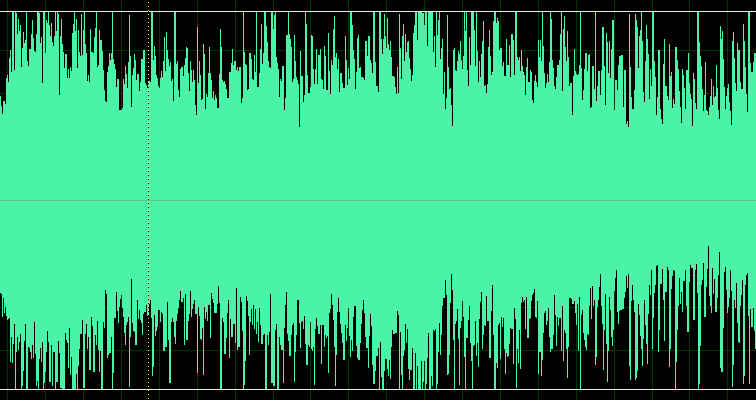 Now here's a section of the same file that's been encoded to a high-quality MP3: 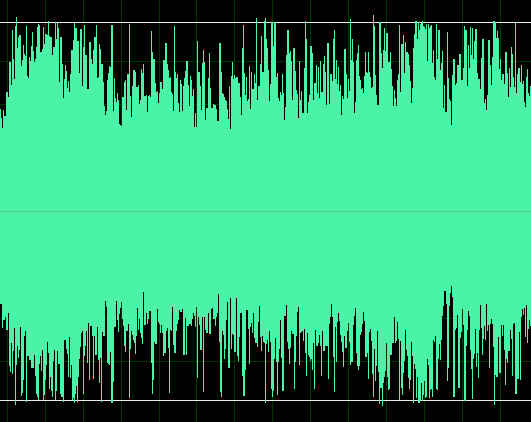 Note that a few peaks now exceed the previous limit. Fortunately, they're not overs because my conservative -1db limit left enough headroom to absorb these new peaks. This phenomenon gets worse - much worse - with lower-quality MP3s. Below is the same song, this time encoded to 128Kb/s, CBR. Not the lowest quality, but representative of what Soundclick provides with a free account. 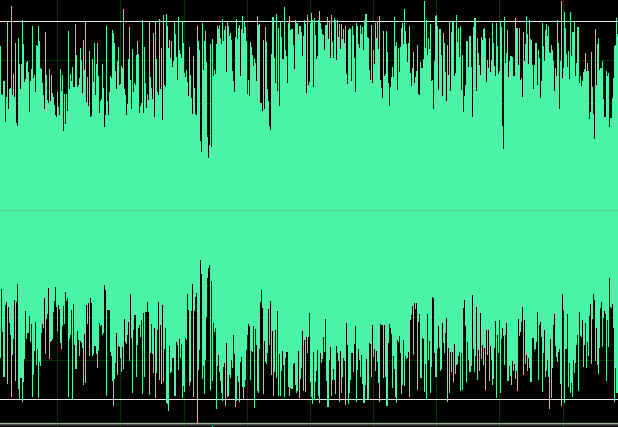 Note that many peaks now exceed the old limit, and in fact some of them are actual overs. The peaks have somehow grown by more than 1db.
 All else is in doubt, so this is the truth I cling to. My Stuff
|
bitflipper
01100010 01101001 01110100 01100110 01101100 01101
- Total Posts : 26036
- Joined: 2006/09/17 11:23:23
- Location: Everett, WA USA
- Status: offline
RE: Why extra headroom is needed for MP3s
2009/04/12 10:46:40
(permalink)
You can perform this test yourself using any audio editor. I used Adobe Audition, for its amplitude statistics feature, which reports overs. Sound Forge would work well, as would Audacity. Or even SONAR alone, if that's all you've got.
I simply loaded the original wave file (24/44.1) and took a screenshot, then saved it as an MP3 using Audition's highest VBR quality setting. I then closed the file and re-opened the MP3.
Audio editors cannot actually edit MP3 files directly. All of them, including SONAR, let you load MP3s. However, you are not looking at an MP3 but rather a wave file that was generated from the MP3. It is during this conversion to a wave that the peaks grow.
So you might be thinking that this is a quirk of the audio editor, and that it doesn't apply to MP3s that are never converted to waves. Wrong: every MP3 has to be converted to a wave if you want to actually hear it. It just normally happens inside the player. But the effect shown here applies to all MP3 files.
All else is in doubt, so this is the truth I cling to. My Stuff
|
bitflipper
01100010 01101001 01110100 01100110 01101100 01101
- Total Posts : 26036
- Joined: 2006/09/17 11:23:23
- Location: Everett, WA USA
- Status: offline
RE: Why extra headroom is needed for MP3s
2009/04/12 11:46:06
(permalink)
You may be wondering why this occurs. It has to do with the fact that compression schemes such as MP3 rely on narrow bandpass filters. You may recall that steep filters can cause ringing that raises peak levels. It's one of the reasons we usually try to avoid steep filters in mixing and mastering - but you can't avoid them if you're encoding to MP3. There is a good article titled "Distortion to the People", written by Thomas Lund from TC Electronic and available as a pdf download. It discusses the need for headroom, not just with MP3 but other compressed formats and CDs. It recommends 5db headroom for MP3. Theoretically, you can get up to 6db increases when an MP3 is decoded. Furthermore, uncompressed CDs are not immune from surprise peak values. Intersample peaks can be as much as 3db above the highest "peak" value when converted to analog. Bottom line is that if you're mastering to -0.1db, or even -0.5db, stop that. Nobody is going to notice if your CD is limited to -2db or -3db, but the quality of your MP3s might noticeably improve if you do.
All else is in doubt, so this is the truth I cling to. My Stuff
|
DaveClark
Max Output Level: -71 dBFS

- Total Posts : 956
- Joined: 2006/10/21 17:02:58
- Status: offline
RE: Why extra headroom is needed for MP3s
2009/04/12 13:24:50
(permalink)
Hi Dave,
Thanks for posting that.
The behavior you described is not limited to creating MP3's and expanding them again. Many types of processing of compressed audio can cause "overs." As you know, there is a lot of energy there --- the RMS values are high. *Anything* that detunes the very fine balance between all of the Fourier components could potentially unleash an over. The more severely compressed the audio, the more likely this will occur and the higher the "overs." Because MP3 compression is lossy, one should indeed expect detuning of this fine balance.
Regards,
Dave Clark
|
mixsit
Max Output Level: -75 dBFS

- Total Posts : 789
- Joined: 2004/04/30 11:04:24
- Location: CathouseSound
- Status: offline

RE: Why extra headroom is needed for MP3s
2009/04/12 16:41:33
(permalink)
Thanks for posting this.
Wayne
Wayne Smith Part time long time.. CathouseSound Mother Ships - StudioCat DAWs Portals - RME
|
Roflcopter
Max Output Level: -7.5 dBFS

- Total Posts : 6767
- Joined: 2007/04/27 19:10:06
- Status: offline
RE: Why extra headroom is needed for MP3s
2009/04/12 20:02:42
(permalink)
There should be a law against pictures of obese wav files. They are fugly, man. And then to think someone's Ipod will automatically normalize that yet again, with a bit of luck. 
I'm a perfectionist, and perfect is a skinned knee.
|
cliffsp8
Max Output Level: -83 dBFS

- Total Posts : 375
- Joined: 2003/11/06 17:54:36
- Location: Sunny Yorkshire
- Status: offline
RE: Why extra headroom is needed for MP3s
2009/04/13 03:21:54
(permalink)
Yeah, I noticed that when converting to mp4/m4a files as well using Sound Forge or iTunes. A drum track limited to -2db grew to having peaks at full scale!
Not only that, but the mp4/m4a conversion also sometimes seems to crop about 20 -30 ms off the front of the file too and I'm having to add a bit of silence at the beginning before conversion to compensate. It may not seem a lot for a stand-alone file but if you are dropping compressed clips into a DAW its best to check that the transients of the audio line up where they should.
Cliff
|
The Maillard Reaction
Max Output Level: 0 dBFS

- Total Posts : 31918
- Joined: 2004/07/09 20:02:20
- Status: offline
RE: Why extra headroom is needed for MP3s
2009/04/13 08:50:23
(permalink)
Now you have scared me... I'm about to send my first "single" to Tunecore to see if it can be placed on I-Tunes etc.
The idea that the mp3 is made automatically by the various "stores" and probably never auditioned by a human has been one thing that kept me from doing this earlier.
best regards,
mike
|
mattplaysguitar
Max Output Level: -55.5 dBFS

- Total Posts : 1992
- Joined: 2006/01/02 00:27:42
- Location: Gold Coast, Australia
- Status: offline
RE: Why extra headroom is needed for MP3s
2009/04/13 09:13:12
(permalink)
So, does a highly compressed track have more exceeding samples on average than a more dynamic one? Does the mp3 encoder kinda work worse on hot tracks, or is it just based on probability? A more compressed track will have a higher percentage of samples that are very close to the max headroom allowance than a less compressed one, so a less compressed one will have less overs as there were less samples within a dangerous range to become overs in the first place? Does that make sense? Either way, interesting stuff. If you got any recommended technical reading on this I would love to know.
Cheers
|
Roflcopter
Max Output Level: -7.5 dBFS
- Total Posts : 6767
- Joined: 2007/04/27 19:10:06
- Status: offline
RE: Why extra headroom is needed for MP3s
2009/04/13 09:32:36
(permalink)
I think you also have to be careful with adding *lots* of mid/side spread and a ton or two of compression. Think that's also a good candidate.
I'm a perfectionist, and perfect is a skinned knee.
|
bitflipper
01100010 01101001 01110100 01100110 01101100 01101
- Total Posts : 26036
- Joined: 2006/09/17 11:23:23
- Location: Everett, WA USA
- Status: offline
RE: Why extra headroom is needed for MP3s
2009/04/13 12:07:53
(permalink)
So, does a highly compressed track have more exceeding samples on average than a more dynamic one? Does the mp3 encoder kinda work worse on hot tracks, or is it just based on probability? A more compressed track will have a higher percentage of samples that are very close to the max headroom allowance than a less compressed one, so a less compressed one will have less overs as there were less samples within a dangerous range to become overs in the first place? Does that make sense? Either way, interesting stuff. If you got any recommended technical reading on this I would love to know.
Actually, highly-compressed files are not necessarily more likely to exhibit this problem, since it's about how many peaks cross the line. A lightly-compressed file could still have the same number of peaks that touch the limit, even though the average RMS is lower. It's more about the chosen MP3 conversion quality. If, for example, you upload songs to a free Soundclick or MySpace account, they're going to convert it to 128KB/s CBR, not a particularly high-grade format. It will have worse problems than, say, a 256Kb/s file. So if you're distributing MP3s at 320Kb/s CBR, you'll be OK as long as you maintain at least 1 or 2db headroom. (If you have a choice, CBR may be better than VBR, which is prone to sudden bursts of high-frequency content as the bitrate changes. VBR is better when file size is the overriding requirement.) Here are a couple of relevant links: Pleasurize Music Foundation: MP3 headroom Pleasurize Music Foundation: intersample clipping Distortion to the People Principles of Digital Audio by Ken Pohlmann is a fat, dense textbook and if you have the patience to wade through it, contains a lot of good information, including a chapter on perceptual coding.
All else is in doubt, so this is the truth I cling to. My Stuff
|
bitflipper
01100010 01101001 01110100 01100110 01101100 01101
- Total Posts : 26036
- Joined: 2006/09/17 11:23:23
- Location: Everett, WA USA
- Status: offline
RE: Why extra headroom is needed for MP3s
2009/04/13 12:10:13
(permalink)
Now you have scared me... I'm about to send my first "single" to Tunecore to see if it can be placed on I-Tunes etc.
The idea that the mp3 is made automatically by the various "stores" and probably never auditioned by a human has been one thing that kept me from doing this earlier.
How does that work, Mike? Do you send them a wave file and they do the conversion for you?
All else is in doubt, so this is the truth I cling to. My Stuff
|
The Maillard Reaction
Max Output Level: 0 dBFS
- Total Posts : 31918
- Joined: 2004/07/09 20:02:20
- Status: offline
RE: Why extra headroom is needed for MP3s
2009/04/13 13:04:54
(permalink)
I just sent them a .wav file 16/44 peaks at -1.2dBFS RMS at -14dBFS.
Once you send up your baby it's completely out of your hands.
Each vendor they supply too has a different way to do it but presumably it's all automated and quite heartless.
Tunecore began with accepting .mp3, then they moved to FLAC, now they request that you upload 16/44 .wav so that's what I did.
My wife is building me a shopping cart and I'll host and offer 320kbs .mp3 files direct from my site in the near future... because all the sites Tunecore will help yu with will only do lo-res. Apparently if someone in house at ITunes thinks its worthwhile they MAY offer a high res for you... but it's totally at their whim.
File all this under "you just have to try" because I'm not so much expecting anything to happen as I am acknowledging that nothing can happen if you do not make it possible. So I'm finally taking the first step.
best regards,
mike
|
batsbrew
Max Output Level: 0 dBFS
- Total Posts : 10037
- Joined: 2007/06/07 16:02:32
- Location: SL,UT
- Status: offline
RE: Why extra headroom is needed for MP3s
2009/04/13 14:00:37
(permalink)
i now create my mp3's directly from WAVELAB, and at 320kbps, and i don't see these issues.
it's kinda f'd up that an mp3 encoder would apply algorhythms that cause gain increase on the data....
and do it so poorly.
|
bitflipper
01100010 01101001 01110100 01100110 01101100 01101
- Total Posts : 26036
- Joined: 2006/09/17 11:23:23
- Location: Everett, WA USA
- Status: offline
RE: Why extra headroom is needed for MP3s
2009/04/13 14:49:23
(permalink)
I guess the only way you'll know is to download their version and check it out. I wonder if you have any recourse if you don't like the result based on technical criteria.
All else is in doubt, so this is the truth I cling to. My Stuff
|
The Maillard Reaction
Max Output Level: 0 dBFS
- Total Posts : 31918
- Joined: 2004/07/09 20:02:20
- Status: offline
RE: Why extra headroom is needed for MP3s
2009/04/13 17:23:22
(permalink)
I figured I'd start with a "single" to see how it all works out.
It'll be 4-6 weeks before I expect to know if ITunes even accepts it.
|
julibee
Max Output Level: -47 dBFS

- Total Posts : 2826
- Joined: 2008/03/28 17:38:15
- Location: San Marcos, CA
- Status: offline
RE: Why extra headroom is needed for MP3s
2009/04/14 13:10:57
(permalink)
GREAT info bitflipper... I've been working so hard lately to get my stuff mixed better, and I'll add this to the pile! Grazie!
|
jimmyman
Max Output Level: -53.5 dBFS

- Total Posts : 2193
- Joined: 2008/12/16 06:57:38
- Status: offline
RE: Why extra headroom is needed for MP3s
2009/04/14 13:21:41
(permalink)
may thanks for all your good info. the one thing im not clear on
is can an mpg be edited after conversion? it sounds like no it cant
in a way. does it convert to wav when its edited then when saved
converts back to mpg?
but the actual mpg isnt edited just a copy of it is?
|
Roflcopter
Max Output Level: -7.5 dBFS
- Total Posts : 6767
- Joined: 2007/04/27 19:10:06
- Status: offline
RE: Why extra headroom is needed for MP3s
2009/04/14 13:25:30
(permalink)
If you edit an existing mpg and recompress it, and again, and again - you get the same results as when editing a jpg in Photoshop and saving it as jpg every time. After so many rounds there will be holes appearing in your file. It's awful.
That's why I never work on compressed files unless it's the only way to get the data. You want to work with either lossless compression, or failing that, none at all.
I'm a perfectionist, and perfect is a skinned knee.
|
altima_boy_2001
Max Output Level: -55 dBFS

- Total Posts : 2033
- Joined: 2005/11/04 17:48:01
- Location: Central Iowa
- Status: offline
RE: Why extra headroom is needed for MP3s
2009/04/15 05:28:41
(permalink)
I believe there is software that will let you edit mp3 files without decompressing, but its functionality is limited to adding or removing encoded frames. This would allow things like trimming silence or joining 2 mp3 files into 1 file.
You can use me as your eSoundz referral (altima_boy_2001).
|
The Maillard Reaction
Max Output Level: 0 dBFS
- Total Posts : 31918
- Joined: 2004/07/09 20:02:20
- Status: offline
RE: Why extra headroom is needed for MP3s
2009/04/15 07:21:46
(permalink)
Isn't it sort of like editing GOP video?
|
Roflcopter
Max Output Level: -7.5 dBFS
- Total Posts : 6767
- Joined: 2007/04/27 19:10:06
- Status: offline
RE: Why extra headroom is needed for MP3s
2009/04/15 07:33:30
(permalink)
Any compressed file, essentially. If I edit video it goes from mpeg to lossless back to whatever - but anything I did to it never lost a single bit in the process, unless I thew it out.
I'm a perfectionist, and perfect is a skinned knee.
|
auto_da_fe
Max Output Level: -56.5 dBFS

- Total Posts : 1866
- Joined: 2004/08/04 21:32:18
- Status: offline
RE: Why extra headroom is needed for MP3s
2009/05/19 13:56:38
(permalink)
Bitflipper -
Do you use the free DR plug in from the pleasurize site ?
It looks like another interesting visual tool to help guide one to place where there would at lease be some consistency to the 'loudness' of one's efforts.
That MP3 tutorial you pasted may explain why my 'rough MP3s' sometimes sound better than my 'final MP3s'. (my rough MP3s I do not limit that much)
JR
HP DV6T - 2670QM, 8 GB RAM, Sonar Platypus, Octa Capture, BFD2 & Jamstix3, Komplete 10 and Komplete Kontrol Win 10 64 SLS PS8R Monitors and KRK Ergo https://soundcloud.com/airportface
|
rob.pulman
Max Output Level: -68 dBFS

- Total Posts : 1146
- Joined: 2008/02/14 02:06:00
- Status: offline
RE: Why extra headroom is needed for MP3s
2009/05/19 15:51:19
(permalink)
I wonder if you can explain this to me, I'm a bit confused.
You mention the compression of the Soundclick site - when songs are uploaded there, they've already been compressed?
Sorry if this sounds daft, but just want to be clear on it.
I use the LAME encoder through Audacity to encode my Wavs - I don't know about bit rates etc, but could you explain how I could get a better quality mp3 from my Wavs? Is there anything I could do in Audacity to alter any settings that could give me better transfer to mp3?
many thanks
Rob
Stoojo Music Dell 2400, XP 1 Gig RAM, Pentium 4 2.8 Ghz, M-Audio 2496, PSR310, LP Custom, Fender Strat, Yam Acoustic, Peavey amps, Zodiac BXP bass
|
bitflipper
01100010 01101001 01110100 01100110 01101100 01101
- Total Posts : 26036
- Joined: 2006/09/17 11:23:23
- Location: Everett, WA USA
- Status: offline
RE: Why extra headroom is needed for MP3s
2009/05/19 16:49:04
(permalink)
Do you use the free DR plug in from the pleasurize site ? Yes, I've been experimenting with both the offline version and the plugin. At this time I am unable to say whether it's actually helped me much, though. I am uncomfortable that its creator has not, AFAIK, publicly described its inner workings. I'm therefore not sure what it's really measuring, and not knowing that, I am not sure what useful information it's conveying. But it's fun to play with.
All else is in doubt, so this is the truth I cling to. My Stuff
|
bitflipper
01100010 01101001 01110100 01100110 01101100 01101
- Total Posts : 26036
- Joined: 2006/09/17 11:23:23
- Location: Everett, WA USA
- Status: offline
RE: Why extra headroom is needed for MP3s
2009/05/19 17:08:57
(permalink)
You mention the compression of the Soundclick site - when songs are uploaded there, they've already been compressed? What happens is they are re-encoded to meet the site's requirements. As you might imagine, encoding the same file twice does not enhance its fidelity! This applies to free Soundclick accounts only. Paid "premium" accounts just store the files you upload, without modification. But free accounts are restricted to 128kb/s CBR. Anything else you send them, even 128kb/s VBR, will be automatically re-encoded and their quality reduced. Experimentation has shown that sending them a higher-quality file results in less degradation. But sending high-quality MP3s means bigger files, so you run into the catch-22 of the 10MB size limitation. You therefore want to send them the highest quality file that comes in under 10MB in size. LAME has a boatload of options. Here is a list. As for quality options, generally the higher the bit rate the better. 64kb/s is OK for speech. 128kb/s is about the minimal acceptable quality for music. 192kb/s is a good compromise between quality and file size. 256kb/s or 320kb/s is near-CD quality. You can specify either constant or variable bit rates. With the latter, the encoder uses higher bit rates for sections that have a lot of high-frequency content and lower bit rates for sections that do not. The result is better resolution without increasing file size too much. Use the -V n option to allow LAME to use variable bit rate (VBR), where n is a number between 0 and 9 that indicates the quality level. -V 0 gives the best quality, -V 9 gives the smallest files. If you have a file size limitation (as with a free Soundclick account) you'll have to experiment to find which option you can get away with for any particular song. Start with -V 0 and see how big the file is. If it's too big, work your way down from -V 1 to -V 9 until you get the file size down where you need it to be.
All else is in doubt, so this is the truth I cling to. My Stuff
|
SongCraft
Max Output Level: -36 dBFS

- Total Posts : 3902
- Joined: 2007/09/19 17:54:46
- Status: offline
RE: Why extra headroom is needed for MP3s
2009/05/19 19:45:55
(permalink)
ORIGINAL: bitflipper
You mention the compression of the Soundclick site - when songs are uploaded there, they've already been compressed?
What happens is they are re-encoded to meet the site's requirements. As you might imagine, encoding the same file twice does not enhance its fidelity!
This applies to free Soundclick accounts only. Paid "premium" accounts just store the files you upload, without modification. But free accounts are restricted to 128kb/s CBR.
Anything else you send them, even 128kb/s VBR, will be automatically re-encoded and their quality reduced. Experimentation has shown that sending them a higher-quality file results in less degradation. But sending high-quality MP3s means bigger files, so you run into the catch-22 of the 10MB size limitation. You therefore want to send them the highest quality file that comes in under 10MB in size.
LAME has a boatload of options. Here is a list.
As for quality options, generally the higher the bit rate the better. 64kb/s is OK for speech. 128kb/s is about the minimal acceptable quality for music. 192kb/s is a good compromise between quality and file size. 256kb/s or 320kb/s is near-CD quality.
You can specify either constant or variable bit rates. With the latter, the encoder uses higher bit rates for sections that have a lot of high-frequency content and lower bit rates for sections that do not. The result is better resolution without increasing file size too much.
Use the -V n option to allow LAME to use variable bit rate (VBR), where n is a number between 0 and 9 that indicates the quality level. -V 0 gives the best quality, -V 9 gives the smallest files.
If you have a file size limitation (as with a free Soundclick account) you'll have to experiment to find which option you can get away with for any particular song. Start with -V 0 and see how big the file is. If it's too big, work your way down from -V 1 to -V 9 until you get the file size down where you need it to be.
Soundclick has both Lo-Fi and Hi-Fi Options for either free or paid accounts. The file at Soundclick is re-encoded to Lo-Fi, if you take note when uploading be it free account or paid once the file is uploaded another window opens stating: 'now convertining to Lo-Fi' -- *ugh* I can live with 128kbs but I wish there was an option to not include Lo-Fi. Anyway... people soon realise it's best not to play the lo-fi version. Generally! 128kbs is OK (not great but OK) anything less is not so great at all. I set my main output levels to -1 and have never had any issues. For years my mixes have always been -1 (outputs) including for CD release, however.... on some sites if their MP3 playback don't sound as good I simply reduce output level by another 1 or 2 but so far I have not had to do that because I have not had any issues other than corruption on upload (simply re-upload the same file and it's OK, if that option is not immediately available then contact support, they will remove it so you can try again). Another thing is... increased peaks in that wavform you demonstrated is nothing to get overly worried about (if there's no horrible distortion or overly noticeable artifacts occuring) then live with it... that is just the nature of 'conversion' to MP3 format and we all know that isn't the best format but that's what a lot of listeners are use to (MP3) and some bands offer as a 'free' song (single) download (this is a good marketing stradegy I am seriously consider doing after reading up on it and since piracy can't be beaten) I understand why MP3 downloads is all too common it's because the band or record label wants to generate more interest for fans to purchase their CD (Thank you for downloading our song (MP3 format), we also have a CD available that is of the highest quality - click here to purchase)  Having said that... do you get what I'm trying to say Bitflipper? bands give MP3 away for free so what if the sound is less than spactacular compared to CD. It's the song that matters most to fans and if they want more and if they want a better quality product give them the option to BUY the CD. Please read the following article: Click Here
post edited by SongCraft - 2009/05/19 20:01:11
|
rob.pulman
Max Output Level: -68 dBFS
- Total Posts : 1146
- Joined: 2008/02/14 02:06:00
- Status: offline
RE: Why extra headroom is needed for MP3s
2009/05/20 01:10:23
(permalink)
Thanks for the info -
I just thought wavs got converted and that was it, didn't realise there was so much to it, different qualities etc.
I'll have a tinker about with LAME, see what happens.
Stoojo Music Dell 2400, XP 1 Gig RAM, Pentium 4 2.8 Ghz, M-Audio 2496, PSR310, LP Custom, Fender Strat, Yam Acoustic, Peavey amps, Zodiac BXP bass
|
Texrat
Max Output Level: -60 dBFS

- Total Posts : 1531
- Joined: 2009/03/12 19:46:35
- Status: offline
RE: Why extra headroom is needed for MP3s
2009/05/20 10:07:37
(permalink)
So bit-- has this revelation induced you to consider rethinking your ceiling, to maybe -2 db?
|
No How
Max Output Level: -23.5 dBFS

- Total Posts : 5180
- Joined: 2006/05/02 11:56:01
- Location: the boogie-woogie Isles
- Status: offline
RE: Why extra headroom is needed for MP3s
2009/05/21 13:12:22
(permalink)
What a blessing to find this thread. these last couple weeks i've been rackin' my brain trying to figure why the mp3 is distorting when the wav isn't. I keep going back into projects to take down more and more high end so it doens't screech... but to no avail. of course an intelligent logical guy would immediately put 2 and 2 together. I see i need to get something i've never gotten before....HEADROOM. also: I'm using the mp3 converter in Audacity. I'll experiment with 'V' (Thanks,Bit.)
post edited by No How - 2009/05/21 14:27:15
s o n g s – Beauty lodged in a bad hotel has no value. Raymond Lull
|