zonth_zonth
Max Output Level: -90 dBFS

- Total Posts : 11
- Joined: 2009/11/02 20:44:04
- Status: offline
1 week and cant even perform the basics
Simply using the drum program, started a beat, armed the record, hit record on the transfer bar..... and no frequency (sinusoidal waves) in the clips bar. When I hit stop, there is no playback.
It obviously is not communicating with the recording mechanism as I do not see any of the frequency waves in the clips bar when I hit record.
If I cant even record the preinstalled drum tracks, I loathe to think of trying to hook up my guitar when I get my UA-1g USB interface that I probably just wasted 100$ on......thinking I should have just bought an updated digital 8-track
|
Wood67
Max Output Level: -64 dBFS

- Total Posts : 1348
- Joined: 2008/10/27 08:57:36
- Location: Brighton, UK
- Status: offline

Re:1 week and cant even perform the basics
2009/11/03 07:49:27
(permalink)
Did you go through the tutorials? They may seem dull and obvious, but start at #1 and keep going til you reach the end of the last one. I'm sure they'll answer a lot of your questions.
Wood Studio One 3 Pro, (Sonar Platinum), Intel i7, Win10 Pro, 32Gb ram, RME Babyface Pro, Behringer X-Touch, Presonus Faderport, Akai MPK49, Arturia KeyLab25, KRK Rokit 5 monitors, and other sonic surprises.
|
zonth_zonth
Max Output Level: -90 dBFS
- Total Posts : 11
- Joined: 2009/11/02 20:44:04
- Status: offline
Re:1 week and cant even perform the basics
2009/11/03 08:06:40
(permalink)
I went through a some basic tutorial that was with the manual. Are there other tutorials in the software itself? In fact I had some problems just using the tutorials in the manual.
MC5 ---4G, Windows 7, E5300 dual
|
Guitarhacker
Max Output Level: 0 dBFS

- Total Posts : 24398
- Joined: 2007/12/07 12:51:18
- Location: NC
- Status: offline
Re:1 week and cant even perform the basics
2009/11/03 08:14:16
(permalink)
Drums are MIDI..... so you will need to work the tutorials on inserting a soft synth (#8 IIRC) also see my web site for some plain English instructions on working with synths and I have a specific section there on setting up the DRUMS for sound.
Your inputs and outputs to the soundcard are very important. Follow this info and come back to ask more questions if this doesn't work.
BY THE WAY: It took me about 2 weeks of fiddling with stuff, totally frustrated, ready to carry it all back to the store for a refund..... when suddenly, with the help of a few people here...... it worked.....and the rest, as they say, is history..... so just be patient and be persistant. Stick with it.
My website & music: www.herbhartley.com MC4/5/6/X1e.c, on a Custom DAW Focusrite Firewire Saffire Interface BMI/NSAI "Just as the blade chooses the warrior, so too, the song chooses the writer "
|
Beagle
Max Output Level: 0 dBFS
- Total Posts : 50621
- Joined: 2006/03/29 11:03:12
- Location: Fort Worth, TX
- Status: offline
Re:1 week and cant even perform the basics
2009/11/03 08:52:48
(permalink)
yes, the tutorials are in the help files of MC and they are very good info.
if you're having problems recording and playing back, you may not have your soundcard configured properly. I'm assuming from your post that you have ordered a new soundcard, but haven't gotten it yet, so that leads me to believe that you're using your onboard soundcard until it arrives.
if that's the case, and you can't get it to record, then I suggest you change to MME driver mode: OPTIONS>AUDIO>GENERAL>DRIVER MODE = MME
click APPLY, then OK. it will run the wave profiler, let it.
then make sure you're choosing the correct input of the audio track, arm it and press record on the transport.
are you plugging your guitar into the soundcard? if so, is there anything else between the guitar and the soundcard? if not, the signal may be too weak to pick anything up.
also - what EXACTLY is the input you're using, how is it connected, what is the input listed in the track? give us as many details as you can and we should be able to help you get going.
|
zonth_zonth
Max Output Level: -90 dBFS
- Total Posts : 11
- Joined: 2009/11/02 20:44:04
- Status: offline
Re:1 week and cant even perform the basics
2009/11/03 10:54:15
(permalink)
Beagle
yes, the tutorials are in the help files of MC and they are very good info.
if you're having problems recording and playing back, you may not have your soundcard configured properly. I'm assuming from your post that you have ordered a new soundcard, but haven't gotten it yet, so that leads me to believe that you're using your onboard soundcard until it arrives.
i am using onboard soundcard. The item I am awaiting is the interface for my guitar to communicate with soundcard.
if that's the case, and you can't get it to record, then I suggest you change to MME driver mode: OPTIONS>AUDIO>GENERAL>DRIVER MODE = MME
click APPLY, then OK. it will run the wave profiler, let it.
after wave profiler runs, the top half of the results (inputs) there is nothing listed.
then make sure you're choosing the correct input of the audio track, arm it and press record on the transport.
are you plugging your guitar into the soundcard? if so, is there anything else between the guitar and the soundcard? if not, the signal may be too weak to pick anything up.
also - what EXACTLY is the input you're using, how is it connected, what is the input listed in the track? give us as many details as you can and we should be able to help you get going.
at this point i am simply using the SS-drums software. I select a sample and loop it, for input I have been selecting "omni", and output I select my computer speakers. I think that may be a potential issue. What am I suppose to select for imput exactly? I have tried just about every option from the drop down for input yet it does not record. It appears to be recording but there are no sinusoidal frequency waves in the clips bar, and nothing plays back. So I am guessing the input is incorrect, as I can hear the output fine but it doesnt record.
|
57Gregy
Max Output Level: 0 dBFS
- Total Posts : 14404
- Joined: 2004/05/31 17:04:17
- Location: Raleigh, North Carolina
- Status: offline
Re:1 week and cant even perform the basics
2009/11/03 11:01:45
(permalink)
Simply using the drum program, started a beat, armed the record, hit record on the transfer bar..... and no frequency (sinusoidal waves) in the clips bar. When I hit stop, there is no playback Yeah, the "pre-installed drum tracks" are MIDI, and there won't be a wave form in the track, just dots and dashes. This image is of a MIDI track, and the exact same part that has been converted to audio after recording the MIDI. But a MIDI track only has the dots and dashes until you convert it. You also have to make sure you're using a MIDI track for MIDI. MIDI won't record on an audio track and audio won't record on a MIDI track. MIDI tracks have the icon that looks like the end of a MIDI plug, audio tracks have a wave form icon. 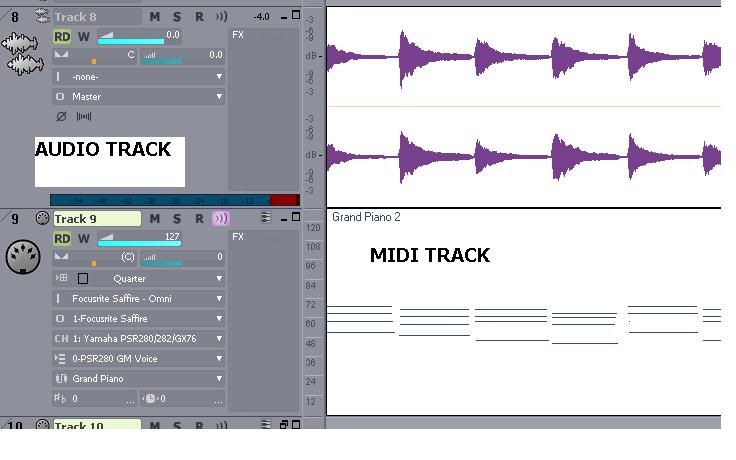
|
zonth_zonth
Max Output Level: -90 dBFS
- Total Posts : 11
- Joined: 2009/11/02 20:44:04
- Status: offline
Re:1 week and cant even perform the basics
2009/11/03 11:27:44
(permalink)
thanks for the explanation Greg. That makes sense. However, with the "installed drum tracks", I dont even get the tick/lines (dots and dashes) on the clips pane.
|
RobertB
Max Output Level: 0 dBFS
- Total Posts : 11256
- Joined: 2005/11/19 23:40:50
- Location: Fort Worth, Texas
- Status: offline
Re:1 week and cant even perform the basics
2009/11/03 11:36:29
(permalink)
F1 is your friend.
With the SI drums GUI in focus, click the F1 key. This will bring up a help file specific to SI Drums.
F1 works for most Cakewalk VST's (synths and effects) as well as many third party VST's.
You cannot record the output of SI Drums, or any soft synth for that matter. You need to drag the patterns from the SI GUI to your MIDI track.
It will look like dots and dashes, not a waveform. This is the MIDI data that triggers the synth.
If you have a keyboard or controller, you can record the keystrokes from that as MIDI data.
Either way, you must have the data in your MIDI track to get sound on playback.
It seems tricky at first, but once you understand how it works, the process is really pretty simple.
My Soundclick Page SONAR Professional, X3eStudio,W7 64bit, AMD Athlon IIx4 2.8Ghz, 4GB RAM, 64bit, AKAI EIE Pro, Nektar Impact LX61,Alesis DM6,Alesis ControlPad,Yamaha MG10/2,Alesis M1Mk2 monitors,Samson Servo300,assorted guitars,Lava Lamp Shimozu-Kushiari or Bob
|
57Gregy
Max Output Level: 0 dBFS
- Total Posts : 14404
- Joined: 2004/05/31 17:04:17
- Location: Raleigh, North Carolina
- Status: offline
Re:1 week and cant even perform the basics
2009/11/03 11:36:47
(permalink)
I don't have SI Drums, but I think you select a MIDI track by clicking on it, then either double-click the MIDI clip you want and it transfers to that MIDI track, or you drag the clip into the track. That's how it works in Session Drummer anyway. When using pre-made clips, either MIDI or audio, you don't need to set the input. Also when writing music in the staff view or Piano Roll View (PRV), you don't need to set the input. The output is important, or you won't hear anything.  Can you list what outputs you have available for MIDI and audio?
|
Beagle
Max Output Level: 0 dBFS
- Total Posts : 50621
- Joined: 2006/03/29 11:03:12
- Location: Fort Worth, TX
- Status: offline
Re:1 week and cant even perform the basics
2009/11/03 14:06:32
(permalink)
edited - I found where he is getting output. ok - as for INPUT to the MIDI track - if you don't have a keyboard you won't be able to select anythng for the input nor will you be able to record anything. you'll need to record MIDI data by using your mouse in the PRV mode or Staff View mode. what do you mean by "the installed drum tracks?" do you mean the MIDI loops you can choose from in the SI Drums? if so, you'll need to drag them from the SI DRums interface onto the MIDI track.
post edited by Beagle - 2009/11/03 14:10:10
|
Guitarhacker
Max Output Level: 0 dBFS
- Total Posts : 24398
- Joined: 2007/12/07 12:51:18
- Location: NC
- Status: offline
Re:1 week and cant even perform the basics
2009/11/03 15:56:24
(permalink)
My site shows you how to create a drum track from scratch.
My website & music: www.herbhartley.com MC4/5/6/X1e.c, on a Custom DAW Focusrite Firewire Saffire Interface BMI/NSAI "Just as the blade chooses the warrior, so too, the song chooses the writer "
|
zonth_zonth
Max Output Level: -90 dBFS
- Total Posts : 11
- Joined: 2009/11/02 20:44:04
- Status: offline
Re:1 week and cant even perform the basics
2009/11/03 17:15:38
(permalink)
RobertB
You cannot record the output of SI Drums, or any soft synth for that matter. You need to drag the patterns from the SI GUI to your MIDI track.
>ahhh. That is the explanation. I was simply playing the loop in the backround and hitting record on the transfer. I will try dragging the track.
|
zonth_zonth
Max Output Level: -90 dBFS
- Total Posts : 11
- Joined: 2009/11/02 20:44:04
- Status: offline
Re:1 week and cant even perform the basics
2009/11/03 17:59:51
(permalink)
another issue I am having. During the first couple days I was able to bring up Cakewalk Sound Center. Now I am not able to bring it up anymore. I researched some old posts here and some of you guys instructed another newbe to..... INSERT>SOFTSYNTHS>CAKEWALK SOUND CENTER
I have followed this, and cakewalk sound center is not in the dropdown. What the heck happened to it. Now all I can get for synth is the TTS-1
ps.. guitarhacker. I went to your site, and tried some of your tutorials but didnt get anywhere just yet. I intend to keep at this thing though.
|
zonth_zonth
Max Output Level: -90 dBFS
- Total Posts : 11
- Joined: 2009/11/02 20:44:04
- Status: offline
Re:1 week and cant even perform the basics
2009/11/03 18:03:33
(permalink)
57Gregy
Can you list what outputs you have available for MIDI and audio?
> microsoft GS wavetable for midi output
Kyle dual 2.6GHz, 4-GB RAM, 64-bit Windows7
|
Beagle
Max Output Level: 0 dBFS
- Total Posts : 50621
- Joined: 2006/03/29 11:03:12
- Location: Fort Worth, TX
- Status: offline
Re:1 week and cant even perform the basics
2009/11/03 19:37:57
(permalink)
not sure why it would disappear. go to OPTIONS>GLOBAL>VST PLUGINS and make sure the C:\PROGRAM FILES\CAKEWALK\VST PLUGINS folder is listed (if it's not, then add it) and then hit the SCAN VST FOLDERS button.
|
Steve Cox [Cakewalk] 
Max Output Level: -89 dBFS

- Total Posts : 80
- Joined: 2009/10/12 10:18:01
- Status: offline
Re:1 week and cant even perform the basics
2009/11/04 16:56:59
(permalink)
Hi Kyle, If you're running Win7 x64, you may need to add the x86 Program Files path (which is different than your normal Program Files) manually. - Go to Options | Global | VST Plug-ins
- Click Add and navigate to C:\Program Files (x86)\Cakewalk\vstplugins
- Once added, click the Scan VST Folders button
Hope that clears up the problem.
Steve Cox Technical Support Cakewalk
|
57Gregy
Max Output Level: 0 dBFS
- Total Posts : 14404
- Joined: 2004/05/31 17:04:17
- Location: Raleigh, North Carolina
- Status: offline
Re:1 week and cant even perform the basics
2009/11/04 21:27:30
(permalink)
Kyle dual 2.6GHz, 4-GB RAM, 64-bit Windows7 Huh. That wasn't in the earlier posts. No wonder nothing works.  Anyway, I'm glad Steve Cox stepped in with a (possible) solution.
|
Robomusic
Max Output Level: 0 dBFS
- Total Posts : 8943
- Joined: 2004/05/30 00:54:24
- Status: offline
Re:1 week and cant even perform the basics
2009/11/05 11:17:00
(permalink)
Hey Steve with only 19 post that makes you a newbie!
|
zonth_zonth
Max Output Level: -90 dBFS
- Total Posts : 11
- Joined: 2009/11/02 20:44:04
- Status: offline
Re:1 week and cant even perform the basics
2009/11/07 15:53:08
(permalink)
your telling me Greg. For starters Windows 7 is killing me. I cannot get up and running online. My wireless router is an old Linksy so my new OS does not recognize the wireless adapter and cannot use the CD installation because W7 states it is not compatible. Same thing all around.....I bought the UA1g USB interface for my guitar, and the software for installation only has XP& vistas-- setup.exe files....so I cant figure out how to install the software.
Back to MC5, using Sound Creator, I can go through all the tabs of different music instruments with examples, but cannot figure out how to drag a sample to the main screen. Why can I not drag some clips over with Sound Creator like I can with the SI drum program?
ps thanks for the tip for finding and scanning for the VST plugins. Do you know what the purpose or reaosn of having "program files (x86)" versus just "program files" is? Why does W7 split the program files like this?
Both Windows 7 and MC5 are working synergistically to give me a headache.
Kyle dual 2.6GHz, 4-GB RAM, 64-bit Windows7
|
Beagle
Max Output Level: 0 dBFS
- Total Posts : 50621
- Joined: 2006/03/29 11:03:12
- Location: Fort Worth, TX
- Status: offline
Re:1 week and cant even perform the basics
2009/11/07 18:21:19
(permalink)
Back to MC5, using Sound Creator, I can go through all the tabs of different music instruments with examples, but cannot figure out how to drag a sample to the main screen. Why can I not drag some clips over with Sound Creator like I can with the SI drum program? because there aren't any pre-created MIDI loops included with Soundcenter like there are for SI Drums. you have to create them yourself using a MIDI keyboard, or by entering the notes one by one in the Piano Roll View or Staff View. you can find MIDI files of covers on the internet - but I don't think that's what you're wanting to do. Do you know what the purpose or reaosn of having "program files (x86)" versus just "program files" is? Why does W7 split the program files like this? I don't know anything about Win7, sorry.
|
Wood67
Max Output Level: -64 dBFS
- Total Posts : 1348
- Joined: 2008/10/27 08:57:36
- Location: Brighton, UK
- Status: offline
Re:1 week and cant even perform the basics
2009/11/08 17:37:16
(permalink)
I have W7 64bit, and it seems to install all the 'old' stuff in the program files\x86 folder. But the system seems quite happy. btw - W7 is a fantastic step up from Vista. Funny thing is a can't pinpoint as to exactly why - it just seems to work!
Wood Studio One 3 Pro, (Sonar Platinum), Intel i7, Win10 Pro, 32Gb ram, RME Babyface Pro, Behringer X-Touch, Presonus Faderport, Akai MPK49, Arturia KeyLab25, KRK Rokit 5 monitors, and other sonic surprises.
|
zonth_zonth
Max Output Level: -90 dBFS
- Total Posts : 11
- Joined: 2009/11/02 20:44:04
- Status: offline
Re:1 week and cant even perform the basics
2009/11/09 09:33:43
(permalink)
Eureka! I have got my guitar hooked up through the ua1-g interface and am able to hear and record through an audio track.
However the playback sounds like crap. Not quite sure how to decribe it, echo, hissing garbled..... I am assuming there are some incorrect input parameters ie...bit rate, frequency (Hz), etc
any ideas?
thanks
Kyle dual 2.6GHz, 4-GB RAM, 64-bit Windows7
|
Beagle
Max Output Level: 0 dBFS
- Total Posts : 50621
- Joined: 2006/03/29 11:03:12
- Location: Fort Worth, TX
- Status: offline
Re:1 week and cant even perform the basics
2009/11/09 10:15:07
(permalink)
ok - did you install the ua1-g software?
when you started MC after installing the UA1-G, did you run the wave profiler or change to ASIO driver mode?
if you ran or run the wave profiler in WDM driver mode, then you have to make sure your onboard soundcard is no longer being used as the DRIVERS or the RECORDING and PLAYBACK TIMING MASTERS in the OPTIONS>AUDIO window.
|
zonth_zonth
Max Output Level: -90 dBFS
- Total Posts : 11
- Joined: 2009/11/02 20:44:04
- Status: offline
Re:1 week and cant even perform the basics
2009/11/11 12:10:48
(permalink)
that did it beagle.
I am content now. My goal was simply to get two guitar tracks and a bass up and running to record and playback. I think I got a handle on the audio tracks for live instruments......
still dont think I have a good conception of what to do with the MIDI tracks and Sound Creator but will try to get familiar. For now just glad to get my guitars playing and recording. thanks all
Kyle dual 2.6GHz, 4-GB RAM, 64-bit Windows7
|
57Gregy
Max Output Level: 0 dBFS
- Total Posts : 14404
- Joined: 2004/05/31 17:04:17
- Location: Raleigh, North Carolina
- Status: offline
Re:1 week and cant even perform the basics
2009/11/11 14:11:46
(permalink)
still dont think I have a good conception of what to do with the MIDI tracks Well. you don't have to use MIDI at all! But if you want drums or an orchestra or grand piano or bag pipes, or any instrument you don't play, you can use MIDI for them. Or you can use audio samples of those instruments, although I think that would be a lot more work. Work through the help files and tutorials on MIDI and soft synths, you might want to use them some day.
|
zonth_zonth
Max Output Level: -90 dBFS
- Total Posts : 11
- Joined: 2009/11/02 20:44:04
- Status: offline
Re:1 week and cant even perform the basics
2009/11/12 09:31:38
(permalink)
"But if you want drums or an orchestra or grand piano or bag pipes, or any instrument you don't play, you can use MIDI for them........ you might want to use them some day"
yep. I encountered the inability the transpose the drum track onto the intstrument tracks to burn to disk. I am assuming like an 8-track once all tracks are edited to ones liking, than they must be recorded on a "master track".
I learned to transpose all instrument tracks, by click and dragging the tracks into one. However I wasnt able to drag the drum track into the master track.
Kyle dual 2.6GHz, 4-GB RAM, 64-bit Windows7
|
57Gregy
Max Output Level: 0 dBFS
- Total Posts : 14404
- Joined: 2004/05/31 17:04:17
- Location: Raleigh, North Carolina
- Status: offline
Re:1 week and cant even perform the basics
2009/11/13 00:28:01
(permalink)
I don't think "transpose" is what you want to do; in music, that usually means to change the key.
In order to burn MIDI tracks to CD, they have to be audio. To do that, mute all the tracks you don't want to bounce, then you select the MIDI track(s) and the software synthesizer track(s) by clicking on them while holding down the Ctrl key on your computer keyboard. Then you go to 'Edit' at the top, select 'Bounce To Track(s)', choose a preset from the list, usually "What You Hear" works, then click OK and the track will be converted to an audio track, which can be burned to a CD.
|
CakeMaker
Max Output Level: -81 dBFS

- Total Posts : 469
- Joined: 2006/01/21 14:44:34
- Location: NorthEast Kingdom
- Status: offline
Re:1 week and cant even perform the basics
2009/11/13 21:44:20
(permalink)
holy cow zonth_zonth
U've made some progress tho
wow!
|