jayrmac
Max Output Level: -89 dBFS

- Total Posts : 90
- Joined: 2008/12/20 18:03:39
- Location: Melbourne, Australia
- Status: offline

E-MU Success and a Question
Hi All,
Finally got my E-MU 0404 interface! - the white one with the updated Vista compatible software ... verrry nice. I remember reading on this forum that I should first uninstall ASIO4ALL, which I did, and disable the on-board Realtek sound card, which I also did. After plugging in the unit and installing the drivers (and taking a deep breath) I started up MC4. Bingo - it worked like a dream. All the parameters were changed for me. There were only two things I had to do: change over to the ASIO driver and change the audio data setting to 24 bit. Done ... no problems.
I noticed two things straightaway. First the bass in all my projects was barely audible in the mix. I had been monitoring through a (good) hi-fi amp and speakers. But they were seriousy exaggerating the botton end, God bless em. Easily fixed.
Second, my projects were now too busy. Lack of sonic detail makes things (comparatively) dry and uninteresting. I was compensating by adding an effect or doubling up on a synth - including adding extra tracks - to keep the listener interested. But the E-MU improves the sound quality and the detail, and this adds a level of interest. So I intend to go back and judiciously remove things that are just cluttering the mix.
I do have a question. But first, one problem I had to solve installing the E-MU, which others might benefit from hearing about. Although the E-MU worked great with MC4, and also with ACID, Windows was refusing to recognise it. Rather, it was refusing to recognise that it is enabled. I could get no sound from Internet Explorer or from Windows Media player. Audacity (which I use standalone) was also silent. I tried all the obvious things, but Windows kept telling me that the selected audio device (the 0404) was not enabled. But it was. What solved the problem was this. It was not enough to disable the Realtek, I had to uninstall it completely. Then I had to reinstall the E-MU drivers. Now everything is working ... the 0404 is the only audio device available.
Well, I think everything is working, which brings me to my question. The E-MU supports direct monitoring. So I can record a guitar part dry (with virtually zero latency), and add effects afterwards. Alternatively, I can 'choose to software monitor' by turning off the direct monitoring function on the E-MU. This is preferable for me, since I'll play differently with some reverb or distortion added. Problem is, I can't get software monitoring to work in MC4. I set the input and the output on the audio track to the E-MU, and I can see the record level meter jumping around when the track is armed, like it does when direct monitoring is turned on, but I get no sound (and no sound is recorded). I notice in the Manual it explains how to record audio in Sonar with direct monitoring. It does the same with Cubase. (The E-MU comes with light versions of Sonar, Cubase and Ableton Live.) When it comes to Abelton though, it says: 'Direct monitoring can be turned off on the E-MU since we're monitoring through Abelton Live (Auto)'. This makes me think that software monitoring is possible with Abelton LE, but not with Sonar LE (or MC4) or Cubase LE. Is that right? I haven't installed Abelton Live yet. But even if it works with Abelton, I'd like to know whether it works with MC4 or Sonar LE.
Cheers,
John
MC4/5/6, Windows 7 Pro x64 (+SP1), Intel Xeon E3 Quadcore 3.3 GHz CPU, 16 GB DDR3 RAM, 1 x 500 GB SATA (System), 1 x 1TB SATA (Samples), 1 x 1TB SATA (Audio), E-MU 0404 USB2.0 interface, Miditech keyboard
|
jayrmac
Max Output Level: -89 dBFS
- Total Posts : 90
- Joined: 2008/12/20 18:03:39
- Location: Melbourne, Australia
- Status: offline
Question Answered
2009/11/21 04:43:11
(permalink)
OK, I just read a post by Tap from a couple of weeks back, who mentioned something about turning on echo to record and monitor with effects. I tried it and it works - change the output from the E-MU 0404 to the Master bus and turn on echo ... works like a charm. Still very low/unnoticeable latency. Thanks Tap!
MC4/5/6, Windows 7 Pro x64 (+SP1), Intel Xeon E3 Quadcore 3.3 GHz CPU, 16 GB DDR3 RAM, 1 x 500 GB SATA (System), 1 x 1TB SATA (Samples), 1 x 1TB SATA (Audio), E-MU 0404 USB2.0 interface, Miditech keyboard
|
57Gregy
Max Output Level: 0 dBFS

- Total Posts : 14404
- Joined: 2004/05/31 17:04:17
- Location: Raleigh, North Carolina
- Status: offline
Re:E-MU Success and a Question
2009/11/21 14:52:20
(permalink)
What solved the problem was this. It was not enough to disable the Realtek, I had to uninstall it completely. Yeah, I had to do that, too, for my Focusrite Saffire to work. Then I had to go into Control Panel>Sounds and Audio Devices and select Focusrite DirectSound to hear all the other things, like streaming audio or Windows Media Player. I was going to mention the input echo, then I read your second post. Thanks for posting this; it could help someone down the line.
|
jayrmac
Max Output Level: -89 dBFS
- Total Posts : 90
- Joined: 2008/12/20 18:03:39
- Location: Melbourne, Australia
- Status: offline
Re:E-MU Success and a Question
2009/11/21 17:17:03
(permalink)
Thanks Greg. Actually, now that I've been exploring a bit, I notice that there is a problem with the record latency. Under Options>audio>advanced the ASIO reported latency is 523. This is noticeable and I can't seem to reduce it using the manual offset. Are there any adjustments I can make elsewhere that would help?
MC4/5/6, Windows 7 Pro x64 (+SP1), Intel Xeon E3 Quadcore 3.3 GHz CPU, 16 GB DDR3 RAM, 1 x 500 GB SATA (System), 1 x 1TB SATA (Samples), 1 x 1TB SATA (Audio), E-MU 0404 USB2.0 interface, Miditech keyboard
|
57Gregy
Max Output Level: 0 dBFS
- Total Posts : 14404
- Joined: 2004/05/31 17:04:17
- Location: Raleigh, North Carolina
- Status: offline
Re:E-MU Success and a Question
2009/11/21 22:20:52
(permalink)
In 'Options>Audio' you should have a button called ASIO Panel. Click that to adjust the E-Mu's latency. 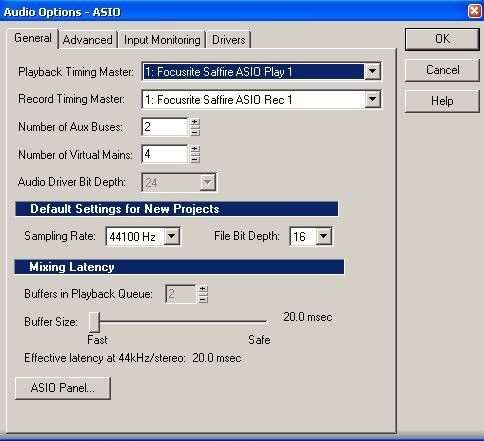
|
jayrmac
Max Output Level: -89 dBFS
- Total Posts : 90
- Joined: 2008/12/20 18:03:39
- Location: Melbourne, Australia
- Status: offline
Re:E-MU Success and a Question
2009/11/21 22:50:43
(permalink)
Thanks Greg. It's the record latency (under 'Advanced') that I can't adjust. I've got the mixing latency down to 10.0 msec. There is the occasional pop on playback, so I might have to increase that a little for some projects. But it's the record latency that is the problem.
MC4/5/6, Windows 7 Pro x64 (+SP1), Intel Xeon E3 Quadcore 3.3 GHz CPU, 16 GB DDR3 RAM, 1 x 500 GB SATA (System), 1 x 1TB SATA (Samples), 1 x 1TB SATA (Audio), E-MU 0404 USB2.0 interface, Miditech keyboard
|
57Gregy
Max Output Level: 0 dBFS
- Total Posts : 14404
- Joined: 2004/05/31 17:04:17
- Location: Raleigh, North Carolina
- Status: offline
Re:E-MU Success and a Question
2009/11/21 23:45:10
(permalink)
Hmm... I don't have that under my advanced tab. I never heard of that. Maybe adjust your buffers?
You may have to check the E-Mu's mixer and options.
When recording using soft synths to hear MIDI, a low latency is desired, so there is not much delay between pressing a key and hearing it. But when you're through recording and into mixing the song, you can decrease the latency so there is less strain on the processor, which can recuce any pops during playback.
|
jayrmac
Max Output Level: -89 dBFS
- Total Posts : 90
- Joined: 2008/12/20 18:03:39
- Location: Melbourne, Australia
- Status: offline
Re:E-MU Success and a Question
2009/11/22 06:00:32
(permalink)
Great. I'll follow up on your suggestions, Greg. Thanks for the info.
- John
MC4/5/6, Windows 7 Pro x64 (+SP1), Intel Xeon E3 Quadcore 3.3 GHz CPU, 16 GB DDR3 RAM, 1 x 500 GB SATA (System), 1 x 1TB SATA (Samples), 1 x 1TB SATA (Audio), E-MU 0404 USB2.0 interface, Miditech keyboard
|
Tap
Max Output Level: -30 dBFS

- Total Posts : 4536
- Joined: 2008/10/09 11:55:30
- Location: Newburyport, MA
- Status: offline
Re:E-MU Success and a Question
2009/11/22 10:07:29
(permalink)
OK, I just read a post by Tap from a couple of weeks back, who mentioned something about turning on echo to record and monitor with effects. I tried it and it works - change the output from the E-MU 0404 to the Master bus and turn on echo ... works like a charm. Still very low/unnoticeable latency. Thanks Tap!
Glad to help, I'm sure any of the fine folks here could have easily have helped out, though ....Good luck.
-TAP-
MC4 - M-Audio FW410 / Behringer UCA202 - Fender Strat / Jazzmaster / DuoSonic / Washburn / Peavy Foundation M-Audio Radium 49 Roland Juno 106 / JazzChorus / Seymore Duncan Convertible - HP A1230N ( AMD Athalon 3800+ 2G Ram + 200G HD ) http://soundclick.com/cut2thechaise
|