TomG
Max Output Level: -84 dBFS

- Total Posts : 339
- Joined: 2007/02/19 05:28:39
- Status: offline
Sonar 8 x64 & Windows 7 x64 & Faderport ...... any users here
Hi fellow Sonar'ites.
Anyone here running a Presonus Faderport under Windows 7 x64 and Sonar 8 x64 ?
Reason I ask is that Windows 7 X64 is not listed as supported with the latest 1.3.5 Driver and the Presonus forums mention some mini-drama-stories about registering the .dll file with Sonar etc..... just so Sonar can see the unit ?
So ..... anyone here using one ?
I was looking to get another AlphaTrack but I got really annoyed with the hard-plastic-hard-click buttons - very anoying to use.
All real-world user comments would be grealty appreciated.
Ta
TommyG
|
Graal
Max Output Level: -89 dBFS

- Total Posts : 91
- Joined: 2009/04/24 20:17:51
- Status: offline

Re:Sonar 8 x64 & Windows 7 x64 & Faderport ...... any users here
2010/05/25 05:03:58
(permalink)
I'm on Sonar 8.5.3 x32 and Windows 7 x64 and got faderport to work just fine, but had a little bit of a hassle at first.
When you download the presonus faderport latest drivers, you have a folder for sonar, that contains .dll files for both 32 and 64 bit.
You need the 64bit files.
You have to copy that .dll file into cakewalk shared surfaces.
Then you might have to register it:
Click the Start button on windows taskbar.
Type RUN in the Search line.
Open RUN.
Paste this, replacing with your own .dll file path:
regsvr32 "D:\Sonar\Shared Components\Shared Surfaces\faderport.dll"
I hope this works. It worked for the 32 bit version. BTW you might have to put regsvr64 for the 64 bit version (i'm not sure).
Try it with regsvr32 first and see if it helps.
Cheers!
|
TomG
Max Output Level: -84 dBFS
- Total Posts : 339
- Joined: 2007/02/19 05:28:39
- Status: offline
Re:Sonar 8 x64 & Windows 7 x64 & Faderport ...... any users here
2010/05/25 06:37:04
(permalink)
Hi Graal
I havent had a chance to lay my hands on one one yet ...... I am used to the Alphatrack hard-plastic-hard-click buttons.
Graal - could I get your opinions please:-
How are the buttons on the Faderport ?
- soft-rubber / hard-rubber ?
- soft plastic / hard plastic ?
- quiet / soft clicking ?
- do they all light up ?
- how does the Fader feel ? - it seems that almost universally in all the reviews, the FaderPort fader is considered *much* smoother / quieter than the A/Track Fader ?
Ta
TG
|
seriousfun
Max Output Level: -78 dBFS

- Total Posts : 641
- Joined: 2003/11/07 19:29:54
- Location: SoCal
- Status: offline
Re:Sonar 8 x64 & Windows 7 x64 & Faderport ...... any users here
2010/05/25 11:44:34
(permalink)
Yes - W7 x64 and S8 x64 with Faderport. Works great for me.
Register the .dll as described, and it will show up as a control surface in SONAR.
Hard plastic lighted switch buttons with a bit of a click. Good fader feel - better than Alphatrack, not as good as the best recording console faders.
|
Graal
Max Output Level: -89 dBFS
- Total Posts : 91
- Joined: 2009/04/24 20:17:51
- Status: offline
Re:Sonar 8 x64 & Windows 7 x64 & Faderport ...... any users here
2010/05/25 15:56:43
(permalink)
You got your answer there.
I think it is awesome.
The buttons are hard plastic, really clicky (if you've used an MPC - sorta like the transport buttons on that), but it doesn't bother me.
I actually like them. There is kinda no way to go back to track view in Sonar.
But I have that assigned on my wireless keyboard on the ` (~) and 1.
The fader feels alright (smooth) when you move it, but kinda jerky when it reads automation.
I wish they would make an 8 channel version of this (extendable to 16/24/32) with digital backlit labels, assignable channels (like Cake V-700) and maybe metering at a low cost.
That would be AWESOME.
Cheers!
|
TomG
Max Output Level: -84 dBFS
- Total Posts : 339
- Joined: 2007/02/19 05:28:39
- Status: offline
Re:Sonar 8 x64 & Windows 7 x64 & Faderport ...... any users here
2010/05/27 07:36:38
(permalink)
Hi Graal & seriousfun
With the FaderPort, can you also " write " VST EFX parameters ? or can you only " write " Volume / Pan / mute ?
Thx
tomg
|
seriousfun
Max Output Level: -78 dBFS
- Total Posts : 641
- Joined: 2003/11/07 19:29:54
- Location: SoCal
- Status: offline
Re:Sonar 8 x64 & Windows 7 x64 & Faderport ...... any users here
2010/05/27 10:33:23
(permalink)
TomG
Hi Graal & seriousfun
With the FaderPort, can you also " write " VST EFX parameters ? or can you only " write " Volume / Pan / mute ?
Thx
tomg
Just Vol/Pan/etc. Faderport SONAR integration is solid, but limited (it may be different in HUI mode).
|
jm24
Max Output Level: -54 dBFS

- Total Posts : 2127
- Joined: 2003/11/12 10:41:12
- Status: offline
Re:Sonar 8 x64 & Windows 7 x64 & Faderport ...... any users here
2010/05/27 11:57:48
(permalink)
Can any of yous guys change the Faderport's user defined buttons' funtions?
|
kristoffer
Max Output Level: -82 dBFS

- Total Posts : 406
- Joined: 2010/08/18 15:25:37
- Location: Bergen, Norway
- Status: offline
Re:Sonar 8 x64 & Windows 7 x64 & Faderport ...... any users here
2011/04/12 18:10:47
(permalink)
 I'm having a bit of a trouble with this one. It worked fine with my last "computer" (had a mobo which died, and had to reinstall now) Now, after installing everything in my Gigabyte board, we came to the last one. The presonus. When Im trying to register it with regsvr32, I get: the module c:\xxx.faderport.dll is loaded, but "something" til DllRegisterServer failed with fail code 0x80070005 Help?
SonarPlatinum/X3e ProducerHW:
~Pod HD pro~Pod X3~JTV-69 US~Tascam FW1884~BEYERDYNAMIC DT770 PRO~Røde NTK~MaschineMikro~ADAM ARTist5
W10 - i7 920 - Intel DX58SO2 - Nvidia NVS450 Quad - 12GB OCZ Gold 1600Mhz RAM - Noctua NH-D14 - Corsair TX950w PSU
- Corsair MX200 500GB OS/Programs - OCZ Agility 3 SSD (Audio) - WD Black 1TB
|
jm24
Max Output Level: -54 dBFS
- Total Posts : 2127
- Joined: 2003/11/12 10:41:12
- Status: offline
Re:Sonar 8 x64 & Windows 7 x64 & Faderport ...... any users here
2011/04/15 10:18:01
(permalink)
|
kristoffer
Max Output Level: -82 dBFS
- Total Posts : 406
- Joined: 2010/08/18 15:25:37
- Location: Bergen, Norway
- Status: offline
Re:Sonar 8 x64 & Windows 7 x64 & Faderport ...... any users here
2011/04/18 07:12:45
(permalink)
jm24
Support at presonus.
Yep - tried. They do really not have the best support - my ticket is still "in process" (that usually means that they have not opened it yet...  ) after 6 days. Hopefully they will help at last. Does anyone know how I can check in the registry if the dll have been registered? And maybe"deregister" it?
SonarPlatinum/X3e ProducerHW:
~Pod HD pro~Pod X3~JTV-69 US~Tascam FW1884~BEYERDYNAMIC DT770 PRO~Røde NTK~MaschineMikro~ADAM ARTist5
W10 - i7 920 - Intel DX58SO2 - Nvidia NVS450 Quad - 12GB OCZ Gold 1600Mhz RAM - Noctua NH-D14 - Corsair TX950w PSU
- Corsair MX200 500GB OS/Programs - OCZ Agility 3 SSD (Audio) - WD Black 1TB
|
kristoffer
Max Output Level: -82 dBFS
- Total Posts : 406
- Joined: 2010/08/18 15:25:37
- Location: Bergen, Norway
- Status: offline
Re:Sonar 8 x64 & Windows 7 x64 & Faderport ...... any users here
2011/04/28 04:29:43
(permalink)
They have answered now, and sent me a new 64bit .dll file.
Same error.
Anyone know how to check in Windows registry if this have been registered, or how to "unregister" it?
I suspect there is a problem with the registry or something?
SonarPlatinum/X3e ProducerHW:
~Pod HD pro~Pod X3~JTV-69 US~Tascam FW1884~BEYERDYNAMIC DT770 PRO~Røde NTK~MaschineMikro~ADAM ARTist5
W10 - i7 920 - Intel DX58SO2 - Nvidia NVS450 Quad - 12GB OCZ Gold 1600Mhz RAM - Noctua NH-D14 - Corsair TX950w PSU
- Corsair MX200 500GB OS/Programs - OCZ Agility 3 SSD (Audio) - WD Black 1TB
|
jm24
Max Output Level: -54 dBFS
- Total Posts : 2127
- Joined: 2003/11/12 10:41:12
- Status: offline
Re:Sonar 8 x64 & Windows 7 x64 & Faderport ...... any users here
2011/04/28 10:01:23
(permalink)
this is an access denied error:
So, launch the command prompt window with a right click, "Run as administrator".
And then register
|
kristoffer
Max Output Level: -82 dBFS
- Total Posts : 406
- Joined: 2010/08/18 15:25:37
- Location: Bergen, Norway
- Status: offline
Re:Sonar 8 x64 & Windows 7 x64 & Faderport ...... any users here
2011/04/29 04:20:20
(permalink)
Thanks, will try again tonight.
But, as far as I can remember, when I tried this there was not an alternative when I right clicked.
Can this be because of the UAC or that I only have one account and that is Administrator?
SonarPlatinum/X3e ProducerHW:
~Pod HD pro~Pod X3~JTV-69 US~Tascam FW1884~BEYERDYNAMIC DT770 PRO~Røde NTK~MaschineMikro~ADAM ARTist5
W10 - i7 920 - Intel DX58SO2 - Nvidia NVS450 Quad - 12GB OCZ Gold 1600Mhz RAM - Noctua NH-D14 - Corsair TX950w PSU
- Corsair MX200 500GB OS/Programs - OCZ Agility 3 SSD (Audio) - WD Black 1TB
|
jm24
Max Output Level: -54 dBFS
- Total Posts : 2127
- Joined: 2003/11/12 10:41:12
- Status: offline
Re:Sonar 8 x64 & Windows 7 x64 & Faderport ...... any users here
2011/04/29 10:09:22
(permalink)
|
kristoffer
Max Output Level: -82 dBFS
- Total Posts : 406
- Joined: 2010/08/18 15:25:37
- Location: Bergen, Norway
- Status: offline
Re:Sonar 8 x64 & Windows 7 x64 & Faderport ...... any users here
2011/04/30 18:06:23
(permalink)
hmmm... I've created a new account now, (standard) but the only account before was "DAW" and that was admin. Still not possible to "Run as administrator" at the command run.exe Cmd I can run as administrator. Tried both with UAC on and off. This is the error message, I think it is new now: 
SonarPlatinum/X3e ProducerHW:
~Pod HD pro~Pod X3~JTV-69 US~Tascam FW1884~BEYERDYNAMIC DT770 PRO~Røde NTK~MaschineMikro~ADAM ARTist5
W10 - i7 920 - Intel DX58SO2 - Nvidia NVS450 Quad - 12GB OCZ Gold 1600Mhz RAM - Noctua NH-D14 - Corsair TX950w PSU
- Corsair MX200 500GB OS/Programs - OCZ Agility 3 SSD (Audio) - WD Black 1TB
|
kristoffer
Max Output Level: -82 dBFS
- Total Posts : 406
- Joined: 2010/08/18 15:25:37
- Location: Bergen, Norway
- Status: offline
Re:Sonar 8 x64 & Windows 7 x64 & Faderport ...... any users here
2011/04/30 18:57:16
(permalink)
I found this in the Event viewer: Log Name: Application Source: SideBySide Date: 01.05.2011 00:45:35 Event ID: 33 Task Category: None Level: Error Keywords: Classic User: N/A Computer: DAW-PC Description: Activation context generation failed for "c:\program files\Cakewalk\Shared Surfaces\Faderport.dll". Dependent Assembly Microsoft.VC80.MFC,processorArchitecture="x86",publicKeyToken="1fc8b3b9a1e18e3b",type="win32",version="8.0.50608.0" could not be found. Please use sxstrace.exe for detailed diagnosis. Event Xml: <Event xmlns=" http://schemas.microsoft.com/win/2004/08/events/event"> <System> <Provider Name="SideBySide" /> <EventID Qualifiers="49409">33</EventID> <Level>2</Level> <Task>0</Task> <Keywords>0x80000000000000</Keywords> <TimeCreated SystemTime="2011-04-30T22:45:35.000000000Z" /> <EventRecordID>2199</EventRecordID> <Channel>Application</Channel> <Computer>DAW-PC</Computer> <Security /> </System> <EventData> <Data>Microsoft.VC80.MFC,processorArchitecture="x86",publicKeyToken="1fc8b3b9a1e18e3b",type="win32",version="8.0.50608.0"</Data> <Data>c:\program files\Cakewalk\Shared Surfaces\Faderport.dll</Data>
SonarPlatinum/X3e ProducerHW:
~Pod HD pro~Pod X3~JTV-69 US~Tascam FW1884~BEYERDYNAMIC DT770 PRO~Røde NTK~MaschineMikro~ADAM ARTist5
W10 - i7 920 - Intel DX58SO2 - Nvidia NVS450 Quad - 12GB OCZ Gold 1600Mhz RAM - Noctua NH-D14 - Corsair TX950w PSU
- Corsair MX200 500GB OS/Programs - OCZ Agility 3 SSD (Audio) - WD Black 1TB
|
jm24
Max Output Level: -54 dBFS
- Total Posts : 2127
- Joined: 2003/11/12 10:41:12
- Status: offline
Re:Sonar 8 x64 & Windows 7 x64 & Faderport ...... any users here
2011/05/01 10:41:35
(permalink)
Log in as DAW
Orb/start - all programs - accessories
right click on "Command Prompt"
is "Run as administrator" available?
|
kristoffer
Max Output Level: -82 dBFS
- Total Posts : 406
- Joined: 2010/08/18 15:25:37
- Location: Bergen, Norway
- Status: offline
Re:Sonar 8 x64 & Windows 7 x64 & Faderport ...... any users here
2011/05/06 09:21:52
(permalink)
jm24
Log in as DAW
Orb/start - all programs - accessories
right click on "Command Prompt"
is "Run as administrator" available?
Thank you for your effort to help. Yes it was available - the cmd command I could run as administrator. both in the admin account and my standard it was available. but not "run". Either way, I have solved the problem. After this, I uninstalled everything which was related to .NET and Visual C, and tried to reinstall them. Not helping, so I tried to repair my Win7 install (with the Win7 dvd) No luck. So I formatted the system drive and installed Win7 again. working perfect :) Pretty shure it has something to do with .NET - there was some files missing from system32 or something but could not locate which. I googled to find several others with the same error message, all .NET related. (different programs, flight simulator, ATI cards etc)
SonarPlatinum/X3e ProducerHW:
~Pod HD pro~Pod X3~JTV-69 US~Tascam FW1884~BEYERDYNAMIC DT770 PRO~Røde NTK~MaschineMikro~ADAM ARTist5
W10 - i7 920 - Intel DX58SO2 - Nvidia NVS450 Quad - 12GB OCZ Gold 1600Mhz RAM - Noctua NH-D14 - Corsair TX950w PSU
- Corsair MX200 500GB OS/Programs - OCZ Agility 3 SSD (Audio) - WD Black 1TB
|
kristoffer
Max Output Level: -82 dBFS
- Total Posts : 406
- Joined: 2010/08/18 15:25:37
- Location: Bergen, Norway
- Status: offline
Re:Sonar 8 x64 & Windows 7 x64 & Faderport ...... any users here
2011/08/22 05:05:24
(permalink)
After my latest reinstall (I changed my OS disk to a SSD and started over again) I have a new problem with my Faderport. It is recognized in the Surfaces menu, I have also manually registered it. (get success message also) As you can see, the Faderport lists as "Faderport -1" and also the midi in/out is not saved. I can set the Faderport as midi in/out. (but is is blank when I go in again) I am starting Sonar as administrator. The Faderport is sending midi messages. Anyone know why this is happening? And what to try? 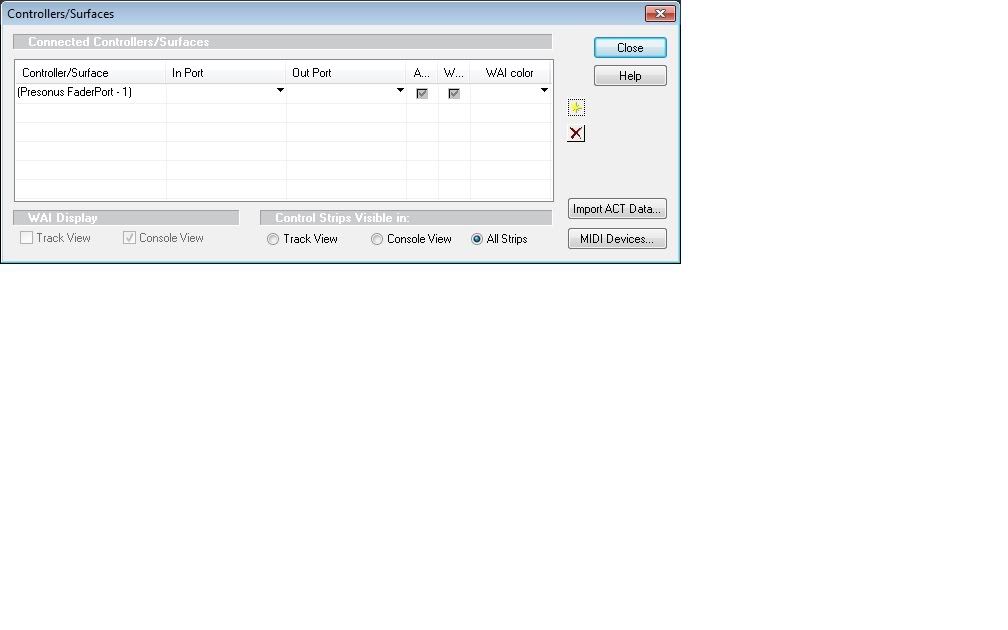
SonarPlatinum/X3e ProducerHW:
~Pod HD pro~Pod X3~JTV-69 US~Tascam FW1884~BEYERDYNAMIC DT770 PRO~Røde NTK~MaschineMikro~ADAM ARTist5
W10 - i7 920 - Intel DX58SO2 - Nvidia NVS450 Quad - 12GB OCZ Gold 1600Mhz RAM - Noctua NH-D14 - Corsair TX950w PSU
- Corsair MX200 500GB OS/Programs - OCZ Agility 3 SSD (Audio) - WD Black 1TB
|
kristoffer
Max Output Level: -82 dBFS
- Total Posts : 406
- Joined: 2010/08/18 15:25:37
- Location: Bergen, Norway
- Status: offline
Re:Sonar 8 x64 & Windows 7 x64 & Faderport ...... any users here
2011/08/23 04:03:52
(permalink)
Seems to be a 64bit issue - I've installed Sonar 32bit and it works perfectly.
I'll try to contact Presonus again to see if they can help :)
SonarPlatinum/X3e ProducerHW:
~Pod HD pro~Pod X3~JTV-69 US~Tascam FW1884~BEYERDYNAMIC DT770 PRO~Røde NTK~MaschineMikro~ADAM ARTist5
W10 - i7 920 - Intel DX58SO2 - Nvidia NVS450 Quad - 12GB OCZ Gold 1600Mhz RAM - Noctua NH-D14 - Corsair TX950w PSU
- Corsair MX200 500GB OS/Programs - OCZ Agility 3 SSD (Audio) - WD Black 1TB
|
kristoffer
Max Output Level: -82 dBFS
- Total Posts : 406
- Joined: 2010/08/18 15:25:37
- Location: Bergen, Norway
- Status: offline
Re:Sonar 8 x64 & Windows 7 x64 & Faderport ...... any users here
2011/08/23 15:20:30
(permalink)
Did a uninstall, installed again and registered again (regsvr32 with "Run" command) Works perfectly now
SonarPlatinum/X3e ProducerHW:
~Pod HD pro~Pod X3~JTV-69 US~Tascam FW1884~BEYERDYNAMIC DT770 PRO~Røde NTK~MaschineMikro~ADAM ARTist5
W10 - i7 920 - Intel DX58SO2 - Nvidia NVS450 Quad - 12GB OCZ Gold 1600Mhz RAM - Noctua NH-D14 - Corsair TX950w PSU
- Corsair MX200 500GB OS/Programs - OCZ Agility 3 SSD (Audio) - WD Black 1TB
|
the wildman
Max Output Level: -87 dBFS

- Total Posts : 158
- Joined: 2008/11/20 05:25:39
- Location: United Kingdom
- Status: offline
Re:Sonar 8 x64 & Windows 7 x64 & Faderport ...... any users here
2012/11/22 10:19:29
(permalink)
I had a Frontier Alphatrack. it was great in Producer 8.5 Good in X1 But really screwed up my PC in X2. Blue Screen of Death nearly everytime you touched the thing.
Tried all and any ways of installing drivers etc but to no avail. So I sold it on ebay, and all my frustration went away, ( along with any way of writing realtime fader automation)
So I tried a Presonus Faderport. Could not install it properley at first. I could not get the Faderport to show up as a Control surface in control surface devices. Presonus told me that not many people use Sonar and they'd never heard of any problems. Yeah right!!! So i found out how to do it by trawling the net and i have written down clear instructions of what you may need to do. It now it works for me fine. (If you want to try this, first uninstall Faderport from your pc and remove all presonus folders from both your 'programs ' and 'x86 programs folders).
Heres what i did; .....
------------------------------------------------------------------------------------------------- To make the Presonus Faderport work with Sonar X2 do the following things: 1/ download the driver installer package from teh presonus website @ [link=http://www.presonus.com/uploads/products/1243/downloads/FaderPort_135_617.exe]http://www.presonus.com/u.../FaderPort_135_617.exe[/link] 2/ Now on your PC; navigate to the ‘64bit dll’ file which is situated within; C:\Program Files (x86)\PreSonus\FaderPort\FaderPort Dll\Sonar\x64’ 3/ copy and paste this to; C:\Program Files\Cakewalk\Shared Surfaces 4/ run the command prompt by clicking Start Programs Accessories Command Prompt - (Right click and select: ‘Run as administrator’) 5/ Paste this into the command prompt window, (directly after the last piece of existing text) cd C:\Program Files\Cakewalk\Shared Surfaces\
C:\windows\SysWow64\regsvr32 FaderPort.dll 6/ Press ‘Enter’ 7/ Close command promt box 8/ Open Sonar X2 9/ Open any project 10/ Click on the Contorl surface box at the top. (it may say ‘no control surfaces’ assuming you have none at present) and click ‘Select hardware/controller surface’ 11/ Click on the yellow star symbol at top right corner 12/ from the ‘controller/surface’ drop down box select ‘Presonus Faderport’ (This will appear now as an available choice, whereas it did not before, right?) 13/ from the ‘input Port and output Port drop down boxes, select Faderport, and then hit Enter When you click enter, you will hear your Fader on the Faderport return to zero. Your done! Hooray!!!!!!!!!! [font="verdana, sans-serif; line-height: 13px; background-color: rgb(239, 242, 244)"]------------------------------------------------------------------------------------------------- [font="verdana, sans-serif; line-height: 13px; background-color: rgb(239, 242, 244)"]
|