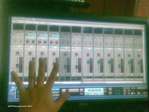
Just an update. I ordered the Dell ST220T multi touch monitor, received today and got it setup.
In summary.. touch screen won't work for X1..for now (yeah.. that's fast to discovered) ..the mixer faders do not response correctly to the finger 'drag' such as click and drag using a mouse (submitted a 'bug' report) ...hopefully it will be fixed.
Here's the longer version.
The native screen resolution is 1920 x 1080 (21.5 inch monitor), and is fine and clear for normal usage, but it's too small for touch screen usage. To be effective, the resolution needs to be set lower, so the faders and buttons will appeared bigger. And since this setup will be in multi monitor environment, setting the screen to a lower resolution is not an issue. Only stuffs like mixer and transport control will be placed on this monitor.. so i hoped.
I set mine to 1280 x 720. At this setting, the transport buttons are just nice - fitting for the finger tip. The mixer fader is about 2 inches in length, and all the other buttons (mute, solo, etc..) are easily engaged with a touch.
Holding the scroll bar works as expected, same as a mouse drag, and it's fast to see all the tracks.
Holding the fader.. well it won't work as expected. Moving the finger tip will cause the fader to move 'double' fast. 1 cm of finger movement caused the fader to move 2 cm.. like it's accelerated. And I did not 'flip' my finger.. I just move it real slow - imitating the mouse dragging the fader movement.
In comparison, I opened up Windows volume control. I was able to drag the Win volume up/down in stable and expected movement.
So.. my excitement stop short after the fader test.
Attached is the pic of the monitor set to 1280 x 720 resolution. Well..that's all for now. Let me know if there is any feature you liked me to try out..
Attached Image(s)