rebelclueless
Max Output Level: -90 dBFS

- Total Posts : 8
- Joined: 2011/07/25 06:27:21
- Status: offline

EastWest VST Plugins and Sonar X1
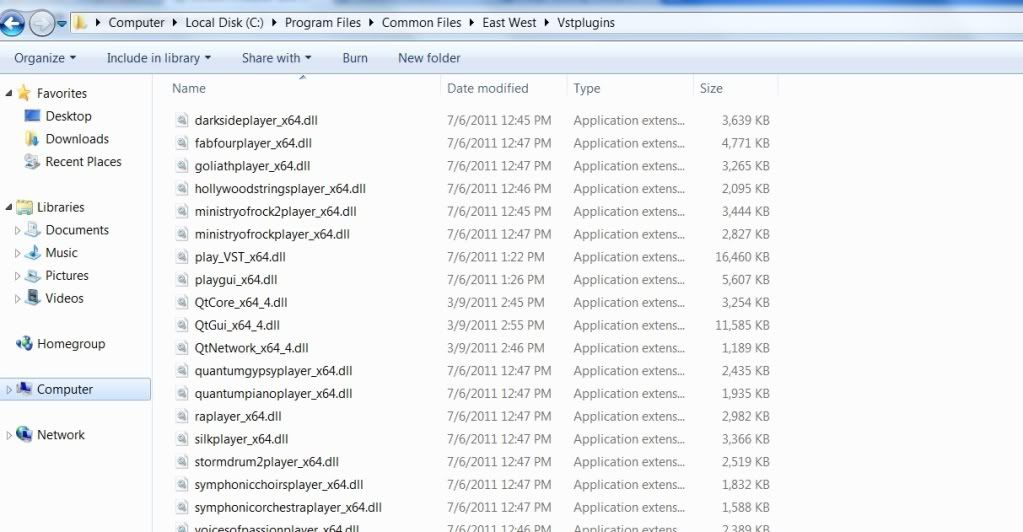
Howdy folks! I've recently returned to Cakewalk products and have Sonar X1 up and running. I have installed the VST Plugin files however, unlike in the video at the link below, I do not have the ability to select different EastWest Players for different tracks. The fields as-installed consist of 1 full VST player/ext and several other extensions labeled as players for each sound library (Orchestra, Rock, Goliath, Ra, etc)
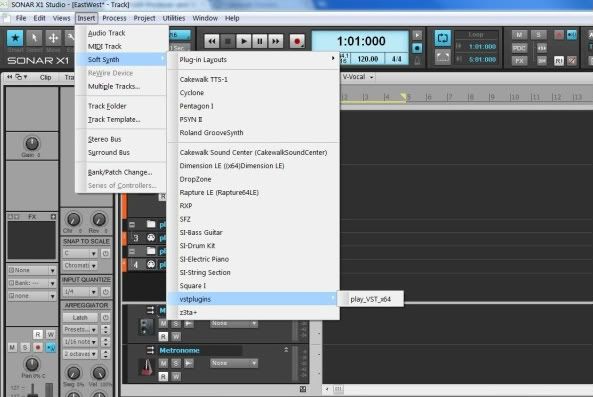
Now I have the instruments installed in my hard drive as what I guess are standalone applications as well. And I can open any of the various specific players as a standalone application (Orchestra, Rock, etc.) However I cannot select this in Sonar X1. Per attached picture it only recognizes the main VST 64 app but not the player extensions. So when I press "P" and go to the main plug-in list it lists the main VST App but none of the player extensions. So I can't choose different sample players for different tracks. I hope I'm explaining this clearly.
In the following tutorial at about 2'50" the presenter scans his installed VST plug-ins and they open in Sonar 8.5 as separate choices. To me this is a must if one is to ever combine different instruments in the same project, correct? (well I assume you could use one player in some cases but not most)
http://www.youtube.com/watch?v=4jPW-OoUFwQ
So what might I be doing wrong? I have installed all of the updates and patches for Sonar 1, double-checked my VST patch scan list and everything. Forgive me as I am new to both any recent Sonar AND EastWest PLAY version Instruments. Any advice would be GREATLY APPRECIATED! Tony
In the attached screencap you can see what I am seeing in Sonar X1
Here is what is in the folder where Sonar X1 is scanning my EastWest VSTs:
<message edited by rebelclueless on 24 mins. ago>
|