kelsoz
Max Output Level: -86 dBFS

- Total Posts : 235
- Joined: 2007/06/16 19:09:06
- Location: Pennsylvania
- Status: offline

Auto-Punch Loop Recording MIDI From My Hardware Keyboard
Here's what I want to do. With an existing MIDI track I want to select a time span during which that I want to consecutively (automatically) record several takes. I want playback for each new take to begin before the start of the record start time and continue playing a short time after the record end time - then loop back and do it all again. I do not want to hear the source or previous takes during each record of a new take. To do this, I set up loop points. Within the loop, set up punch in and punch out points. My selected record settings are: Sound on Sound Auto Punch Mute Previous Takes Store Takes in a single Track Create New Lanes on Overlap 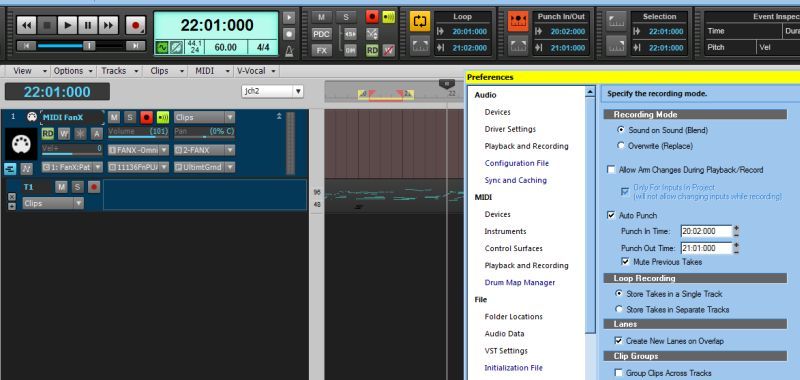 When I record several takes everything happens mechanically pretty much as expected - Loops loop good, the recording starts and stops with the auto punch points, and I get a new lane with each take. But here's more: - The notes of source track (Take Lane 1) in the Auto Punch time seem to be muted when I hit Record, which seems good.
- As takes are recorded, the previous tracks not muted, which is bad.
- The notes of source track (Take Lane 1) that seemed be muted (which stay that way even if I delete all the new take takes) - well, I can't un-mute them, which is bad.
So this approach is not suitable because 1) previous takes are playing away while I'm trying to record the current take, and 2) I don't see how to get back the original, muted (if they are actual "muted") notes. So now I change from Sound on Sound to Overwrite to see what happens. Again, mechanically, everything happens as expected. But here's more: - The notes of source track (Take Lane 1) in the Auto Punch time are deleted when I hit Record.
- Previous tracks are silent (not muted) while recording subsequent tracks, which is good.
So this works good, except that I've lost my source track notes in the Auto Punch time. Knowing this I guess I could dup the track prior to all this, then I'd have all my bases covered. I have a faint recollection from the past that the problem has to do with the fact I'm here dealing with MIDI tracks, and for some reason they fall short here, while audio tracks don't. I can't find a reference to that in manual, and the two videos I have for X2 approach this subject with audio tracks while not mentioning MIDI. So - is there a combination of setting that will give me all I could want - silent original material and previous takes while recording, and keeping the original material? Or does someone know if can't do this?
kelsoz Dell Desktop PC / Win7 HomePrem 64 / Core i5 760 (quad, 2.8GHz) / 8GB / 1 TB / E-MU1616 PCI+Realtek PC Audio / Event 6 Pro Monitors / BIAB 2012.5 / Sonar X3c/64 Bld 216
|
tacman7
Max Output Level: -87 dBFS

- Total Posts : 176
- Joined: 2012/06/18 11:48:51
- Status: offline
Re:Auto-Punch Loop Recording MIDI From My Hardware Keyboard
2012/10/08 10:27:53
(permalink)
>>As takes are recorded, the previous tracks not muted, which is bad.
That's the sound on sound option you checked I think...
|
STinGA
Max Output Level: -79 dBFS

- Total Posts : 552
- Joined: 2005/11/06 14:51:38
- Location: Andover, UK
- Status: offline
Re:Auto-Punch Loop Recording MIDI From My Hardware Keyboard
2012/10/08 10:56:29
(permalink)
Kelsoz,
I experience exactly the same as you! I'm not sure what the answer is. It is only with midi that this happens.
Win 8 x64 Sonar X3b Producer X64 Edirol UA-101 BCF2000 A-Pro 500 Roland TD-6KV
|
Mystic38
Max Output Level: -59 dBFS

- Total Posts : 1622
- Joined: 2010/08/30 17:40:34
- Location: Mystic, CT
- Status: offline
Re:Auto-Punch Loop Recording MIDI From My Hardware Keyboard
2012/10/08 12:14:03
(permalink)
OK.. I do not see this happening.. I setup a single midi track, a 4 bar loop and the inner 2 bars being punch record. settings are overwrite, mute previous takes, create new lanes on overlap. I did not create take lanes nor arm a take lane.. I simply arm the track, record three times and have three take lanes of data, which is exactly what i would expect... edit 1 (10mins later) However... If i stop the recording session then restart another one (say to make more takes).. they all disappear. edit 2 (20 mins later) Solution: If you are making a punch in, or non first time recording, make a new take lane and arm the take lane for recording.. you will need to mute all previous takes on that track... by arming a take lane, rather than the track, prior data is not erased (so it seems) .. I guess to make a common workflow flow, it would likely make sense to always arm a take lane rather than a track when loop/punch recording
post edited by Mystic38 - 2012/10/08 12:25:55
HPE-580T with i7-950, 8G, 1.5T, ATI6850, Win7/64, Motu 828 III Hybrid, Motu Midi Express, Sonar Platinum, Komplete 9, Ableton Live 9 & Push 2, Melodyne Editor and other stuff, KRK VXT8 Monitors Virus Ti2 Polar, Fantom G6, Yamaha S70XS, Novation Nova, Novation Nova II, Korg MS2000, Waldorf Micro Q, NI Maschine Studio, TC-VoiceLive Rack, 2012 Gibson Les Paul Standard, 2001 Gibson Les Paul DC, 1999 Fender Am Hardtail Strat, Fender Blues Jr, Orange TH30/PPC212, Tak EF360GF, one mic, no talent.
|
kelsoz
Max Output Level: -86 dBFS
- Total Posts : 235
- Joined: 2007/06/16 19:09:06
- Location: Pennsylvania
- Status: offline
Re:Auto-Punch Loop Recording MIDI From My Hardware Keyboard
2012/10/09 10:20:44
(permalink)
Thanks for your comments Mystic 38. Here's what I find -
Mystic38
OK.. I do not see this happening..
I setup a single midi track, a 4 bar loop and the inner 2 bars being punch record. settings are overwrite, mute previous takes, create new lanes on overlap.
I did not create take lanes nor arm a take lane.. I simply arm the track, record three times and have three take lanes of data, which is exactly what i would expect...
Same here - But this started as a clean track, not my current problem (which you address in Edit 2).
edit 1 (10mins later)
However... If i stop the recording session then restart another one (say to make more takes).. they all disappear.
Same here - and the new takes are appended to the existing (now blank) take lanes. This seems very undesirable. I want to be the one who decides if a take lane is to be deleted.
edit 2 (20 mins later)
Solution:
If you are making a punch in, or non first time recording, make a new take lane and arm the take lane for recording.. you will need to mute all previous takes on that track... by arming a take lane, rather than the track, prior data is not erased (so it seems) .. I guess to make a common workflow flow, it would likely make sense to always arm a take lane rather than a track when loop/punch recording
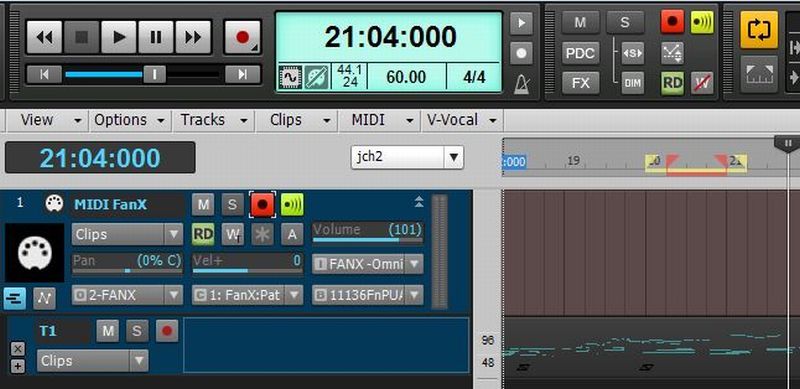
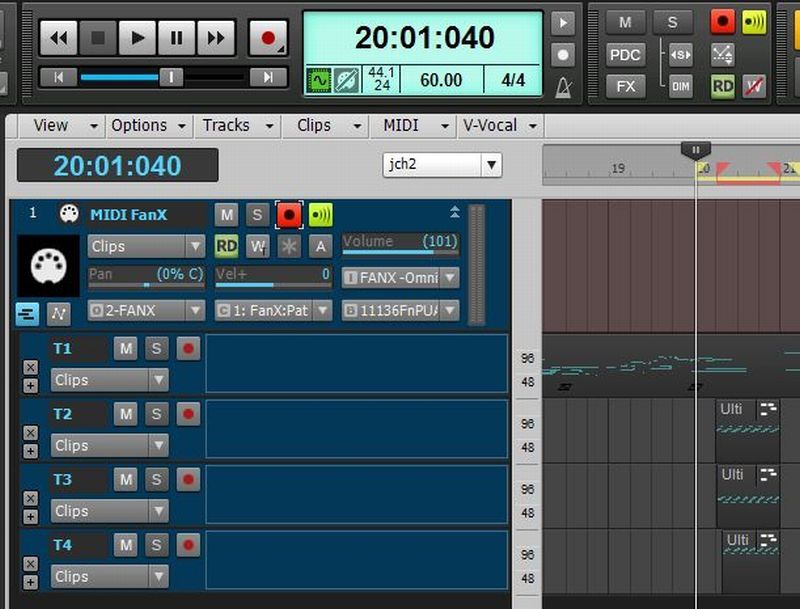
It looks to me like this "arming the take, not the track" approach works exactly the same as just arming the track. Here's what happens either way for me (as in my OP, with same settings as you : As soon as I hit record, the original material (in Take 1) is deleted in the punch time zone (see pics - before and after), and subsequent takes are properly cycled, all previous takes are muted. Just exactly what I want EXCEPT for deleting the original material.
Question - when you do this does the original materila in the punch zone of Take 1 get deleted when you hit Record? If I can get this to NOT happen, I'm golden.
 ] ]
kelsoz Dell Desktop PC / Win7 HomePrem 64 / Core i5 760 (quad, 2.8GHz) / 8GB / 1 TB / E-MU1616 PCI+Realtek PC Audio / Event 6 Pro Monitors / BIAB 2012.5 / Sonar X3c/64 Bld 216
|
Mystic38
Max Output Level: -59 dBFS
- Total Posts : 1622
- Joined: 2010/08/30 17:40:34
- Location: Mystic, CT
- Status: offline
Re:Auto-Punch Loop Recording MIDI From My Hardware Keyboard
2012/10/09 10:37:41
(permalink)
What i see is that if you arm a fresh take lane instead of the track you do not delete prior takes. You do need to mute prior takes though as they will still play.. this does need a bug report.
kelsoz
Question - when you do this does the original materila in the punch zone of Take 1 get deleted when you hit Record? If I can get this to NOT happen, I'm golden.
]
HPE-580T with i7-950, 8G, 1.5T, ATI6850, Win7/64, Motu 828 III Hybrid, Motu Midi Express, Sonar Platinum, Komplete 9, Ableton Live 9 & Push 2, Melodyne Editor and other stuff, KRK VXT8 Monitors Virus Ti2 Polar, Fantom G6, Yamaha S70XS, Novation Nova, Novation Nova II, Korg MS2000, Waldorf Micro Q, NI Maschine Studio, TC-VoiceLive Rack, 2012 Gibson Les Paul Standard, 2001 Gibson Les Paul DC, 1999 Fender Am Hardtail Strat, Fender Blues Jr, Orange TH30/PPC212, Tak EF360GF, one mic, no talent.
|
Mystic38
Max Output Level: -59 dBFS
- Total Posts : 1622
- Joined: 2010/08/30 17:40:34
- Location: Mystic, CT
- Status: offline
Re:Auto-Punch Loop Recording MIDI From My Hardware Keyboard
2012/10/09 14:06:09
(permalink)
For verification, I created an audio track to duplicate the process one would expect in a workflow ie a) record a track b) go oops..and recognise the need to do a punch in, inside a loop as we discuss here c) arm the track, hit record and the punch in region is muted with overlapping takes being in lanes.. d) i note that the muted region of the original take is in fact deleted not muted. So it would appear that behaviour for audio punch in and midi punch in is the same.... which suggests this may not be a midi bug per-se, just the way it is.. I would suggest to either duplicate the track, or select and drag the punch-in region clip to the clipboard, then place it back into a take lane if needed?..
post edited by Mystic38 - 2012/10/09 14:36:23
HPE-580T with i7-950, 8G, 1.5T, ATI6850, Win7/64, Motu 828 III Hybrid, Motu Midi Express, Sonar Platinum, Komplete 9, Ableton Live 9 & Push 2, Melodyne Editor and other stuff, KRK VXT8 Monitors Virus Ti2 Polar, Fantom G6, Yamaha S70XS, Novation Nova, Novation Nova II, Korg MS2000, Waldorf Micro Q, NI Maschine Studio, TC-VoiceLive Rack, 2012 Gibson Les Paul Standard, 2001 Gibson Les Paul DC, 1999 Fender Am Hardtail Strat, Fender Blues Jr, Orange TH30/PPC212, Tak EF360GF, one mic, no talent.
|
kelsoz
Max Output Level: -86 dBFS
- Total Posts : 235
- Joined: 2007/06/16 19:09:06
- Location: Pennsylvania
- Status: offline
Re:Auto-Punch Loop Recording MIDI From My Hardware Keyboard
2012/10/10 08:54:35
(permalink)
Thanks again Mystic38. I think we agree. This seems like a bad feature, but there's a work-around, and, I'll not spend more time on it.
kelsoz Dell Desktop PC / Win7 HomePrem 64 / Core i5 760 (quad, 2.8GHz) / 8GB / 1 TB / E-MU1616 PCI+Realtek PC Audio / Event 6 Pro Monitors / BIAB 2012.5 / Sonar X3c/64 Bld 216
|