karma1959
Max Output Level: -80 dBFS

- Total Posts : 515
- Joined: 2008/10/31 10:56:29
- Location: Brooklyn, NY
- Status: offline
FX button in transport doesn't disable Prochannel effects in some projects
Hi, Is there an easy way to disable all prochannel modules in all tracks - similar to the FX button at the top, which bypasses all effects? I find in large projects with prochannel strips enabled on every track, I incur clicks and pops at low buffer settings when tracking. To get around this, I've manually clicked on the "global on / off" at the top of a bunch of tracks, disabling the pro channel on those until the clicks went away, but I'm guessing there's a much easier way to do this. Thanks Russ
post edited by karma1959 - 2016/05/18 09:30:05
Sonar Platinum x64 on Win10 64, Dell T7400 w/ 8 Xeon cores, 8 Gbyte RAM, 3 hard drives, RME Fireface UFX, UAD-1, Mackie Control, Adam A7X
|
KPerry
Max Output Level: -44 dBFS

- Total Posts : 3120
- Joined: 2011/04/26 15:13:15
- Location: London, UK
- Status: offline

Re: Disable / bypass all Prochannel modules
2016/05/15 15:44:12
(permalink)
Does selecting all tracks (Ctrl-A?) then ctrl-clicking the power button on one PC not disable them on all tracks (quick grouping)?
|
Bristol_Jonesey
Max Output Level: 0 dBFS

- Total Posts : 16775
- Joined: 2007/10/08 15:41:17
- Location: Bristol, UK
- Status: offline
Re: Disable / bypass all Prochannel modules
2016/05/15 15:53:04
(permalink)
The shortcut E disables all active Pro Channels.
I always track with all Fx disabled, avoiding any possibility of pops, clicks, dropouts etc. And it reduces latency considerably.
CbB, Platinum, 64 bit throughoutCustom built i7 3930, 32Gb RAM, 2 x 1Tb Internal HDD, 1 x 1TB system SSD (Win 7), 1 x 500Gb system SSD (Win 10), 2 x 1Tb External HDD's, Dual boot Win 7 & Win 10 64 Bit, Saffire Pro 26, ISA One, Adam P11A,
|
John
Forum Host

- Total Posts : 30467
- Joined: 2003/11/06 11:53:17
- Status: offline
Re: Disable / bypass all Prochannel modules
2016/05/15 16:14:31
(permalink)
There is also the FX button in the Mix Module of the Control Bar.
|
karma1959
Max Output Level: -80 dBFS
- Total Posts : 515
- Joined: 2008/10/31 10:56:29
- Location: Brooklyn, NY
- Status: offline
Re: Disable / bypass all Prochannel modules
2016/05/15 19:27:51
(permalink)
Thanks Jonesy - I'll try that.
John - yes, thanks, I'm already using the FX bypass button, but am looking to also bypass prochannel instances. The FX bypass button only seems to disable FX in the FX bin (for me, at least)
Sonar Platinum x64 on Win10 64, Dell T7400 w/ 8 Xeon cores, 8 Gbyte RAM, 3 hard drives, RME Fireface UFX, UAD-1, Mackie Control, Adam A7X
|
John
Forum Host
- Total Posts : 30467
- Joined: 2003/11/06 11:53:17
- Status: offline
Re: Disable / bypass all Prochannel modules
2016/05/15 19:54:00
(permalink)
It does on mine. I just tested it.
|
Anderton
Max Output Level: 0 dBFS
- Total Posts : 14070
- Joined: 2003/11/06 14:02:03
- Status: offline
Re: Disable / bypass all Prochannel modules
2016/05/16 00:44:01
(permalink)
KPerry
Does selecting all tracks (Ctrl-A?) then ctrl-clicking the power button on one PC not disable them on all tracks (quick grouping)?
It does indeed. The only fine point is you need to do channels and buses independently.
|
karma1959
Max Output Level: -80 dBFS
- Total Posts : 515
- Joined: 2008/10/31 10:56:29
- Location: Brooklyn, NY
- Status: offline
Re: Disable / bypass all Prochannel modules
2016/05/16 11:39:55
(permalink)
John
It does on mine. I just tested it.
John - thanks for testing, very kind of you. I would swear it didn't disable active ProChannel modules on mine, but will doublecheck tonight - maybe I did something wrong or I'm delusional. :)
Sonar Platinum x64 on Win10 64, Dell T7400 w/ 8 Xeon cores, 8 Gbyte RAM, 3 hard drives, RME Fireface UFX, UAD-1, Mackie Control, Adam A7X
|
karma1959
Max Output Level: -80 dBFS
- Total Posts : 515
- Joined: 2008/10/31 10:56:29
- Location: Brooklyn, NY
- Status: offline
Re: Disable / bypass all Prochannel modules
2016/05/17 07:41:39
(permalink)
Did a quick test - it seems the FX button in the transport DOES disable ProChannel effects in one of my projects, but it doesn't in another project.
I haven't tested other projects yet, but any ideas why this would be?
Thanks,
Russ
Sonar Platinum x64 on Win10 64, Dell T7400 w/ 8 Xeon cores, 8 Gbyte RAM, 3 hard drives, RME Fireface UFX, UAD-1, Mackie Control, Adam A7X
|
karma1959
Max Output Level: -80 dBFS
- Total Posts : 515
- Joined: 2008/10/31 10:56:29
- Location: Brooklyn, NY
- Status: offline
Re: Disable / bypass all Prochannel modules
2016/05/18 09:11:28
(permalink)
Bump - any thoughts on below pls?
Did a quick test - it seems the FX button in the transport DOES disable ProChannel effects in one of my projects, but it DOES NOT in another project.
Any ideas why this would be?
Sonar Platinum x64 on Win10 64, Dell T7400 w/ 8 Xeon cores, 8 Gbyte RAM, 3 hard drives, RME Fireface UFX, UAD-1, Mackie Control, Adam A7X
|
John
Forum Host
- Total Posts : 30467
- Joined: 2003/11/06 11:53:17
- Status: offline
Re: Disable / bypass all Prochannel modules
2016/05/19 05:11:25
(permalink)
karma1959
Bump - any thoughts on below pls?
Did a quick test - it seems the FX button in the transport DOES disable ProChannel effects in one of my projects, but it DOES NOT in another project.
Any ideas why this would be?
The FX button is not in the the Transport module. Its in the Mix module. 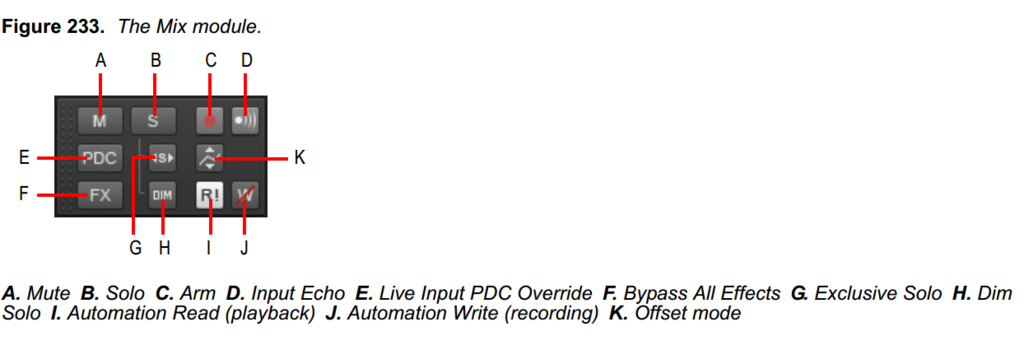
|
karma1959
Max Output Level: -80 dBFS
- Total Posts : 515
- Joined: 2008/10/31 10:56:29
- Location: Brooklyn, NY
- Status: offline
Re: Disable / bypass all Prochannel modules
2016/05/19 09:11:53
(permalink)
John
karma1959
Bump - any thoughts on below pls?
Did a quick test - it seems the FX button in the transport DOES disable ProChannel effects in one of my projects, but it DOES NOT in another project.
Any ideas why this would be?
The FX button is not in the the Transport module. Its in the Mix module.
John - thanks.. yes.. that's the one I'm using. I mistakenly referred to the entire top area as the transport.. It's odd it disables prochannel modules on some projects, but on others, it only disables the prochannel modules on busses, but not on tracks. I'm baffled. Maybe it's corruption in projects, but those projects function fine otherwise.
Sonar Platinum x64 on Win10 64, Dell T7400 w/ 8 Xeon cores, 8 Gbyte RAM, 3 hard drives, RME Fireface UFX, UAD-1, Mackie Control, Adam A7X
|
Bristol_Jonesey
Max Output Level: 0 dBFS
- Total Posts : 16775
- Joined: 2007/10/08 15:41:17
- Location: Bristol, UK
- Status: offline
Re: Disable / bypass all Prochannel modules
2016/05/19 10:14:26
(permalink)
From memory (not at my DAW), pressing E (or clicking the Fx button) will bypass the entire Pro Channel but NOT the individual modules contained inside. Are you sure this is not what you're seeing?
CbB, Platinum, 64 bit throughoutCustom built i7 3930, 32Gb RAM, 2 x 1Tb Internal HDD, 1 x 1TB system SSD (Win 7), 1 x 500Gb system SSD (Win 10), 2 x 1Tb External HDD's, Dual boot Win 7 & Win 10 64 Bit, Saffire Pro 26, ISA One, Adam P11A,
|
karma1959
Max Output Level: -80 dBFS
- Total Posts : 515
- Joined: 2008/10/31 10:56:29
- Location: Brooklyn, NY
- Status: offline
Re: Disable / bypass all Prochannel modules
2016/05/19 10:43:22
(permalink)
Bristol_Jonesey
From memory (not at my DAW), pressing E (or clicking the Fx button) will bypass the entire Pro Channel but NOT the individual modules contained inside. Are you sure this is not what you're seeing?
I'm not in front of my DAW, but what I recall in some projects, it worked fine - clicking "FX" in the mix bar disabled all the prochannels by disabling the button at the top of each prochannel module on every track and bus. To your point, I didn't open up the prochannel to examine each individual effect, but I suspect they correctly disabled, as my CPU usage and latency went way down when the master prochannel button was disabled on each track. However in other projects, when clicking the FX button in the mix bar, it only disabled the master Prochannel on/ off on busses, but not on individual tracks. I haven't tried the E keyboard shortcut, but will try that over the weekend to see if there's a difference in behavior.
Sonar Platinum x64 on Win10 64, Dell T7400 w/ 8 Xeon cores, 8 Gbyte RAM, 3 hard drives, RME Fireface UFX, UAD-1, Mackie Control, Adam A7X
|
azslow3
Max Output Level: -42.5 dBFS

- Total Posts : 3297
- Joined: 2012/06/22 19:27:51
- Location: Germany
- Status: offline
Re: Disable / bypass all Prochannel modules
2016/06/09 02:45:24
(permalink)
☄ Helpfulby tenfoot 2016/06/09 07:59:31
Sonar 8LE -> Platinum infinity, REAPER, Windows 10 pro GA-EP35-DS3L, E7500, 4GB, GTX 1050 Ti, 2x500GB RME Babyface Pro (M-Audio Audiophile Firewire/410, VS-20), Kawai CN43, TD-11, Roland A500S, Akai MPK Mini, Keystation Pro, etc. www.azslow.com - Control Surface Integration Platform for SONAR, ReaCWP, AOSC and other accessibility tools
|
tenfoot
Max Output Level: -53.5 dBFS

- Total Posts : 2186
- Joined: 2015/01/22 18:12:07
- Location: Qld, Australia
- Status: offline
Re: Disable / bypass all Prochannel modules
2016/06/09 03:12:44
(permalink)
I have a couple of projects with this issue as well Russ. I suspect that the link provided by Azslow could well describe the cause in my case. At some stage I bypassed all FX in the Mix module, then reactivated them one by one. I have not tried to reproduce the issue yet, but will when I get a chance.
Bruce. Sonar Platinum 2017-09, Studio One 3.5.3, Win 10 x64, Quad core i7, RME Fireface, Behringer X32 Producer, Behringer X32 Rack, Presonus Faderport, Lemure Software Controller (Android), Enttec DMXIS VST lighting controller, Xtempo POK.
|
Bristol_Jonesey
Max Output Level: 0 dBFS
- Total Posts : 16775
- Joined: 2007/10/08 15:41:17
- Location: Bristol, UK
- Status: offline
Re: Disable / bypass all Prochannel modules
2016/06/09 04:56:32
(permalink)
CbB, Platinum, 64 bit throughoutCustom built i7 3930, 32Gb RAM, 2 x 1Tb Internal HDD, 1 x 1TB system SSD (Win 7), 1 x 500Gb system SSD (Win 10), 2 x 1Tb External HDD's, Dual boot Win 7 & Win 10 64 Bit, Saffire Pro 26, ISA One, Adam P11A,
|
karma1959
Max Output Level: -80 dBFS
- Total Posts : 515
- Joined: 2008/10/31 10:56:29
- Location: Brooklyn, NY
- Status: offline
Re: Disable / bypass all Prochannel modules
2016/06/09 07:30:25
(permalink)
Yes, that's probably what happened. Seems odd behavior - I'd be surprised if this is an intentional design. I'll send a bug report to CW this weekend for them to research further. Thanks again for all your assistance - good to know I'm not completely losing my mind. :)
Sonar Platinum x64 on Win10 64, Dell T7400 w/ 8 Xeon cores, 8 Gbyte RAM, 3 hard drives, RME Fireface UFX, UAD-1, Mackie Control, Adam A7X
|