cdaw01
Max Output Level: -90 dBFS

- Total Posts : 12
- Joined: 2015/01/29 14:15:16
- Status: offline
vsts where are they
Ive about come to the end of my rope. Yous see I bought the IK plugins. No matter what i have set in the preferences (where the Vsts are actually)I cant get any to show when I insert a new interment track. The cakewalk stuff works fine. Each plujgin works buy its self but i can connect that with sonar.
needin help
Jeremy
|
chuckebaby
Max Output Level: 0 dBFS

- Total Posts : 13146
- Joined: 2011/01/04 14:55:28
- Status: offline

Re: vsts where are they
2016/12/25 07:11:15
(permalink)
make sure the plug ins are in the folder that is being scanned (See plug in manager)
if all else fails, run a reset, rescan of the plug in manager.
Windows 8.1 X64 Sonar Platinum x64 Custom built: Asrock z97 1150 - Intel I7 4790k - 16GB corsair DDR3 1600 - PNY SSD 220GBFocusrite Saffire 18I8 - Mackie Control
|
cdaw01
Max Output Level: -90 dBFS
- Total Posts : 12
- Joined: 2015/01/29 14:15:16
- Status: offline
Re: vsts where are they
2016/12/25 07:40:35
(permalink)
These are my file locations:
c:\program files\cakewalk\vstplugins\
c:\program files\vstplugins\
and
c:\program files (X86)\vstplugins\
i get a scan that 93 instruments are found BUT that is not apparently good
|
dwardzala
Max Output Level: -61 dBFS

- Total Posts : 1470
- Joined: 2008/05/26 19:18:33
- Status: offline
Re: vsts where are they
2016/12/25 07:49:32
(permalink)
Can you see the IK plug-in .dll files in one of those folders? If not, you need to add that path to your plug-in manager, reset and rescan your plug-ins.
DaveMain Studio- Core i5 @2.67GHz, 16Gb Ram, (2) 500Gb HDs, (1) 360 Gb HD MotU Ultralite AVB, Axiom 49 Midi Controller, Akai MPD18 Midi Controller Win10 x64 Home Sonar 2017.06 Platinum (and X3e, X2c, X1d) Mobile Studio - Sager NP8677 (i7-6700HQ @2.67MHz, 16G Ram, 250G SSD, 1T HD) M-Box Mini v. 2 Win 10 x64 Home Sonar 2016.10 Platinum Check out my original music: https://soundcloud.com/d-wardzala/sets/d-wardzala-original-music
|
cdaw01
Max Output Level: -90 dBFS
- Total Posts : 12
- Joined: 2015/01/29 14:15:16
- Status: offline
Re: vsts where are they
2016/12/25 07:59:32
(permalink)
All I can do when i insert and instrument is
tts-1
4 front
Applied Acoustics
or
Cakelwalk
but thats it.
|
robert_e_bone
Moderator

- Total Posts : 8968
- Joined: 2007/12/26 22:09:28
- Location: Palatine, IL
- Status: offline
Re: vsts where are they
2016/12/25 08:20:28
(permalink)
You need to locate the actual path to wherever those missing plugins live, and then make sure that the path to those is present (or add it) in the Cakewalk Plugin Manager VST Options Scan Paths.
Then it should automatically find those and make those available to Sonar.
I am thinking they didn't get installed to any of the folders currently in the scanning path that the Plugin Manager has at this time - so by making sure that the actual path to the actual location of those plugins gets added to Plugin Manager.
Bob Bone
Wisdom is a giant accumulation of "DOH!" Sonar: Platinum (x64), X3 (x64) Audio Interfaces: AudioBox 1818VSL, Steinberg UR-22 Computers: 1) i7-2600 k, 32 GB RAM, Windows 8.1 Pro x64 & 2) AMD A-10 7850 32 GB RAM Windows 10 Pro x64 Soft Synths: NI Komplete 8 Ultimate, Arturia V Collection, many others MIDI Controllers: M-Audio Axiom Pro 61, Keystation 88es Settings: 24-Bit, Sample Rate 48k, ASIO Buffer Size 128, Total Round Trip Latency 9.7 ms
|
cdaw01
Max Output Level: -90 dBFS
- Total Posts : 12
- Joined: 2015/01/29 14:15:16
- Status: offline
Re: vsts where are they
2016/12/25 08:22:03
(permalink)
yes they are there /I can see them/ i can scan them/ but that's it> then I insert an instrument don't get them:.
|
cdaw01
Max Output Level: -90 dBFS
- Total Posts : 12
- Joined: 2015/01/29 14:15:16
- Status: offline
Re: vsts where are they
2016/12/25 08:28:30
(permalink)
i went a far as manual dll registraton for "samplemood.dll) that didnt work.
I know this stuff. It should work. but it dont
|
cdaw01
Max Output Level: -90 dBFS
- Total Posts : 12
- Joined: 2015/01/29 14:15:16
- Status: offline
Re: vsts where are they
2016/12/25 08:52:19
(permalink)
a little background
my audio PC
8 core and 64 @4.6Ghz 16GB ram 1.5Tb of hdd
interface tascam us-1200
|
DeeringAmps
Max Output Level: -49 dBFS

- Total Posts : 2614
- Joined: 2005/10/03 10:29:25
- Location: Seattle area
- Status: offline
Re: vsts where are they
2016/12/25 09:02:09
(permalink)
Jeremy,
Q1) you bought the old 32 bit IK synths?
Q2) you are trying to run them in Sonar x64?
You might list your entire system specs, OS, Sonar, etc
T
Tom Deering Tascam FW-1884 User Resources Page Firewire "Legacy" Tutorial, Service Manual, Schematic, and Service Bulletins Win10x64 StudioCat Pro Studio Coffee Lake 8086k 32gb RAM  RME UFX (Audio) Tascam FW-1884 (Control) in Win 10x64 Pro
|
cdaw01
Max Output Level: -90 dBFS
- Total Posts : 12
- Joined: 2015/01/29 14:15:16
- Status: offline
Re: vsts where are they
2016/12/25 09:16:54
(permalink)
i got Studio 3 from ik has some 32s and a few 64sI use Sonar Premium on Windows 10 32 and 64 bit (in 64bit)
Id reformat back to 32bit wn 7 if you think think it would help.
i have vista too.
I can renumber back as far ad Pro Audio ver4 but that was a long time ago
|
chuckebaby
Max Output Level: 0 dBFS
- Total Posts : 13146
- Joined: 2011/01/04 14:55:28
- Status: offline
Re: vsts where are they
2016/12/25 09:19:34
(permalink)
cdaw01
I know this stuff. It should work. but it dont
If you knew this stuff well enough, then you wouldn't be here asking. I know you want to blame the software but don't. There is probably a simple misunderstanding going on. Has this worked in the past ? just start with the basics- 1- you install the plug ins (64 bit or 32 bit would help to know) 2- These plug ins should be in your Cakewalk/Program files/VST plug ins folder. 3- Open up Sonar and go to Preferences 4- Go to VST Plug ins 5- Look at the settings. 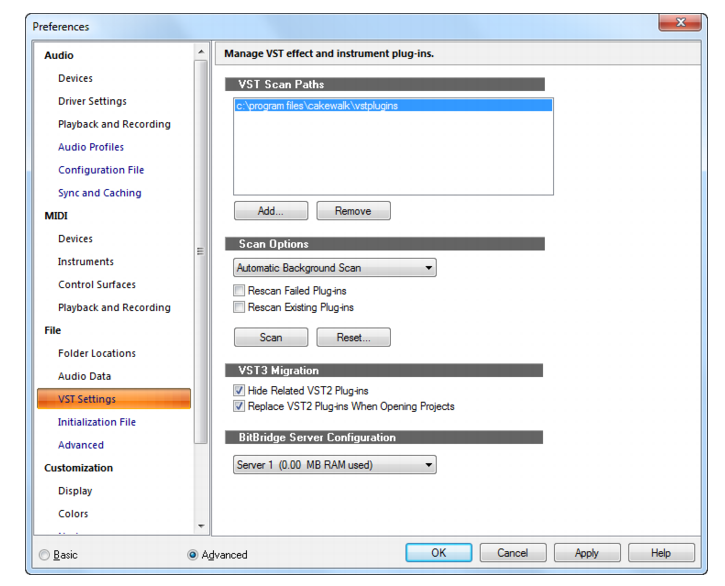 6- Choose Rescan Failed / Rescan existing Plug ins. 7- Click - Scan. 8- If this doesn't do it, try clicking - Reset. IMPORTANT: To use Soft synths, you need to insert them as Insert/Soft synth To use a plug in, you need to click in the FX bin and choose Insert FX Maybe there is a misunderstanding going on here about how to insert a soft synth Vs how to insert an FX.
Windows 8.1 X64 Sonar Platinum x64 Custom built: Asrock z97 1150 - Intel I7 4790k - 16GB corsair DDR3 1600 - PNY SSD 220GBFocusrite Saffire 18I8 - Mackie Control
|
cdaw01
Max Output Level: -90 dBFS
- Total Posts : 12
- Joined: 2015/01/29 14:15:16
- Status: offline
Re: vsts where are they
2016/12/25 09:45:01
(permalink)
I don't come to the usegoup for normal stuff. I only visit when i cant figure something out
Here are my 32s that dont work:
amplitube
csr hall FX
philharmonik
SampleMoog
SampleTank
SampleTron
Sonik Syth
Tracks 3
These are 64bit that dont work:
Amplitube
Tracks 3
I may be totally off the mark but I THOUGHT 32 and 64 bit plugins should work on 64 bit sonar on 64 bit windows
|
Anderton
Max Output Level: 0 dBFS
- Total Posts : 14070
- Joined: 2003/11/06 14:02:03
- Status: offline
Re: vsts where are they
2016/12/25 09:53:46
(permalink)
Not sure about IK, but a lot of companies assume there's a Program Files/Steinberg/VSTplugins folder and install there, create it if it doesn't exist, or create a folder of their own. Doesn't sound that that's what happening if you can see, but I'm wondering which folder you're seeing them in.
That said, a rescan is not enough, you need to do a reset AND rescan. Assuming the folder where the plug-ins reside is in your scan path, that should take care of it.
|
cdaw01
Max Output Level: -90 dBFS
- Total Posts : 12
- Joined: 2015/01/29 14:15:16
- Status: offline
Re: vsts where are they
2016/12/25 10:09:32
(permalink)
just for fun I copied all the dlls to Cakewalk vstiplugins in both 32 and 64 bit respectively. NO change. sill no worky
I did find 12 more plugins same no worky.
thisi s just getting fun.
Maybe ill send my system to cakewalk again
|
cdaw01
Max Output Level: -90 dBFS
- Total Posts : 12
- Joined: 2015/01/29 14:15:16
- Status: offline
Re: vsts where are they
2016/12/25 10:16:08
(permalink)
IK goes to Program files (x86)\vstplugins
or Program Files\vstplugins if Steindberg is not there
all my plugin locations are correctly input.
|
DeeringAmps
Max Output Level: -49 dBFS
- Total Posts : 2614
- Joined: 2005/10/03 10:29:25
- Location: Seattle area
- Status: offline
Re: vsts where are they
2016/12/25 10:16:55
(permalink)
Did he not say that he "knows" where the dll's are, and how to get them scanned?
(looks like I was typing while he posted)
So, here is my experience, I an NOT the norm... but I'm not the only one.
All the IK plugs quit working in Sonar X2 on both my systems x86 and x64.
When they updated TRAckS and Amp3 to 64 bit those 2 worked both x86 and x64 on both systems.
Read that to mean the new x86 dll and the x64 dll worked fine.
Then, Amp3x64 quit working in SONAR somewhere in X3 or early Platinum.
I posted here and at the IK site; Problem Reports, the whole schmear! no joy.
I had to run AMP3x86 with JBridge in SONAR Platx64. Worked fine in SONAR x86, both systems.
Amp4 works fine.
SampleTank 3 fine; but not the VST3 version.
Jeremy, if you want to get the "old" synths working I would try JBridge.
Can I verify that "samplemoog" for instance will work, NO!
I just used JBridge to run Amp3.
Of course all the advice above is worth a try.
But if/when all else fails...
HTH,
T
Tom Deering Tascam FW-1884 User Resources Page Firewire "Legacy" Tutorial, Service Manual, Schematic, and Service Bulletins Win10x64 StudioCat Pro Studio Coffee Lake 8086k 32gb RAM RME UFX (Audio) Tascam FW-1884 (Control) in Win 10x64 Pro
|
cdaw01
Max Output Level: -90 dBFS
- Total Posts : 12
- Joined: 2015/01/29 14:15:16
- Status: offline
Re: vsts where are they
2016/12/25 10:26:44
(permalink)
Im gonna get a new hard disk and play with 32bit win 7. This window 10 install is otherwise working well
|
Sanderxpander
Max Output Level: -36.5 dBFS

- Total Posts : 3873
- Joined: 2013/09/30 10:08:24
- Status: offline
Re: vsts where are they
2016/12/25 10:30:09
(permalink)
Are you using a custom plugin layout?
|
DeeringAmps
Max Output Level: -49 dBFS
- Total Posts : 2614
- Joined: 2005/10/03 10:29:25
- Location: Seattle area
- Status: offline
Re: vsts where are they
2016/12/25 10:34:26
(permalink)
"Im gonna get a new hard disk and play with 32bit win 7"
I'm not running Win 10, but I don't think that's the issue here.
Way cheaper to install JBridge and give that a run.
And please add your system specs to your signature, it really makes it easier for those trying to help.
Just my nickel98, free advice; you know....
T
Tom Deering Tascam FW-1884 User Resources Page Firewire "Legacy" Tutorial, Service Manual, Schematic, and Service Bulletins Win10x64 StudioCat Pro Studio Coffee Lake 8086k 32gb RAM RME UFX (Audio) Tascam FW-1884 (Control) in Win 10x64 Pro
|
cdaw01
Max Output Level: -90 dBFS
- Total Posts : 12
- Joined: 2015/01/29 14:15:16
- Status: offline
Re: vsts where are they
2016/12/25 10:34:31
(permalink)
No. Im factory fresh
i just wan to get them working
|
DeeringAmps
Max Output Level: -49 dBFS
- Total Posts : 2614
- Joined: 2005/10/03 10:29:25
- Location: Seattle area
- Status: offline
Re: vsts where are they
2016/12/25 10:47:44
(permalink)
Hold on! SONAR Plat 2016.11 or .12? Open the Browser "B". Go to views insert "Synth Rack" 2016.10 the rack will be visible in the browser Hit the "+" then "Plug-in Layouts" un-check the sort by  now see if your synths show up. if not re-scan The Bakers keep changing things to keep old farts like me and our ol'pal on our toes. T
Tom Deering Tascam FW-1884 User Resources Page Firewire "Legacy" Tutorial, Service Manual, Schematic, and Service Bulletins Win10x64 StudioCat Pro Studio Coffee Lake 8086k 32gb RAM RME UFX (Audio) Tascam FW-1884 (Control) in Win 10x64 Pro
|
chuckebaby
Max Output Level: 0 dBFS
- Total Posts : 13146
- Joined: 2011/01/04 14:55:28
- Status: offline
Re: vsts where are they
2016/12/25 10:50:35
(permalink)
Windows 8.1 X64 Sonar Platinum x64 Custom built: Asrock z97 1150 - Intel I7 4790k - 16GB corsair DDR3 1600 - PNY SSD 220GBFocusrite Saffire 18I8 - Mackie Control
|
JohanSebatianGremlin
Max Output Level: -82 dBFS

- Total Posts : 402
- Joined: 2016/03/17 22:27:15
- Status: offline
Re: vsts where are they
2016/12/25 11:21:47
(permalink)
Can you clarify a bit more please? Is the problem that you can't plugins to show up in the list in browser? Or is the problem that they show up, but won't load when you click on them?
If gear was the determining factor, we would all have a shelf full of Grammies and a pocket full of change. -microapp i7, 32gb RAM, Win10 64bit, RME UFX
|
scook
Forum Host

- Total Posts : 24146
- Joined: 2005/07/27 13:43:57
- Location: TX
- Status: offline
Re: vsts where are they
2016/12/25 13:46:10
(permalink)
|