Tony,
Let's try this one step at a time.
First of all, let's establish which input, or inputs you will be using on your R16. In fact, let's push the envelope a bit, and assume that you want to record drums to four tracks, like so:-
Two overheads, input 1 and 2
Kick, input 3
Snare, input 4
Before I even think of X1, I will set the trim levels on the R16.
Next, I'll set up the audio tracks in X1, onto which I will record the drum parts. And I will do that in a brand new blank Project (I actually create a Blank Cakewalk Template file that creates a new project with no tracks set up). Now, what I am about to show you may not be exactly what the experts do, but it works for me, generally, and it allows me to show you how to set up a mixture of mono and stereo audio tracks.
First off, I am going to record the overheads to a stereo track. Admittedly, not the best way perhaps, but stay with me for the moment. In Track View, I right click and select "Insert Audio Track" from the pop up menu.
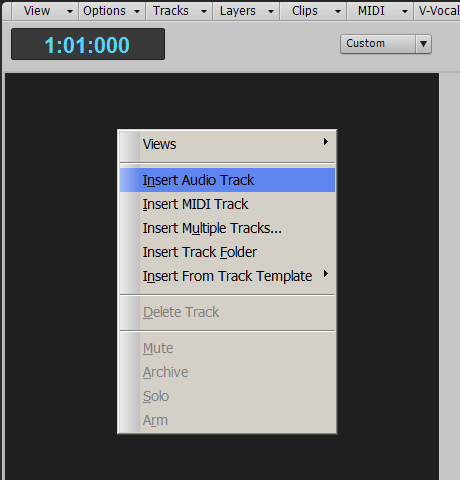
By default, I will get a new Audio Track:-

As you can see, Output is set to "Master" by default, and Input is set to "-None-." Also, the little graphic in the top left hand corner, to the right of the track number, shows a crude, single waveform, and this denotes that the audio track is currently a "mono" track. I am now going to change the name of the track to "Drum Overheads" by double clicking on the current name, and then set the Input source to my desired QUAD-CAPTURE inputs by clicking on the down arrow of the Input menu and selecting the "Stereo QUAD-CAPTURE 1-2" input (and the process will be the same for your R16).
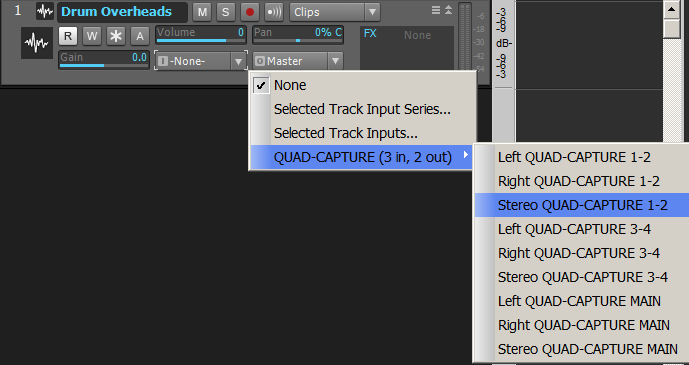
The finished set-up track will now look like this:-

Note that the little icon next to the track number has changed to two crude waveforms and that denotes that the track is now a stereo audio track. That happened purely because I chose a stereo input as the input source.
I am now going to repeat the process for the next track, which will be for the kick drum mic. That particular mic is plugged into the third input channel of my audio interface, and I will select it the same as before. It will be a mono audio track:-
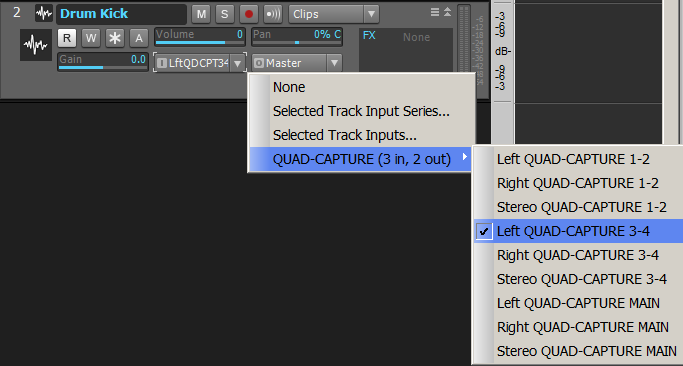
And the same again for the Snare, only this time I'll select the last remaining input channel of my interface.
So, my finished track set-up will look like this:-
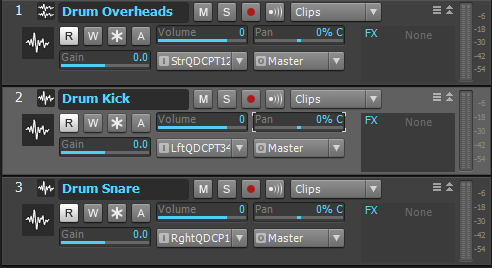
I could, at this point, create a Folder, call it Drums, and place my three tracks into the folder, just to tidy things up a bit. But I will leave that for another time.
And that's about as far as I can go for the moment. I do not have a real drum kit set up at the moment, so I cannot demonstrate the next stages. But what I am hoping I have done here is at least made sure that we are not getting our wires crossed while setting up the basic tracks onto which we need to record.
If you are already doing the above, and are still experiencing problems, that I am not sure what else I can do to help, other than set up some kind of remote desktop connection thing, where I log onto your desktop and see what you are doing...