RTGraham
Max Output Level: -57 dBFS

- Total Posts : 1824
- Joined: 2004/03/29 20:17:13
- Location: New York
- Status: offline

Does 8.5.2 Fix Delete Hole / Envelope Automation? - EXAMPLE POSTED
EDIT: See post #11 for an example project for download, and screencaps. ORIGINAL POST: In 8.5.2, is the longstanding issue with the way edit commands affect automation envelopes (especially bus envelopes) fixed? For example, here's what I've seen in the past - and other users' posts indicating that this was not fixed in versions 7 or 8 are the main reason I'm still running version 6: 1) Create a high-track-count project with extensive volume, panning, and FX send automation on multiple tracks and multiple busses 2) Ctrl-A to select the whole project 3) Click-and-drag in the timeline to specify a time range (or type values into the selection toolbar) 4) Edit -> Delete - make sure "Delete Hole" is checked - make sure all selectable items (clips, markers, tempo, envelopes, etc.) are checked Does SONAR properly take a chunk of time out of the project, leaving everything before and after the edit point unaltered? In my experience in the past, automation envelopes (especially on busses) would be extremely unpredictable after this edit operation. Can someone test this? I'd really like to know if it's finally fixed. Thanks. P.S. - yes, I've submitted problem reports about it in the past.
post edited by RTGraham - 2009/12/20 20:19:30
~~~~~~~~~~ Russell T. Graham Keys, Vocals, Songwriting, Production russell DOT graham AT rtgproductions DOT com www DOT myspace DOT com SLASH russelltgraham
|
RTGraham
Max Output Level: -57 dBFS
- Total Posts : 1824
- Joined: 2004/03/29 20:17:13
- Location: New York
- Status: offline

Re:Does 8.5.2 Fix...
2009/12/15 11:55:24
(permalink)
BUMP!
Any chance someone could check this behavior in 8.5.2 and post back?
~~~~~~~~~~ Russell T. Graham Keys, Vocals, Songwriting, Production russell DOT graham AT rtgproductions DOT com www DOT myspace DOT com SLASH russelltgraham
|
Blades
Max Output Level: -43 dBFS

- Total Posts : 3246
- Joined: 2003/11/06 08:22:52
- Location: Georgia
- Status: offline
Re:Does 8.5.2 Fix...
2009/12/15 15:30:42
(permalink)
Russell,
Not sure I have a taxing enough project with enough envelopes to repro what you are talking about. I took a project of mine, added a number of volume and pan envelopes, did the select everything, then limit to a time period (3 measures in this case), dod a cut with everything selected that I could select, said to delete the hole and everything went where I was expecting it to.
Do have a pet project that you could upload somewhere?
|
cyberzip
Max Output Level: -78 dBFS

- Total Posts : 613
- Joined: 2003/11/12 13:09:45
- Location: Sweden
- Status: offline
Re:Does 8.5.2 Fix...
2009/12/15 15:33:15
(permalink)
This very issue is making me tear my hair (and has been, for years)!  I am currently trying to cut down a long dance track to a short radio remix, but frankly, it's a pain in the a** because of the bus envelope issues. I can't understand why this isn't bugging a lot of people? Don't people ever re-arrange their tracks? Move parts? Sorry for the rant, I feel better now. :) Thanks for taking it up RTGraham! Please keep this bumped.
post edited by cyberzip - 2009/12/15 15:37:17
|
bapu
Max Output Level: 0 dBFS

- Total Posts : 86000
- Joined: 2006/11/25 21:23:28
- Location: Thousand Oaks, CA
- Status: offline
Re:Does 8.5.2 Fix...
2009/12/15 16:32:20
(permalink)
Don't people ever re-arrange their tracks? Usually no. But I would think that if and when I do, it would be long before I added envelopes. Move parts? See above answer. I can see how some people want to write, arrange, record, re-arrange, mix and master as if it it is one big task with no delineation. I am of the opionion that each stage has a delineation (rarely to be returned to). Write/Compose Arrange Record Mix Master Mind you, I am *not* recording other artists work. I work in an online collaboration environment so the band knows what the arrangement is before we record our parts. Today we have one song that is to be re-arranged. Fortunately all that was laid down was the guitars, bass and scratch drums. I'll get new guitars and scratch drums and then record my bass. Then the arrangement is off to the rest of the band to be 'cooked'. So no, this bug is *not* bugging me.
|
cyberzip
Max Output Level: -78 dBFS
- Total Posts : 613
- Joined: 2003/11/12 13:09:45
- Location: Sweden
- Status: offline
Re:Does 8.5.2 Fix...
2009/12/15 16:46:20
(permalink)
bapu
I can see how some people want to write, arrange, record, re-arrange, mix and master as if it it is one big task with no delineation.
So no, this bug is *not* bugging me.
I hear ya. :) I'm probably a worst case scenario, where I work with my tracks as "one big task" and I often want/need to remix them. There are inconsistencies that should affect most people now and then though. For example: - Selecting From & Thru time using the mouse vs. clicking Set From/Thru buttons in the toolbar gives entirely different results with the selection of bus envelopes.
- Sometimes entire bus envelopes get deleted when only a few nodes in them were selected and you select Delete.
I'm glad you're using a workflow where you're not affected! :)
post edited by cyberzip - 2009/12/15 16:50:56
|
Tom Riggs
Max Output Level: -57.5 dBFS

- Total Posts : 1752
- Joined: 2003/11/08 22:47:26
- Location: Displaced Kansan living in Philippines
- Status: offline
Re:Does 8.5.2 Fix...
2009/12/15 16:56:18
(permalink)
cyberzip
This very issue is making me tear my hair (and has been, for years)!
I am currently trying to cut down a long dance track to a short radio remix, but frankly, it's a pain in the a** because of the bus envelope issues. I can't understand why this isn't bugging a lot of people? Don't people ever re-arrange their tracks? Move parts?
Sorry for the rant, I feel better now. :) Thanks for taking it up RTGraham! Please keep this bumped.
If the mix is already the way you want it why not export the whole thing to an audio file....import that into a new project and the slice and dice to you hearts content.
i7-3770k OC at 4.5Ghz, asus p8z77-m, 16g g.skill aries 1600 c9 ram, Noctua d-14 cooler, RME HDSPe Raydat, Motu FastLane, Nvidea GTX 980 ti 6G, windows 7 and 8.1 pro x64. Sonar Platinum and x3e currently installed My Music My YouTube
|
RTGraham
Max Output Level: -57 dBFS
- Total Posts : 1824
- Joined: 2004/03/29 20:17:13
- Location: New York
- Status: offline
Re:Does 8.5.2 Fix...
2009/12/15 18:02:15
(permalink)
Blades
Do have a pet project that you could upload somewhere?
Probably. It might take a couple of days for me to locate, prep, and upload it though (and I would need to come up with a space to upload it to). I wonder if it might be feasible to do it without the audio data, and just tell SONAR to skip missing files at the other end. bapu
Don't people ever re-arrange their tracks?
Usually no. But I would think that if and when I do, it would be long before I added envelopes.
Move parts?
See above answer.
Actually, my "typical" scenario for needing to do this is when dealing with a song that has a "full" version and also an "edited" version (i.e. a shortened Radio or Internet edit). I need to get the full mix correct, but then trim out a piece of it. Tom Riggs
If the mix is already the way you want it why not export the whole thing to an audio file....import that into a new project and the slice and dice to you hearts content.
The problem with doing this for a shortened edited version of a song is that sometimes the most seamless transitions come from creating different edit points from track to track or from bus to bus. The best edit point for the strings (to avoid having it sound like an edit) might be in a different place from the best edit point for the vocals, or the crash cymbal, etc. For the time being my workaround has been to render stems, import them into a new project, and edit the stems as needed. But it shouldn't be necessary. As I've stated before, this is the main reason I'm still using SONAR 6. If it's not fixed in newer versions, why should I upgrade? The Cakewalk folks have, at this point, lost two upgrades worth of my money. If someone can conclusively state that it's fixed in 8.5.2, I'll go ahead and upgrade. Otherwise, I don't want to deal with changing my configuration. EDIT TO ADD: By the way, thanks for chiming in on this, folks. It's reassuring to at least know that I'm not the only one posting in this thread.
post edited by RTGraham - 2009/12/15 18:06:46
~~~~~~~~~~ Russell T. Graham Keys, Vocals, Songwriting, Production russell DOT graham AT rtgproductions DOT com www DOT myspace DOT com SLASH russelltgraham
|
tarsier
Max Output Level: -45 dBFS

- Total Posts : 3029
- Joined: 2003/11/07 11:51:35
- Location: 6 feet under
- Status: offline
Re:Does 8.5.2 Fix...
2009/12/16 16:24:22
(permalink)
This very issue is making me tear my hair (and has been, for years)! Me too. We do a bunch of sound for video. We often get updates to the video where (for example) 5 frames are cut here... 15 frames cut there... 8 frames added there... 12 seconds of new stuff over there.. All those edits have been well documented for us so it should be a simple matter for me to make the same changes in the Sonar project, right? Wrong. It's just painful and I have to be super cautious to not screw up the mix. Sure it would be nice to have picture/edit lock before we get it for the soundtrack but that's a pipe dream. I really should change to another DAW for my soundtrack work but that opens a whole nother set of problems...
|
tarsier
Max Output Level: -45 dBFS
- Total Posts : 3029
- Joined: 2003/11/07 11:51:35
- Location: 6 feet under
- Status: offline
Re:Does 8.5.2 Fix...
2009/12/16 16:30:45
(permalink)
I can see how some people want to write, arrange, record, re-arrange, mix and master as if it it is one big task with no delineation. I am of the opionion that each stage has a delineation (rarely to be returned to). Write/Compose Arrange Record Mix Master I would love to work that way. But there's no chance, it's just not realistic for the work I do. Once a project's been created it can be in any one of those stages at any time. Yes, I might be having to "master" when "writing" so as not to present the producer with something crappy that he would either fall in love with, or on the flip side wonder why is he paying me to produce that horrible sounding scratch track? Sonar could make it easy, but it's not. I can dream of a world with nicely delineated stages of audio production, but they sure don't exist in my reality.
|
RTGraham
Max Output Level: -57 dBFS
- Total Posts : 1824
- Joined: 2004/03/29 20:17:13
- Location: New York
- Status: offline
Re:Does 8.5.2 Fix Delete Hole / Envelope Automation?
2009/12/20 20:17:45
(permalink)
Alright, I've finally gotten it together to post an example project and some screencaps. The SONAR project seen in these screencaps is available for download (temporarily) at THIS LINK. The download password is SONARTest (case-sensitive). The ZIP archive contains the SONAR project file and the Audio folder. The Audio folder contains only two files - a stereo modulated noise file, and a mono modulated noise file. (I replaced all audio in the original project with noise, to make the example ZIP as compact as possible.) The project and the screencaps reflect editing taking place in SONAR 6. What I'm hoping for, is that someone will open this project in SONAR 8.5.2, repeat this series of editing steps, and post back here stating whether the end results are correct (as in my "Mockup" screencap below), or incorrect (as in my "Actual" screencap below). Here are the steps: 1) Open the project. 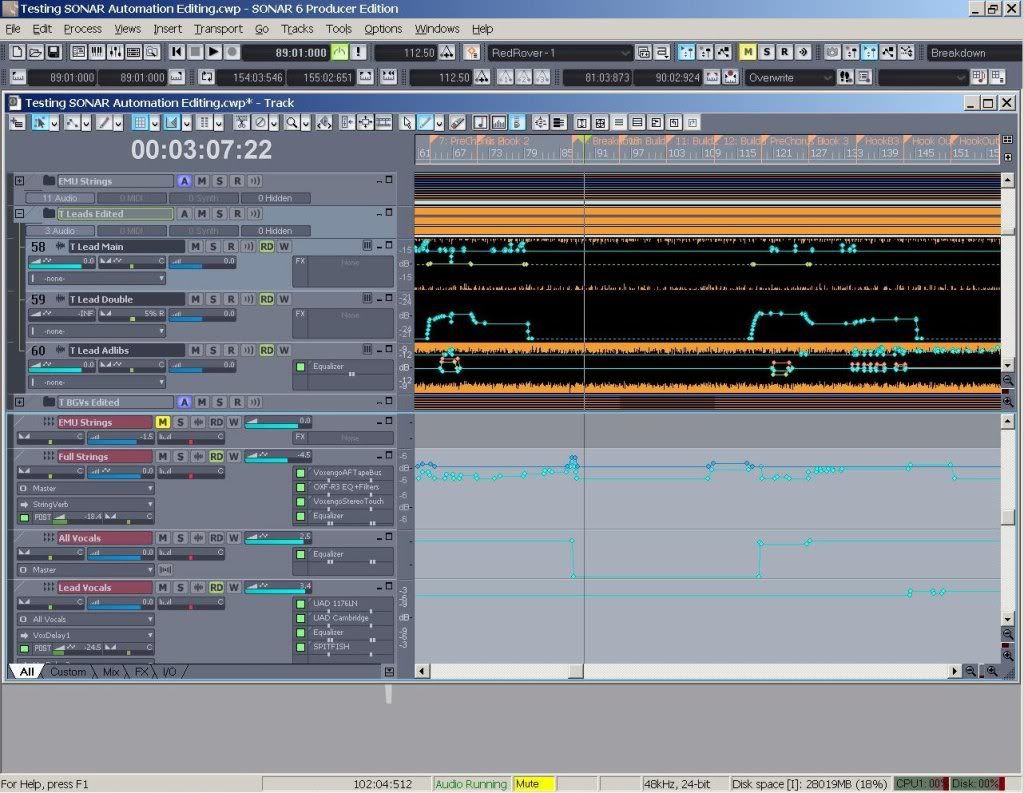 2) Select the desired section of the project for editing, including the bus pane. NOTE THAT TO INCLUDE ALL BUSES IN THE SELECTION, I NEEDED TO FIRST CTRL-A TO SELECT ALL, THEN TYPE THE DESIRED SELECTION POINTS (in this case measure 95 through measure 111) INTO THE TOOLBAR. This way the bus-pane-selection is preserved; clicking in the timeline deselects the buses. 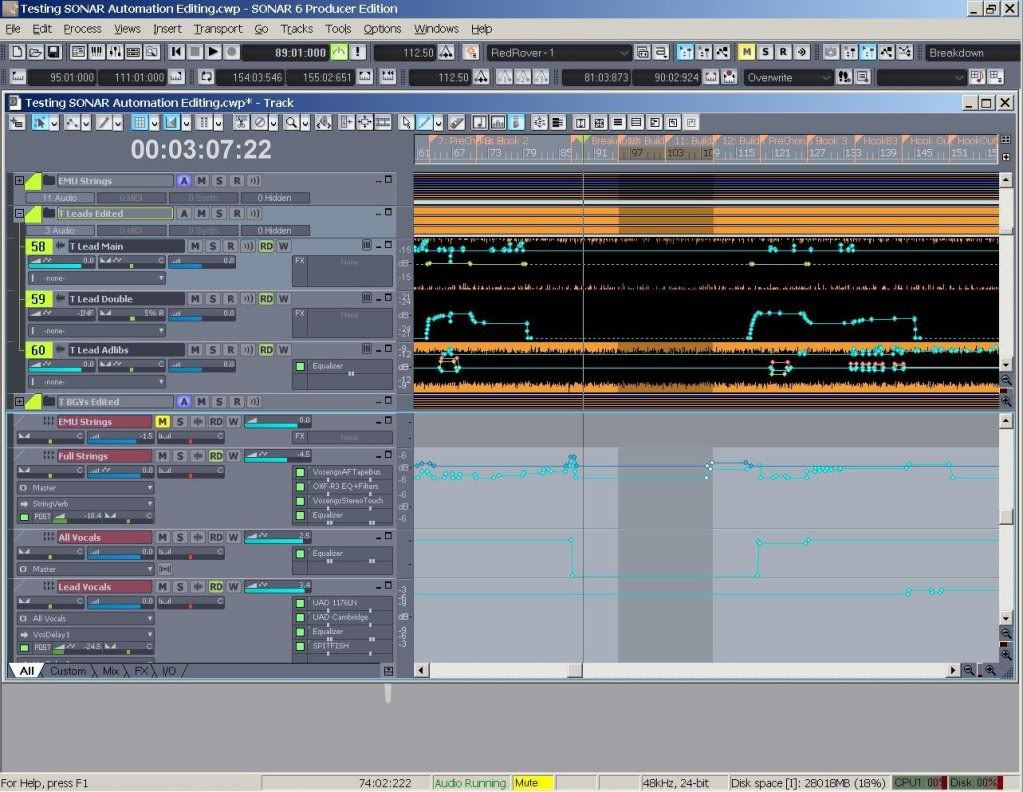 3) Edit -> Delete. Make sure to select all elements including automation, and "Delete Hole." 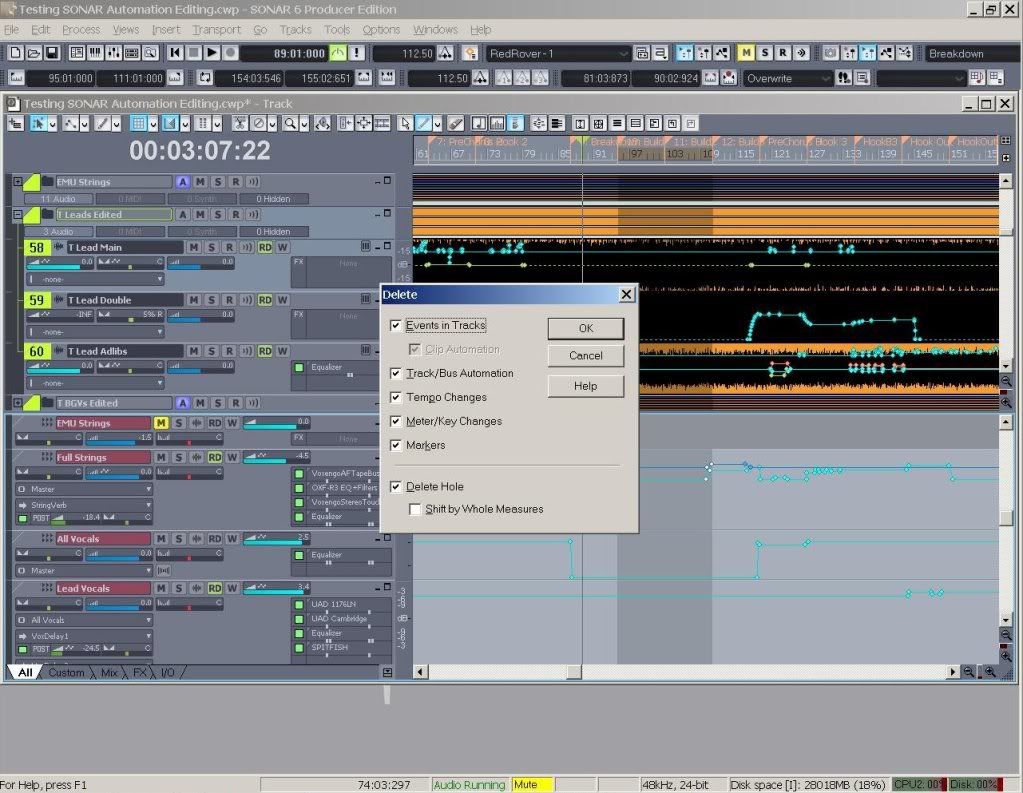 4) Here is what the results SHOULD look like. The automation envelopes on each side of the edit - and pay special attention to the bus envelopes - should retain their relative shapes. This is an edited image to illustrate the desired results. 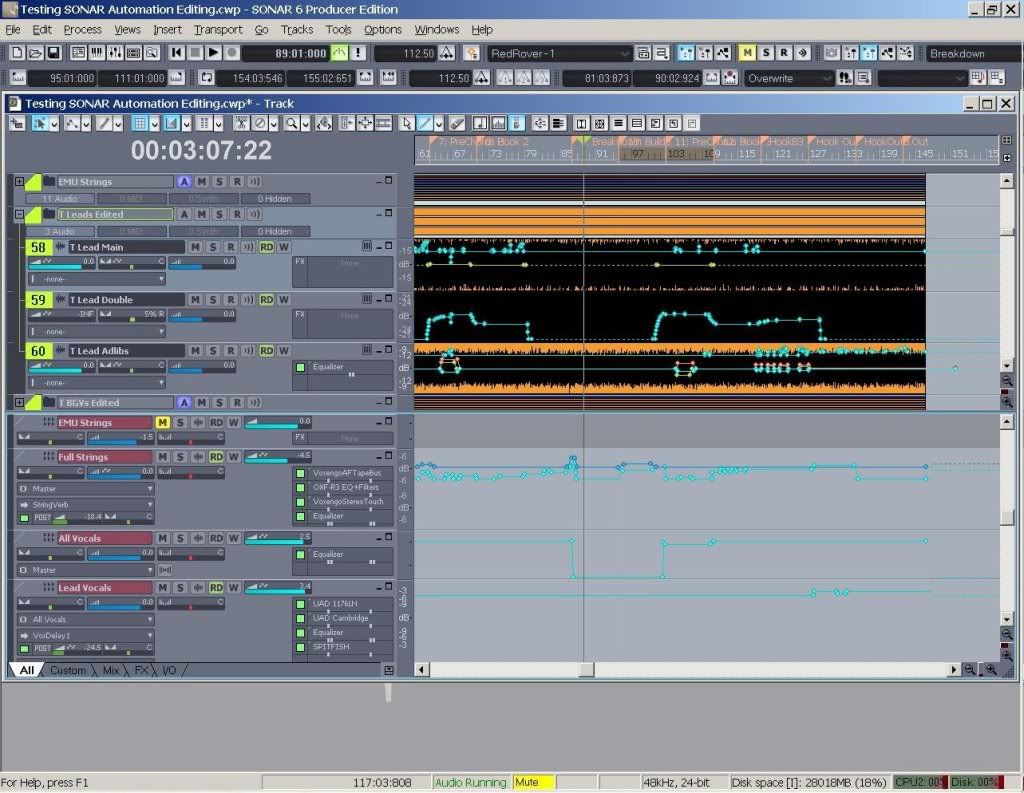 5) Here are the ACTUAL results. Note how the bus envelopes fail to preserve their shapes after the edit. This makes it impossible to take a complex finished mix and do a song-section-deletion (i.e. for a shortened version of a song). 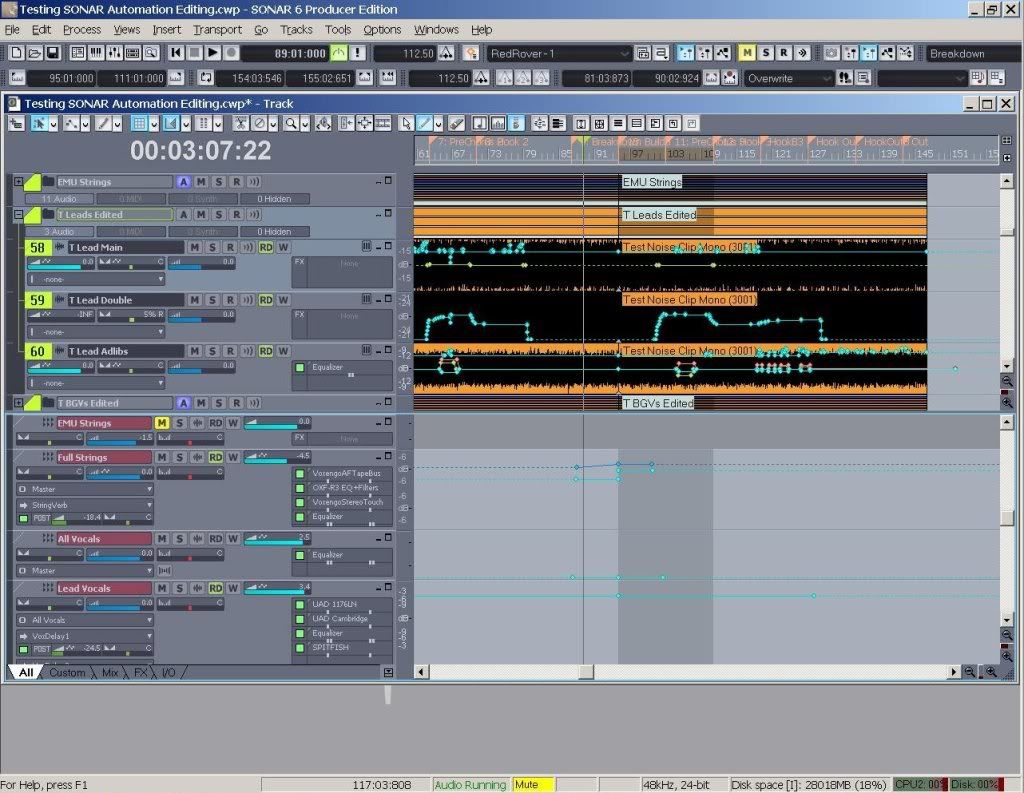 To anyone who undertakes recreating these steps with the example project: thanks so much for taking the time. I look forward to finding out your results. To anyone who questions why this type of edit should be necessary when you're already this far into a mix: sometimes a client will decide that their song is too long, and the musical interlude (or some other section) should be shortened, and they want to hear the edit NOW, not after you print all the stems, edit them, and reprint the shortened mix. (Edited to add previously-omitted download password)
post edited by RTGraham - 2009/12/20 20:35:54
~~~~~~~~~~ Russell T. Graham Keys, Vocals, Songwriting, Production russell DOT graham AT rtgproductions DOT com www DOT myspace DOT com SLASH russelltgraham
|
brundlefly
Max Output Level: 0 dBFS

- Total Posts : 14250
- Joined: 2007/09/14 14:57:59
- Location: Manitou Spgs, Colorado
- Status: offline
Re:Does 8.5.2 Fix Delete Hole / Envelope Automation?
2009/12/20 20:23:52
(permalink)
Password for download? Edit: Since I can't get the download for the time being, I added a bus envelope to an existing projec't and deleted a chunk from the middle. Seemed to work okay. The bus gain envelope was in the the process of fading in through the part that I deleted, and SONAR kindly inserted two new nodes to make the jump necessary to accommodat ethe deletion. Not bad. Remains to be seen whether this works in your test scenario.
post edited by brundlefly - 2009/12/20 20:39:19
SONAR Platinum x64, 2x MOTU 2408/PCIe-424 (24-bit, 48kHz) Win10, I7-6700K @ 4.0GHz, 24GB DDR4, 2TB HDD, 32GB SSD Cache, GeForce GTX 750Ti, 2x 24" 16:10 IPS Monitors
|
brundlefly
Max Output Level: 0 dBFS
- Total Posts : 14250
- Joined: 2007/09/14 14:57:59
- Location: Manitou Spgs, Colorado
- Status: offline
Re:Does 8.5.2 Fix Delete Hole / Envelope Automation?
2009/12/20 20:33:48
(permalink)
TYPE THE DESIRED SELECTION POINTS (in this case measure 95 through measure 111) INTO THE TOOLBAR. This way the bus-pane-selection is preserved; clicking in the timeline deselects the buses. Incidentally, I discovered that it's only dragging in the timesline that deselects the bus. Clicking in the timeline and using F9 to set From and F10 to set Thru works okay.
SONAR Platinum x64, 2x MOTU 2408/PCIe-424 (24-bit, 48kHz) Win10, I7-6700K @ 4.0GHz, 24GB DDR4, 2TB HDD, 32GB SSD Cache, GeForce GTX 750Ti, 2x 24" 16:10 IPS Monitors
|
RTGraham
Max Output Level: -57 dBFS
- Total Posts : 1824
- Joined: 2004/03/29 20:17:13
- Location: New York
- Status: offline
Re:Does 8.5.2 Fix Delete Hole / Envelope Automation?
2009/12/20 20:34:30
(permalink)
brundlefly
Password for download?
Argh. Figures I would leave out a detail. The download password is SONARTest (case-sensitive).
~~~~~~~~~~ Russell T. Graham Keys, Vocals, Songwriting, Production russell DOT graham AT rtgproductions DOT com www DOT myspace DOT com SLASH russelltgraham
|
RTGraham
Max Output Level: -57 dBFS
- Total Posts : 1824
- Joined: 2004/03/29 20:17:13
- Location: New York
- Status: offline
Re:Does 8.5.2 Fix Delete Hole / Envelope Automation?
2009/12/20 20:36:38
(permalink)
brundlefly
TYPE THE DESIRED SELECTION POINTS (in this case measure 95 through measure 111) INTO THE TOOLBAR. This way the bus-pane-selection is preserved; clicking in the timeline deselects the buses.
Incidentally, I discovered that it's only dragging in the timesline that deselects the bus. Clicking in the timeline and using F9 to set From and F10 to set Thru works okay.
Interesting, and useful. Thanks for the tip.
~~~~~~~~~~ Russell T. Graham Keys, Vocals, Songwriting, Production russell DOT graham AT rtgproductions DOT com www DOT myspace DOT com SLASH russelltgraham
|
brundlefly
Max Output Level: 0 dBFS
- Total Posts : 14250
- Joined: 2007/09/14 14:57:59
- Location: Manitou Spgs, Colorado
- Status: offline
Re:Does 8.5.2 Fix Delete Hole / Envelope Automation?
2009/12/20 20:58:51
(permalink)
Bad news RT: I get the same result on the All Vocals and All Strings bus envelopes that I see in your screenshot of the failed result. I'll play around a little, but it doesn't look good at this point.  Edit: This is with 32-bit SONAR 8.5.2 on XP SP3.
post edited by brundlefly - 2009/12/20 21:00:08
SONAR Platinum x64, 2x MOTU 2408/PCIe-424 (24-bit, 48kHz) Win10, I7-6700K @ 4.0GHz, 24GB DDR4, 2TB HDD, 32GB SSD Cache, GeForce GTX 750Ti, 2x 24" 16:10 IPS Monitors
|
RTGraham
Max Output Level: -57 dBFS
- Total Posts : 1824
- Joined: 2004/03/29 20:17:13
- Location: New York
- Status: offline
Re:Does 8.5.2 Fix Delete Hole / Envelope Automation?
2009/12/20 21:16:08
(permalink)
brundlefly
Bad news RT: I get the same result on the All Vocals and All Strings bus envelopes that I see in your screenshot of the failed result. I'll play around a little, but it doesn't look good at this point.
Edit: This is with 32-bit SONAR 8.5.2 on XP SP3.
Bummer. However, since this now appears to be a problem that has persisted through 6, 7, 8, and 8.5, perhaps if I submit a new Problem Report (pointing to this thread), it might get taken care of.
~~~~~~~~~~ Russell T. Graham Keys, Vocals, Songwriting, Production russell DOT graham AT rtgproductions DOT com www DOT myspace DOT com SLASH russelltgraham
|
tarsier
Max Output Level: -45 dBFS
- Total Posts : 3029
- Joined: 2003/11/07 11:51:35
- Location: 6 feet under
- Status: offline
Re:Does 8.5.2 Fix Delete Hole / Envelope Automation?
2009/12/21 10:58:45
(permalink)
To anyone who undertakes recreating these steps with the example project: thanks so much for taking the time. I look forward to finding out your results. To anyone who undertakes recreating these steps with the example project: thanks so much for taking the time. I look forward to finding out your results. I gave it a shot, and the results were even worse than what you got! The bus envelopes completely flatlined! Sorry, no screenshot, but I was left with only a few nodes on each bus envelope, all at the same amplitude. I tried on a brand new empty project with one bus and one bus envelope with lots of curviness and nodes. I did a delete hole in a small 1 measure area, and the envelope flatlined again with just a few nodes.
|
RTGraham
Max Output Level: -57 dBFS
- Total Posts : 1824
- Joined: 2004/03/29 20:17:13
- Location: New York
- Status: offline
Re:Does 8.5.2 Fix Delete Hole / Envelope Automation?
2009/12/21 15:37:01
(permalink)
tarsier
To anyone who undertakes recreating these steps with the example project: thanks so much for taking the time. I look forward to finding out your results.
To anyone who undertakes recreating these steps with the example project: thanks so much for taking the time. I look forward to finding out your results.
I gave it a shot, and the results were even worse than what you got! The bus envelopes completely flatlined! Sorry, no screenshot, but I was left with only a few nodes on each bus envelope, all at the same amplitude.
I tried on a brand new empty project with one bus and one bus envelope with lots of curviness and nodes. I did a delete hole in a small 1 measure area, and the envelope flatlined again with just a few nodes.
This was in 8.5.2?
~~~~~~~~~~ Russell T. Graham Keys, Vocals, Songwriting, Production russell DOT graham AT rtgproductions DOT com www DOT myspace DOT com SLASH russelltgraham
|
tarsier
Max Output Level: -45 dBFS
- Total Posts : 3029
- Joined: 2003/11/07 11:51:35
- Location: 6 feet under
- Status: offline
Re:Does 8.5.2 Fix Delete Hole / Envelope Automation?
2009/12/21 15:39:10
(permalink)
This was in 8.5.2? Sorry, yes, forgot to mention that. It was in 8.5.2.222
|
RTGraham
Max Output Level: -57 dBFS
- Total Posts : 1824
- Joined: 2004/03/29 20:17:13
- Location: New York
- Status: offline
Re:Does 8.5.2 Fix Delete Hole / Envelope Automation?
2009/12/21 16:15:50
(permalink)
tarsier
This was in 8.5.2?
Sorry, yes, forgot to mention that. It was in 8.5.2.222
Alrighty! Navigating to the problem reporter page now. Thanks so much for confirming.
~~~~~~~~~~ Russell T. Graham Keys, Vocals, Songwriting, Production russell DOT graham AT rtgproductions DOT com www DOT myspace DOT com SLASH russelltgraham
|
pcuser32
Max Output Level: -90 dBFS

- Total Posts : 40
- Joined: 2008/10/15 23:39:09
- Status: offline
Re:Does 8.5.2 Fix Delete Hole / Envelope Automation?
2009/12/22 09:30:39
(permalink)
I ran rtgraham's test on my system (sonar 8.5.2 windows xp sp3 32bit)
with the same terrible result as rtgraham and others observed.
Interesting exercise, more of a linear approach, I personally dont edit that way, i do use track envelopes but i have never used the delete hole feature on tracks with zone envelopes before, so i wanted to check this out.
Here is a flawed but partial solution aimed @ rtgraham which also illustrates my approach fwiw. there is no real audio in the file you submitted so i'm not sure if this will work in sonar... please post back if you try it.
example:
Lets say the client wants to hear the composition without bars 80 to 90
my approach would be to select paste not delete hole. I would preserve the current mix and perform the edit request further in the time line.
The composition is about 164 bars long, select bars 1 to 80, paste at bar 200, and mark it version 2, then select bars 90 to 164, paste at bar 280 and begin payback at bar 200.
Now here's the rub/flaw in the solution, track envelopes seem to be intact but the bus automation is all over the place.
I think the real solution may just be to never mix in sonar...
If you do any audio where you need to copy paste automation you are out luck in sonar i think rtgraham's exercise reveals that.
But in sonar's defense this is more of a mastering issue and i dont think calkwalk views sonar in that way. So I dont see cakewalk addressing this issue any time soon. If you need proof, just do a search of bus automation or track envelopes, the problem date's back to before sonar 5 so cakewalk has known about and ignored this issue for years.
/pcuser
"sometimes the only way to win is not to play..."
|
Blades
Max Output Level: -43 dBFS
- Total Posts : 3246
- Joined: 2003/11/06 08:22:52
- Location: Georgia
- Status: offline
Re:Does 8.5.2 Fix Delete Hole / Envelope Automation?
2009/12/22 10:34:44
(permalink)
Automation at the bus level certainly doesn't make it a mastering isue. this and so many other envelope bugs really need to be addressed. as a hobby user who only occasionally uses envelopes for anything, I've come across a number of "why doesn't this work" situations and my uses are probably pretty rudimentary compared to some of the folks here doing soundtrack work and the like - even those just dong pro work and not hobby stuff.
|
RTGraham
Max Output Level: -57 dBFS
- Total Posts : 1824
- Joined: 2004/03/29 20:17:13
- Location: New York
- Status: offline
Re:Does 8.5.2 Fix Delete Hole / Envelope Automation?
2009/12/22 12:16:59
(permalink)
pcuser32
I ran rtgraham's test on my system (sonar 8.5.2 windows xp sp3 32bit)
with the same terrible result as rtgraham and others observed.
Interesting exercise, more of a linear approach, I personally dont edit that way, i do use track envelopes but i have never used the delete hole feature on tracks with zone envelopes before, so i wanted to check this out.
Here is a flawed but partial solution aimed @ rtgraham which also illustrates my approach fwiw. there is no real audio in the file you submitted so i'm not sure if this will work in sonar... please post back if you try it.
example:
Lets say the client wants to hear the composition without bars 80 to 90
my approach would be to select paste not delete hole. I would preserve the current mix and perform the edit request further in the time line.
The composition is about 164 bars long, select bars 1 to 80, paste at bar 200, and mark it version 2, then select bars 90 to 164, paste at bar 280 and begin payback at bar 200.
Now here's the rub/flaw in the solution, track envelopes seem to be intact but the bus automation is all over the place.
I think the real solution may just be to never mix in sonar...
If you do any audio where you need to copy paste automation you are out luck in sonar i think rtgraham's exercise reveals that.
/pcuser
I hadn't thought of doing it as a copy / paste. While multiple-bus copy / paste doesn't seem to work well, I think it *is* possible (if I'm remembering correctly) to get *one* bus at a time to copy and paste envelope segments. Thanks for the suggestion. pcuser32
But in sonar's defense this is more of a mastering issue and i dont think calkwalk views sonar in that way. So I dont see cakewalk addressing this issue any time soon. If you need proof, just do a search of bus automation or track envelopes, the problem date's back to before sonar 5 so cakewalk has known about and ignored this issue for years.
/pcuser
I don't view it as a mastering issue at all. In a few different projects, now, I have needed to chop out a section of a song after mixing - and doing it at the mastering level is trickier than at the track / bus level. In some cases there isn't even an acceptable edit point at all, if you try to do it at the mastering level. A cymbal tail disappears, or a string run setting up a section is missing, etc. To create a truly elegant edit, quite often different musical elements need to be spliced a measure or two before or after the actual section break. This is something that, based on the rest of the program's functionality, SONAR absolutely should be able to do without mangling the envelopes. This is, singularly, the primary reason I'm still running SONAR 6 and Cakewalk has lost two upgrades worth of my patronage. Many of my colleagues know me as "the guy who uses SONAR" instead of Pro Tools as my "go-to" application. I run Pro Tools if necessary, but my first choice is SONAR and I'm articulate about explaining that to other audio and music professionals. Lately, this and other automation bugs, coupled with the fact that I've skipped two upgrades, makes it a bit more difficult for me to defend that stance. Not a good reflection on the program.
~~~~~~~~~~ Russell T. Graham Keys, Vocals, Songwriting, Production russell DOT graham AT rtgproductions DOT com www DOT myspace DOT com SLASH russelltgraham
|
dontletmedrown
Max Output Level: -58 dBFS

- Total Posts : 1722
- Joined: 2006/09/09 13:52:26
- Location: Camarillo, CA
- Status: offline
Re:Does 8.5.2 Fix Delete Hole / Envelope Automation?
2009/12/22 12:56:26
(permalink)
Lol, automating the master bus is certainly not a "mastering issue". How does arrangement tweaks or bus automation have anything to do with mastering?
|
cyberzip
Max Output Level: -78 dBFS
- Total Posts : 613
- Joined: 2003/11/12 13:09:45
- Location: Sweden
- Status: offline
Re:Does 8.5.2 Fix Delete Hole / Envelope Automation?
2009/12/22 17:35:20
(permalink)
RTGraham: Big thanks for your ambitious work here, explaining the bug to the masses! :) I recently needed to create a short radio edit of a longer version of an electronic dance music track. I needed to take the last 8 bars of the intro, cut out half of the instrumental riff, cut out half of the break etc. Needless to say, if I hadn't been very careful I would've messed up and/or deleted the envelopes. The workflow one needs to use is pretty cumbersome. Summary Some points to think about (I'm repeating some of the above to summarize): - CTRL-A followed by timeline dragging with mouse deselects bus envelopes.
- CTRL-A followed by clicking between two markers (cursor turns into a down arrow) keeps bus envelopes selected.
- CTRL-A followed by setting start and stop selection with F9/F10 or buttons in toolbar keeps bus envelopes selected.
- Do not use the Delete button on your keyboard when the bus envelopes are selected – this kills ("flatlines") your bus envelopes. Use Delete from the Edit menu, and remember to de-select Track/bus automation.
When using the tricks above , you can then use cut & paste to restructure the song. Good luck and let's hope the bug gets fixed!
post edited by cyberzip - 2009/12/22 17:38:45
|
pcuser32
Max Output Level: -90 dBFS
- Total Posts : 40
- Joined: 2008/10/15 23:39:09
- Status: offline
Re:Does 8.5.2 Fix Delete Hole / Envelope Automation?
2009/12/22 19:40:09
(permalink)
I dont think the editing of zone envelopes is a mastering issue either. I think its an advanced feature and not Calkwalks focus right now. I was just trying to make sense of calkwalks decision to not to address this issue and possibly draw calkwak into the discussion. It cant be lack of programming expertise i think we can all agree they have programed more complex functions than envelope copying. So I'll be direct, calkwalk if your monitoring this thread please defend your dicision not to adress this issue! @rtgraham I can look at your mix an tell you need to come over to protools or maybe neundo if you afford it, calkwalk is holding you hostage<g>... you should have a look at vienna ensemble pro, or audioport universal make sonar your windows plugin host player you can still create in sonar, slave it to protools or slave protools to sonar if makes you feel better. well thats how we work. /pcuser
post edited by pcuser32 - 2009/12/22 22:16:51
"sometimes the only way to win is not to play..."
|
dontletmedrown
Max Output Level: -58 dBFS
- Total Posts : 1722
- Joined: 2006/09/09 13:52:26
- Location: Camarillo, CA
- Status: offline
Re:Does 8.5.2 Fix Delete Hole / Envelope Automation?
2009/12/22 19:53:13
(permalink)
pcuser which system do you use? Not tryin to drag things off topic, but both of those look very interesting. I don't know if I buy it. I mean, it sure sounds good in print but it kinda sounds too good to be true. I'd love to hear from some satisfied customers. I can have Sonar and PTLE open at the same time, but can't sync them together. That would be really helpful for me. BACK ON TOPIC I didn't try Russel's test. I do lots of automation in my projects and I have had lots of clients that wanted me to chop out sections of the song. I don't know what I'm doing different than Russel, but the bus envelopes always get chopped the way I would expect them to. I always do a CTRL+A then make my selection on the timeline, then delete. Don't know if that is helpful at all. I didn't read the entire thread. 
post edited by dontletmedrown - 2009/12/22 19:55:33
|
pcuser32
Max Output Level: -90 dBFS
- Total Posts : 40
- Joined: 2008/10/15 23:39:09
- Status: offline
Re:Does 8.5.2 Fix Delete Hole / Envelope Automation?
2009/12/22 21:07:56
(permalink)
@dontletmedown I think I'll reserved answering that to stay on topic it is not my intension to hijack this thread or promote one solution over the other (we own both solutions). I have written all i want to on the issue read it again... maybe i shouldn't have wrote anything at all.. was just trying to help. Folks around here are very sensitive and protective of sonar and seem to resent the discussion of other setups. /pcuser
post edited by pcuser32 - 2009/12/22 21:40:40
"sometimes the only way to win is not to play..."
|
dontletmedrown
Max Output Level: -58 dBFS
- Total Posts : 1722
- Joined: 2006/09/09 13:52:26
- Location: Camarillo, CA
- Status: offline
Re:Does 8.5.2 Fix Delete Hole / Envelope Automation?
2009/12/22 22:21:59
(permalink)
I was just curious about the technology. No need to get bent out of shape.
|