DavidUlrich
Max Output Level: -90 dBFS

- Total Posts : 49
- Joined: 2008/02/07 10:58:58
- Location: Boca Raton, Fl
- Status: offline

Re:What standard laptops are you using successfully?
2010/01/09 12:39:59
(permalink)
I am done with the whole whats what convo.. i am going to crack open of the elite books tommorrow at work to see if there is any markings on the chip set.. there is no cardbus but i find it hard to believe that a major manufacture like HP would not update that little piece of the manual..escpecially if a consumer (ie Ratona) is looking for a specific device and come across these manauls.. like i said in an earlier post i work for an HP Partner and ill run this up the flag pole and see where it sticks..Scott I do hope this is considered a friendly argument.. i do want you to recognize that i recognize you know your ****..
one more wrinkle... i notice these laptop state 1394a... this is slower speed as compared to b .. 400 to 800 safe to assume this is something to watch for as well? thoughts?
|
jcschild
Max Output Level: -41 dBFS

- Total Posts : 3409
- Joined: 2003/11/08 00:20:10
- Location: Kentucky y'all
- Status: offline
Re:What standard laptops are you using successfully?
2010/01/09 13:03:22
(permalink)
Hey Dave,
its all good man really.
if there were a TI based (Native) laptop i would be selling it i can resell any laptop made including HP.
(as i said i became an Apple dealer just because of this and now they dont have TI)
when i say i searched the world over i am not joking. and i continue to do this.
Laptops are a major major PITA.
and what kills me is they keep changing/discontinuing models without warning.
on Thursday Intel Launched I3/I5 and I5 mobile. here we go again... the i7 mobile was launched just a while ago.
that changed 2 of my laptops.
every time there is a change i get stuck with numerous laptops that dont work. i am here at work taking one of those and building it out for my wife today.
as to HP not changing the manual this comes as no surprise. as i said HP does not make their own nor does anyone but Asus (and they make laptops for others as well) at one point they made Apple.
Quanta makes most of HP laptops and in fact 1 of 3 laptops in the world are made by quanta.
Scott ADK Home of the Kentucky Fried DAW!
|
ajcabinetry
Max Output Level: -90 dBFS
- Total Posts : 9
- Joined: 2009/04/23 11:28:51
- Location: Liberty, KY
- Status: offline
Re:What standard laptops are you using successfully?
2010/01/09 13:43:34
(permalink)
I have a HP dv7- 1245dx laptop, AMD Turon X2 processor (2.00Mgh dual core), 4 gigs ram, two 320 gig hard drives dives. I use Drive:C (5400rpm) for my programs including Sonar and Drive:D (7200rpm) for recording (Sonar audio files) and I have a Tascam US-1641 audio interface. I also am wondering if I were to use a SSD for my programs if the increased performance would be noticeable enough to justify the cost?
I have been using this system for about 6 months with Vista 64 bit & Sonar 8.3 and have had very limited results (lots of drop outs and latency problems). Using DPC latency checker I have noticed that the latency is higher with the USB port that is next to my e-SATA input as opposed to the 2 USB ports on the other side of my laptop.
I have just updated to Windows 7 64bit, Sonar 8.5.2 (64) and updated the us-1641 with Tascams latest drivers. I will say this system works best with this setup but it still has problems. I can only record and playback multiple tracks without using plugins. In order to do a mix with plugins I have to disable/disconnect the us-1641 and use the laptops sound card (IDT Hi-def audio codec). Yes the laptops internal sound card works the best as far as CPU usage and fewer dropouts.
I have tried Vista (32 and 64) and Sonar 8.3 in both 32 and 64 bit installs and the Windows 7 setup I'm now using is the best so far. I would have tried Windows XP but I can't get XP to install on this computer even with the SATA drivers slipstreamed onto the setup disk.
I think Tascam still needs better drivers or I need a better computer.
I guess an Intel I7 quad core processor and 6-8 gig of ram would do it.
Any help or suggestions would be appreciated.
|
DavidUlrich
Max Output Level: -90 dBFS
- Total Posts : 49
- Joined: 2008/02/07 10:58:58
- Location: Boca Raton, Fl
- Status: offline
Re:What standard laptops are you using successfully?
2010/01/09 15:45:23
(permalink)
ajacabinetry... You will see a marked increase going from 5400 to a 7200 OS drive.. I cant speek for the SSD card as i have not tested that yet.. I would say more ram since you are now 64x also i have seen odd performance issue with those Turons with the ones i have worked with (buisness class Notebooks) comapred to intels in the same class and i am an AMD guy... guess it dependes on what you want to spend... does the cost of getting more ram + SSD almost eqaul justifying a new PC purchase? or maybe try a 7200 speed OS drive and more ram .. and go from there... and i would turn off all the fluff on 7 if you have not done so allready.... i found a pretty good link a bit ago ill see if i can find it again >> http://www.computingunleashed.com/2009/06/speed-up-windows-7-ultimate-guide-to.html
post edited by DavidUlrich - 2010/01/09 16:03:34
|
mick@itc
Max Output Level: -78 dBFS

- Total Posts : 629
- Joined: 2004/04/27 18:53:49
- Location: Australia
- Status: offline
Re:What standard laptops are you using successfully?
2010/01/18 21:24:25
(permalink)
Mick from Oz. HP DV7-3008tx , Sonar 8.5 PE, Komplete 6, GPO, JABB, Ozone 4, Melodyne Studio & DNA
|
ratona
Max Output Level: -89 dBFS

- Total Posts : 69
- Joined: 2007/12/10 16:37:46
- Status: offline
Re:What standard laptops are you using successfully?
2010/01/31 17:12:40
(permalink)
Hey David,
I checked the manual of my Dell and saw that the controller for it was not the Ricoh but rather Intel. So I decided to buy an express card (bekin). A safe thing to do since I could return it if it didn't work. So Installed it and checked the device manager and saw it was using the TI Chipset from the express card. So here is what I do in 5 minutes before setting up to record for the weekend and also what my experience has been thus far. Again, I am really a layman at all this but am steadfast and gaining experience. Here is what I do:
My setup first:
Dell Inspiron E1505 Laptop
Windows Vista Home Preium
Intel(R)Core(TM)2CPU T7200 @ 2.00GHz 2.00 GHz
Memory: RAM 2.00GB
System: 32 Bit
Recording w/Sonar 8 Producer Edition
Sound Card: Motu 8-pre
Yamaha S90ES Keyboard
Device Manager
The Following are disabled when recording:
*Battery:Microsoft ACPI-Compliant Control Method Battery
*Display Driver:NVIDIA GeForce Go 7300
*DVD Drive
*IDE ATA/ATAPI controllers (only the following)
-Ricoh Memory Stick Host Controller
-Ricoh MMC Host Controller
-Ricoh xD-Picture Card Controller
*IEEE 1394 Bus Host Controllers (only the following
-RICOH OHCI Compliant IEEE 1394 Host Controller
*Imaging Devices
-Brother MFC-7820N LAN (my printer)
*Modems
-Conexant HDA D110 MDC V.92 Modem
*Networking:
-Broadcom 440x 10/100 Integrated Controller
-Broadcom 802.11g Network Adapter
***NOTE This doesn't take but a couple of minutes and a reboot, but before reboot, I also do 2 other things.
Here they are.
1. Under the "Start Menu" in the search pane I type in the following "msconfig"
2. I am then prompted by a pop-up window -the user account control and it requestes my permission to continue. I select "continue"
3. I then see the System Configuration Panel. There are 5 tabs at the top. I select the "Services tab"
4. VERY IMPORTANT, at the bottom left corner of the screen you will see a box you can check that says "Hide All Microsoft services" . I check the box.
5. Then I select the "Disable all" tab at the right side above the help tab.
6. Then I select the Apply tab to the left of the help tab.
7. Then again to the top where the 5 tabs are I select the Startup tab.
8. On that screen I simply select Disable all at the lower right above the help tab.
9. Again select apply
11. On the General Tab (again found at the top-one of the 5 main tabs) I select it.
12. Here I have 3 options for startup selection. I see the following choices: Normal startup, Diagonostic startup and Selective startup. The one that is selected is the 3rd on and the associated boxes under that have "Load system services" checked. "Load startup items" is NOT checked and Use orginal boot configuration is Greyed out.
13. If you make any changes here then select apply, otherwise just close by selecting the X at the upper right coner of the box.
14. If you get a window that asks you to reboot, select "exit without rebooting or restarting"
Lastly, I go to the bottom right of my main windows screen and place my pointer over the norton icon in task manager. I disable "norton anti virus" and "smart firewall"
OKAY, then I reboot.
Results
I have been recording just fine. No pops/clicks or dropouts.
I have not done any live recording yet.
Initally I took one of my old songs that had 4 midi tracks done and cloned them to the point of having 32 tracks. Not a problem.
The DPC Checker I ran shows all in the green and no red.
It has now been several weeks and without problem.
Again to set this up only takes about 5 minutes.
Don't know if this will help you out, but it did me.
Chao!
 Ratona Windows 7 pro Gigabyte X58 8 Gigs Ram 64 bit Recording w/Sonar 8.53 Producer Edition Sound Card: Motu 8-pre Yamaha S90ES and more... bla bla bla
|
zungle
Max Output Level: -48 dBFS

- Total Posts : 2745
- Joined: 2006/02/15 13:00:33
- Status: offline
Re:What standard laptops are you using successfully?
2010/01/31 20:09:21
(permalink)
no latency with either... Sorry Dude .........thats physically impossible....run a genuine loop back and start counting samples.
|
GotMetalBoy
Max Output Level: -88 dBFS

- Total Posts : 122
- Joined: 2005/10/21 08:50:16
- Location: Marsden Rd. Rochester, NY 14609
- Status: offline

Re:What standard laptops are you using successfully?
2010/02/08 13:03:31
(permalink)
I use a Dell Vostro 1700 w/ internal 5400RPM hard drive; Sonar 6, 7, 8, 8.5 PE; Microsoft XP 32bit, Win 7 32bit and 64bit; Line 6 POD X3 Live, UX2, GearBox, PODfarm; PreSonus FireStudio Project, FireBox; Motu USB MIDI Express XT; Toontracks EZdrummer, EZX, Superior Drummer 2; Izotope Ozone; Waves Mercury.
The only tweaking I do is from the Line 6 GearBox 3.5 and later Windows XP & Vista Audio Tips & Optimizations. I can run at least 32 tracks and mix and master all in the same project w/ my mastering plugins in the Output bus. I usually record everything "virtually" meaning I record guitars dry while monitoring the FX thru my Line 6 UX2 and add PODfarm to change the sounds during mixing and record MIDI drums w/ my Roland TD-20 V-Drums and add Toontracks Superior Drummer 2 to change the sounds during mixing. I can change Guitar and Drum sounds when ever I want during mixing and not stuck w/ a mic'ed recording. I'm even able to record using Win 7 64bit, UX2 and Sonar 8.5PE which I've read that most people are having problems.
Thanks, Lou Sonar Platinum 12/01/2015; Line 6 UX2; Focusrite 6i6; MOTU USB MIDI Express XT; Roland TD-20 V-Drums; XLN Addictive Drums 2; Fractal Audio Axe-Fx II; FAMC LF+ Pro+; Mesa Boogie TriAxis, Stereo Simul-Class 2:90; Marshall 1960AV; Yamaha DXR12
|
DPTrainor
Max Output Level: -87 dBFS

- Total Posts : 162
- Joined: 2009/02/18 23:11:48
- Status: offline
Re:What standard laptops are you using successfully?
2010/02/15 09:53:11
(permalink)
You can use almost any laptop that meets the meets / exceeds the min specs for Sonar 8 with great results. No Clicks, Pops or otherwise. You just have to know how to tweak / optimize the OS (Vista, or Windows 7) for audio performance (the key) AND have the appropriate Audio Interface set up with the latest drivers. If you are told otherwise, follow the money.
|
bapu
Max Output Level: 0 dBFS

- Total Posts : 86000
- Joined: 2006/11/25 21:23:28
- Location: Thousand Oaks, CA
- Status: offline
Re:What standard laptops are you using successfully?
2010/02/15 12:27:12
(permalink)
I use a Dell Inspiron 9400 (core 2 Duo/2Gb memory, 500GB internal, 320GB/500GB externals in the one case on the right) with a Cakewalk UA-1G and a UAD Solo/Laptop for remote mixing only (no recording). 
post edited by bapu - 2010/02/15 12:34:14
|
guitardog247
Max Output Level: -66 dBFS

- Total Posts : 1226
- Joined: 2004/02/29 00:06:07
- Location: Madison, WI
- Status: offline
Re:What standard laptops are you using successfully?
2010/02/18 01:20:58
(permalink)
Has there not been mention of the king of laptops - the Macbook Pro?
Can't go wrong with that baby.
Sonar, Les Paul Studio, FTU, puter, plugs.........
|
jcschild
Max Output Level: -41 dBFS
- Total Posts : 3409
- Joined: 2003/11/08 00:20:10
- Location: Kentucky y'all
- Status: offline
Re:What standard laptops are you using successfully?
2010/02/18 09:11:44
(permalink)
really? they are not without issues as well. (speedstep for one) while a far greater chance of working than any other "off the shelf" laptop
1)older processors
2)have to bootcamp it (so more money)
3) very pricy @ $1999 with a slow 5400 drive you can afford a very good PC laptop
the 17" @ 2549 (the only one with an Express slot for expansion) for that amount of $ you can get a 17" laptop
with a real Core i7 desktop procesor in it.
so unless using logic why would you?
Scott ADK Home of the Kentucky Fried DAW!
|
oxrabidus
Max Output Level: -88 dBFS
- Total Posts : 132
- Joined: 2009/09/18 15:40:27
- Status: offline
Re:What standard laptops are you using successfully?
2010/02/22 01:05:53
(permalink)
i use ad Inspiron 1525, i put a Core2Duo T9500 in it, and my audio interface is a Cakewalk UA-1G, im like the original poster, most of my songs dont use that many tracks, i try to make it sound as live as possible, normally for me that means if i can do on continuos take then i do, as opposed to doing one bit then doing another and piecing it together, and making it "tachnically" perfect, but i like the more live feel...
I use HS7XL and i have played with at most 8 or 10 audio tracks including the one im playing through and had no latency issues... maybe im just lucky or my projects are simple compared to most people here...
the only MIDI i ever use is the drum machines... but that will change wen i get an interface with enough iputs to mic a drum kit...
but my laptop was a cheapo one and its almost 3 years old... no problems yet...
Windows 7 Ultimate 64-bit, Sonar Platinum, Focusrite Scarlett2i2
|
johnnyV
Max Output Level: -48.5 dBFS

- Total Posts : 2677
- Joined: 2010/02/22 11:46:33
- Location: Here, in my chair
- Status: offline
Re:What standard laptops are you using successfully?
2010/03/02 10:57:57
(permalink)
Hmmm, getting back to your request for what "works" AND what doesn't. I used a cheap Acer TM 4100 (1.7 Mhz 1 Gig Ram) for 7 years on stage live to play back wave files without a problem. I used CW to edit MIDI files I had created on my Atari and I started adding real bass so I bought the M audio.. now it crashed. For the last year I have used a Asus 1000HE (1.6Mhz 2 gigs) netbook, it's rock solid and ya its hard to get ride of the little spikes but it's never crashed. Just don't ask it to do to much. I am 100% with you on the track count issue. I rarely use more than 10 audio tracks. I pre-mix drums to stereo and keep the kick seperate
post edited by johnnyV - 2010/03/02 11:37:02
|
johnnyV
Max Output Level: -48.5 dBFS
- Total Posts : 2677
- Joined: 2010/02/22 11:46:33
- Location: Here, in my chair
- Status: offline
Re:What standard laptops are you using successfully?
2010/03/02 11:34:05
(permalink)
also last summer my son first bought a Dell, not sure of model but was $1,400 Can. It would just not handle audio at all - dpclat was in the RED> And ya we now all about optimizing OS big time, He sent it back to Dell twice and finally gave up and bought a $600 Acer which has been working fine. Anybody what to buy a Dell for 1/2 price? He has a Native Instrument stereo DJ gizmo. to record his band live.
|
Phoenix
Max Output Level: -56.5 dBFS

- Total Posts : 1886
- Joined: 2003/11/07 18:25:33
- Location: Long Island, New York
- Status: offline
Re:What standard laptops are you using successfully?
2010/03/03 12:19:27
(permalink)
|
johnnyV
Max Output Level: -48.5 dBFS
- Total Posts : 2677
- Joined: 2010/02/22 11:46:33
- Location: Here, in my chair
- Status: offline
Re:What standard laptops are you using successfully?
2010/03/03 16:27:33
(permalink)
Yes Sonar 6 on a Net Book> they are all 1.6Mhz which is more or less like an old P4 which I also used without problems for 6 years. For the netbook I upped RAM to 2 GIGs. I have never gone beyond 2 tracks of audio 5 tracks MIDI. I had more problems with the M-Audio Fast track than the netbook itself. If OP buys what he's talking about he will be way above this and have no problems doing what he's proposing. I'm impressed with the Asus, Not Impressed with the Acer 1, they are Slooowww
post edited by johnnyV - 2010/03/03 16:28:59
|
unstopology
Max Output Level: -90 dBFS
- Total Posts : 2
- Joined: 2006/01/08 02:13:48
- Status: offline
Re:What standard laptops are you using successfully?
2010/03/10 23:34:03
(permalink)
Soooo.... if I use a 1394 expresscard will that work. I'm in the market for a DAW Lappy too. Good thing I came to this thread. I might have made a colossal mistake.
|
jcschild
Max Output Level: -41 dBFS
- Total Posts : 3409
- Joined: 2003/11/08 00:20:10
- Location: Kentucky y'all
- Status: offline
Re:What standard laptops are you using successfully?
2010/03/11 09:06:04
(permalink)
Scott ADK Home of the Kentucky Fried DAW!
|
unstopology
Max Output Level: -90 dBFS
- Total Posts : 2
- Joined: 2006/01/08 02:13:48
- Status: offline
Re:What standard laptops are you using successfully?
2010/03/14 05:22:00
(permalink)
Yeah. I just found out that most lappies that have the dreaded Ricoh 1394 chips, most likely have Ricoh controlled expresscard busses also.
On a side note, today I was at Bestbuy and I checked EVERY SINGLE laptop that had firewire and ALL of them had teh Ricoh 1394 chips. This confirms what jcschild's been saying about the whole TI thing. I guess I chose a bad time to be in the market for a LapDAW.
Can people post more laptops with TI chips that work good? I'm searching for some good used potential laptops. Preferably with Core 2 Duos. Thanx
|
tom1
Max Output Level: -79 dBFS

- Total Posts : 559
- Joined: 2008/03/23 16:40:52
- Status: offline
Re:What standard laptops are you using successfully?
2010/03/14 13:37:44
(permalink)
hi:
I have a Toshiba Satellite A500; Windows 7 (64 bit) I7 Processor,
6 Gig Ram- 500 G (7200rpm) harddrive
and I'm using a USB Edirol Sound card.
It has been working fine....BUT
I am not a power user. I have extensive East West Sample Libraries
that I keep on my desk top; and I have no intentions of intergrating
these 100 plus gigs of sounds into my laptop..
having said that.....
I have run 4 or 5 audio files (at 24bit 48k) 4 minutes or so in length,
and have a few instances of Dimension Pro and other soft synths
running very smoothly.
Sonar Producer X2/ProTools/Cubase/Reaper Studio Cat 32 Gig Ram East West: Hollywood Strings/Brass/Woodwinds/Goliath Kontakt Ultimate / FabFilter Bundle / EaReverb / Maag4 / Izotope Ozone 5 / Izotope RX2 / Elastique / Waves
|
dfreeborg
Max Output Level: -90 dBFS
- Total Posts : 34
- Joined: 2009/11/09 22:45:52
- Status: offline
Re:What standard laptops are you using successfully?
2010/03/14 17:59:01
(permalink)
It depends on what you call "work". I have the new Toshiba A505 core i7 laptop that BestBuy currently sells for 899. I went to the store with the dpc latency checker in tow. It was the only laptop that would stay in the green 150-300us with the stock setup and that was with the wifi on! All the rest would spike into the 2000+ range on a regular basis. I don't use it as a DAW with the wifi on obviously because some update service would eventually spike it but after a consult with Jim Roseberry to tweak it it's running in the 90-220us range and drop out free at 128 sample latency (8ms roundtrip). After reading his review on the slightly more powerful HP I feel lucky instead of doomed. That latency is fast enough for me to play through amp sims, synths, NI Maschine ect. I've even used it to effect monitor vocals with some success especially if you don't track with headphones on. I use it with a Saffire Pro 40 interface and also a Pod X3Live(although with bigger buffers-no soft synths). The laptop that Jim uses is a custom job that is literally a desktop shoved into a larger than normal laptop case. That is why he is able to use it reliably at 64 samples and below. Sure i'd love that kind of performance but I don't really need it. As drivers mature for my machine maybe I'll get the latency down to 6ms eventually but I can live with 8. I'm happy with the way this Toshiba is performing it just depends on what you intend to do. If effect monitoring vocals isn't that important I'd call it a winner.
Emu 1820M, Roland Quad Capture , Tascam US-2x2, NI Maschine 2.2, Yoga 13, 4960 i7 DAW with Sonar Platinum, Reaper, and all Sony's. Roland GR 700, GM 70, GR 33, GP-10 VG-8EX, MMP-2, VE-2 VM3100PRO/RPC-1, Ibanez IMG 2010, Godin LGXT, Variax 600/300/300 nylon, Pod HD 500, Bose L1 MII/T1-DB, Digitech Vocalist Live 4, Xenix 1204USB FX.
|
dfreeborg
Max Output Level: -90 dBFS
- Total Posts : 34
- Joined: 2009/11/09 22:45:52
- Status: offline
Re:What standard laptops are you using successfully?
2010/03/14 18:01:07
(permalink)
Mine has the Ricoh chip but....it's working. Here is a snip of it's optimised state.
post edited by dfreeborg - 2010/03/14 20:40:40
Attached Image(s)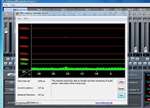
Emu 1820M, Roland Quad Capture , Tascam US-2x2, NI Maschine 2.2, Yoga 13, 4960 i7 DAW with Sonar Platinum, Reaper, and all Sony's. Roland GR 700, GM 70, GR 33, GP-10 VG-8EX, MMP-2, VE-2 VM3100PRO/RPC-1, Ibanez IMG 2010, Godin LGXT, Variax 600/300/300 nylon, Pod HD 500, Bose L1 MII/T1-DB, Digitech Vocalist Live 4, Xenix 1204USB FX.
|
Phoenix
Max Output Level: -56.5 dBFS
- Total Posts : 1886
- Joined: 2003/11/07 18:25:33
- Location: Long Island, New York
- Status: offline
Re:What standard laptops are you using successfully?
2010/03/15 10:41:28
(permalink)
unstopology
Yeah. I just found out that most lappies that have the dreaded Ricoh 1394 chips, most likely have Ricoh controlled expresscard busses also.
On a side note, today I was at Bestbuy and I checked EVERY SINGLE laptop that had firewire and ALL of them had teh Ricoh 1394 chips. This confirms what jcschild's been saying about the whole TI thing. I guess I chose a bad time to be in the market for a LapDAW.
Can people post more laptops with TI chips that work good? I'm searching for some good used potential laptops. Preferably with Core 2 Duos. Thanx
Yep. That's what I did last year. This has been going on for a while. I don't know if you'll find a used laptop that's recent enough to have enough oomph and have TI firewire, depends on your usage, I guess....oh yeah-- and have DPC latency you can work with. Maybe try the one dfreeborg has...I didn't look at Toshiba myself cos I had some issues with my last Toshiba laptop, but I don't think that's typical.
|
ratona
Max Output Level: -89 dBFS
- Total Posts : 69
- Joined: 2007/12/10 16:37:46
- Status: offline
Re:What standard laptops are you using successfully?
2010/03/16 00:15:37
(permalink)
Ditto that "dfreeborg", my config provides the same with the info provided in eariler posts of mine. I am however keeping my eyes open for something newer like possibly what you have compared to my inspiron e1505. Can you post what you did to your cmptr to optimize it? Check out my post and see if there may be more to add in lite of your experience. It is helpful.
Ratona Windows 7 pro Gigabyte X58 8 Gigs Ram 64 bit Recording w/Sonar 8.53 Producer Edition Sound Card: Motu 8-pre Yamaha S90ES and more... bla bla bla
|