Computer compatibility with Sonar X1

Page: < 12 Showing page 2 of 2
Author
tonebastard
Max Output Level: -90 dBFS
  • Total Posts : 17
  • Joined: 2012/07/10 20:52:36
  • Status: offline
Re:Computer compatibility with Sonar X1 2012/07/13 18:47:15 (permalink)
Can't get it working.   Anyway, I've already done what you said and still can't get it working.  When I clicked the drop down box, I clicked "selected track inputs" and clicked "Stereo Zoom R16 stereo Driver Input Channel 3" but it still won't work. Sometimes it even has the level lights still working in track 1...though most times there are no level lights at all.  I've tried channel 3 left and right mono as well instead of stereo but stil nothing
#31
tonebastard
Max Output Level: -90 dBFS
  • Total Posts : 17
  • Joined: 2012/07/10 20:52:36
  • Status: offline
Re:Computer compatibility with Sonar X1 2012/07/13 18:48:40 (permalink)
I've done that and still nothing
#32
synkrotron
Max Output Level: -22.5 dBFS
  • Total Posts : 5263
  • Joined: 2006/04/28 16:21:21
  • Location: Warrington, UK
  • Status: offline
Re:Computer compatibility with Sonar X1 2012/07/13 19:06:06 (permalink)
Are you sure you have the input echo turned on? 

Mind you... that is just so you can monitor what you are playing, and you should still be able to record.

I'm trying to think, but you've got me stumped at the moment. Perhaps I really should hit the sack now and get some shut eye, and I'll try to help again tomorrow, unless someone has managed to come up with the answer in the meantime.

Cheers, and keep on having fun ;^)

andy
post edited by synkrotron - 2012/07/13 19:20:14

http://www.synkrotron.co.uk/
Intel Core™i7-3820QM Quad Core Mobile Processor 2.70GHz 8MB cache | Intel HM77 Express Chipset | 16GB SAMSUNG 1600MHz SODIMM DDR3 RAM | NVIDIA GeForce GTX 675M - 2.0GB DDR5 Video RAM | 500GB Samsung 850 Pro SSD | 1TB Samsung 850 Pro SSD | Windows 10 Pro | Roland OCTA-CAPTURE | SONAR Platinum ∞ FFS| Too many VSTi's to list here | KRK KNS-8400 Headphones | Roland JP-8000 | Oberheim OB12 | Novation Nova | Gibson SG Special | PRS Studio
#33
tonebastard
Max Output Level: -90 dBFS
  • Total Posts : 17
  • Joined: 2012/07/10 20:52:36
  • Status: offline
Re:Computer compatibility with Sonar X1 2012/07/14 09:58:03 (permalink)
I can hear fine when I plug into track 1 b ut still can't get the leve3ls to light up on track 3. I tried some other tracks as well and the same problem.
#34
synkrotron
Max Output Level: -22.5 dBFS
  • Total Posts : 5263
  • Joined: 2006/04/28 16:21:21
  • Location: Warrington, UK
  • Status: offline
Re:Computer compatibility with Sonar X1 2012/07/14 10:56:12 (permalink)
Tony, I'm going to create a step by step account here so that I can be sure that I am covering everything correctly, and not misleading you. I'm going to have to create a set of screen dumps to help me explain what I am doing, so it could take me an hour or so. So bear with me for now and I will post here again soon...

http://www.synkrotron.co.uk/
Intel Core™i7-3820QM Quad Core Mobile Processor 2.70GHz 8MB cache | Intel HM77 Express Chipset | 16GB SAMSUNG 1600MHz SODIMM DDR3 RAM | NVIDIA GeForce GTX 675M - 2.0GB DDR5 Video RAM | 500GB Samsung 850 Pro SSD | 1TB Samsung 850 Pro SSD | Windows 10 Pro | Roland OCTA-CAPTURE | SONAR Platinum ∞ FFS| Too many VSTi's to list here | KRK KNS-8400 Headphones | Roland JP-8000 | Oberheim OB12 | Novation Nova | Gibson SG Special | PRS Studio
#35
tonebastard
Max Output Level: -90 dBFS
  • Total Posts : 17
  • Joined: 2012/07/10 20:52:36
  • Status: offline
Re:Computer compatibility with Sonar X1 2012/07/14 11:09:43 (permalink)
I just recorded again on track one and even though I picked R16 stereo driver input channel rather than left or right, I still only get the sound coming out of the lrft side speaker. It's not stereo. When you record in stereo should you get two side by side waves on screen?
#36
tonebastard
Max Output Level: -90 dBFS
  • Total Posts : 17
  • Joined: 2012/07/10 20:52:36
  • Status: offline
Re:Computer compatibility with Sonar X1 2012/07/14 11:11:56 (permalink)
Thanks for all your patience Andy
#37
synkrotron
Max Output Level: -22.5 dBFS
  • Total Posts : 5263
  • Joined: 2006/04/28 16:21:21
  • Location: Warrington, UK
  • Status: offline
Re:Computer compatibility with Sonar X1 2012/07/14 11:14:41 (permalink)
tonebastard


When you record in stereo should you get two side by side waves on screen?

Yes, that's right.


Hang on in there though dood, and I'll create something here that will take you through how to set up and X1 project for a multi-track recording. Be about an hour...

http://www.synkrotron.co.uk/
Intel Core™i7-3820QM Quad Core Mobile Processor 2.70GHz 8MB cache | Intel HM77 Express Chipset | 16GB SAMSUNG 1600MHz SODIMM DDR3 RAM | NVIDIA GeForce GTX 675M - 2.0GB DDR5 Video RAM | 500GB Samsung 850 Pro SSD | 1TB Samsung 850 Pro SSD | Windows 10 Pro | Roland OCTA-CAPTURE | SONAR Platinum ∞ FFS| Too many VSTi's to list here | KRK KNS-8400 Headphones | Roland JP-8000 | Oberheim OB12 | Novation Nova | Gibson SG Special | PRS Studio
#38
tonebastard
Max Output Level: -90 dBFS
  • Total Posts : 17
  • Joined: 2012/07/10 20:52:36
  • Status: offline
Re:Computer compatibility with Sonar X1 2012/07/14 11:33:02 (permalink)
When I click the drop down box under my track 3 "In/Out I" there are four options to click
None
Selected track input series...
Selected track inputs...
Zoom R16-R24 ASIO Driver (4 in, 1 out)

For the last option there are a load of choices to the right for each channel.  When I click on "Selected track input series...", above a dialog box it says "first input to assign". I click on that and choose channel three left (or right or stereo) but it keeps defaulting back to left 1 when I click OK and go back in afterwards.  When I click on the last option, it does stay where I chose (channel thre, left) but that first option keeps going back to channel one left...if any of this makes any sense.

Tony
#39
synkrotron
Max Output Level: -22.5 dBFS
  • Total Posts : 5263
  • Joined: 2006/04/28 16:21:21
  • Location: Warrington, UK
  • Status: offline
Re:Computer compatibility with Sonar X1 2012/07/14 12:06:48 (permalink)

Tony,

Let's try this one step at a time.

First of all, let's establish which input, or inputs you will be using on your R16. In fact, let's push the envelope a bit, and assume that you want to record drums to four tracks, like so:-

Two overheads, input 1 and 2
Kick, input 3
Snare, input 4

Before I even think of X1, I will set the trim levels on the R16.

Next, I'll set up the audio tracks in X1, onto which I will record the drum parts. And I will do that in a brand new blank Project (I actually create a Blank Cakewalk Template file that creates a new project with no tracks set up). Now, what I am about to show you may not be exactly what the experts do, but it works for me, generally, and it allows me to show you how to set up a mixture of mono and stereo audio tracks.

First off, I am going to record the overheads to a stereo track. Admittedly, not the best way perhaps, but stay with me for the moment. In Track View, I right click and select "Insert Audio Track" from the pop up menu.
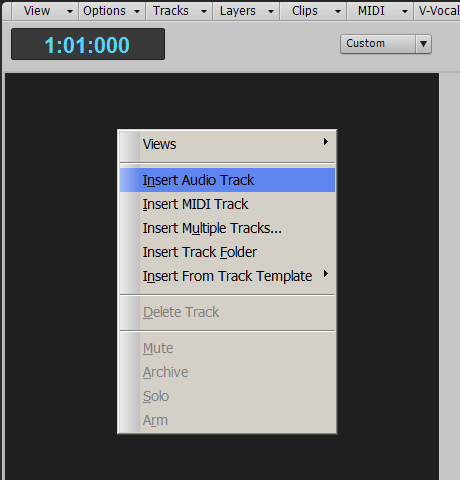


By default, I will get a new Audio Track:-



As you can see, Output is set to "Master" by default, and Input is set to "-None-." Also, the little graphic in the top left hand corner, to the right of the track number, shows a crude, single waveform, and this denotes that the audio track is currently a "mono" track. I am now going to change the name of the track to "Drum Overheads" by double clicking on the current name, and then set the Input source to my desired QUAD-CAPTURE inputs by clicking on the down arrow of the Input menu and selecting the "Stereo QUAD-CAPTURE 1-2" input (and the process will be the same for your R16).
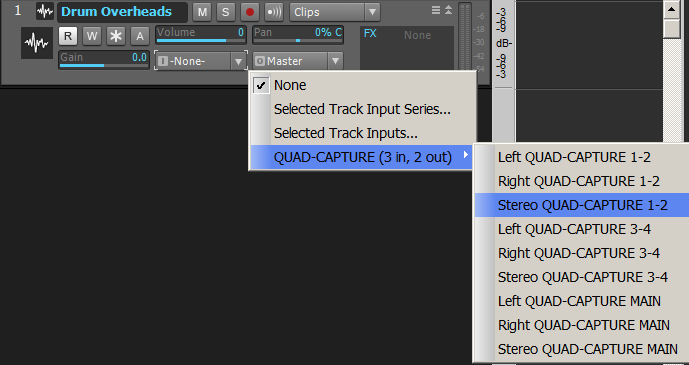


The finished set-up track will now look like this:-



Note that the little icon next to the track number has changed to two crude waveforms and that denotes that the track is now a stereo audio track. That happened purely because I chose a stereo input as the input source.

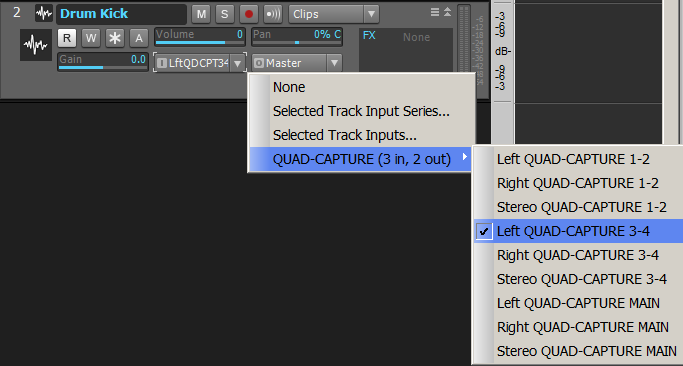
I am now going to repeat the process for the next track, which will be for the kick drum mic. That particular mic is plugged into the third input channel of my audio interface, and I will select it the same as before. It will be a mono audio track:-


And the same again for the Snare, only this time I'll select the last remaining input channel of my interface.

So, my finished track set-up will look like this:-
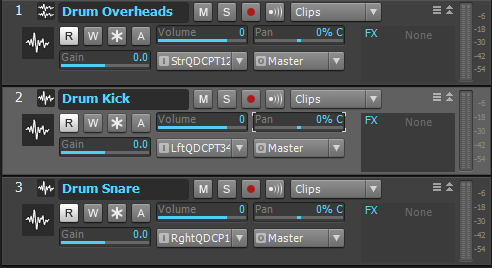


I could, at this point, create a Folder, call it Drums, and place my three tracks into the folder, just to tidy things up a bit. But I will leave that for another time.

And that's about as far as I can go for the moment. I do not have a real drum kit set up at the moment, so I cannot demonstrate the next stages. But what I am hoping I have done here is at least made sure that we are not getting our wires crossed while setting up the basic tracks onto which we need to record.

If you are already doing the above, and are still experiencing problems, that I am not sure what else I can do to help, other than set up some kind of remote desktop connection thing, where I log onto your desktop and see what you are doing...


http://www.synkrotron.co.uk/
Intel Core™i7-3820QM Quad Core Mobile Processor 2.70GHz 8MB cache | Intel HM77 Express Chipset | 16GB SAMSUNG 1600MHz SODIMM DDR3 RAM | NVIDIA GeForce GTX 675M - 2.0GB DDR5 Video RAM | 500GB Samsung 850 Pro SSD | 1TB Samsung 850 Pro SSD | Windows 10 Pro | Roland OCTA-CAPTURE | SONAR Platinum ∞ FFS| Too many VSTi's to list here | KRK KNS-8400 Headphones | Roland JP-8000 | Oberheim OB12 | Novation Nova | Gibson SG Special | PRS Studio
#40
synkrotron
Max Output Level: -22.5 dBFS
  • Total Posts : 5263
  • Joined: 2006/04/28 16:21:21
  • Location: Warrington, UK
  • Status: offline
Re:Computer compatibility with Sonar X1 2012/07/14 12:18:12 (permalink)
tonebastard

Zoom R16-R24 ASIO Driver (4 in, 1 out) 

For the last option there are a load of choices to the right for each channel
Hi Tony, yeah, as you can see from my pictures in that last post, it is the audio device options that I use to set up my input options. I will be honest and tell you that I do not know myself what the other "Selected Track Input Series..." and "Selected Track Inputs..." is for. I do not recall seeing those options in Sonar 6, which is what I used to use before upgrading to X1 recently. I will need to find out one day, for sure, but in the meantime, the directions I give above should work.


I've just realised that I've missed one thing out, and that is not to forget to a) turn on "Input Echo" for each track and b) arm each track for recording. I think you already know which buttons they are. If you don't, let me know and I will update the post above :^)

http://www.synkrotron.co.uk/
Intel Core™i7-3820QM Quad Core Mobile Processor 2.70GHz 8MB cache | Intel HM77 Express Chipset | 16GB SAMSUNG 1600MHz SODIMM DDR3 RAM | NVIDIA GeForce GTX 675M - 2.0GB DDR5 Video RAM | 500GB Samsung 850 Pro SSD | 1TB Samsung 850 Pro SSD | Windows 10 Pro | Roland OCTA-CAPTURE | SONAR Platinum ∞ FFS| Too many VSTi's to list here | KRK KNS-8400 Headphones | Roland JP-8000 | Oberheim OB12 | Novation Nova | Gibson SG Special | PRS Studio
#41
tonebastard
Max Output Level: -90 dBFS
  • Total Posts : 17
  • Joined: 2012/07/10 20:52:36
  • Status: offline
Re:Computer compatibility with Sonar X1 2012/07/14 13:04:12 (permalink)
Yes

I did all those things you showed me in your diagrams but still not working. As well, i went back and recorded in track one again and chose stereo. However, even though it is marked as stereo and two lines scroll by when I am recording, only one has any data. Just the left side. The right "wave" is just a flat line with nothing on it.  Where is "Input Echo" switch?
#42
synkrotron
Max Output Level: -22.5 dBFS
  • Total Posts : 5263
  • Joined: 2006/04/28 16:21:21
  • Location: Warrington, UK
  • Status: offline
Re:Computer compatibility with Sonar X1 2012/07/14 13:47:54 (permalink)
Okay Tony... I think it is time to take some screen dumps yourself and post them up here. Do you know how to do that? I have my own FTP site, so I am able to use that for my images, but you could also use something like photobucket too. I just need to see the settings of your tracks and stuff. I am really stumped now as to why you cannot record to new tracks.

Here's where you will find the Input Echo on/off button and it turns blue when the function is turned on:-


http://www.synkrotron.co.uk/
Intel Core™i7-3820QM Quad Core Mobile Processor 2.70GHz 8MB cache | Intel HM77 Express Chipset | 16GB SAMSUNG 1600MHz SODIMM DDR3 RAM | NVIDIA GeForce GTX 675M - 2.0GB DDR5 Video RAM | 500GB Samsung 850 Pro SSD | 1TB Samsung 850 Pro SSD | Windows 10 Pro | Roland OCTA-CAPTURE | SONAR Platinum ∞ FFS| Too many VSTi's to list here | KRK KNS-8400 Headphones | Roland JP-8000 | Oberheim OB12 | Novation Nova | Gibson SG Special | PRS Studio
#43
chuckebaby
Max Output Level: 0 dBFS
  • Total Posts : 13146
  • Joined: 2011/01/04 14:55:28
  • Status: offline
Re:Computer compatibility with Sonar X1 2012/07/14 13:51:00 (permalink)
synkro,(clapping hands together) dude,nice job on the pics bro.
 
thats a serious comment too.

Windows 8.1 X64 Sonar Platinum x64
Custom built: Asrock z97 1150 - Intel I7 4790k - 16GB corsair DDR3 1600 - PNY SSD 220GB
Focusrite Saffire 18I8 - Mackie Control
   
#44
synkrotron
Max Output Level: -22.5 dBFS
  • Total Posts : 5263
  • Joined: 2006/04/28 16:21:21
  • Location: Warrington, UK
  • Status: offline
Re:Computer compatibility with Sonar X1 2012/07/14 13:59:16 (permalink)
Thanks Charlie :^)

I'm sure I'm pointing Tony in the right direction here, but it looks like I'm failing to solve Tony's problem. I think I need to take a trip to his "studio" and see for myself what is going on.

Is there anything you can see where I might have misled Tony somewhere? I checked and double checked, and all I have covered here is the basic beginnings of setting up tracks ready to record, and it is something I have been doing for years now, and could do it in my sleep...

http://www.synkrotron.co.uk/
Intel Core™i7-3820QM Quad Core Mobile Processor 2.70GHz 8MB cache | Intel HM77 Express Chipset | 16GB SAMSUNG 1600MHz SODIMM DDR3 RAM | NVIDIA GeForce GTX 675M - 2.0GB DDR5 Video RAM | 500GB Samsung 850 Pro SSD | 1TB Samsung 850 Pro SSD | Windows 10 Pro | Roland OCTA-CAPTURE | SONAR Platinum ∞ FFS| Too many VSTi's to list here | KRK KNS-8400 Headphones | Roland JP-8000 | Oberheim OB12 | Novation Nova | Gibson SG Special | PRS Studio
#45
tonebastard
Max Output Level: -90 dBFS
  • Total Posts : 17
  • Joined: 2012/07/10 20:52:36
  • Status: offline
Re:Computer compatibility with Sonar X1 2012/07/14 14:21:30 (permalink)
I have no idea how to do pics like you sent me. I know it's probably something simple I am doing becaue, like I said, all this is new territory for me and I only started at this a couple of days ago. 
#46
synkrotron
Max Output Level: -22.5 dBFS
  • Total Posts : 5263
  • Joined: 2006/04/28 16:21:21
  • Location: Warrington, UK
  • Status: offline
Re:Computer compatibility with Sonar X1 2012/07/14 14:34:35 (permalink)
No worries Tony, stick with it and I'm sure we'll crack this nut open soon.

Regarding capturing pictures... on your computer keyboard, along the top somewhere, just to the right of the function keys, you will see a key marked "Prt Scr" or something similar. Pressing this key basically copies the contents of your computer monitor to the "clipboard." If you then open the "Paint" software, that comes with Windows, pressing control+V will paste the image of your screen into the paint software. You can then edit that, if needed, by clipping it or adding notes. You can then upload the picture to "Photobucket" or something similar and then paste the link for that picture here.

Or, if you would prefer, I could PM you my e-mail address and you could mail it to me.

What ever it takes to get you recording to those other tracks...

http://www.synkrotron.co.uk/
Intel Core™i7-3820QM Quad Core Mobile Processor 2.70GHz 8MB cache | Intel HM77 Express Chipset | 16GB SAMSUNG 1600MHz SODIMM DDR3 RAM | NVIDIA GeForce GTX 675M - 2.0GB DDR5 Video RAM | 500GB Samsung 850 Pro SSD | 1TB Samsung 850 Pro SSD | Windows 10 Pro | Roland OCTA-CAPTURE | SONAR Platinum ∞ FFS| Too many VSTi's to list here | KRK KNS-8400 Headphones | Roland JP-8000 | Oberheim OB12 | Novation Nova | Gibson SG Special | PRS Studio
#47
Page: < 12 Showing page 2 of 2
Jump to:
© 2025 APG vNext Commercial Version 5.1