DaveG74
Max Output Level: -86 dBFS

- Total Posts : 220
- Joined: 2013/07/07 12:54:25
- Status: offline

First time Sonar user: questions/concerns
EDITED, 1/15 The PRV doesn't seem to reflect my highlighted/select Track in the Track pane.I have to highlight a Track and choose Views-Piano Roll View every time to force the PRV to show that Track's notation data. [v v v OLD POST BELOW...STARTED NEW THREAD FOR ABOVE v v v] I just upgraded from Sonar X3 to Sonar Artist to expand/refresh my experience with this amazing DAW. I wish to share some questions and concerns I have with the installation experience, if I may... ***SOLVED*** 1) CAKEWALK COMMAND CENTERThe Artist registration/activation process confused me. Apparently, registration is irrelevant and (after reading a page full of online-instruction) activation requires installation of the Cakewalk Command Center. The installation was successful -- but frankly, I feel that this made the install process rather convoluted and lengthy. Am I the only one annoyed by this? So, once the software is installed, do I require Command Center? Will I ever have to use it again? I bet yes. ***SOLVED*** 2) INSTALLATION OF ADD-ONS I thought I was missing my plug-ins/add-ons until, unbeknownst to me, those had to be installed through Command Center also. I recall clearly that the installation process in its entirety was much quicker, cleaner and simpler with X3. (shrug) ***SOLVED*** 3) THE INSTALLATION FILE SYSTEM My Sonar X3 install package consisted of three parts, each over 1GB...and they were on my hard drive for easy access. However, the Sonar Artist file I downloaded (22.12.0.12) is only half a GB. It seems as though between the Artist install and the plug-ins, every install file is downloaded from a server/cloud somewhere, validated, then installed. What a lengthy process! It kind of concerns me that these files "install from nowhere". Where does the install come from? Where are my local install files (which I'd rather have than off-site install files somewhere)? I'd much rather have the install files I paid for, in my possession, on my hard drive. What happens if the files go away sometime from now and I can no longer access them?
post edited by Grundberg - 2017/01/15 11:00:54
|
The Grim 
Max Output Level: -76 dBFS

- Total Posts : 724
- Joined: 2016/04/19 02:31:06
- Location: hades
- Status: offline
Re: First time Sonar Artist user: Questions/concerns
2017/01/13 21:15:45
(permalink)
☄ Helpfulby Grundberg 2017/01/14 09:22:53
you can download the files from your cakewalk account and install them manually, you don't have to use ccc
also, the install files that ccc downloads are stored in the path indicated in ccc's settings, so you can back them up if you like
|
abacab
Max Output Level: -30.5 dBFS

- Total Posts : 4464
- Joined: 2014/12/31 19:34:07
- Status: offline
Re: First time Sonar Artist user: Questions/concerns
2017/01/13 21:42:47
(permalink)
Here's my view of Command Center path options. I was a long time X3 holdout until about 6 months ago. But I gotta say, I like the CCC way now. With CCC, you can always see if any of your Cakewalk products have updates available. Besides, you can still log into Cakewalk and access your products directly, if you wish. 
DAW: CbB; Sonar Platinum, and others ...
|
Anderton
Max Output Level: 0 dBFS

- Total Posts : 14070
- Joined: 2003/11/06 14:02:03
- Status: offline
Re: First time Sonar Artist user: Questions/concerns
2017/01/13 23:08:29
(permalink)
For old-timers, Cakewalk sometimes seems to have taken a step backward. And that may be the case, but it can also be what allows them to take two steps forward.
By using the CCC, if you have a catastrophic computer failure, you're fine - everything you own is in the account recognized by the CCC, and can be re-downloaded. There's no more "I can't find my install disc!!" or "I left my install disc out in the sun!" (although as pointed out, you can back up the files you download). Also you'll be told if you have the latest version of your programs, and can download any updates.
The main tradeoff with "download only" is if you live in an area with internet bandwidth limitations, because then it can take a loooong time to download everything. Also, a CCC is one more "moving part" compared to something like a DVD. However by and large I think the CCC is working well, and it will continue to evolve.
|
Cactus Music
Max Output Level: 0 dBFS
- Total Posts : 8424
- Joined: 2004/02/09 21:34:04
- Status: offline
Re: First time Sonar Artist user: Questions/concerns
2017/01/14 01:23:57
(permalink)
☄ Helpfulby Grundberg 2017/01/14 09:23:09
Once you get the hang of it you'll see it is better overall. It's just different. Yes it is a little annoying to have to install something just to install something else. I hate it when CCC updates.
Once you've downloaded and installed everything. make a back up of the CCC download folder.
It is found here ; Computer/Program Data/Cakewalk/command center / downloads.
You can use those files to set up a second computer or as a back up just like you did with X3. The only differance is you still need the CCC to do this.
If you put the files in the new computer in the same location CCC will find them and use them instead of re downloading.
And you need CCC to keep Sonar up to date. This is done about once a month. Might be less for Artist
|
paulo
Max Output Level: -13 dBFS

- Total Posts : 6218
- Joined: 2007/01/30 05:06:57
- Status: offline
Re: First time Sonar Artist user: Questions/concerns
2017/01/14 07:39:47
(permalink)
The Grim
you can download the files from your cakewalk account and install them manually, you don't have to use ccc
also, the install files that ccc downloads are stored in the path indicated in ccc's settings, so you can back them up if you like
This. The only thing I really see in the CCC that might be convenient to me is the rollback option. Compared to X3e, Platinum ( 2016.12 version, the only one I have installed on my offline DAW) is a crash fest so moving forward I can see how the ability to easily pretend that the last install didn't happen would be useful.
|
pwalpwal
Max Output Level: -43 dBFS

- Total Posts : 3249
- Joined: 2015/01/17 03:52:50
- Status: offline
Re: First time Sonar Artist user: Questions/concerns
2017/01/14 07:51:01
(permalink)
one doesn't have to use the ccc at all because all the installer downloads are available via your account - the only thing i've found that can't be done without ccc is to get the latest sonar demo...
|
DaveG74
Max Output Level: -86 dBFS
- Total Posts : 220
- Joined: 2013/07/07 12:54:25
- Status: offline
Re: First time Sonar Artist user: Questions/concerns
2017/01/14 09:25:36
(permalink)
I wish to thank you for your responses! Notably to Grim and Cactus Music, who promptly notified me that my software downloads are indeed available to me in whole, and where they are. Had I made the effort to look around in the right place, I would've found them! LOL. Thanks a bunch, guys. I feel much better now. I also understand Cakewalk Command Center much better, and my Cakewalk Account page. However, I haven't decided whether I really need the Command Center or not, considering I'm trying to minimize the load of apps I truly need. Thanks again! :)
post edited by Grundberg - 2017/01/14 10:14:29
|
DaveG74
Max Output Level: -86 dBFS
- Total Posts : 220
- Joined: 2013/07/07 12:54:25
- Status: offline
Re: First time Sonar Artist user: Questions/concerns
2017/01/14 10:14:22
(permalink)
A few more questions...: 1) UNINSTALL RAPTURE SESSIONS I've uninstalled Rapture Sessions just for lack of interest. However, although Command Center shows Rapture as uninstalled, the Sessions instrument packs remain installed (green orbs are lit). How do I clean uninstall Rapture and its session packs? (Deleting the folders manually doesn't help.) 2) WHERE'S THE "CURRENT" SONAR DOCUMENTATION? I installed the Sonar Artist Documentation file, but I cannot find it. I found the online Cakewalk Documentation for what appears to be Sonar Platinum, but it looks like a "throwback manual" to Sonar X3. I see Platinum screen shots, but also several screenshots that show Sonar X3 but nothing prominently relevant to the current Sonar family. Is there a dedicated user manual for the current family of Sonar products? And is it available as a PDF? 3) ONE-CLICK SELECT TRACK IN PRV? Is there a one-click method for selecting a track for editing? I always click the track (which does nothing) and choose View-Piano Roll View. (Double-clicking selects all tracks.) Is there a one-click method I'm missing to just select a track? 4) SONAR ARTIST AUTO-RENEWAL? After the first year of my Sonar Artist purchase, will I be given an auto-renew & auto-charge option for the next year of updates? I don't plan on renewing and I wish to be aware once the times comes.
post edited by Grundberg - 2017/01/14 11:26:40
|
Cactus Music
Max Output Level: 0 dBFS
- Total Posts : 8424
- Joined: 2004/02/09 21:34:04
- Status: offline
Re: First time Sonar Artist user: Questions/concerns
2017/01/14 11:51:27
(permalink)
I'm thinking you might be one with a 120 SSD C drive and are worried about space? I found by deleting the contents of the Command center folder, once I had copied it to an external drive, freed up a lot of space. 1. Command center might be a little buggy still and if you deleted the folders and content don't worry about the green light, Its probably using info from your registry. So getting rid of it will possibly involve a reg edit. 2.I would also like to know. It seem to be all on line and only shows tips in the help module. 3.We now have docking windows. For me if I double click a midi track it will open in the PRV at the bottom of my screen. You have to undock it and re size to be able to work. This is a feature I dislike compared to the "old " way. I find myself taking all this extra steps just to get what once worked perfectly fine. Once it's set up it stays that way for the life of the project. 4. My Professional version was never renewed by me as I moved to PLat. So it shows orange and dated Aug 2014. It's still mine to use but I'd have to pay money to re activate updates. CCC program takes up very little room and you'll find it's the best way to work with Sonars new system. And if you back up the content of the CCC folder to a back up drive. You can still roll back buy putting the appropriate version back on your C drive. Manual download and install is a PITA, I did it for a whole year because I had very little internet back then, 3 GB per month. I would not recommend manual downloading, it way to much work compared to CCC. Working offline, I keep my main DAW offline. Takes 10 seconds to enable and disable my ethernet in device manager. I just updated my main DAW using the files in the backup drive. You still have to be online to run CCC but then I disable my ethernet once I'm done
post edited by Cactus Music - 2017/01/14 19:42:30
|
DaveG74
Max Output Level: -86 dBFS
- Total Posts : 220
- Joined: 2013/07/07 12:54:25
- Status: offline
Re: First time Sonar Artist user: Questions/concerns
2017/01/14 16:08:00
(permalink)
Cactus Music
3.We now have docking windows. For me if I click a midi track it will open in the PRV at the bottom of my screen. You have to undock it and re size to be able to work. This is a feature I dislike compared to the "old " way. I find myself taking all this extra steps just to get what once worked perfectly fine.
Thanks for the response. Can you please explain to me exactly what you mean by this though? I try to undock the PRV view, and it totally disappears. I'm trying to figure out a simpler way to "pick" the track I want to work on. I usually click the track, and go through View-Piano Roll View... Thanks for your help.
|
abacab
Max Output Level: -30.5 dBFS
- Total Posts : 4464
- Joined: 2014/12/31 19:34:07
- Status: offline
Re: First time Sonar Artist user: Questions/concerns
2017/01/14 17:04:34
(permalink)
☄ Helpfulby Grundberg 2017/01/14 19:01:28
#2 - Edit > Preferences > File > Advanced > "Always Use Local Help"
Then the F1 key will open it up (context aware) relevant for the part of Sonar in focus when you hit F1.
DAW: CbB; Sonar Platinum, and others ...
|
Cactus Music
Max Output Level: 0 dBFS
- Total Posts : 8424
- Joined: 2004/02/09 21:34:04
- Status: offline
Re: First time Sonar Artist user: Questions/concerns
2017/01/14 17:22:38
(permalink)
That's sounds like what happens if you HAD two monitors and are now only using one. Maybe you don't have your view set properly , There are tabs at the bottom for all the views you open including PRV. Once you undock you can move in to the center of your screen or with 2 monitors I put it full screen over there. Then if I click the Console tab I get a full screen console. Once again it's just the way it works now and once you get the hang of it it's workable. Set your view and you can also save it as a Screen set. And now a Lens whic I still haven't figured out myself. 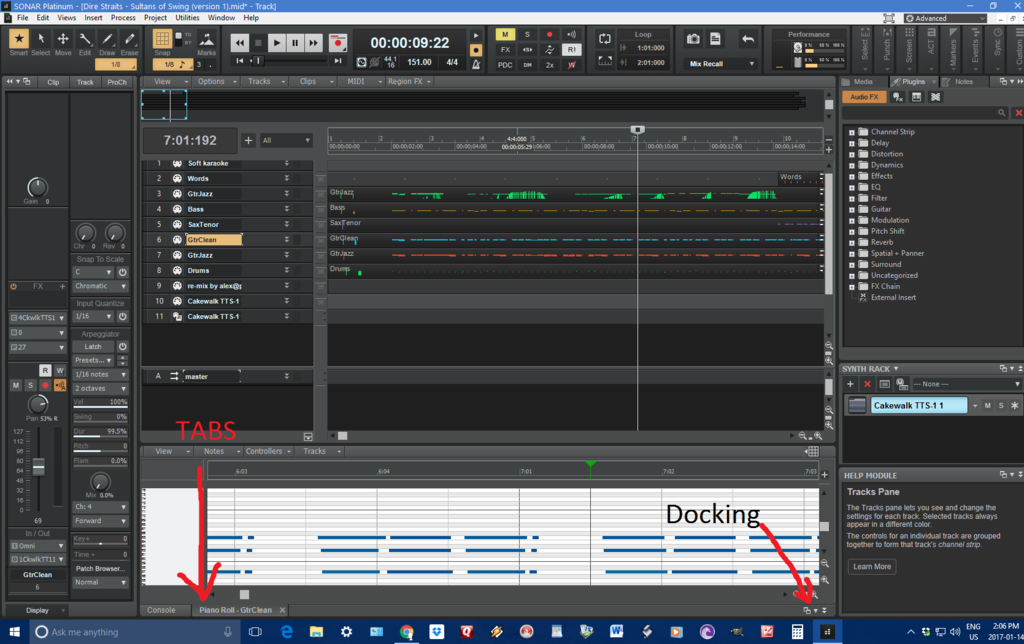
|
DaveG74
Max Output Level: -86 dBFS
- Total Posts : 220
- Joined: 2013/07/07 12:54:25
- Status: offline
Re: First time Sonar Artist user: Questions/concerns
2017/01/14 19:09:28
(permalink)
This is my current view...this is as minimal as I thought of setting it. Per Cactus Music's explanation, I'm trying to understand the docking/undocking and the window positioning and how it relates...?  ABACAB: ABACAB: I enabled "Local Help" as you stated, and that's an extremely helpful option to have at my disposal! However, I can't still for the life of me understand why simply clicking a track doesn't pick/select it. Am I missing something? How do I pick a track? CACTUS MUSIC: I'm trying to absorb what you are explaining, but still unclear as to how this relates to picking a track. Once again, to get from for example Track 1 to Track 3, I have to click Track 3, then choose (in the View menu) Piano Roll view. I know it's only three mouse clicks, but I think it's unfortunate how we have to perform the simplest function in three clicks when it should be one. (Clicking Track 3 once -- there, I can edit there now.)
|
abacab
Max Output Level: -30.5 dBFS
- Total Posts : 4464
- Joined: 2014/12/31 19:34:07
- Status: offline
Re: First time Sonar Artist user: Questions/concerns
2017/01/14 19:14:03
(permalink)
Whenever I double click on a MIDI clip in the clips pane, it automatically open that track in the Piano Roll.
You can open the Piano Roll view by any of these methods:
1. Select the track you want to edit and use the Views > Piano Roll View command or press ALT+3.
2. Double-click a MIDI clip in the Clips pane (you can change this option with the Track view Options > Click Behavior > Double-Click > MIDI Clips command).
If the Piano Roll opens up in the Multidock, and you wish to float and resize it, just right-click on the Piano Roll tab and select "undock".
And just clicking on the tracks number at the left side of the track strip "selects" that track, but does not change the Piano Roll tracks. It is now selected for echo, editing, processing, etc.
Also check out the "Tracks" button at the top edge of the Piano Roll window. This menu lets you choose the tracks viewed in Piano Roll. Just clicking on the tracks above in the track view does not change the track viewed in Piano Roll. That has a separate menu for track selection. Maybe that wasn't obvious, but it's the way it works.
DAW: CbB; Sonar Platinum, and others ...
|
scook
Forum Host

- Total Posts : 24146
- Joined: 2005/07/27 13:43:57
- Location: TX
- Status: offline
Re: First time Sonar Artist user: Questions/concerns
2017/01/14 19:37:12
(permalink)
Grundberg
4) SONAR ARTIST AUTO-RENEWAL?
After the first year of my Sonar Artist purchase, will I be given an auto-renew & auto-charge option for the next year of updates? I don't plan on renewing and I wish to be aware once the times comes.
Depends on the payment plan. The one-time payment plan has no provision for automatic billing, it is up to the user to decide what to do at the end of the membership period. The monthly payment plan will continue billing until the user tells Cleverbridge to stop.
|
Cactus Music
Max Output Level: 0 dBFS
- Total Posts : 8424
- Joined: 2004/02/09 21:34:04
- Status: offline
Re: First time Sonar Artist user: Questions/concerns
2017/01/14 19:45:34
(permalink)
You double click just like always. A single click highlights. It been like that forever.
When you click the undock button it will turn blue and you can float it around. If your is disappearing try changing the max/min tab in Windows Explorer in the very top right corner.
|
DaveG74
Max Output Level: -86 dBFS
- Total Posts : 220
- Joined: 2013/07/07 12:54:25
- Status: offline
Re: First time Sonar Artist user: Questions/concerns
2017/01/14 20:30:30
(permalink)
Cactus Music
You double click just like always. A single click highlights. It been like that forever.
When you click the undock button it will turn blue and you can float it around. If your is disappearing try changing the max/min tab in Windows Explorer in the very top right corner.
That's strange on the first part, selecting a Track. When I double-click on the number of a Track, it highlights all tracks. I mean, otherwise, I could pick via Tracks-Pick Tracks in the PRV, but that's still extra effort to simply select a Track.
|
abacab
Max Output Level: -30.5 dBFS
- Total Posts : 4464
- Joined: 2014/12/31 19:34:07
- Status: offline
Re: First time Sonar Artist user: Questions/concerns
2017/01/14 21:32:45
(permalink)
Grundberg
Cactus Music
You double click just like always. A single click highlights. It been like that forever.
When you click the undock button it will turn blue and you can float it around. If your is disappearing try changing the max/min tab in Windows Explorer in the very top right corner.
That's strange on the first part, selecting a Track.
When I double-click on the number of a Track, it highlights all tracks.
I mean, otherwise, I could pick via Tracks-Pick Tracks in the PRV, but that's still extra effort to simply select a Track.
Don't double click on the tracks (in the numbered track strip on the left hand side). Move over to the right into the clips pane and double click on a MIDI clip instead. There are several reasons for selecting a track by clicking once on the track in the track strip (track #), but they have absolutely nothing to do with the piano roll track selection.
DAW: CbB; Sonar Platinum, and others ...
|
Cactus Music
Max Output Level: 0 dBFS
- Total Posts : 8424
- Joined: 2004/02/09 21:34:04
- Status: offline
Re: First time Sonar Artist user: Questions/concerns
2017/01/14 23:14:00
(permalink)
Oh I see what you did wrong. As above it's always been the actual midi track you click, not the track inspector.
|
DaveG74
Max Output Level: -86 dBFS
- Total Posts : 220
- Joined: 2013/07/07 12:54:25
- Status: offline
Re: First time Sonar Artist user: Questions/concerns
2017/01/15 10:11:22
(permalink)
ABACAB: I have no clips in my Track Pane right side grid/work area; it's all blank. (Per my image in Post #14, all tracks are collapsed to single-line.) I double-click that right side and it highlights the Track, but doesn't "select/pick" it for PRV editing. As you stated, highlighting a Track has nothing to do with the PRV editing. Is it supposed to be this way? Isn't the highlighted Track supposed to automatically appear in the PRV grid? Just the same, isn't the PRV supposed to reflect the highlighted/selected Track? That's the way it's been in past DAW's I've used, unless I'm still not understanding... (I test this by assigning a different instrument to each Track for sampling, and playing keys.) I can confirm the PRV is not working hand-in-hand with the Track pane and it doesn't (or has never) reflected my highlighted Track, unless I force it in either of these ways: 1) Highlight a track, then select Views-Piano Roll View to populate the PRV with that Track's data2) In the PRV Tracks button, select Pick Tracks (followed by Track # selection)
I have contacted Cakewalk tech support to see if this is an interface thing or user error.I just want to know how to select a Track, and have that Track's notation data appear in PRV as I think it should. :)
post edited by Grundberg - 2017/01/15 10:47:25
|
abacab
Max Output Level: -30.5 dBFS
- Total Posts : 4464
- Joined: 2014/12/31 19:34:07
- Status: offline
Re: First time Sonar Artist user: Questions/concerns
2017/01/15 11:04:10
(permalink)
Grundberg
I have no clips in my Track Pane right side grid/work area; it's all blank. (Per my image in Post #14, all tracks are collapsed to single-line.) I double-click that right side and it highlights the Track, but doesn't "select/pick" it for PRV editing. As you stated, highlighting a Track has nothing to do with the PRV editing. Clicking on a blank clip won't work. If there's no data in the clip, there is nothing to open in Piano Roll. Please use the method described below. Grundberg
Isn't the highlighted Track supposed to automatically appear in the PRV grid? Just the same, isn't the PRV supposed to reflect the highlighted/selected Track? That's the way it's been in past DAW's I've used, unless I'm still not understanding... No. But you can click to select one, or ctrl-click several, and then on main menu, use Views > Piano Roll View, and the selected tracks will be selected within the Piano Roll when it opens up. The keyboard shortcut is Alt-3. You can also select additional tracks in the track view, then Alt-3 to see all selected in the existing Piano Roll. But you have to make an action to get them visible in the piano roll. As far as I know, Cakewalk Piano Roll has never worked the way you seem you want it to. The track view and piano roll do not move hand in hand sync with selection as you describe.
DAW: CbB; Sonar Platinum, and others ...
|
chuckebaby
Max Output Level: 0 dBFS
- Total Posts : 13146
- Joined: 2011/01/04 14:55:28
- Status: offline
Re: First time Sonar Artist user: Questions/concerns
2017/01/15 11:16:06
(permalink)
if you click on a blank track (in the area where the clips should be but there's no data yet)
instead right click and choose Views/ PRV . Then that track and its respective VST Synth will open in the PRV.
the advise given here is great so I cant add to anything that's already been said. these guys are all over it. so I don't want to confuse you by adding anything more. however if I may add one suggestion,
when you open the PRV, use the "Track pane" to switch between tracks.
In the PRV there are some drop down menus.
View/ Show Track pane
Tracks/ Pick tracks
this is where you can cycle between tracks easily. pick all the tracks you want in the track pane then simply click on the track you want to edit. BUT be sure to lock the others you don't want edited or you may start editing everything.
Windows 8.1 X64 Sonar Platinum x64 Custom built: Asrock z97 1150 - Intel I7 4790k - 16GB corsair DDR3 1600 - PNY SSD 220GBFocusrite Saffire 18I8 - Mackie Control
|
abacab
Max Output Level: -30.5 dBFS
- Total Posts : 4464
- Joined: 2014/12/31 19:34:07
- Status: offline
Re: First time Sonar Artist user: Questions/concerns
2017/01/15 11:28:21
(permalink)
chuckebaby
when you open the PRV, use the "Track pane" to switch between tracks.
In the PRV there are some drop down menus.
View/ Show Track pane
Tracks/ Pick tracks
this is where you can cycle between tracks easily. pick all the tracks you want in the track pane then simply click on the track you want to edit. BUT be sure to lock the others you don't want edited or you may start editing everything.
Great tip chucke! Forgot about that one. Here's a link to the help on that topic : http://www.cakewalk.com/D...lp=EditingMIDI.10.html
DAW: CbB; Sonar Platinum, and others ...
|
abacab
Max Output Level: -30.5 dBFS
- Total Posts : 4464
- Joined: 2014/12/31 19:34:07
- Status: offline
Re: First time Sonar user: questions/concerns
2017/01/15 12:03:52
(permalink)
Grundberg
EDITED, 1/15
The PRV doesn't seem to reflect my highlighted/select Track in the Track pane.
I have to highlight a Track and choose Views-Piano Roll View every time to force the PRV to show that Track's notation data.
I just upgraded from Sonar X3 to Sonar Artist to expand/refresh my experience with this amazing DAW. I wish to share some questions and concerns I have with the installation experience, if I may...
It works the same way in X3, which I still have installed. So what exactly changed when you upgraded to Artist?
DAW: CbB; Sonar Platinum, and others ...
|
DaveG74
Max Output Level: -86 dBFS
- Total Posts : 220
- Joined: 2013/07/07 12:54:25
- Status: offline
Re: First time Sonar user: questions/concerns
2017/01/15 14:41:55
(permalink)
chuckebaby
if you click on a blank track (in the area where the clips should be but there's no data yet)
instead right click and choose Views/ PRV . Then that track and its respective VST Synth will open in the PRV.
Based on your instructions, this is what I'm getting when I right-click that area:  But SOMEHOW, I did accidentally see the Views part when I tried to screencap this (via Paint Shop Pro), involving CTRL and/or SHIFT along the way...! But on your Pick Tracks instruction, I believe that makes sense. Maybe I've been doing it the counter-intuitive way all along. abacab
It works the same way in X3, which I still have installed. So what exactly changed when you upgraded to Artist?
That's a good question. I'm sure it was the same in Sonar X3, but it just occurred to me that I'm taking an extra step having to access the Menu every time I want to change tracks for editing. Know what I'm saying? I'll have to reinstall Sonar X3 and see exactly how this function behaves differently. I just thought choosing a track for editing in the PRV would be a lot more intuitive than this. (shrug)
|
chuckebaby
Max Output Level: 0 dBFS
- Total Posts : 13146
- Joined: 2011/01/04 14:55:28
- Status: offline
Re: First time Sonar user: questions/concerns
2017/01/15 15:32:04
(permalink)
Grundberg
chuckebaby
if you click on a blank track (in the area where the clips should be but there's no data yet)
instead right click and choose Views/ PRV . Then that track and its respective VST Synth will open in the PRV.
Based on your instructions, this is what I'm getting when I right-click that area:
that's because your right clicking in the PRV  What I said was: "Right click on a blank track (in the area where the clips should be but there's no data yet)" IE - The Track View" Normally when you record data in to a track..there is data in that track. when there is NO data in that track you can simply click in the blank area (in the track view) and right click/views/prv and that synth will open in the PRV
Windows 8.1 X64 Sonar Platinum x64 Custom built: Asrock z97 1150 - Intel I7 4790k - 16GB corsair DDR3 1600 - PNY SSD 220GBFocusrite Saffire 18I8 - Mackie Control
|
abacab
Max Output Level: -30.5 dBFS
- Total Posts : 4464
- Joined: 2014/12/31 19:34:07
- Status: offline
Re: First time Sonar user: questions/concerns
2017/01/15 16:10:57
(permalink)
☄ Helpfulby Grundberg 2017/01/15 16:40:26
I think the answer is that this is neither an interface bug, or user error. All DAWs have a slightly different workflow from each other, and differences in how the interface is designed to function. There is no standard. The best thing to do is learn how the DAW that you own functions, and work with it. You cannot always expect a DAW to work the way you want it to. If you cannot stand the way something works, use another tool for that. But complaining about the way a tool is designed is a waste of time. Of course, you could always submit a feature request to Cakewalk. There are usually several ways to accomplish something in Sonar, which can add to the learning curve. So this is the place to find out how to accomplish a task, or maybe discover a workaround for what you need to do. 
DAW: CbB; Sonar Platinum, and others ...
|
DaveG74
Max Output Level: -86 dBFS
- Total Posts : 220
- Joined: 2013/07/07 12:54:25
- Status: offline
Re: First time Sonar user: questions/concerns
2017/01/15 16:33:42
(permalink)
CHUCKEBABY:In the image I posted, that right-click menu indeed came from the Track Pane clips work area. It dropped downward from where my mouse pointer was. ABACAB:I took your advice into consideration, but prior to that, I had tinkered with the "Pick Tracks" function and the corresponding Pick Tracks Pane. This is what I discovered... In the image below (a bare-bones template), I enabled the Pick Tracks Pane and picked all Tracks to be edited. I collapsed the Browser for the time being, not having a use for it until special effects are involved.  I am -- and will always be -- using one monitor, as my workspace restricts me to this and it's the way I gotta go. The Tracks Pane seems like a refreshing solution to my complaint. Having done this, I can legitimately one-click a Track for PRV editing and go right to it. As long as I remember this caveat: all notes in every track will be visible at once. This might be the way to go, as is seems much easier than going to the Views menu each time just to select a track. :)
|
abacab
Max Output Level: -30.5 dBFS
- Total Posts : 4464
- Joined: 2014/12/31 19:34:07
- Status: offline
Re: First time Sonar user: questions/concerns
2017/01/15 16:43:42
(permalink)
☄ Helpfulby Grundberg 2017/01/15 16:44:07
Grundberg
(Is there a way to show only the selected track in the PRV?) This might be the way to go, as is seems much easier than going to the Views menu each time just to select a track. :)
Yup! Take another look at the little icons for each track in the track list pane, that looks like a pair of 1/8 notes. You can enable or disable the view of the notes in that track. So you can either see all tracks side by side in color coded fashion, or select just one or more part(s) when selecting notes to edit.
DAW: CbB; Sonar Platinum, and others ...
|