DeeringAmps
Max Output Level: -49 dBFS

- Total Posts : 2614
- Joined: 2005/10/03 10:29:25
- Location: Seattle area
- Status: offline
Loop & Punch problem SOLVED!
With the release of X3e the X series is fully "Loop & Punch" capable! Well the "X" series is still "BROKEN"!Loop a section and record as many takes as you like, and the timing is spot on.Loop and Punch a section, and the first pass is right, but each successive recording drifts farther and farther off.8.5 works flawlessly.FIX ITIs Sonar "Pro" gear or what?12-21-13YES X3d exhibits the same behavior.Thanks to all who have "chimed" in.My only reason for posting was to "verify" for anyone experiencing timing issues when looping & punching,that YES it is Sonar, not your system.... Tom
post edited by DeeringAmps - 2014/03/19 23:03:27
Tom Deering Tascam FW-1884 User Resources Page Firewire "Legacy" Tutorial, Service Manual, Schematic, and Service Bulletins Win10x64 StudioCat Pro Studio Coffee Lake 8086k 32gb RAM  RME UFX (Audio) Tascam FW-1884 (Control) in Win 10x64 Pro
|
scook
Forum Host

- Total Posts : 24146
- Joined: 2005/07/27 13:43:57
- Location: TX
- Status: offline

Re: Fix Loop & Punch for Cris Sake!
2013/11/04 08:44:18
(permalink)
Do you record with the metronome on?
|
Jackdied
Max Output Level: -89 dBFS

- Total Posts : 99
- Joined: 2012/06/11 16:37:37
- Status: offline
Re: Fix Loop & Punch for Cris Sake!
2013/11/04 08:44:25
(permalink)
Not a fix but a solution. Turn on "metronome", and (if you don't want ho hear) mute metronome bus.
|
DeeringAmps
Max Output Level: -49 dBFS
- Total Posts : 2614
- Joined: 2005/10/03 10:29:25
- Location: Seattle area
- Status: offline
Re: Fix Loop & Punch for Cris Sake!
2013/11/04 08:46:15
(permalink)
Turning on the metronome causes Sonar to line up the recorded audio correctly?
T
Tom Deering Tascam FW-1884 User Resources Page Firewire "Legacy" Tutorial, Service Manual, Schematic, and Service Bulletins Win10x64 StudioCat Pro Studio Coffee Lake 8086k 32gb RAM RME UFX (Audio) Tascam FW-1884 (Control) in Win 10x64 Pro
|
scook
Forum Host
- Total Posts : 24146
- Joined: 2005/07/27 13:43:57
- Location: TX
- Status: offline
Re: Fix Loop & Punch for Cris Sake!
2013/11/04 08:47:12
(permalink)
Not after the fact but it does appear to prevent the drift while recording issue.
|
Grem
Max Output Level: -19.5 dBFS

- Total Posts : 5562
- Joined: 2005/06/28 09:26:32
- Location: Baton Rouge Area
- Status: offline
Re: Fix Loop & Punch for Cris Sake!
2013/11/04 08:50:16
(permalink)
DeeringAmps
Turning on the metronome causes Sonar to line up the recorded audio correctly?
T
Yeah, same thing I am asking. Why? I may have never noticed this, behavior, because what I always do is leave the metronome on and mute it. But not for timing reasons! I leave it on because at some point in the project I will use it again and I find it easier to just unmute it.
Grem
Michael Music PC i7 2600K; 64gb Ram; 3 256gb SSD, System, Samples, Audio; 1TB & 2TB Project Storage; 2TB system BkUp; RME FireFace 400; Win 10 Pro 64; CWbBL 64, Home PCAMD FX 6300; 8gb Ram; 256 SSD sys; 2TB audio/samples; Realtek WASAPI; Win 10 Home 64; CWbBL 64 Surface Pro 3Win 10 i7 8gb RAM; CWbBL 64
|
lawajava
Max Output Level: -55 dBFS

- Total Posts : 2040
- Joined: 2012/05/31 23:23:55
- Location: Seattle
- Status: offline
Re: Fix Loop & Punch for Cris Sake!
2013/11/04 08:54:09
(permalink)
I hope someone posted a ticket about this.
Two internal 2TB SSDs laptop stuffed with Larry's deals and awesome tools. Studio One is the cat's meow as a DAW now that I've migrated off of Sonar. Using BandLab Cakewalk just to grab old files when migrating songs.
|
scook
Forum Host
- Total Posts : 24146
- Joined: 2005/07/27 13:43:57
- Location: TX
- Status: offline
Re: Fix Loop & Punch for Cris Sake!
2013/11/04 08:54:54
(permalink)
Grem
Yeah, same thing I am asking. Why?
It has been discussed many times and it appears that the metronome affects loop recording. No one from Cakewalk has ever suggested a reason it is just an observed behavior.
|
Grem
Max Output Level: -19.5 dBFS
- Total Posts : 5562
- Joined: 2005/06/28 09:26:32
- Location: Baton Rouge Area
- Status: offline
Re: Fix Loop & Punch for Cris Sake!
2013/11/04 08:59:23
(permalink)
scook
It has been discussed many times and it appears that the metronome affects loop recording. No one from Cakewalk has ever suggested a reason it is just an observed behavior.
Yeah I have read a lot of the threads. Just never expressed my, (how can I say this nice) total amazement, that this even happens.
Grem
Michael Music PC i7 2600K; 64gb Ram; 3 256gb SSD, System, Samples, Audio; 1TB & 2TB Project Storage; 2TB system BkUp; RME FireFace 400; Win 10 Pro 64; CWbBL 64, Home PCAMD FX 6300; 8gb Ram; 256 SSD sys; 2TB audio/samples; Realtek WASAPI; Win 10 Home 64; CWbBL 64 Surface Pro 3Win 10 i7 8gb RAM; CWbBL 64
|
DeeringAmps
Max Output Level: -49 dBFS
- Total Posts : 2614
- Joined: 2005/10/03 10:29:25
- Location: Seattle area
- Status: offline
Re: Fix Loop & Punch for Cris Sake!
2013/11/04 10:02:21
(permalink)
Turning the Metronome "on" does NOT solve the problem on my system!
Simple loop back test.
A few measures of audio, sent out output 3 (doesn't matter) and brought back to input 5 (again doesn't matter).
When I "loop" the section, ALL recorded audio lines up perfectly (null test).
If I "loop & punch", the FIRST recorded audio is spot on; after that each section gets later and later.
The solution; loop, but do not punch in.
Then "trim" the recorded audio.
I'm storing each "take" as a new track, I'll try it with each new "pass" being a new "lane".
This should work, come on Cake!
T
Tom Deering Tascam FW-1884 User Resources Page Firewire "Legacy" Tutorial, Service Manual, Schematic, and Service Bulletins Win10x64 StudioCat Pro Studio Coffee Lake 8086k 32gb RAM RME UFX (Audio) Tascam FW-1884 (Control) in Win 10x64 Pro
|
bvideo
Max Output Level: -58 dBFS

- Total Posts : 1707
- Joined: 2006/09/02 22:20:02
- Status: offline
Re: Fix Loop & Punch for Cris Sake!
2013/11/04 10:59:20
(permalink)
Loop recording was not perfect in 8.5. In ASIO, there were gaps at the end of each loop. This problem was fixed in X1d but at that moment punch-in was broken, at least in loop recording. So my conclusion is punch-in with loop recording on the same interval is both useless and unnecessary.
post edited by bvideo - 2013/11/04 16:42:55
|
Adralicus
Max Output Level: -89 dBFS
- Total Posts : 73
- Joined: 2011/11/05 09:18:21
- Status: offline
Re: Fix Loop & Punch for Cris Sake!
2013/11/04 11:25:10
(permalink)
Loop recording with Input Quantize enabled is broken anyway. Record the first pass and listen to it when it loops back(with record still on). You will hear it dropping notes. http://www.screencast.com/t/wk0bcP4KcrC4 I sent in a bug report.
Sonar Platinum Gigabyte GA-Z87X-UD3H | Intel Haswell i7 4770K @ 4.3 Mhz | 16GB DDR3 1600Mhz | Samsung 820 256GB SSD System Drive | 1 x Crucial 960gb SSD A/V Drive | 1 x Crucial 512 SSD Samples Drive | 1x Gigabyte GTX 660 2gb | 40" 4k Monitor | RME Fireface 400 |Windows 8.1 x64
|
brundlefly
Max Output Level: 0 dBFS

- Total Posts : 14250
- Joined: 2007/09/14 14:57:59
- Location: Manitou Spgs, Colorado
- Status: offline
Re: Fix Loop & Punch for Cris Sake!
2013/11/04 12:25:29
(permalink)
Adralicus
Loop recording with Input Quantize enabled is broken anyway.
Yes we know, but that's totally unrelated to this thread.  As for the actual topic, I can't reproduce a problem (as usual - since none of the loop-drift scenarios seem to affect my DAW). I don't think it should matter, but I wonder in this case whether it might be due to not having latency compensation dialed in with the appropriate Manual Offset to compensate for unreported latency...? Bzzzt! Wrong answer! See my post #16 And with reference to bvideo's post about looping and punching the same interval, I presume the reason for combining looping and punching is to be able to loop some bars in advance of the punch region to "get in the groove" ahead of the punch region on each pass. So the punch region is not the same as the looped region.
post edited by brundlefly - 2013/11/04 13:26:44
SONAR Platinum x64, 2x MOTU 2408/PCIe-424 (24-bit, 48kHz) Win10, I7-6700K @ 4.0GHz, 24GB DDR4, 2TB HDD, 32GB SSD Cache, GeForce GTX 750Ti, 2x 24" 16:10 IPS Monitors
|
bvideo
Max Output Level: -58 dBFS
- Total Posts : 1707
- Joined: 2006/09/02 22:20:02
- Status: offline
Re: Fix Loop & Punch for Cris Sake!
2013/11/04 12:44:47
(permalink)
Brundlefly,
No manual dial-in here. I agree with your reasoning; i.e. looping some bars outside of the punch-in interval for a wind-up would be useful, whereas simultaneous intervals are not necessary. If you have tested punch-in recording strictly inside a loop, i.e. not simultaneously with a loop, and found no gaps or timing problems with the recorded segments, that's a good enough result. How about with either or both of the punch-in endpoints lined up with a loop? By the way, what I found was not a timing drift, but errors in the length of punch-in recorded segments.
|
DeeringAmps
Max Output Level: -49 dBFS
- Total Posts : 2614
- Joined: 2005/10/03 10:29:25
- Location: Seattle area
- Status: offline
Re: Fix Loop & Punch for Cris Sake!
2013/11/04 13:14:52
(permalink)
Brundlefly, When looping AND punching in, you are NOT seeing problems with the 2nd thru whatever passes? Here is how my "sync" is setup. 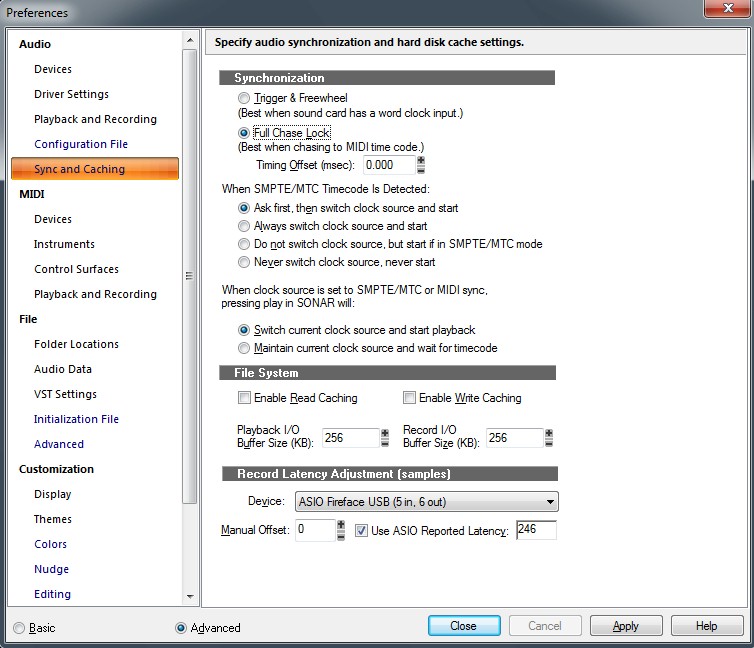 I have the same issues with my StudioCat DAW and my office setup. T
Tom Deering Tascam FW-1884 User Resources Page Firewire "Legacy" Tutorial, Service Manual, Schematic, and Service Bulletins Win10x64 StudioCat Pro Studio Coffee Lake 8086k 32gb RAM RME UFX (Audio) Tascam FW-1884 (Control) in Win 10x64 Pro
|
brundlefly
Max Output Level: 0 dBFS
- Total Posts : 14250
- Joined: 2007/09/14 14:57:59
- Location: Manitou Spgs, Colorado
- Status: offline
Re: Fix Loop & Punch for Cris Sake!
2013/11/04 13:23:48
(permalink)
Hmmm... did some re-testing, and I am able to reproduce it in X3c now, punching in two bars in the middle of a 4-bar loop. Each take is 172 samples later than the previous one - about 20 samples more than half my total latency. Interestingly, if I enter that value as a Manual Offset, then all of the takes are 172 samples late, but the error is not cumulative. Oddly, though, I have to enter it as a negative offset (i.e. decompensation) rather than the positive value you would expect would be needed to compensate for latency. Definitely an issue here, in any case. Apologies to the OP for not double-checking.
post edited by brundlefly - 2013/11/04 16:07:21
SONAR Platinum x64, 2x MOTU 2408/PCIe-424 (24-bit, 48kHz) Win10, I7-6700K @ 4.0GHz, 24GB DDR4, 2TB HDD, 32GB SSD Cache, GeForce GTX 750Ti, 2x 24" 16:10 IPS Monitors
|
bvideo
Max Output Level: -58 dBFS
- Total Posts : 1707
- Joined: 2006/09/02 22:20:02
- Status: offline
Re: Fix Loop & Punch for Cris Sake!
2013/11/04 15:06:25
(permalink)
Brundlefly, did you really mean X1C? There was a change from X1c to X1d (deeringamp's signature Sonar version). (Edit: ok deeringamp updated his sig to X3C)
post edited by bvideo - 2013/11/04 16:01:08
|
DeeringAmps
Max Output Level: -49 dBFS
- Total Posts : 2614
- Joined: 2005/10/03 10:29:25
- Location: Seattle area
- Status: offline
Re: Fix Loop & Punch for Cris Sake!
2013/11/04 15:16:10
(permalink)
Just to clarify the "Loop & Punch" issue is consistent in all of the Sonar X series.
IT DON'T WORK!
Brundlefly,
I've never been "patient" enough to track down the error, "about 20 samples more than half my total latency" gives me a place to start; thanks for that!
Sounds like 20 is the "hidden" samples for your driver to me.
Thanks to all,
Tom
Tom Deering Tascam FW-1884 User Resources Page Firewire "Legacy" Tutorial, Service Manual, Schematic, and Service Bulletins Win10x64 StudioCat Pro Studio Coffee Lake 8086k 32gb RAM RME UFX (Audio) Tascam FW-1884 (Control) in Win 10x64 Pro
|
brundlefly
Max Output Level: 0 dBFS
- Total Posts : 14250
- Joined: 2007/09/14 14:57:59
- Location: Manitou Spgs, Colorado
- Status: offline
Re: Fix Loop & Punch for Cris Sake!
2013/11/04 16:05:54
(permalink)
DeeringAmps
Sounds like 20 is the "hidden" samples for your driver to me.
Yes... sort of. What SONAR reports for RTL is within 2 samples of what CEntrance reports for a digital loopback with no A/D/A conversion, whereas an analog round-trip is 40 samples longer. So 20 samples is approximately the one-way converter latency. But it doesn't make sense that is would up in this case since SONAR doesn't know about the converter latency and I did the test with digital loopback. So I think there's something else going on, and it's just coincidence that it seems to match the unreported converter latency.
SONAR Platinum x64, 2x MOTU 2408/PCIe-424 (24-bit, 48kHz) Win10, I7-6700K @ 4.0GHz, 24GB DDR4, 2TB HDD, 32GB SSD Cache, GeForce GTX 750Ti, 2x 24" 16:10 IPS Monitors
|
brundlefly
Max Output Level: 0 dBFS
- Total Posts : 14250
- Joined: 2007/09/14 14:57:59
- Location: Manitou Spgs, Colorado
- Status: offline
Re: Fix Loop & Punch for Cris Sake!
2013/11/04 16:08:27
(permalink)
bvideo
Brundlefly, did you really mean X1C?
D'oh! Changed to X3c, and updated my sig, too.
SONAR Platinum x64, 2x MOTU 2408/PCIe-424 (24-bit, 48kHz) Win10, I7-6700K @ 4.0GHz, 24GB DDR4, 2TB HDD, 32GB SSD Cache, GeForce GTX 750Ti, 2x 24" 16:10 IPS Monitors
|
bvideo
Max Output Level: -58 dBFS
- Total Posts : 1707
- Joined: 2006/09/02 22:20:02
- Status: offline
Re: Fix Loop & Punch for Cris Sake!
2013/11/04 19:04:37
(permalink)
OK, I went through some old trouble reports.
In '07 I reported that ASIO loop recording problem back in Sonar 7, gaps at the end of each loop, not using punch-in. That's what was fixed in X1d.
In '09 I reported a punch-in/out (no loop) problem in Sonar 8. The punch-in/out placed a clip seemingly recorded late by the amount of ASIO reported input latency and left a gap at the end, equal to the difference between the ASIO driver-reported RT latency and the Centrance reported latency. I don't know whether the driver report was to be trusted at that time, so other users may have had a gap or not.
|
bvideo
Max Output Level: -58 dBFS
- Total Posts : 1707
- Joined: 2006/09/02 22:20:02
- Status: offline
Re: Fix Loop & Punch for Cris Sake!
2013/11/04 20:28:47
(permalink)
An experiment on X3c:
Did a punch-in/out record of two measures taken during a 4 measure record, no looping. The recorded clip was placed properly in the timeline, data lined up in sync.
Imported the file into which the punch-in was actually recorded into a separate track.
Lined it up sample-for-sample with the clip placed by the punch-in.
The recorded file has an extra 256 samples at the beginning and an extra 84 samples at the end.
Then when I did a 4-measure loop recording with a 2-measure punch-in/out, each successive take was placed 256 samples later than the previous. My ASIO buffer size is currently 128. Reported latency is 148 in, 236 out.
I was about to go on with experiments, but suddenly the loop & punch-in record started behaving weirdly: each take in the loop was made of a tiny 1024-sample clip followed by a clip that filled the rest of the punch area. I saved and restarted, and the problem persisted. I give up.
|
Anderton
Max Output Level: 0 dBFS
- Total Posts : 14070
- Joined: 2003/11/06 14:02:03
- Status: offline
Re: Fix Loop & Punch for Cris Sake!
2013/11/04 22:55:33
(permalink)
bvideo
An experiment on X3c:
Did a punch-in/out record of two measures taken during a 4 measure record, no looping. The recorded clip was placed properly in the timeline, data lined up in sync.
Imported the file into which the punch-in was actually recorded into a separate track.
Lined it up sample-for-sample with the clip placed by the punch-in.
The recorded file has an extra 256 samples at the beginning and an extra 84 samples at the end.
I tried this experiment, but I'm not sure if I understand you correctly. I have a four-measure clip and punch in over measures 2 and 3. Now I take the punched section and copy that into a different track. Then I line up the copy in the different track with the section that was punched in the original track. But I don't see any difference, both clips start and end exactly at the start of measure 2 and end at the start of measure 4. Could it be something as simple as "Snap to Audio Zero Crossings" being checked, so when you selected what you thought was two measures (and it looked that way visually unless you were zoomed waaaaay in), the selection itself had extra samples at the beginning and end due to it snapping to the nearest zero-crossing? I've been tripped up many times when trying to cut sample-accurate loops because I had "Snap to Audio Zero Crossings" checked. Don't know if that's the same issue for you, though.
|
brundlefly
Max Output Level: 0 dBFS
- Total Posts : 14250
- Joined: 2007/09/14 14:57:59
- Location: Manitou Spgs, Colorado
- Status: offline
Re: Fix Loop & Punch for Cris Sake!
2013/11/04 23:05:15
(permalink)
bvideo
I was about to go on with experiments, but suddenly the loop & punch-in record started behaving weirdly: each take in the loop was made of a tiny 1024-sample clip followed by a clip that filled the rest of the punch area. I saved and restarted, and the problem persisted. I give up.
That sounds like what happens when you comp record and stop the transport just after the the next iteration of the loop starts; all previous takes get split at the end of the snippet in the last take lane. All you have to do is delete that last partial take, and swipe through the last complete take with the comp tool to heal the splits in all the remaining takes.
SONAR Platinum x64, 2x MOTU 2408/PCIe-424 (24-bit, 48kHz) Win10, I7-6700K @ 4.0GHz, 24GB DDR4, 2TB HDD, 32GB SSD Cache, GeForce GTX 750Ti, 2x 24" 16:10 IPS Monitors
|
brundlefly
Max Output Level: 0 dBFS
- Total Posts : 14250
- Joined: 2007/09/14 14:57:59
- Location: Manitou Spgs, Colorado
- Status: offline
Re: Fix Loop & Punch for Cris Sake!
2013/11/04 23:11:37
(permalink)
Anderton
Now I take the punched section and copy that into a different track.
Hey Craig, what Bill was saying is to import the audio file representing the punched take into another track. That audio file is longer than the just the punched section. That's not too surprising, but it seems there might be a correspondence between the extra length of that file, and the cumulative latency that occurs when loop recording with a punch in region. I'll have to check that on the test I did.
SONAR Platinum x64, 2x MOTU 2408/PCIe-424 (24-bit, 48kHz) Win10, I7-6700K @ 4.0GHz, 24GB DDR4, 2TB HDD, 32GB SSD Cache, GeForce GTX 750Ti, 2x 24" 16:10 IPS Monitors
|
bvideo
Max Output Level: -58 dBFS
- Total Posts : 1707
- Joined: 2006/09/02 22:20:02
- Status: offline
Re: Fix Loop & Punch for Cris Sake!
2013/11/05 01:33:00
(permalink)
Hi Craig and Brundlefly, Thanks to Brundlefly for the explanation to Craig; that's what I meant. The old loop recording bug and this punch-in/out problem have some evidence behind the scenes, and also a potential built-in workaround, which is the actual file where the audio was recorded. The clips placed on the timeline by the loop or punch record are really just different segments of that file, with the clip start and end edges locked so they can not be slip edited to reveal any other data in the file. Importing the file allows us to align, slice up, and set the clip boundaries correctly, if the data is all there. That was what I wanted to check next with multiple passes over a loop with an interior punch region. About the tiny clip, I get what you're saying. I did have recording set to comp, but every time that happened I had stopped the record after the punch-out point and before the end of the loop. In other words, I never stopped recording within the punch region. I think that means all the clips should have been intact. Bill B. Aha! Set the record mode to sound on sound. Stopped recording after the fourth punchout and before the end of the loop and got a fifth take lane with just a tiny clip. This one contains 768 samples after recording 4 full loops. That is the same number of samples by which the fourth take is delayed (3*256).
post edited by bvideo - 2013/11/05 01:48:44
|
Splat 
Max Output Level: 0 dBFS
- Total Posts : 8672
- Joined: 2010/12/29 15:28:29
- Location: Mars.
- Status: offline
Re: Fix Loop & Punch for Cris Sake!
2013/11/21 23:20:58
(permalink)
So assuming this is still a bug will this be fixed for X3D or X3E ?
post edited by CakeAlexS - 2013/12/19 10:04:20
Sell by date at 9000 posts. Do not feed. @48/24 & 128 buffers latency is 367 with offset of 38. Sonar Platinum(64 bit),Win 8.1(64 bit),Saffire Pro 40(Firewire),Mix Control = 3.4,Firewire=VIA,Dell Studio XPS 8100(Intel Core i7 CPU 2.93 Ghz/16 Gb),4 x Seagate ST31500341AS (mirrored),GeForce GTX 460,Yamaha DGX-505 keyboard,Roland A-300PRO,Roland SPD-30 V2,FD-8,Triggera Krigg,Shure SM7B,Yamaha HS5.Maschine Studio+Komplete 9 Ultimate+Kontrol Z1.Addictive Keys,Izotope Nectar elements,Overloud Bundle,Geist.Acronis True Image 2014.
|
Splat
Max Output Level: 0 dBFS
- Total Posts : 8672
- Joined: 2010/12/29 15:28:29
- Location: Mars.
- Status: offline
Re: Fix Loop & Punch for Cris Sake!
2013/12/19 10:08:28
(permalink)
So DeeringAmps has created a new thread saying that this isn't fixed. Rather than split the discussion over two threads I'm responding here. Could anybody do a test case for this please if it still exists in X3D, here is an example of a test case ( totally unrelated!!). We need exact steps to reproduce.... Let's just make this totally clear... Supply screenshots but only if necessary. Make sure you supply all steps starting with "Start Sonar X3d, create new project". Got to be extremely detailed... thanks... TEST CASE EXAMPLE: STEPS FIRST ISSUE
Turn on 3 USB MIDI devices (such as keyboards), each MIDI device has it's own channel (say 1 + 2 + 3). Start Sonar X3D Create new project Insert 3 Dimension Pro softsynths. Assign an exclusive sound for each softsynth. Assign a single MIDI device to each softsynth track, making sure the MIDI input channel is specifically set correctly. i.e. If it's a Yamaha keyboard on channel 1, assign Yamaha Keyboard -> MIDI ch.1. Check to see if instruments play correctly. Save the Project. Close Sonar X3D application. Turn off one MIDI device. Start Sonar X3D Open existing project. Now play the MIDI controllers. EXPECTED...a) Some warning that MIDI devices have disappeared. b) All three MIDI tracks have maintained their values, however the missing device is flagged up in some way. ACTUAL...The track with the missing MIDI device seems to have had the MIDI input changed to one of the other MIDI Input devices (which is weird). Another MIDI Controller will have it's value changed for no reason whatsoever. A third MIDI Controller will have the value persist.
post edited by CakeAlexS - 2013/12/19 10:39:00
Sell by date at 9000 posts. Do not feed. @48/24 & 128 buffers latency is 367 with offset of 38. Sonar Platinum(64 bit),Win 8.1(64 bit),Saffire Pro 40(Firewire),Mix Control = 3.4,Firewire=VIA,Dell Studio XPS 8100(Intel Core i7 CPU 2.93 Ghz/16 Gb),4 x Seagate ST31500341AS (mirrored),GeForce GTX 460,Yamaha DGX-505 keyboard,Roland A-300PRO,Roland SPD-30 V2,FD-8,Triggera Krigg,Shure SM7B,Yamaha HS5.Maschine Studio+Komplete 9 Ultimate+Kontrol Z1.Addictive Keys,Izotope Nectar elements,Overloud Bundle,Geist.Acronis True Image 2014.
|
Anderton
Max Output Level: 0 dBFS
- Total Posts : 14070
- Joined: 2003/11/06 14:02:03
- Status: offline
Re: Fix Loop & Punch for Cris Sake!
2013/12/19 11:45:18
(permalink)
I realized why this isn't a problem for me. I never punch within a loop because I rarely quantize audio, so I usually need to add crossfades for any "punched" clip inside a loop. I record the "punched" part on a separate track while looping, then when I have the part I want, bring the clip into the track where a section needed to be replaced and add the crossfades.
Sure, it would be nice if you could have a punch inside a loop. But I MUST be missing something, because it seems to me there are several ways to accomplish replacing a section inside an existing track, so I don't see why this would be a deal-breaker in terms of working on projects.
|
Splat
Max Output Level: 0 dBFS
- Total Posts : 8672
- Joined: 2010/12/29 15:28:29
- Location: Mars.
- Status: offline
Re: Fix Loop & Punch for Cris Sake!
2013/12/19 12:11:04
(permalink)
Nevertheless if this is a bug I'm keen to reproduce. There's always a million ways to skin a cat I agree :)
Sell by date at 9000 posts. Do not feed. @48/24 & 128 buffers latency is 367 with offset of 38. Sonar Platinum(64 bit),Win 8.1(64 bit),Saffire Pro 40(Firewire),Mix Control = 3.4,Firewire=VIA,Dell Studio XPS 8100(Intel Core i7 CPU 2.93 Ghz/16 Gb),4 x Seagate ST31500341AS (mirrored),GeForce GTX 460,Yamaha DGX-505 keyboard,Roland A-300PRO,Roland SPD-30 V2,FD-8,Triggera Krigg,Shure SM7B,Yamaha HS5.Maschine Studio+Komplete 9 Ultimate+Kontrol Z1.Addictive Keys,Izotope Nectar elements,Overloud Bundle,Geist.Acronis True Image 2014.
|