HumbleNoise
Max Output Level: -46 dBFS

- Total Posts : 2946
- Joined: 2004/01/04 12:53:50
- Status: offline
How Would You Create a Continuously Changing Tempo?
I was playing around with a tune last night on my guitar and found myself playing slowly through the intro/verse (really just a musical phrase) and slowly speeding up through the chorus then back to slow starting the next verse. Is there some way to create a smooth transition slow to fast and back again? Or is it just a matter of changing tempo a little each measure? And back again?
Humbly Yours Larry Sonar X2 x64 MAudio 2496 Yamaha MG 12/4 Roland XV-88 Intel MB with Q6600 and 4 GB Ram NVidia 9800 GTX Windows 7 x64 Home Premium
|
kwhetzel
Max Output Level: -88 dBFS

- Total Posts : 128
- Joined: 2005/04/24 16:13:58
- Status: offline

Re:How Would You Create a Continuously Changing Tempo?
2011/05/06 18:14:18
(permalink)
Go to Views-Tempo (or Alt-Shift-5) and draw in your desired tempo. It follows whatever your current Snap to Grid setting is.
|
HumbleNoise
Max Output Level: -46 dBFS
- Total Posts : 2946
- Joined: 2004/01/04 12:53:50
- Status: offline
Re:How Would You Create a Continuously Changing Tempo?
2011/05/06 19:39:22
(permalink)
Thanks kwhetzel, Got the basics with your help but I see there's a lot to learn about the finer details. My first goal is to create a drum/click track that follows those tempo changes. Start with MIDI? Sweet - Thanks again
post edited by HumbleNoise - 2011/05/06 19:44:52
Humbly Yours Larry Sonar X2 x64 MAudio 2496 Yamaha MG 12/4 Roland XV-88 Intel MB with Q6600 and 4 GB Ram NVidia 9800 GTX Windows 7 x64 Home Premium
|
kwhetzel
Max Output Level: -88 dBFS
- Total Posts : 128
- Joined: 2005/04/24 16:13:58
- Status: offline
Re:How Would You Create a Continuously Changing Tempo?
2011/05/06 20:38:23
(permalink)
Sounds like you may want to use the Fit to Improvisation tool since you're planning on using a MIDI drum/click reference track. I've not used it before so don't know much about it, but just from scanning the Help file, it looks like it may be what you're looking for as the Tempo changes implemented from using it will be based more on what you've played into the reference track vs. trying to draw the Tempo in via my method.
kw
|
...wicked
Max Output Level: -1.5 dBFS

- Total Posts : 7360
- Joined: 2003/12/18 01:00:56
- Location: Seattle
- Status: offline
Re:How Would You Create a Continuously Changing Tempo?
2011/05/06 21:34:43
(permalink)
Generally speaking, when I "humanize" a sequence to make it feel more like a real band, I do small changes of 1 or 2 BPM at a time, and do them in a sequence at each bar leading up to a section change.
So, 2 measures before a verse/chorus transition I'll bump the tempo up a BPM or two, 1 measure before the change another bump, and then the final one at the beginning of the section. You can eek out a 6bpm change that way that feels pretty natural, as it takes a measure or so to feel the change and it's not jerky.
I usually do this right before I bounce down all my MIDI, because it's a total pain to deal with it afterwards. (possible, but still a pain, even with Audiosnap)
=========== The Fog People =========== Intel i7-4790 16GB RAM ASUS Z97 Roland OctaCapture Win10/64 SONAR Platinum 64-bit billions VSTs, some of which work
|
HumbleNoise
Max Output Level: -46 dBFS
- Total Posts : 2946
- Joined: 2004/01/04 12:53:50
- Status: offline
Re:How Would You Create a Continuously Changing Tempo?
2011/05/06 21:44:07
(permalink)
Thanks wicked. This is really just a strange whim I wanted to experiment with as I was playing a tune last night and haven't yet determine the tempo range but it will probably be more than 6bpm. Could be a disaster, could be interesting but either way really appreciated the advice.
Humbly Yours Larry Sonar X2 x64 MAudio 2496 Yamaha MG 12/4 Roland XV-88 Intel MB with Q6600 and 4 GB Ram NVidia 9800 GTX Windows 7 x64 Home Premium
|
F@ker
Max Output Level: -87 dBFS

- Total Posts : 182
- Joined: 2004/01/03 01:46:22
- Status: offline
Re:How Would You Create a Continuously Changing Tempo?
2011/05/07 00:50:51
(permalink)
|
FastBikerBoy
Forum Host

- Total Posts : 11326
- Joined: 2008/01/25 16:15:36
- Location: Watton, Norfolk, UK
- Status: offline
|
WDI
Max Output Level: -54.5 dBFS

- Total Posts : 2069
- Joined: 2007/08/28 02:31:11
- Status: offline
Re:How Would You Create a Continuously Changing Tempo?
2011/05/07 01:53:43
(permalink)
Oops, probably not what you were looking for...
post edited by WDI - 2011/05/07 01:56:47
Sonar 7 PE Windows XP Pofessional (SP3) MSI K8N Neo4-F AMD Athlon 64 3500+ 2 GB PC 3200 Ram RME Fireface 800 Edirol FA-66 CM Labs MotorMix Old stuff: ARJO
|
andychap
Max Output Level: -88 dBFS
- Total Posts : 107
- Joined: 2004/01/17 09:06:01
- Location: Plymouth UK
- Status: offline
Re:How Would You Create a Continuously Changing Tempo?
2011/05/07 11:06:41
(permalink)
Don't use the metronome when recording, works for me 
Andy Phenom IIx4 965 3.4Ghz & 8Gb RAM Win 7x64 bit,Sonar X1B, Komplete 5 Xstation, A&H ZED10, Roland E09
|
osd
Max Output Level: -84 dBFS

- Total Posts : 345
- Joined: 2010/12/05 19:13:45
- Status: offline
Re:How Would You Create a Continuously Changing Tempo?
2011/05/07 11:14:08
(permalink)
I have some projects that are delta blues style, so having a meandering tempo is important. The Fit to Improvisation, with a little AS tweaking afterward, has worked pretty well over here.
i7-870 2.93Ghz, 16GB RAM, Radeon HD 5770 + 2 x DisplayLink w/ 4 x 22" screens, Intel SSD 80GB, Sonar X1-D Exp. - Problems? How's your latency? What processes are running? Driver crash?
|
AndyW
Max Output Level: -45.5 dBFS

- Total Posts : 2956
- Joined: 2005/10/06 17:13:00
- Status: offline
Re:How Would You Create a Continuously Changing Tempo?
2011/05/07 14:51:38
(permalink)
Record a scratch track of the guitar part then use AS to create the tempo map.
|
Blogman
Max Output Level: -81 dBFS

- Total Posts : 481
- Joined: 2011/02/08 02:32:48
- Status: offline
Re:How Would You Create a Continuously Changing Tempo?
2011/05/07 15:12:31
(permalink)
What I do is record whatever you want first. then enable the audio click. Open the tempo view. If it doesn't change much, leave your snap on measures. If it will change more rapidly or over the course of a measure, then use beats as your snap (or no snap at all).
Next, one measure (or beat) at a time You draw the tempo change in and listen to the metronome and look at the grid. You'll see the grid changing. (looks like the audio moving). I've gotten really good at it. No wondering, make the click do what you want.
|
Chez Jonesy
Max Output Level: -87 dBFS
- Total Posts : 179
- Joined: 2005/12/12 13:10:32
- Location: Vancouver, British Columbia
- Status: offline
Re:How Would You Create a Continuously Changing Tempo?
2011/05/07 17:27:19
(permalink)
My thoughts:
I just recorded a song with a tempo that starts at 80 bpm, and continuously speeds up to 140 by the end of the song.
After playing around with it for a while, i found that 'drawing' in a tempo was difficult and impractical. But there IS a way to draw in a LINEAR tempo increase. If you do that, you can have a steady, smooth increase in tempo,
The advantages to doing it this way are:
1) you can still use some midi drums if you like, as they will speed up and slow down automatically with the project tempo
2) you can still use groove clips that you have recorded (same reason)
3) you can still use the metronome, and play along with it. Useful for recording the first track. Either you can use the metronome, or drag and drop in a simple midi drum loop after you've set up the tempo. You can always put in the drums you really want later.
I think that tempo is a cool way to change the feel of a song. Post your tune when you're done - i'd love to hear it.
chez
Vancouver, BC visit www.chezjonesy.com. running Sonar PATINUM Producer SIXalbums and lots of tunes on-line. also, check out the Moon Tunes section for some great jam session recordings. Presonus Studiolive mixer, microKORG, A800 Pro, MS-20, guitars, basses, Yammaha DTXPLORER, M-AUDIO CX8's.
|
HumbleNoise
Max Output Level: -46 dBFS
- Total Posts : 2946
- Joined: 2004/01/04 12:53:50
- Status: offline
Re:How Would You Create a Continuously Changing Tempo?
2011/05/07 18:22:16
(permalink)
Chez Jonesy
But there IS a way to draw in a LINEAR tempo increase. If you do that, you can have a steady, smooth increase in tempo,
I think that tempo is a cool way to change the feel of a song. Post your tune when you're done - i'd love to hear it.
chez
I discovered this in the manual and would love to post the tune but I have yet to actually produce a tune and this most likely will not be the first. Thanks for the tip though.
Humbly Yours Larry Sonar X2 x64 MAudio 2496 Yamaha MG 12/4 Roland XV-88 Intel MB with Q6600 and 4 GB Ram NVidia 9800 GTX Windows 7 x64 Home Premium
|
HumbleNoise
Max Output Level: -46 dBFS
- Total Posts : 2946
- Joined: 2004/01/04 12:53:50
- Status: offline
Re:How Would You Create a Continuously Changing Tempo?
2011/05/08 09:59:22
(permalink)
Humbly Yours Larry Sonar X2 x64 MAudio 2496 Yamaha MG 12/4 Roland XV-88 Intel MB with Q6600 and 4 GB Ram NVidia 9800 GTX Windows 7 x64 Home Premium
|
Blogman
Max Output Level: -81 dBFS
- Total Posts : 481
- Joined: 2011/02/08 02:32:48
- Status: offline
Re:How Would You Create a Continuously Changing Tempo?
2011/05/08 13:30:57
(permalink)
Chez Jonesy
My thoughts:
I just recorded a song with a tempo that starts at 80 bpm, and continuously speeds up to 140 by the end of the song.
After playing around with it for a while, i found that 'drawing' in a tempo was difficult and impractical. But there IS a way to draw in a LINEAR tempo increase. If you do that, you can have a steady, smooth increase in tempo,
The advantages to doing it this way are:
1) you can still use some midi drums if you like, as they will speed up and slow down automatically with the project tempo
2) you can still use groove clips that you have recorded (same reason)
3) you can still use the metronome, and play along with it. Useful for recording the first track. Either you can use the metronome, or drag and drop in a simple midi drum loop after you've set up the tempo. You can always put in the drums you really want later.
I think that tempo is a cool way to change the feel of a song. Post your tune when you're done - i'd love to hear it.
chez
Humans need to show machines what 'feel' is.... machines don't feel. Here's a great example of a gradual human speed up. This is a screenshot of 'Give me one reason to stay here' -tracy chapman in my tempo view where I drew in the tempo. Notice how the band gets excited in the tempo department. It's not linear though. 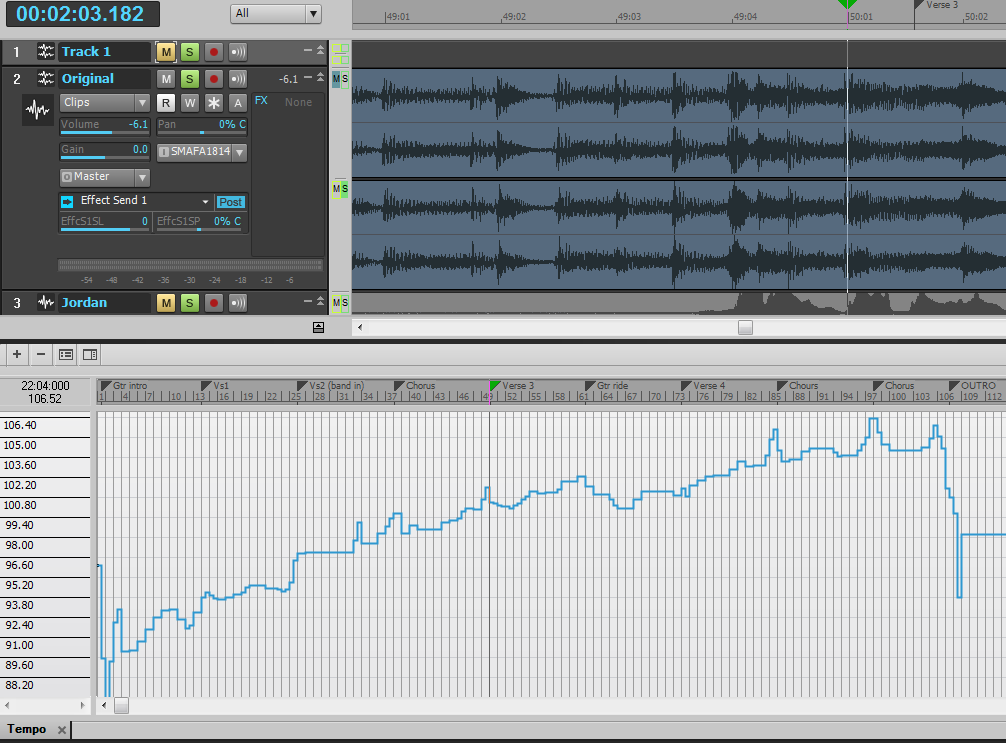
|
HumbleNoise
Max Output Level: -46 dBFS
- Total Posts : 2946
- Joined: 2004/01/04 12:53:50
- Status: offline
Re:How Would You Create a Continuously Changing Tempo?
2011/05/08 14:15:00
(permalink)
Wow almost 20 BPM difference? Interesting. Thanks for that.
Humbly Yours Larry Sonar X2 x64 MAudio 2496 Yamaha MG 12/4 Roland XV-88 Intel MB with Q6600 and 4 GB Ram NVidia 9800 GTX Windows 7 x64 Home Premium
|
Somerset
Max Output Level: -78 dBFS

- Total Posts : 634
- Joined: 2004/10/20 06:07:27
- Location: Sydney, Australia
- Status: offline
Re:How Would You Create a Continuously Changing Tempo?
2011/05/09 03:33:36
(permalink)
Blogman
What I do is record whatever you want first. then enable the audio click. Open the tempo view. If it doesn't change much, leave your snap on measures. If it will change more rapidly or over the course of a measure, then use beats as your snap (or no snap at all).
Next, one measure (or beat) at a time You draw the tempo change in and listen to the metronome and look at the grid. You'll see the grid changing. (looks like the audio moving). I've gotten really good at it. No wondering, make the click do what you want.
I am very interested in this. Are you saying you just use trial and error to adjust the tempo manually on each measure or beat to get the whole song to be in sync with your metronome? That seems like it could be very time consuming. Could you please explain your method in a little more detail? I have had some success using either "fit improvisation" or Audio Snap (after manually recording a "sync click track" which is in time with the "improvised track"), but neither method has been entirely without issues.
|
Blogman
Max Output Level: -81 dBFS
- Total Posts : 481
- Joined: 2011/02/08 02:32:48
- Status: offline
Re:How Would You Create a Continuously Changing Tempo?
2011/05/09 14:14:25
(permalink)
One might call it trial and error, but I simply just adjust the tempo manually in the tempo view with the track view showing the waveform. You have to zoom in enough on both t I'm using my Tranzport to scroll by beats, and between looking at the Waveform and listening to the audio click I'm able to draw in the appropriate tempo to Perfectly lock the click to ANY audio. Above you can see where I imported the Tracy chapman song and drew in the tempo to follow the click. Easy to make a soundtrack when you can click the metronome with the origianl first, then change to whatever new key or tempo(s) your client needs it to be in. I do this all of the time and am very fast at it. It is also very effective for when no click was used. Great way to retain the original artist energy. speeding up through drum fills etc...
|
dmbaer
Max Output Level: -49.5 dBFS

- Total Posts : 2585
- Joined: 2008/08/04 20:10:22
- Location: Concord CA
- Status: offline
Re:How Would You Create a Continuously Changing Tempo?
2011/05/09 14:41:44
(permalink)
Blogman
One might call it trial and error, but I simply just adjust the tempo manually in the tempo view with the track view showing the waveform. You have to zoom in enough on both t I'm using my Tranzport to scroll by beats, and between looking at the Waveform and listening to the audio click I'm able to draw in the appropriate tempo to Perfectly lock the click to ANY audio. Above you can see where I imported the Tracy chapman song and drew in the tempo to follow the click. Easy to make a soundtrack when you can click the metronome with the origianl first, then change to whatever new key or tempo(s) your client needs it to be in. I do this all of the time and am very fast at it. It is also very effective for when no click was used. Great way to retain the original artist energy. speeding up through drum fills etc...
This is fascinating. So are you saying that you take a guess at what tempo will cause the track view now-time line to land where you want in the track view and keep refining that until it more or less ends up where you are aiming? Which makes me want to ask if you have ever tried creating a transient marker pool and using Sonar's tempo matching facilities based on that? In other words, I'm curious as to whether you found your technique because the Sonar's solution didn't work for you (or didn't work as easily) or whether you just found this approach and didn't need to look for any better solution.
|
Poco
Max Output Level: -76 dBFS

- Total Posts : 746
- Joined: 2005/10/11 15:10:53
- Status: offline
Re:How Would You Create a Continuously Changing Tempo?
2011/05/09 15:54:48
(permalink)
Just record a drummer playing by himself...
God People - God Music Where there is no peace, it is not peaceful.
|
brundlefly
Max Output Level: 0 dBFS

- Total Posts : 14250
- Joined: 2007/09/14 14:57:59
- Location: Manitou Spgs, Colorado
- Status: offline
Re:How Would You Create a Continuously Changing Tempo?
2011/05/09 21:56:02
(permalink)
BlogmanYou draw the tempo change in and listen to the metronome and look at the grid. You'll see the grid changing. (looks like the audio moving). Actually it is the audio moving. SONAR's grid does not change proportions with tempo changes. M:B:T time is the fixed visual reference, and the length and position of audio changes with changing tempo. I've mentioned this is before, and recently entered a feature request to have an optional mode where absolute time is the fixed visual reference, and the length of measures and beats changes with tempo. I doubt it will ever happen, but I think it would help address some of the "unintuitiveness" of Audiosnap. FWIW, I think Set Measure/Beat At Now lets you do this with less trial and error, and with greater accuracy and precision.
|
Blogman
Max Output Level: -81 dBFS
- Total Posts : 481
- Joined: 2011/02/08 02:32:48
- Status: offline
Re:How Would You Create a Continuously Changing Tempo?
2011/05/09 22:59:13
(permalink)
Actually it is the audio moving. SONAR's grid does not change proportions with tempo changes. M:B:T time is the fixed visual reference, and the length and position of audio changes with changing tempo. Actually the audio just 'looks' like its stretching and pulling but is still right where it has always been. The grid is being told to speed up and slow down to stay with the audio. Now once I've tracked my click to follow the audio, sometimes I'll go a step further and then enable audio stretch so as to be able to change or straighten out the tempo. As far as precision and less trial and error, it's as precise as you can get. I can do it with track playing in real time making the necessary adjustments. I've put in a request for a tap tempo feature. Not just tap in the most recent tempo, but all of the tempos in real time.... conducting. Someone said 'hire a drummer'... I play drums too so that's not the issue. This solution of mine goes along with live musicians playing without a click, or live musicians playing to a click that speeds up and slows down to follow an origianl artist's tempos and feels. Also if I'm recreating an orchestra production off of an original that has been conducted, this works great.
|
Blogman
Max Output Level: -81 dBFS
- Total Posts : 481
- Joined: 2011/02/08 02:32:48
- Status: offline
Re:How Would You Create a Continuously Changing Tempo?
2011/05/09 23:01:22
(permalink)
and yes I've tried sonar's tempo finding tools, and this is a far more perfect and reliable solution.
|
F@ker
Max Output Level: -87 dBFS
- Total Posts : 182
- Joined: 2004/01/03 01:46:22
- Status: offline
Re:How Would You Create a Continuously Changing Tempo?
2011/05/10 00:22:39
(permalink)
HumbleNoise
F@ker
http://www.youtube.com/us...p/search/0/cP_4X5QdppE
Meant to thank you for that link F@ker. It was pretty informative.
Glad to point you to it. When I first viewed it I thought, "Doh! Why didn't I think of this?" Credit to dusty puppy.
|
Somerset
Max Output Level: -78 dBFS
- Total Posts : 634
- Joined: 2004/10/20 06:07:27
- Location: Sydney, Australia
- Status: offline
Re:How Would You Create a Continuously Changing Tempo?
2011/05/10 01:52:03
(permalink)
Blogman
Now once I've tracked my click to follow the audio, sometimes I'll go a step further and then enable audio stretch so as to be able to change or straighten out the tempo.
Are you creating a new click track that is in time with the track? Sounds like it, because you say "tracked my click". That's what I do sometimes, and hit a snare (for example) on every quarter note in time with the source track, and then use whatever method to line up the grid to my new click track. Or are you saying you just use the metronome, and adjust the tempo while listening to that click?
|
brundlefly
Max Output Level: 0 dBFS
- Total Posts : 14250
- Joined: 2007/09/14 14:57:59
- Location: Manitou Spgs, Colorado
- Status: offline
Re:How Would You Create a Continuously Changing Tempo?
2011/05/10 02:04:23
(permalink)
Actually the audio just 'looks' like its stretching and pulling but is still right where it has always been. Yes in real time, it hasn't moved. I was just trying to correct the impression you gave that "you'll see the grid changing". You won't; you'll see the audio clip morphing to fit the fixed visual grid. Underneath the interface, it is the grid that's changing, but that's not what you see.
|
Blogman
Max Output Level: -81 dBFS
- Total Posts : 481
- Joined: 2011/02/08 02:32:48
- Status: offline
Re:How Would You Create a Continuously Changing Tempo?
2011/05/10 03:58:12
(permalink)
Somerset
Blogman
Now once I've tracked my click to follow the audio, sometimes I'll go a step further and then enable audio stretch so as to be able to change or straighten out the tempo.
Are you creating a new click track that is in time with the track? Sounds like it, because you say "tracked my click". That's what I do sometimes, and hit a snare (for example) on every quarter note in time with the source track, and then use whatever method to line up the grid to my new click track. Or are you saying you just use the metronome, and adjust the tempo while listening to that click?
The latter... I use the metronome and adjust the tempo while both listening to that click, the source material, and watching the grid. It's easy to see where kick drums and snare drums are. Orchestra stuff requires more listening.
|
Somerset
Max Output Level: -78 dBFS
- Total Posts : 634
- Joined: 2004/10/20 06:07:27
- Location: Sydney, Australia
- Status: offline
Re:How Would You Create a Continuously Changing Tempo?
2011/05/10 05:35:33
(permalink)
Blogman
Somerset
Blogman
Now once I've tracked my click to follow the audio, sometimes I'll go a step further and then enable audio stretch so as to be able to change or straighten out the tempo.
Are you creating a new click track that is in time with the track? Sounds like it, because you say "tracked my click". That's what I do sometimes, and hit a snare (for example) on every quarter note in time with the source track, and then use whatever method to line up the grid to my new click track. Or are you saying you just use the metronome, and adjust the tempo while listening to that click?
The latter... I use the metronome and adjust the tempo while both listening to that click, the source material, and watching the grid. It's easy to see where kick drums and snare drums are. Orchestra stuff requires more listening.
I will have to give this a try. Thanks a lot for the explanations.
|