jih64 
Max Output Level: -75 dBFS

- Total Posts : 797
- Joined: 2014/01/30 20:59:40
- Location: Studio One 3
- Status: offline

Re: How to deal with new plugins
2015/02/27 22:44:32
(permalink)
use the 'insert effects chain preset' from the list, then they should be in there
|
Sailor55
Max Output Level: -89 dBFS

- Total Posts : 76
- Joined: 2008/06/19 11:05:00
- Location: Vancouver BC Canada
- Status: offline
Re: How to deal with new plugins
2015/02/28 00:02:20
(permalink)
Well... so it is scook. I thank you profoundly for that information.
|
Rob[at]Sound-Rehab
Max Output Level: -47 dBFS

- Total Posts : 2819
- Joined: 2011/02/03 04:31:35
- Location: Sound-Rehab, Austria
- Status: offline
Re: How to deal with new plugins
2015/02/28 04:11:38
(permalink)
Kylotan
Given that I have no idea what REMatrix Solo is, that is awkward. Is it a ProChannel thing? I don't touch the ProChannel so it doesn't bother me too much, but I don't like the fact that we have this new automatic installer which only really half-installs things.
You should seriously give it a try ... you are really missing out on something here ... dcumpian
I see a feature request:
Plugin Manager highlights plugins that are either in or not (whatever is easier) in the currently loaded layout.
Regards,
Dan
Love that ... pls put in the feature request, I'll vote for it!
GOOD TUNES LAST FOREVER +++ Visit the Rehab +++ DAW: Platinum/X3e, win10 64 bit, i7-3930K (6x3.2GHz), Asus Sabertooth X79, 32 GB DDR3 1600MHz, ATI HD 5450, 120 GB SSD OCZ Agility3, 2x 1TB WD HDD SATA 600 Audio-Interface: 2x MOTU 1248 AVB, Focusrite OctoPre, (Roland Octa-Capture) Control-Surface: VS-700C VSTi: WAVES, NI K10u, FabFilter, IK, ... (too many really)
|
mudgel
Max Output Level: 0 dBFS

- Total Posts : 12010
- Joined: 2004/08/13 00:56:05
- Location: Linton Victoria (Near Ballarat)
- Status: offline
Re: How to deal with new plugins
2015/02/28 04:18:49
(permalink)
There was a Boost 11 update though it wasn't documented anywhere,
Mike V. (MUDGEL) STUDIO: Win 10 Pro x64, SPlat & CbB x64, PC: ASUS Z370-A, INTEL i7 8700k, 32GIG DDR4 2400, OC 4.7Ghz. Storage: 7 TB SATA III, 750GiG SSD & Samsung 500 Gig 960 EVO NVMe M.2. Monitors: Adam A7X, JBL 10” Sub. Audio I/O & DSP Server: DIGIGRID IOS & IOX. Screen: Raven MTi + 43" HD 4K TV Monitor. Keyboard Controller: Native Instruments Komplete Kontrol S88.
|
Kylotan
Max Output Level: -71 dBFS

- Total Posts : 995
- Joined: 2007/09/10 17:27:35
- Location: Nottingham, UK
- Status: offline
Re: How to deal with new plugins
2015/02/28 04:43:36
(permalink)
Anderton
IR responses are samples for loading into convolution reverbs, you're not limited to using them with the ProChannel REmatrix. Sure, but where do they get installed? Where does anything get installed? To be fair this has been a small problem with Sonar for years, ie. data and plugins spread across a bunch of places, but at least before you only had to learn it all once per version. Now we're going to get this every month. The Rapture Expansion Pack should be in Rapture's browser along with the other Rapture presets. I'm also yet to discover whether Sonar will manage to install this pack properly given that I migrated Rapture from a previous installation instead of using the CCC. My guess is that it probably won't! I may have to just install it, and Dimension Pro, via CCC, but then I'll have to check to see whether it installed the old Rapture and Dim. Pro expansion packs or whether I have to patch them in manually.
Sonar Platinum (Newburyport) / Win 8.1 64bit / Focusrite Scarlett 6i6 / Absynth / Kontakt / Play / Superior Drummer 2 / ESP LTD guitar / etc Twilight's Embrace - gothic/death metal | Other works - instrumental/soundtracks
|
Kylotan
Max Output Level: -71 dBFS
- Total Posts : 995
- Joined: 2007/09/10 17:27:35
- Location: Nottingham, UK
- Status: offline
Re: How to deal with new plugins
2015/02/28 04:47:03
(permalink)
FreeFlyBertl
Kylotan
Given that I have no idea what REMatrix Solo is, that is awkward. Is it a ProChannel thing? I don't touch the ProChannel so it doesn't bother me too much, but I don't like the fact that we have this new automatic installer which only really half-installs things.
You should seriously give it a try ... you are really missing out on something here ... The ProChannel is a usability nightmare for anybody who spends 95% of their time in Track View (ie. me) since it's basically invisible, so I don't bother with it. It looks like REMatrix Solo is Just Another Impulse Loader anyway.
Sonar Platinum (Newburyport) / Win 8.1 64bit / Focusrite Scarlett 6i6 / Absynth / Kontakt / Play / Superior Drummer 2 / ESP LTD guitar / etc Twilight's Embrace - gothic/death metal | Other works - instrumental/soundtracks
|
jih64
Max Output Level: -75 dBFS
- Total Posts : 797
- Joined: 2014/01/30 20:59:40
- Location: Studio One 3
- Status: offline
Re: How to deal with new plugins
2015/02/28 04:47:47
(permalink)
☄ Helpfulby Kylotan 2015/02/28 04:53:31
Kylotan
I'm also yet to discover whether Sonar will manage to install this pack properly given that I migrated Rapture from a previous installation instead of using the CCC. My guess is that it probably won't! I may have to just install it, and Dimension Pro, via CCC, but then I'll have to check to see whether it installed the old Rapture and Dim. Pro expansion packs or whether I have to patch them in manually.
I never installed Rapture or Dimension Pro or any stuff that was in X3e, and the new Rapture stuff is there after the update.
post edited by jih64 - 2015/02/28 04:57:39
|
jih64
Max Output Level: -75 dBFS
- Total Posts : 797
- Joined: 2014/01/30 20:59:40
- Location: Studio One 3
- Status: offline
Re: How to deal with new plugins
2015/02/28 04:54:41
(permalink)
The Rematrix stuff, assuming that is what you are talking about are installed in C:\Cakewalk Content\NYC Showroom Impulse Responses for me anyway, you may or may not have installed to your own locations.
|
jih64
Max Output Level: -75 dBFS
- Total Posts : 797
- Joined: 2014/01/30 20:59:40
- Location: Studio One 3
- Status: offline
Re: How to deal with new plugins
2015/02/28 05:03:47
(permalink)
Kylotan
Given that I have no idea what REMatrix Solo is
You probably know by now, but it's a Reverb thingy, just think of it as Breverbs big brother (albeit cut down from the full ReMatrix) and Pro Channel module only in Sonars version I also had the vst plugin scan say it found 5 new plugs :)
|
FastBikerBoy
Forum Host

- Total Posts : 11326
- Joined: 2008/01/25 16:15:36
- Location: Watton, Norfolk, UK
- Status: offline
Re: How to deal with new plugins
2015/02/28 05:44:27
(permalink)
Kylotan
FreeFlyBertl
Kylotan
Given that I have no idea what REMatrix Solo is, that is awkward. Is it a ProChannel thing? I don't touch the ProChannel so it doesn't bother me too much, but I don't like the fact that we have this new automatic installer which only really half-installs things.
You should seriously give it a try ... you are really missing out on something here ...
The ProChannel is a usability nightmare for anybody who spends 95% of their time in Track View (ie. me) since it's basically invisible, so I don't bother with it. It looks like REMatrix Solo is Just Another Impulse Loader anyway.
Just have the inspector visible, it follows the in focus track, or set up a hybrid screenset with the TV & CV with only the PC showing. The view possibilities since skylight was introduced are only limited by user imagination.
|
Kylotan
Max Output Level: -71 dBFS
- Total Posts : 995
- Joined: 2007/09/10 17:27:35
- Location: Nottingham, UK
- Status: offline
Re: How to deal with new plugins
2015/02/28 06:06:39
(permalink)
I don't want to have to click on a track to know whether I have effects on it or not, nor do I want the Inspector open all the time. And I don't want to keep switching between screensets when the most important thing for me is to have most of the screen available for Track View. The FX bin is the most convenient way to handle these things. If there was any indication at all in Track View that there are ProChannel units in operation for a given track, I might reconsider. But for now, it's an awkward toy designed to impress people who like analogue desks.
Sonar Platinum (Newburyport) / Win 8.1 64bit / Focusrite Scarlett 6i6 / Absynth / Kontakt / Play / Superior Drummer 2 / ESP LTD guitar / etc Twilight's Embrace - gothic/death metal | Other works - instrumental/soundtracks
|
mudgel
Max Output Level: 0 dBFS
- Total Posts : 12010
- Joined: 2004/08/13 00:56:05
- Location: Linton Victoria (Near Ballarat)
- Status: offline
Re: How to deal with new plugins
2015/02/28 06:16:45
(permalink)
Unless you expand a track vertically to a certain size you can't tell it has fx plugins or what they are either.
Mike V. (MUDGEL) STUDIO: Win 10 Pro x64, SPlat & CbB x64, PC: ASUS Z370-A, INTEL i7 8700k, 32GIG DDR4 2400, OC 4.7Ghz. Storage: 7 TB SATA III, 750GiG SSD & Samsung 500 Gig 960 EVO NVMe M.2. Monitors: Adam A7X, JBL 10” Sub. Audio I/O & DSP Server: DIGIGRID IOS & IOX. Screen: Raven MTi + 43" HD 4K TV Monitor. Keyboard Controller: Native Instruments Komplete Kontrol S88.
|
Kylotan
Max Output Level: -71 dBFS
- Total Posts : 995
- Joined: 2007/09/10 17:27:35
- Location: Nottingham, UK
- Status: offline
Re: How to deal with new plugins
2015/02/28 06:31:22
(permalink)
Which most people will have done already, since you can't do much with tracks that are so short that you can't grab hold of the various handles. Tracks of a reasonable size are basically the default, and it's no coincidence that it's how they portray it in their promo screenshots even now - http://www.cakewalk.com/Products/SONAR (look, FX bins all visible - per-track ProChannels only partially so)
Sonar Platinum (Newburyport) / Win 8.1 64bit / Focusrite Scarlett 6i6 / Absynth / Kontakt / Play / Superior Drummer 2 / ESP LTD guitar / etc Twilight's Embrace - gothic/death metal | Other works - instrumental/soundtracks
|
FastBikerBoy
Forum Host
- Total Posts : 11326
- Joined: 2008/01/25 16:15:36
- Location: Watton, Norfolk, UK
- Status: offline
Re: How to deal with new plugins
2015/02/28 06:38:31
(permalink)
Kylotan
I don't want to have to click on a track to know whether I have effects on it or not, nor do I want the Inspector open all the time. And I don't want to keep switching between screensets when the most important thing for me is to have most of the screen available for Track View. The FX bin is the most convenient way to handle these things. If there was any indication at all in Track View that there are ProChannel units in operation for a given track, I might reconsider. But for now, it's an awkward toy designed to impress people who like analogue desks.
You misunderstood me. I wasn't suggesting swapping screensets, but setting one up that shows the info you want. For example to see if the PC is on/off something like this.... 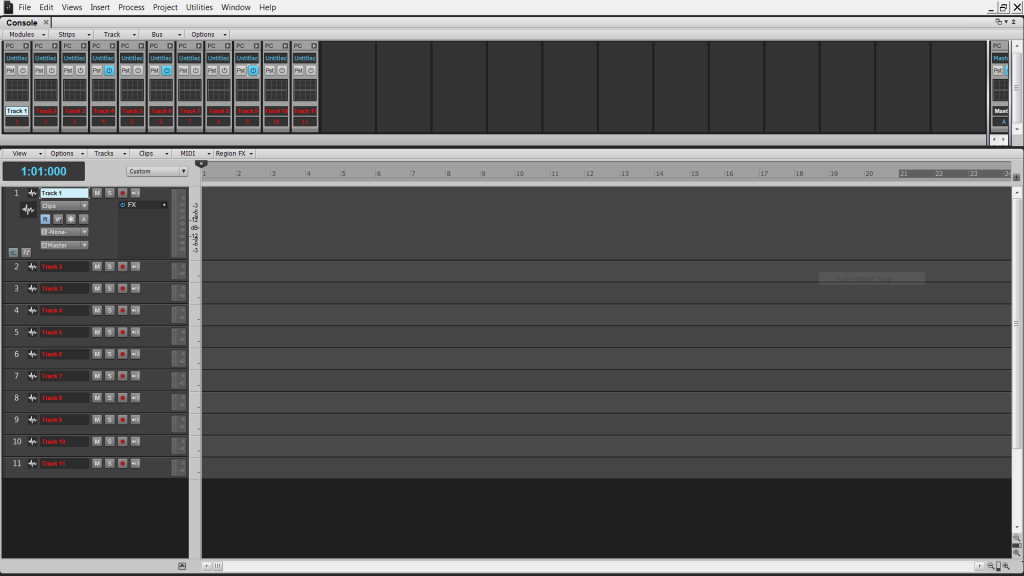 Pressing D could then open the PC for full if you wished. As I said earlier the possibilities are almost endless.
|
Kylotan
Max Output Level: -71 dBFS
- Total Posts : 995
- Joined: 2007/09/10 17:27:35
- Location: Nottingham, UK
- Status: offline
Re: How to deal with new plugins
2015/02/28 06:43:22
(permalink)
The possibilities are endless but screen space is not. I don't want Console view taking up a large chunk of my screen when I am going to use it for literally nothing else. And if I want to see the ProChannel for a given track I still have to click on it in the Track view in order for it to be visible and highlighted in the Console. (There are hardly ever times when I can see every single track onscreen at once with the Console.) It's just a poor interface. Having the information in-line with the track makes more sense. (Which is why almost everything else is there.)
Sonar Platinum (Newburyport) / Win 8.1 64bit / Focusrite Scarlett 6i6 / Absynth / Kontakt / Play / Superior Drummer 2 / ESP LTD guitar / etc Twilight's Embrace - gothic/death metal | Other works - instrumental/soundtracks
|
mudgel
Max Output Level: 0 dBFS
- Total Posts : 12010
- Joined: 2004/08/13 00:56:05
- Location: Linton Victoria (Near Ballarat)
- Status: offline
Re: How to deal with new plugins
2015/02/28 06:48:46
(permalink)
Ah but it's usually the track or few tracks I'm working on that are so expanded and if that's the case I want to see more info that the Inspector gives me. Mind you I have 2 monitors so perhaps that makes a difference.
BTW i hardly think the ProChannel is an awkward toy let alone designed to impress people who like analog desks. I happen to think its an elegant adjunctive to the fx bin.
Mike V. (MUDGEL) STUDIO: Win 10 Pro x64, SPlat & CbB x64, PC: ASUS Z370-A, INTEL i7 8700k, 32GIG DDR4 2400, OC 4.7Ghz. Storage: 7 TB SATA III, 750GiG SSD & Samsung 500 Gig 960 EVO NVMe M.2. Monitors: Adam A7X, JBL 10” Sub. Audio I/O & DSP Server: DIGIGRID IOS & IOX. Screen: Raven MTi + 43" HD 4K TV Monitor. Keyboard Controller: Native Instruments Komplete Kontrol S88.
|
FastBikerBoy
Forum Host
- Total Posts : 11326
- Joined: 2008/01/25 16:15:36
- Location: Watton, Norfolk, UK
- Status: offline
Re: How to deal with new plugins
2015/02/28 06:58:09
(permalink)
I'd hardly call it a large chunk but each to their own. It works for me, I guess I like toys.  I tend to use several fx on tracks, so the FX bin starts to get just as unusable for me as they fill vertically. With a load of tracks showing, I personally find the inspector easier but I do work with a control surface so track selection is automatic. Up until this latest version I found the nightmare of maintaining FX UIs a nightmare compared to the PC. At least the FX UI situation is much better now.
|
Kylotan
Max Output Level: -71 dBFS
- Total Posts : 995
- Joined: 2007/09/10 17:27:35
- Location: Nottingham, UK
- Status: offline
Re: How to deal with new plugins
2015/02/28 07:00:27
(permalink)
To be fair, this is rather wasting my time. I didn't come here to have people evangelise the ProChannel to me, as always happens if I dare mention that I don't use it; I came here to try and find out how people deal with Cakewalk giving us new VSTs and the like once a month. I'm not going to use the ProChannel because to me it is worthless. The bundled effects seem no more interesting than any that already exist and pushing the UI out to places that I never otherwise look means that it is inconvenient.
Sonar Platinum (Newburyport) / Win 8.1 64bit / Focusrite Scarlett 6i6 / Absynth / Kontakt / Play / Superior Drummer 2 / ESP LTD guitar / etc Twilight's Embrace - gothic/death metal | Other works - instrumental/soundtracks
|
Kylotan
Max Output Level: -71 dBFS
- Total Posts : 995
- Joined: 2007/09/10 17:27:35
- Location: Nottingham, UK
- Status: offline
Re: How to deal with new plugins
2015/02/28 07:03:35
(permalink)
FastBikerBoy
Up until this latest version I found the nightmare of maintaining FX UIs a nightmare compared to the PC. At least the FX UI situation is much better now.
That seems to be true for people who used Console view because, for some bizarre reason, that didn't have a flexible-sized box for FX. For those of us who've been using Track View for this for the last 15 years or whatever, this has not really been a problem. You could always make Tracks taller to see more FX. Maybe if you had 6 or more FX it starts to become unwieldy, but not necessarily more so than having to open up a Console view or an Inspector (and switch that to ProChannel view) to see them.
Sonar Platinum (Newburyport) / Win 8.1 64bit / Focusrite Scarlett 6i6 / Absynth / Kontakt / Play / Superior Drummer 2 / ESP LTD guitar / etc Twilight's Embrace - gothic/death metal | Other works - instrumental/soundtracks
|
mudgel
Max Output Level: 0 dBFS
- Total Posts : 12010
- Joined: 2004/08/13 00:56:05
- Location: Linton Victoria (Near Ballarat)
- Status: offline
Re: How to deal with new plugins
2015/02/28 07:06:21
(permalink)
FBB, how weird, your recent posts have just appeared on my screen. I thought I was having a conversation with Kylotan but now I see its you.
Mike V. (MUDGEL) STUDIO: Win 10 Pro x64, SPlat & CbB x64, PC: ASUS Z370-A, INTEL i7 8700k, 32GIG DDR4 2400, OC 4.7Ghz. Storage: 7 TB SATA III, 750GiG SSD & Samsung 500 Gig 960 EVO NVMe M.2. Monitors: Adam A7X, JBL 10” Sub. Audio I/O & DSP Server: DIGIGRID IOS & IOX. Screen: Raven MTi + 43" HD 4K TV Monitor. Keyboard Controller: Native Instruments Komplete Kontrol S88.
|
FastBikerBoy
Forum Host
- Total Posts : 11326
- Joined: 2008/01/25 16:15:36
- Location: Watton, Norfolk, UK
- Status: offline
Re: How to deal with new plugins
2015/02/28 07:08:28
(permalink)
Kylotan
To be fair, this is rather wasting my time. I didn't come here to have people evangelise the ProChannel to me, as always happens if I dare mention that I don't use it; I came here to try and find out how people deal with Cakewalk giving us new VSTs and the like once a month. I'm not going to use the ProChannel because to me it is worthless. The bundled effects seem no more interesting than any that already exist and pushing the UI out to places that I never otherwise look means that it is inconvenient.
Pardon me for trying to suggest a solution to a problem you said you have with the prochannel. I'll stop wasting your (and my) time now.
|