No How
Max Output Level: -23.5 dBFS

- Total Posts : 5180
- Joined: 2006/05/02 11:56:01
- Location: the boogie-woogie Isles
- Status: offline
How to make stereo
I have been recording everything on one track at a time and would like to spread the sounds out a bit. I see the pan control but it doesn't seem to do anything.
One other question: I used a tubeamp plug in for some crunch and there is the usual buzzing from the overdrive. how to eliminate without killing effect?
Thanks.
|
wickerman
Max Output Level: -70 dBFS

- Total Posts : 1039
- Joined: 2005/10/22 19:07:16
- Location: WV
- Status: offline

RE: How to make stereo
2006/12/31 15:09:16
(permalink)
Is the button for stereo set to MONO? or are you recording to one side of a track? (L or R?) May need a bit more info on that one, I record everything on one track and run into my PC as a mono signal, then I pan as I think works. There is a button over (in console view) to switch between stereo and mono mixes...I'm using MC Pro, I think it's the same for others.
the plug in buzzing - I'd try reducing the output gain on it, you may be getting D/O's if it's too hot. (D/O = digital overs)
hope that helps!
|
No How
Max Output Level: -23.5 dBFS
- Total Posts : 5180
- Joined: 2006/05/02 11:56:01
- Location: the boogie-woogie Isles
- Status: offline
RE: How to make stereo
2007/01/01 13:23:47
(permalink)
Thanks, Wickerman.
I have the recording set to one side. I do have the stereo icon clicked on.
I will try reducing output gain on guitar.
|
RobertB
Max Output Level: 0 dBFS

- Total Posts : 11256
- Joined: 2005/11/19 23:40:50
- Location: Fort Worth, Texas
- Status: offline
RE: How to make stereo
2007/01/01 14:26:08
(permalink)
No How,
It looks like wickerman's pretty much got you covered.
Don't forget you have several gain stages, and places to monitor them.
The guitar itself, your ART pre-amp, PatchMix, and the effect. PatchMix is where you have final control of your input signal, and you may find yourself playing with the sliders in that quite a bit.
Effects with a lot of gain, such as FreeAmp2, and possibly the tube plug-in you are using can give you that D/O that wickerman mentioned. You can dial the effect down, or reduce the input level. You will get different results, depending on what you do, so experiment.
Sometimes you need to find a balance by adjusting all of your gain stages a bit. Just keep an eye on all of your meters.
My Soundclick Page SONAR Professional, X3eStudio,W7 64bit, AMD Athlon IIx4 2.8Ghz, 4GB RAM, 64bit, AKAI EIE Pro, Nektar Impact LX61,Alesis DM6,Alesis ControlPad,Yamaha MG10/2,Alesis M1Mk2 monitors,Samson Servo300,assorted guitars,Lava Lamp Shimozu-Kushiari or Bob
|
wickerman
Max Output Level: -70 dBFS
- Total Posts : 1039
- Joined: 2005/10/22 19:07:16
- Location: WV
- Status: offline
RE: How to make stereo
2007/01/01 15:34:45
(permalink)
I thought I would just add this also, I record MONO = but it it MONO across both channels. In other words I feed a signal in that should be Stereo, but make it MONO, so I have audio that has the same visual image and sonic charicteristics on each channel L and R then I pan, I don't know if only tracking to one side restricts your ability to create a wide stereo field. Just a thought, I'm not sure on.
|
RobertB
Max Output Level: 0 dBFS
- Total Posts : 11256
- Joined: 2005/11/19 23:40:50
- Location: Fort Worth, Texas
- Status: offline
RE: How to make stereo
2007/01/01 15:53:36
(permalink)
That's pretty much what I do Terry,
I have the L & R inputs going to seperate tracks, so each track gets a Mono signal. This way you can pan to your hearts content, and you can use the whole stereo field. If you record a Stereo track, the Pan control acts more like a fader, and doesn't move the instrument in the stereo field.
If you record either side, L or R, as Mono, it will default to the center, since the Mono signal is evenly distributed on both sides.
My Soundclick Page SONAR Professional, X3eStudio,W7 64bit, AMD Athlon IIx4 2.8Ghz, 4GB RAM, 64bit, AKAI EIE Pro, Nektar Impact LX61,Alesis DM6,Alesis ControlPad,Yamaha MG10/2,Alesis M1Mk2 monitors,Samson Servo300,assorted guitars,Lava Lamp Shimozu-Kushiari or Bob
|
wickerman
Max Output Level: -70 dBFS
- Total Posts : 1039
- Joined: 2005/10/22 19:07:16
- Location: WV
- Status: offline
RE: How to make stereo
2007/01/01 15:58:20
(permalink)
Right, that's good info for some people new to recording, so when they aren't getting a sound they think they should be getting - they know one possible reason of 'why'.
Panning can be a relative issue related to how the audio was tracked.
|
No How
Max Output Level: -23.5 dBFS
- Total Posts : 5180
- Joined: 2006/05/02 11:56:01
- Location: the boogie-woogie Isles
- Status: offline
RE: How to make stereo
2007/01/01 17:06:52
(permalink)
I am not getting it. Everything was recorded through the right channel on patch mix so all the sounds are on the right only.  Is there a way to get them to the left without having to re-record the track? It has to happen at patchmix first- is this correct?
|
Jamz0r
Max Output Level: -58 dBFS

- Total Posts : 1725
- Joined: 2004/05/22 02:48:18
- Status: offline
RE: How to make stereo
2007/01/01 17:31:39
(permalink)
You need to turn the pan control to straight up in PatchMix before you record, if you are recording from one side.
I think you can bounce to a mono track within Cakewalk and see if that helps.
|
RobertB
Max Output Level: 0 dBFS
- Total Posts : 11256
- Joined: 2005/11/19 23:40:50
- Location: Fort Worth, Texas
- Status: offline
RE: How to make stereo
2007/01/01 17:44:53
(permalink)
Sorry Jamz, That's not entirely accurate. It's not entirely inaccurate either. Depends on what you want. There is a PatchMix screen shot in this thread: Sonar or MC Note the position of the Pan controls in the L & R Input strips. Rick, In the MC Track Pane, next to the Volume Control, is a button that looks kind of like this[>.<]. This is showing a Stereo track Click on it, and it will turn to this [>.] This shows that the Track is now Mono. Even though the track was recorded from a Full Right input, it will now be centered, and should display as a single track, not split as a stereo track would be shown. With the Mono Icon [>.] showing, you can pan freely.
post edited by RobertB - 2007/01/01 18:12:11
My Soundclick Page SONAR Professional, X3eStudio,W7 64bit, AMD Athlon IIx4 2.8Ghz, 4GB RAM, 64bit, AKAI EIE Pro, Nektar Impact LX61,Alesis DM6,Alesis ControlPad,Yamaha MG10/2,Alesis M1Mk2 monitors,Samson Servo300,assorted guitars,Lava Lamp Shimozu-Kushiari or Bob
|
No How
Max Output Level: -23.5 dBFS
- Total Posts : 5180
- Joined: 2006/05/02 11:56:01
- Location: the boogie-woogie Isles
- Status: offline
RE: How to make stereo
2007/01/01 20:10:52
(permalink)
Jamzor, Thanks. i will check it out to see if it works. Robert, I was doing the opposite and making all the icons stereo  , oops. I will go back and make them all mono again and see what happens. Gosh. Writing the tune is a piece of cake. Engineering it is a life long undertaking 
|
RobertB
Max Output Level: 0 dBFS
- Total Posts : 11256
- Joined: 2005/11/19 23:40:50
- Location: Fort Worth, Texas
- Status: offline
RE: How to make stereo
2007/01/01 20:21:00
(permalink)
Give it some time. After a while, you'll be doing these little things without even thinking about it.
Wait 'til you start playing with fun stuff like EQ, compressors, reverb, and all the other details that really make your song come to life. The learning never ends.
My Soundclick Page SONAR Professional, X3eStudio,W7 64bit, AMD Athlon IIx4 2.8Ghz, 4GB RAM, 64bit, AKAI EIE Pro, Nektar Impact LX61,Alesis DM6,Alesis ControlPad,Yamaha MG10/2,Alesis M1Mk2 monitors,Samson Servo300,assorted guitars,Lava Lamp Shimozu-Kushiari or Bob
|
No How
Max Output Level: -23.5 dBFS
- Total Posts : 5180
- Joined: 2006/05/02 11:56:01
- Location: the boogie-woogie Isles
- Status: offline
RE: How to make stereo
2007/01/01 20:44:08
(permalink)
Olay, Robert. Now I really deserve a kick. My receiver is only putting out sound from one side so I can't hear the panning.  I need to get a substitute. What do you recommend for peanuts? (that will do the job) Thanks.
|
RobertB
Max Output Level: 0 dBFS
- Total Posts : 11256
- Joined: 2005/11/19 23:40:50
- Location: Fort Worth, Texas
- Status: offline
RE: How to make stereo
2007/01/01 21:32:01
(permalink)
Yeah, that would do it.  For now I would be inclined to visit someplace like Wal-Mart or Best Buy. They should have several inexpensive units to chose from. Just make sure it has line inputs. You don't need high wattage. Most reciever/amps sound their best in the 40-60% volume range. In time you will probably want to get some good powered monitors, but they aren't cheap. I knew that would come back and bite us, but we solved the problem at hand. Edit:Sitting here brainstorming, and I had an idea. Do you use your computer for gaming at all? The E-MU is not good with games, the software doesn't access the card properly. I'm looking at my gaming speakers, and a light went on. Get a set of powered computer speakers, stereo, don't worry about 5.1 stuff. You can use these with a stereo x 2 mono adapter with the E-MU. This should run you $30-$50. If you want to know what setting up for games entails we can cover that.
post edited by RobertB - 2007/01/01 22:28:39
My Soundclick Page SONAR Professional, X3eStudio,W7 64bit, AMD Athlon IIx4 2.8Ghz, 4GB RAM, 64bit, AKAI EIE Pro, Nektar Impact LX61,Alesis DM6,Alesis ControlPad,Yamaha MG10/2,Alesis M1Mk2 monitors,Samson Servo300,assorted guitars,Lava Lamp Shimozu-Kushiari or Bob
|
57Gregy
Max Output Level: 0 dBFS
- Total Posts : 14404
- Joined: 2004/05/31 17:04:17
- Location: Raleigh, North Carolina
- Status: offline
RE: How to make stereo
2007/01/01 22:48:19
(permalink)
I got a 100 Watt stereo reciever from BB for $99. Not the best, but it works.
Greg
|
gamblerschoice
Max Output Level: -43 dBFS

- Total Posts : 3226
- Joined: 2005/02/25 15:55:05
- Location: Johnstown, Pa
- Status: offline
RE: How to make stereo
2007/01/01 22:51:18
(permalink)
I have been using a Sherwood stereo reviever, 200w, 100w per channel. Only paid $89.00 for it, and I've seen it for less since. Problem free, clean sound, plenty of inputs, set up for two speakers per channel so I have monitors in the mix booth and speakers in the studio.
Later
Albert
|
No How
Max Output Level: -23.5 dBFS
- Total Posts : 5180
- Joined: 2006/05/02 11:56:01
- Location: the boogie-woogie Isles
- Status: offline
RE: How to make stereo
2007/01/02 08:02:02
(permalink)
I don't use it for gaming as I need the memory for this stuff. the kids have a game cube that keeps them happy (for now).
I guess I need to start shopping.
|
Beagle
Max Output Level: 0 dBFS
- Total Posts : 50621
- Joined: 2006/03/29 11:03:12
- Location: Fort Worth, TX
- Status: offline
RE: How to make stereo
2007/01/02 08:43:40
(permalink)
|
No How
Max Output Level: -23.5 dBFS
- Total Posts : 5180
- Joined: 2006/05/02 11:56:01
- Location: the boogie-woogie Isles
- Status: offline
RE: How to make stereo
2007/01/02 09:18:21
(permalink)
THank you , Beagle. I'm using some vestax monitors for speakers now and they seem okay. I will need to put $100 into a sherwood receiver as it's all i can pretend to afford.
post edited by No How - 2007/01/02 09:37:52
|
Beagle
Max Output Level: 0 dBFS
- Total Posts : 50621
- Joined: 2006/03/29 11:03:12
- Location: Fort Worth, TX
- Status: offline
RE: How to make stereo
2007/01/02 11:17:35
(permalink)
No How,
You can spend your money on whatever you want, of course, but I think you may have missed the point of my post.
The Sherwood Reciever, while is a good purchase for home theater, is not the best thing to use for a home studio. for home studio you want FLAT RESPONSE studio monitors. The receiver will not give you a flat response, it augments the signal (sort of like a built in equalizer) and the response you get is not a "reference" like you should be using for mixing.
for $100 you can get some low end powered speakers which are "studio monitors" and will have flat response (or near it) and will be a much better monitor system for your home studio. The first ones I listed there, the 3" m-audios are only $100. They're the lowest of the low end monitors, but they will still be better than buying a receiver to use as a monitor because of the way they're designed.
It's the same thing for your audio card. If you use a Soundblaster card, they're great for GAMING, but they're not designed for home studio recording. They'll work, but they won't work as WELL as something that was DESIGNED to do RECORDING WORK.
|
No How
Max Output Level: -23.5 dBFS
- Total Posts : 5180
- Joined: 2006/05/02 11:56:01
- Location: the boogie-woogie Isles
- Status: offline
RE: How to make stereo
2007/01/02 12:19:43
(permalink)
Beag, So I can get monitors that are powered without a receiver? Great. I will check those out. The Edirol are also $100. Are they about the same in quality as the M-Audio? Thanks for the links.
post edited by No How - 2007/01/02 12:49:40
|
Beagle
Max Output Level: 0 dBFS
- Total Posts : 50621
- Joined: 2006/03/29 11:03:12
- Location: Fort Worth, TX
- Status: offline
RE: How to make stereo
2007/01/02 13:00:01
(permalink)
YES, studio monitors come in two different types, powered and passive. Most home studios tend to use powered since the amps you need to get a good quality flat response from (as well as other parameters) typically will cost you more in the long run once you buy the amp and the passive speakers. plus, you have to deal with the room for them, power consumption, heat, and other considerations. for home studios, powered monitors are the most popular.
Personally, I like the M-audio better, but I believe they are probably both pretty good for entry level.
|
gamblerschoice
Max Output Level: -43 dBFS
- Total Posts : 3226
- Joined: 2005/02/25 15:55:05
- Location: Johnstown, Pa
- Status: offline
RE: How to make stereo
2007/01/02 13:52:55
(permalink)
Hey Beagle:
Any links to info on the difference between flat response powered monitors and a reciever running at flat settings (ie no bass or treble attenuation, just flat levels)? After all, the powered speakers are using some sort of amplifier, aren't they? Not being argumentive, really just asking.
Later
Albert
|
Beagle
Max Output Level: 0 dBFS
- Total Posts : 50621
- Joined: 2006/03/29 11:03:12
- Location: Fort Worth, TX
- Status: offline
RE: How to make stereo
2007/01/02 14:22:26
(permalink)
Hey, Al. No problem, no offense taken.... The quickest I can find an article talks only about the difference between HI FI SPEAKERS and STUDIO MONITORS, but the principle applies to the difference between HI FI amplifiers and Studio Amplifiers as well. Can you tweak a HI FI amp to be used in the studio? Sure, but, with all due respect, I don't think you can do it just by using it in its flat state. I think you actually have to use an EQ on it and flatten it out more than it already is. the problem is that the amps in the powered monitors and the studio amplifers are DESIGNED for a flat response. I could get very technical about this telling you how operational amplifiers and filters are used, but I don't think you need that much info. A HI FI amp is designed to make the listener's experience the "best" that it can be and are typically boosted in the bass and sometimes in the midrange. Here's an article on the HIFI vs Studio monitors: http://www.soundonsound.com/sos/Jun02/articles/monitors.asp http://www.soundonsound.com/sos/Jul02/articles/monitors2.asp While the author of this article's conclusion is not completely conclusive, it still points to the Dynaudios as the best response for near fields as a studio monitor. The HI FI speakers that he used in the test did rather well against some of the studio monitors, but all that tells me is that you have to be careful which monitors you get. Just like anything else. Just because you buy a LARGE DIAMETER CONDENSOR MICROPHONE, doesn't mean you'll get the best sound out of it. A Neuman (although overly priced) is going to sound better than an M-audio NOVA. Every time. And the article does give you a LOT of info about how they determine the responsiveness of the speakers. Here's another article. Notice that the author says that good monitors shouldn't "artificially exaggerate frequencies". http://studio-central.com/studio_monitors.htm Here's an excellent short article, what he says in a few short paragraphs brings up volumes of info. basically, it boils down to this part of the article: Bottom line: If your mixes sound bottom-heavy in the real world, your monitors don't have enough bottom. If your mixes are dull at home or in the car, your monitors are too bright. The monitors are adding highs to the sound which are not added in the mixdown path.
If your mixes are lacking punch, you're mixing on overly-punchy monitors (like the ones in the walls - which are no longer "flat" because they're mounted in non-factory designed enclosures). If the vocals or middle instruments sound thin in the car, there's probably a "bump" in the midrange in your studio. If the panning seems different or you're just having a hard time "seeing" your exact sound field, there's probably some reflections off the board or other gear that's blurring your monitor imaging. But there's more http://www.johnvestman.com/studio_monitor_madness.htm His point about amplifiers is on the money, too.
Power amplifiers, speaker cable and monitor preamplifiers are significant in accurate monitor sound. "But my power amp is flat from 20 to 20K." You have to use your ears when judging a power amp. They're all "flat", but some are dull sounding, some are harsh sounding, some are mushy sounding, some collapse the image, etc.
But then he goes on to say that he prefers HIFI amplifiers to studio amplifers, but he doesn't go into the reasons why. He does say, however, that they need to be the VERY expensive HIFI amps and not ones you buy at Circuit City. You will find a lot of different responses to this question of using flat response amplifiers vs. HIFI amplifiers and studio monitors vs HIFI speakers. The bottom line is you don't want anything to add or not give you enough of a certain frequency range. You want it flat across all human hearning frequency levels. if you can achieve that with HIFi, then go for it! If youcan't, then you have to compensate with EQ or buy better amp/speakers. that's my 2cents.
post edited by Beagle - 2007/01/02 15:13:03
|
gamblerschoice
Max Output Level: -43 dBFS
- Total Posts : 3226
- Joined: 2005/02/25 15:55:05
- Location: Johnstown, Pa
- Status: offline
RE: How to make stereo
2007/01/02 14:42:56
(permalink)
Beagle The link didn't post, but don't worry about it, I get the picture. So much to think about, sample rates, 32 bit floating stuff, 44,100 or 98,000,000, powered monitors or power supplies, sata and raid, I just can't keep up.  The simple explanation is good enough for me here, but I'm still so old school....I mean 100w per channel. How can that be wrong? Later Albert BTW Must remember to not get on your bad side Read your response on another thread...ouch
|
Beagle
Max Output Level: 0 dBFS
- Total Posts : 50621
- Joined: 2006/03/29 11:03:12
- Location: Fort Worth, TX
- Status: offline
RE: How to make stereo
2007/01/02 15:32:02
(permalink)
sorry, Al, I posted early, then went back and fixed it. Which post did I tear someone up? I know i've done it before, but I thought I had been fairly calm lately. if you really wanted to see me yelling at someone for the stuff they post, you should have seen a couple of threads where this one person kept cussing in the forum. And he wouldn't back off. I got a little mad at him those times. If you're talking about ibanezplayer, I'm not really mad at him. I asked him politely not to use that kind of descriptions. He didn't know before now that it bothered me, so now I've informed him and politely asked him to stop. no biggie. Oh, and 100W/channel - isn't wrong....just as long as they made it flat across all frequencies!
post edited by Beagle - 2007/01/02 16:03:01
|
gamblerschoice
Max Output Level: -43 dBFS
- Total Posts : 3226
- Joined: 2005/02/25 15:55:05
- Location: Johnstown, Pa
- Status: offline
RE: How to make stereo
2007/01/02 16:30:14
(permalink)
Lots of stuff to read, probably have to wait till I get home. Thanks.
Hard to believe some one of your even temperment could get angry at any one, but we all have buttons that should not be pushed. 'course you probably communicated with me enough to know I just have this strange sense of humor, that post with ibanez just couldn't get past me without some stupid comment from me.
Thanks again for the reading material, catch up with you later
Albert
|
Robomusic
Max Output Level: 0 dBFS
- Total Posts : 8943
- Joined: 2004/05/30 00:54:24
- Status: offline
RE: How to make stereo
2007/01/02 18:36:17
(permalink)
Beagster is right on this one (usually is anyway) the biggest issue is that Home stereo speakers are designed to add "color" to a mix either bass of treble, or both depending on the makers view of things, but anyway the point is that monitors are design to give a flat response, i might add not a truley great sounding response, home stereo speakers can sound way better, but the monitors sound like what is in the recording, that way you know if it needs more bass or the piano is too low or whatever. This gives the average mixer a base point or starting point hence the name "reference" monitor. Now having said that you can mix from anything as long as you take several looks at it, meaning listen on several different kinds of systems, like a car , home and portable stereo. listen for what it sounds like overall. Still the best way is to use a solid reference monitor.
|
wickerman
Max Output Level: -70 dBFS
- Total Posts : 1039
- Joined: 2005/10/22 19:07:16
- Location: WV
- Status: offline
RE: How to make stereo
2007/01/02 20:30:10
(permalink)
Right, and if you're going to be making an investment in some sort of monitoring device - you may as well get something that would be better suited for recording.
I'm with headphones right now, but they are dying slowly on me - so thanks Reece for those links and the info.
|
RobertB
Max Output Level: 0 dBFS
- Total Posts : 11256
- Joined: 2005/11/19 23:40:50
- Location: Fort Worth, Texas
- Status: offline
RE: How to make stereo
2007/01/02 21:04:24
(permalink)
This brings us to Tweak's Law, which says, whatever your monitors are good at is exactly what your mix will be bad at.] This pretty much sums it up, and thanks for the links Beagle. This has come to be an interesting thread, and we all want to put our best foot forward. I'm looking into monitors, but just as a possible point of interest, this is the response curve on my home stereo speakers. 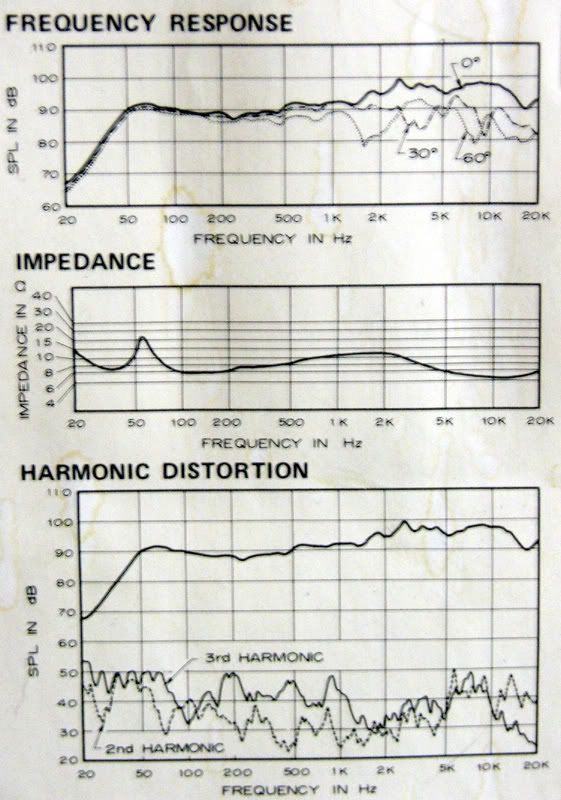 These are Pioneer HPM-100's, pretty decent in their day, and long out of production. I have listened to various mixes on car stereos, portable stereos, and other computers. Once you get a feel for how your mix translates, you get a very good idea of what is being emphasized on your own system, and you can adjust for Tweak's Law. It will be interesting to see how monitors affect things.
post edited by RobertB - 2007/01/02 21:33:58
My Soundclick Page SONAR Professional, X3eStudio,W7 64bit, AMD Athlon IIx4 2.8Ghz, 4GB RAM, 64bit, AKAI EIE Pro, Nektar Impact LX61,Alesis DM6,Alesis ControlPad,Yamaha MG10/2,Alesis M1Mk2 monitors,Samson Servo300,assorted guitars,Lava Lamp Shimozu-Kushiari or Bob
|