Chevy
Max Output Level: -87 dBFS

- Total Posts : 168
- Joined: 2013/06/29 17:58:35
- Status: offline

Latency question about X3 Studio; how to reduce latency if needed
System: Sonar X3 Studio, Focusrite Scarlett 2i2 interface, ASIO drivers, Win 7 Pro 64, Quad core 3.1 ghz cpu. Newbie here.... Just got everything running, upgrading from Producer 8.3, no experience yet with any recording projects on X3.
Soooo... Not sure what to make of this yet... in Producer 8.3, I could go and adjust the setting for latency; there was a + or - variable setting in the global or audio options area; you could push or pull the preset latency by any amount you wanted. When I did a hardwire loop on the 2i2 interface to measure the latency, I could visibly see latency changes and could adjust it all I wanted, the track being recorded moved with the adjustments. I could line up the source track and resulting recorded track really well.
But... with X3, all I get is an adjustment for buffer size. It is currently preset for 10mS. The help file says this "should" be fine for most applications... but doesn't leave me feeling very confident. Again did the hardwire loop at the 2i2 and tried to adjust the buffer size to see what would happen, and it didn't seem to change anything. Went from 10mS all the way to 2 mSec, and nada on the result. The source waveform and resultant recorded waveform seem to be about 7 samples apart, on average, in the track view, if I'm looking at the samples/time grid correctly. (maybe 1 mSec?) I guess that's great, but the lack of adjustment that was previously there seems to be kinda odd.
Any comments or ideas ? Thanks much !
|
Anderton
Max Output Level: 0 dBFS

- Total Posts : 14070
- Joined: 2003/11/06 14:02:03
- Status: offline
Re: Latency question about X3 Studio; how to reduce latency if needed
2014/06/25 11:34:08
(permalink)
Click on ASIO Panel to bring up the Focusrite applet. An interface's applet is the primary place to adjust latency with ASIO.
|
Chevy
Max Output Level: -87 dBFS
- Total Posts : 168
- Joined: 2013/06/29 17:58:35
- Status: offline
Re: Latency question about X3 Studio; how to reduce latency if needed
2014/06/25 11:48:14
(permalink)
Nope... I get the exact same adjustment options and range on the ASIO panel... buffer length 1 to 10 mSec. Using the same 2i2 interface.
post edited by Chevy - 2014/06/25 11:57:36
|
Anderton
Max Output Level: 0 dBFS
- Total Posts : 14070
- Joined: 2003/11/06 14:02:03
- Status: offline
Re: Latency question about X3 Studio; how to reduce latency if needed
2014/06/25 11:51:27
(permalink)
Were you using the Focusrite interface with 8.3?
Also you mentioned "buffer length 1 to mSec." What is the maximum length?
|
Cactus Music
Max Output Level: 0 dBFS
- Total Posts : 8424
- Joined: 2004/02/09 21:34:04
- Status: offline
Re: Latency question about X3 Studio; how to reduce latency if needed
2014/06/25 12:06:04
(permalink)
Your worrying about something you don't need to worry about. Leave it at what ever the default was as Sonar automatically adjusts to compensate for the latency offset while recording. You mess with that and you will have a problem. Sonar and the Focusrite driver will sort it out. The 2i2 doesn't have the Mix Control so I'm not sure what yours looks like , but for me the default is for 9ms which works perfectly for everything I do, tracking and mixing. Focusrite uses a different reporting system and it is determined that the lowest number 2ms is like the same as the 032ms buffer that most drivers report. 9ms is more like 256ms. but this is a guess. see this thread for more: http://www.gearslutz.com/...ance-data-base-20.html I would only move it down to 2ms if using Guitar Rig to get rid of the small delay you'll hear at 9ms. But then I will be on the edge of an unstable audio engine. It will drop out. A better computer than mine probably would be fine. But Focusrite recommends keeping it a little higher than the bottom for tracking smoothly. The Scarlett series does not have great drivers for super low latency performance. They are not even on the list I linked along with a lot of under $300 USB interfaces. This is nothing to worry about unless your a Guitar Rig type user. And even then you might not notice the delay if you have a super computer to make up for it. Anyhow, stop worrying and carry on. There will be no timing offset unless you put it there manually.
|
scook
Forum Host

- Total Posts : 24146
- Joined: 2005/07/27 13:43:57
- Location: TX
- Status: offline
Re: Latency question about X3 Studio; how to reduce latency if needed
2014/06/25 12:14:35
(permalink)
Chevy
in Producer 8.3, I could go and adjust the setting for latency; there was a + or - variable setting in the global or audio options area;
It is called "Manual Offset" at the bottom of Preferences > Audio > Sync and CachingEveryone should take a look at it and run the loopback test to correct the reported latency settings.
|
Chevy
Max Output Level: -87 dBFS
- Total Posts : 168
- Joined: 2013/06/29 17:58:35
- Status: offline
Re: Latency question about X3 Studio; how to reduce latency if needed
2014/06/26 11:40:44
(permalink)
Hey guys, thanks much for the feedback. I just didn't want to start on some new recordings, get some done, and then discover a latency issue later on.
But I still do have 2 questions:
1) Why would Cakewalk do away with something that seems to be such a great feature ? (the ability/tool to have complete over-ride control over latency if you chose to).
2) This is just out of curiosity: Has anyone else done the hardwire loop test, and do my results seem like I'm reading the time/samples grids correctly ? approx. 7 samples or about 1 mSec of latency. (if you expand the track waveform enough, it appears you can pretty much see each sample increment on the screen, and there is a counter that shows the sample position numbers as you move the cursor thru. The mSec show up on the other time grid.)
Thanks kindly,
|
CJaysMusic
Max Output Level: 0 dBFS
- Total Posts : 30423
- Joined: 2006/10/28 01:51:41
- Location: Miami - Fort Lauderdale - Davie
- Status: offline
Re: Latency question about X3 Studio; how to reduce latency if needed
2014/06/26 12:17:26
(permalink)
1) Why would Cakewalk do away with something that seems to be such a great feature ? (the ability/tool to have complete over-ride control over latency if you chose to). Cakewalk and sonar have nothing to do with your latency that you experience. Latency is affected by: - Your PC's MOBO
- Your PC specs
- Your sound card's driver
- The sound card drivers mode
- The settings for the driver mode
- How well the drivers are written by the sound card's manufacturer
- Your signal chain
- What you put in your signal chain
So its up to you how you deal with latency, not Cakewalk or Sonar CJ
|
scook
Forum Host
- Total Posts : 24146
- Joined: 2005/07/27 13:43:57
- Location: TX
- Status: offline
Re: Latency question about X3 Studio; how to reduce latency if needed
2014/06/26 12:24:01
(permalink)
1) the feature exists, see #6 above
2) AFAIK, most interfaces benefit from a little manual offset to the reported latency (one reason the manual offset is there).
|
Chevy
Max Output Level: -87 dBFS
- Total Posts : 168
- Joined: 2013/06/29 17:58:35
- Status: offline
Re: Latency question about X3 Studio; how to reduce latency if needed
2014/06/26 22:47:57
(permalink)
CJaysMusic
1) Why would Cakewalk do away with something that seems to be such a great feature ? (the ability/tool to have complete over-ride control over latency if you chose to).
Cakewalk and sonar have nothing to do with your latency that you experience.
Latency is affected by:
- Your PC's MOBO
- Your PC specs
- Your sound card's driver
- The sound card drivers mode
- The settings for the driver mode
- How well the drivers are written by the sound card's manufacturer
- Your signal chain
- What you put in your signal chain
So its up to you how you deal with latency, not Cakewalk or Sonar
CJ
Ummm... I think you totally missed the point. It's pretty obvious that there are multiple reasons for latency. But Sonar Producer 8.3 (my previous version) had the ability to manually compensate for, as far as I can tell..., pretty much anything. i.e. Sonar X3 still has the ability to change buffer length. Well... you'd likely change buffer length due to some reason outside of Sonar as well, right ? I ain't no recording genius, but seems to me if you've got a great feature, why get rid of it ?
|
Splat 
Max Output Level: 0 dBFS
- Total Posts : 8672
- Joined: 2010/12/29 15:28:29
- Location: Mars.
- Status: offline
Re: Latency question about X3 Studio; how to reduce latency if needed
2014/06/26 23:04:35
(permalink)
Were you using the same drivers with 8.3? I'm guessing they weren't ASIO.
Sell by date at 9000 posts. Do not feed. @48/24 & 128 buffers latency is 367 with offset of 38. Sonar Platinum(64 bit),Win 8.1(64 bit),Saffire Pro 40(Firewire),Mix Control = 3.4,Firewire=VIA,Dell Studio XPS 8100(Intel Core i7 CPU 2.93 Ghz/16 Gb),4 x Seagate ST31500341AS (mirrored),GeForce GTX 460,Yamaha DGX-505 keyboard,Roland A-300PRO,Roland SPD-30 V2,FD-8,Triggera Krigg,Shure SM7B,Yamaha HS5.Maschine Studio+Komplete 9 Ultimate+Kontrol Z1.Addictive Keys,Izotope Nectar elements,Overloud Bundle,Geist.Acronis True Image 2014.
|
Chevy
Max Output Level: -87 dBFS
- Total Posts : 168
- Joined: 2013/06/29 17:58:35
- Status: offline
Re: Latency question about X3 Studio; how to reduce latency if needed
2014/06/26 23:05:57
(permalink)
CakeAlexS
Were you using the same drivers with 8.3?
Yes, same drivers and interface.
|
Splat
Max Output Level: 0 dBFS
- Total Posts : 8672
- Joined: 2010/12/29 15:28:29
- Location: Mars.
- Status: offline
Re: Latency question about X3 Studio; how to reduce latency if needed
2014/06/26 23:13:39
(permalink)
Well just make adjustments using your interface software such as mix control, as everybody has stated. Ta.
Sell by date at 9000 posts. Do not feed. @48/24 & 128 buffers latency is 367 with offset of 38. Sonar Platinum(64 bit),Win 8.1(64 bit),Saffire Pro 40(Firewire),Mix Control = 3.4,Firewire=VIA,Dell Studio XPS 8100(Intel Core i7 CPU 2.93 Ghz/16 Gb),4 x Seagate ST31500341AS (mirrored),GeForce GTX 460,Yamaha DGX-505 keyboard,Roland A-300PRO,Roland SPD-30 V2,FD-8,Triggera Krigg,Shure SM7B,Yamaha HS5.Maschine Studio+Komplete 9 Ultimate+Kontrol Z1.Addictive Keys,Izotope Nectar elements,Overloud Bundle,Geist.Acronis True Image 2014.
|
Cactus Music
Max Output Level: 0 dBFS
- Total Posts : 8424
- Joined: 2004/02/09 21:34:04
- Status: offline
Re: Latency question about X3 Studio; how to reduce latency if needed
2014/06/27 00:31:00
(permalink)
He's talking about manual offset, This is not driver latency settings, Sonar automaticly adjusts your recording of new tracks to match the timing of the playback you hear. I beleieve it actually plays back your already recorded track ahead of time so that the latency of the audio coming in will be in the right place.
You can test this accuracy with a loopback.
Re record a transient rich track like a snare and put the new track beside the original and zoom in.
I've always found it to be right on. And that's even with a Tascam interface.
OP- and why didn't you read scooks post. He's telling you it is still there. He's told your twice now. So he answered your question in #6.
|
MacFurse
Max Output Level: -84 dBFS

- Total Posts : 324
- Joined: 2013/11/10 07:25:54
- Location: Newcastle - Australia
- Status: offline
Re: Latency question about X3 Studio; how to reduce latency if needed
2014/06/27 07:44:27
(permalink)
I am using the 2i2 at present. I DO change setting for mixing/recording. 10ms for mixing, 3ms for recording. No issues this way. If I don't, I have problems mixing, and latency issues while recording. I am about to move up to 18i8 for more inputs/outputs and features, but also because of the mixcontrol software, which is not available for 2i2, and the added control over buffer selection that is not available with the 2i2, which is almost the lowest in the food chain. As others have pointed out, you can adjust manual offset, just like 8.3. The features you are talking about that you have lost, are not lost, dependant upon what interface/software/driver is being used. It's individual to your hardware. Hope you work it out. You have been given excellent advise above already 
Platinum. i7 4771 3.5ghz. ECU H87 mobo with 3 monitor support. 16gb Ripjaws 1600mhz. Focusrite 18i20. 2 x 250gb Samsung EVO SSD's OP/Programs. 2x1TB Seagate Baracuda sata3 data drives. 200gb sata2 bootable drive for online and downloading only. Seagate 2tb USB 3.0 backup drive. 2x27in monitors. Rode K2 valve mic. Sontronics STC-1 pair. Studio Projects B1 condenser. SM58B. SM57B. Presonus Eureka Preamp.
|
Splat
Max Output Level: 0 dBFS
- Total Posts : 8672
- Joined: 2010/12/29 15:28:29
- Location: Mars.
- Status: offline
Re: Latency question about X3 Studio; how to reduce latency if needed
2014/06/27 07:53:36
(permalink)
Sell by date at 9000 posts. Do not feed. @48/24 & 128 buffers latency is 367 with offset of 38. Sonar Platinum(64 bit),Win 8.1(64 bit),Saffire Pro 40(Firewire),Mix Control = 3.4,Firewire=VIA,Dell Studio XPS 8100(Intel Core i7 CPU 2.93 Ghz/16 Gb),4 x Seagate ST31500341AS (mirrored),GeForce GTX 460,Yamaha DGX-505 keyboard,Roland A-300PRO,Roland SPD-30 V2,FD-8,Triggera Krigg,Shure SM7B,Yamaha HS5.Maschine Studio+Komplete 9 Ultimate+Kontrol Z1.Addictive Keys,Izotope Nectar elements,Overloud Bundle,Geist.Acronis True Image 2014.
|
CJaysMusic
Max Output Level: 0 dBFS
- Total Posts : 30423
- Joined: 2006/10/28 01:51:41
- Location: Miami - Fort Lauderdale - Davie
- Status: offline
Re: Latency question about X3 Studio; how to reduce latency if needed
2014/06/27 10:40:47
(permalink)
Ummm... I think you totally missed the point. It's pretty obvious that there are multiple reasons for latency. But Sonar Producer 8.3 (my previous version) had the ability to manually compensate for, as far as I can tell..., pretty much anything.
i.e. Sonar X3 still has the ability to change buffer length. Well... you'd likely change buffer length due to some reason outside of Sonar as well, right ?
I ain't no recording genius, but seems to me if you've got a great feature, why get rid of it ? You are mistaken Latency for Manual Offset. X3 still has manual offset. You'll just have to do some tweaking to get the offset to where you are happy and the same settings may not work that you had in the last sonar versions. There are many variables to take into account , when doing a manual offset.
|
Chevy
Max Output Level: -87 dBFS
- Total Posts : 168
- Joined: 2013/06/29 17:58:35
- Status: offline
Re: Latency question about X3 Studio; how to reduce latency if needed
2014/06/27 12:14:11
(permalink)
CakeAlexS
Well just make adjustments using your interface software such as mix control, as everybody has stated. Ta.
don't have a mix control
|
Chevy
Max Output Level: -87 dBFS
- Total Posts : 168
- Joined: 2013/06/29 17:58:35
- Status: offline
Re: Latency question about X3 Studio; how to reduce latency if needed
2014/06/27 12:16:33
(permalink)
Cactus Music
He's talking about manual offset, This is not driver latency settings, Sonar automaticly adjusts your recording of new tracks to match the timing of the playback you hear. I beleieve it actually plays back your already recorded track ahead of time so that the latency of the audio coming in will be in the right place.
You can test this accuracy with a loopback.
Re record a transient rich track like a snare and put the new track beside the original and zoom in.
I've always found it to be right on. And that's even with a Tascam interface.
OP- and why didn't you read scooks post. He's telling you it is still there. He's told your twice now. So he answered your question in #6.
Sorry, no, the manual +- offset adjustment is not there. It is now only a buffer length adjustment.
|
Cactus Music
Max Output Level: 0 dBFS
- Total Posts : 8424
- Joined: 2004/02/09 21:34:04
- Status: offline
Re: Latency question about X3 Studio; how to reduce latency if needed
2014/06/27 12:35:13
(permalink)
I certainly exactly where steve said it was for me?? Might be the 2i2 driver is different than my 6i6 which has mix control. as said by Mac. But as far as I can tell the manual offset is a Sonar thing.
I'll fire up my Tascam system tonight and double check. I just installed W8.1 so might be a while before I got everything running agian on that system.
May I ask if the loopback is showing your timing is off? Mine is bang on.
|
Chevy
Max Output Level: -87 dBFS
- Total Posts : 168
- Joined: 2013/06/29 17:58:35
- Status: offline
Re: Latency question about X3 Studio; how to reduce latency if needed
2014/06/27 12:36:08
(permalink)
Hoo boy.... thanks much for the feedback, I do appreciate it, but it seems some of you are not familiar with what I'm referring to, or I've just totally lost my marbles. So... I'll try be very specific. My system is Win 7 Pro 64, Sonar X3 Studio, Scarlet 2i2, ASIO drivers. Just moved to X3 Studio. Was on 8.3 P before; same drivers, same interface as before.
This is just for the record... just wanted to ask why they took away this seemingly great feature:
In Producer 8.3 there is, in the "Audio Options - ASIO" dialog box, something called " RECORD LATENCY ADJUSTMENT (samples)". It shows up on the lower left hand corner of the screen, and is labelled as "manual offset", and has a totally variable +/- adjustment range, in SAMPLES. (notice that this is NOT buffer length, and it is adjustable plus OR minus, in SAMPLES). On the lower right portion of the screen is the "USE ASIO REPORTED LATENCY" (in my case it is "1022").
(The system determined the latency to be 1022. Then you could manually offset that to whatever you like. )
So, this feature is gone on X3 Studio. It's just not there. I know it's all moot at this point, but all that is left to me is an adjustment for buffer length, from 2mS to 10mS.
I don't mean to be an upstart here or anything, just a newb curious about stuff.... but THIS SPECIFIC feature is just not available on my X3 Studio screen. Is it available on yours ?
|
Chevy
Max Output Level: -87 dBFS
- Total Posts : 168
- Joined: 2013/06/29 17:58:35
- Status: offline
Re: Latency question about X3 Studio; how to reduce latency if needed
2014/06/27 12:40:16
(permalink)
Cactus Music
I certainly exactly where steve said it was for me?? Might be the 2i2 driver is different than my 6i6 which has mix control. as said by Mac. But as far as I can tell the manual offset is a Sonar thing.
I'll fire up my Tascam system tonight and double check. I just installed W8.1 so might be a while before I got everything running agian on that system.
May I ask if the loopback is showing your timing is off? Mine is bang on.
Nope, no mix control on the 2i2, only a buffer length, from 2mS to 10 mS. Yes, the manual offset must be a Sonar thing, as I'm using the same drivers and interface as I did on 8.3. Currently it appears my latency shows up as approx. 7 samples or about 1 mSec... if I read the scales properly. Is this good ?
|
scook
Forum Host
- Total Posts : 24146
- Joined: 2005/07/27 13:43:57
- Location: TX
- Status: offline
Re: Latency question about X3 Studio; how to reduce latency if needed
2014/06/27 12:51:04
(permalink)
|
Chevy
Max Output Level: -87 dBFS
- Total Posts : 168
- Joined: 2013/06/29 17:58:35
- Status: offline
Re: Latency question about X3 Studio; how to reduce latency if needed
2014/06/27 13:04:33
(permalink)
scook
Would a picture help? The adjustment is now made at the bottom of this page. This illustration from
shows a driver mode other than ASIO. If ASIO driver mode was set, there would be an additional check box to "Use ASIO Reported Lantency" and an entry field for the latency.
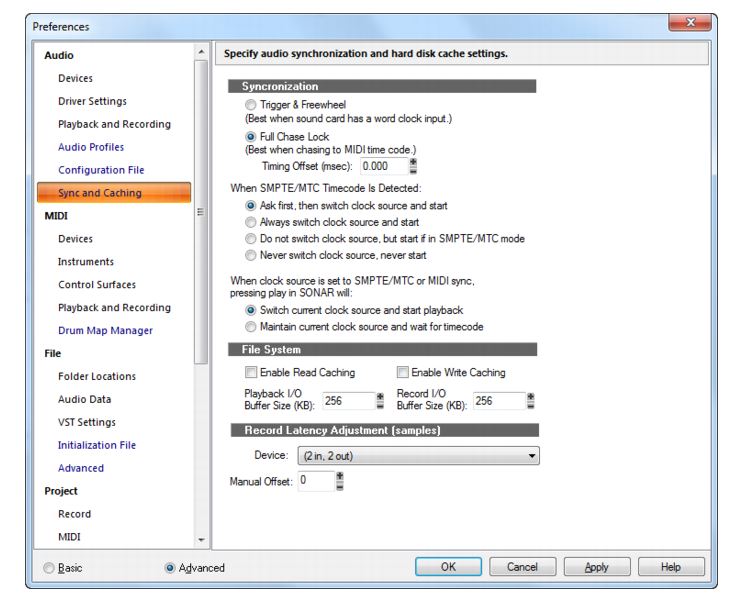
Fantastic ! You totally got it ! BUT ! I don't have that screen available to me for some reason. When I go to "EDIT, PREFERENCES" Under the AUDIO heading I only see Devices, Driver Settings, and Playback and Recording. I dont' get the last 3 selections Audio Profiles, Configuration File or Sync and Caching. I see they are highlited BLUE on the screenshot... what does that mean ?
|
scook
Forum Host
- Total Posts : 24146
- Joined: 2005/07/27 13:43:57
- Location: TX
- Status: offline
Re: Latency question about X3 Studio; how to reduce latency if needed
2014/06/27 13:05:45
(permalink)
It is an Advanced feature. Make sure to select the Advanced radio button at the bottom of the Preferences dialog (just like the picture).
|
Chevy
Max Output Level: -87 dBFS
- Total Posts : 168
- Joined: 2013/06/29 17:58:35
- Status: offline
Re: Latency question about X3 Studio; how to reduce latency if needed
2014/06/27 13:13:37
(permalink)
Right on, Scook ! The case is solve-ed, Chief Inspector ! Thanks for your patience, guys ! Whew.
Well that's what I get for being a newbie... couldn't find the screen !
All is good now, except for some reason the AUDIO PROFILES selection doesn't come up for me, even in the "Advanced" screen.
|
scook
Forum Host
- Total Posts : 24146
- Joined: 2005/07/27 13:43:57
- Location: TX
- Status: offline
Re: Latency question about X3 Studio; how to reduce latency if needed
2014/06/27 13:17:24
(permalink)
It is not displayed for ASIO driver mode.
|
Chevy
Max Output Level: -87 dBFS
- Total Posts : 168
- Joined: 2013/06/29 17:58:35
- Status: offline
Re: Latency question about X3 Studio; how to reduce latency if needed
2014/06/27 13:22:26
(permalink)
scook
It is not displayed for ASIO driver mode.
Ah... then all is good. Thanks much ! EDIT: FYI and FWIW, I went ahead and did another hardwire loopback test, and found the source and recorded tracks were a bit off. Then, with the system ASIO reported latency at 2486, and a new setting of -3 on the manual offset, the source and loopback tracks are bang on. Sweet ! thanks again for your patience and help !
post edited by Chevy - 2014/06/27 13:30:46
|
scook
Forum Host
- Total Posts : 24146
- Joined: 2005/07/27 13:43:57
- Location: TX
- Status: offline
Re: Latency question about X3 Studio; how to reduce latency if needed
2014/06/27 13:44:42
(permalink)
You are welcome. Glad you got it figured out.
|
Splat
Max Output Level: 0 dBFS
- Total Posts : 8672
- Joined: 2010/12/29 15:28:29
- Location: Mars.
- Status: offline
Re: Latency question about X3 Studio; how to reduce latency if needed
2014/06/27 13:47:18
(permalink)
So I was pretty much on the ball then. OK so there is no mix control with your interface. If you had a Scarlett 18i20 for instance then you would have Mix Control which would give you an ASIO buffer size setting to play with.
Sell by date at 9000 posts. Do not feed. @48/24 & 128 buffers latency is 367 with offset of 38. Sonar Platinum(64 bit),Win 8.1(64 bit),Saffire Pro 40(Firewire),Mix Control = 3.4,Firewire=VIA,Dell Studio XPS 8100(Intel Core i7 CPU 2.93 Ghz/16 Gb),4 x Seagate ST31500341AS (mirrored),GeForce GTX 460,Yamaha DGX-505 keyboard,Roland A-300PRO,Roland SPD-30 V2,FD-8,Triggera Krigg,Shure SM7B,Yamaha HS5.Maschine Studio+Komplete 9 Ultimate+Kontrol Z1.Addictive Keys,Izotope Nectar elements,Overloud Bundle,Geist.Acronis True Image 2014.
|