keneds
Max Output Level: -76 dBFS

- Total Posts : 725
- Joined: 2008/10/16 22:49:51
- Location: West Grove PA.
- Status: offline
Looking for advice on converting to WAVE file
I have a song that I thought I had a pretty good mix in the studio......converted it to a Wave file and played it back through my system and I noticed it was low in the volume. During the file convert I had the main levels too low so I deleted and re converted the song at a higher volume. Should I just set the main output to 0 db to get max volume when converting?
Also, once burnt to a cd, it was a whole new mix on my car stereo. Highs were too high......vocals were thinner. Should I do a "save as" and remix to compensate for the fidelity difference in the vehicle? It almost sounded squashed. All that time spent on mixing in my studio just to have it lacking on a real environment stereo. Advice please. This has been something I've been dealing with for a long time and I need to get to the bottom of this once and fore all. Thank you! Ken
SONAR Platinum
Dell XPS17 / External 23" touch screen & 22" HP displays/Windows 10 64bit i5 processor/
8Gb ram/500GB (7200rpm SATA HD)/Roland VS-700 set/KRK rockit 6/KRK 10" sub and a bunch of cables
EZdrummer2 / EZmix2
|
The Maillard Reaction
Max Output Level: 0 dBFS

- Total Posts : 31918
- Joined: 2004/07/09 20:02:20
- Status: offline

Re: Looking for advice on converting to WAVE file
2014/10/17 19:12:49
(permalink)
Conventional wisdom is to always leave your Main Outs at "0".
If you have a Master Bus you can adjust the level of that accordingly.
I like to use a Master bus and use SONAR's bus waveform preview feature (go look that up) as that gives you a great idea of what your export will be like, especially if you leave your MAIN OUT at "0".
As far as the experience of taking your mix out to the car? That's a common challenge. You can continue to gain experience with the goal of learning to anticipate the difference between your monitors and your entertainment systems. You can get better monitors. You can learn about room treatment for your monitor position. You may want to buy IK MUltimedia's ARC and learn to use it. You may want to use a combination of these ideas. You just have to work at getting good at it.
Good luck.
|
keneds
Max Output Level: -76 dBFS
- Total Posts : 725
- Joined: 2008/10/16 22:49:51
- Location: West Grove PA.
- Status: offline
Re: Looking for advice on converting to WAVE file
2014/10/17 20:24:08
(permalink)
So it is possible to get a mix that would sound equally impressive on both studio and "in the car" systems. Hmmmm, back to the drawing board I guess. I mean mixing board.
SONAR Platinum
Dell XPS17 / External 23" touch screen & 22" HP displays/Windows 10 64bit i5 processor/
8Gb ram/500GB (7200rpm SATA HD)/Roland VS-700 set/KRK rockit 6/KRK 10" sub and a bunch of cables
EZdrummer2 / EZmix2
|
clintmartin
Max Output Level: -36.5 dBFS

- Total Posts : 3893
- Joined: 2009/10/11 12:16:43
- Location: Fort Smith, AR
- Status: offline
Re: Looking for advice on converting to WAVE file
2014/10/17 20:33:21
(permalink)
This sounds like a monitoring issue. Sounds great in the monitors, sounds bad in the car. Arc2 helped me a ton in my non-treated studio. As far as the level goes what is the Average RMS level? I shoot for -12 to -14 myself. Most pro stuff is around -6 to -9.
|
johnnyV
Max Output Level: -48.5 dBFS

- Total Posts : 2677
- Joined: 2010/02/22 11:46:33
- Location: Here, in my chair
- Status: offline
Re: Looking for advice on converting to WAVE file
2014/10/17 21:00:48
(permalink)
Monitors are paramount. But no matter which you end up with one need to "learn " them. I think a lot of monitors are way to bass heavy and therefore people under mix the bass. These bass heavy monitors appeal to people mixing modern electronic music with lots of sub bass going on etc. But I personally could not live with that. I have a sub hooked up I kick in for clients who are worried about bass.. they all of a sudden see it's plenty loud enough.
I think I got to the point were all my mixes translate to the real world every time very quickly because I chose the NSM 10's 25 years ago. They are certainly one of the best for that reason alone. It's why they are still on a lot of meter bridges around the world. The new version HS80M will be what I would certainly choose if I was in the market.
Once you finally get a mix that works on all systems, Listen to it on your monitors carefully and remember that sound,,where is the bass, the kick the piano the vocals, how much reverb are you hearing .. then every mix will work too.
I used to have a cheap getto blaster wired to my console to A/B mixes through. I stopped bothering once I learned to trust my monitors.
The room is important, you certainly shouldn't mix in the wrong room, but myself I have had my studio in dozens of different locations and each space was totally different. But my monitors remained the same. I'm sitting less than 3 feet away from the monitors so for me the room has never interfered with what I'm hearing,, I think I tune the room out.. I always make sure the room is optimized as best as I can. Mostly a bit dead. I have so much gear around so that is my sound baffles :?
Sonar X3e Studio - Waiting for Professional Scarlett 6i6Yamaha Gear= 01v - NSM 10 - DTX 400 - MG82cx Roland Gear= A 49- GR 50 - TR 505 - Boss pedalsTascam Gear= DR 40 - US1641 -Mackie Gear= Mix 8 - SRM 350's i5 Z97 3.2GHZ quad 16 Gig RAM W 8.1 home buildTaylor mini GS - G& L Tribute Tele - 72 Fender Princeton - TC BH 250 - Mooer and Outlaw Pedals Korg 05/RW
|
Anderton
Max Output Level: 0 dBFS
- Total Posts : 14070
- Joined: 2003/11/06 14:02:03
- Status: offline
Re: Looking for advice on converting to WAVE file
2014/10/17 21:04:04
(permalink)
☄ Helpfulby HELLYA 2014/10/18 14:14:02
I don't want to sound snarky, but this is why mastering engineers were invented.  Mixing and mastering are very different processes, even though they can seem similar superficially. And in fact, it is possible to mix in such a way that you can use the mix itself as your final master, but after mastering hundreds of tracks, all I can say is I never met a track that couldn't be improved by artistically sympathetic and technically correct mastering. The acoustics are a huge deal. Rockit 6 speakers are not the most expensive speakers in the world, but you can mix over them accurately if a) the bass and treble trims are set properly, and b) more importantly, your room acoustics allow for decent mixing. The fact is that most rooms people mix in are smaller that the wavelength of bass waves. You can really shock yourself by running sine waves through your speakers. You will likely hear that some bass frequencies aren't just "a little lower," but actually cancel. As to the highs, moving your head just a few inches can make the difference between hearing and not hearing certain frequencies. If you mix to compensate for these issues, then your mix will sound totally wrong on systems that don't have these issues. In extreme cases (e.g., when I'm forced to mix in a hotel room on the road), I use headphones but recommend this ONLY if you're aware of all the issues involved with mixing on headphones (e.g., if you mix on Beatz, your music won't translate well over anything except other Beatz headphones). You have "learn" your headphones inside and out, be aware that they exaggerate the stereo field, and often have a sort of proximity effect. Long story short: Run some sine waves through your speakers, become shocked at what happens, then start looking into ways to treat your room. Even a little bit of acoustical treatment (e.g., bass traps in the corners) is better than nothing. Also the distance your ears are from your monitors, the level at which you monitor, and the location of the monitors are all extremely important. As just one example, I have two LED displays located in between two KRK VXT 6 speakers. If the speakers are 2 inches in front of the monitors, the sound is many times more accurate than if they're an inch behind the monitors. Also, I am very careful about controlling reflections from the monitors off the V-Studio control surface. Acoustics are a big deal...good luck!!!! The object is to mix over as flat a system as possible so your music sounds equally wrong over all playback systems, just wrong in different ways
|
keneds
Max Output Level: -76 dBFS
- Total Posts : 725
- Joined: 2008/10/16 22:49:51
- Location: West Grove PA.
- Status: offline
Re: Looking for advice on converting to WAVE file
2014/10/17 21:06:34
(permalink)
My monitors are KRK 6's with a KRK 10" sub for a slight bass enhancement. I don't go heavy on the sub so I don't rattle the family. The bottom end on my cd was not bad.. The highs were hissy and there wasn't as much width in the overall mix compared to the board mix.
SONAR Platinum
Dell XPS17 / External 23" touch screen & 22" HP displays/Windows 10 64bit i5 processor/
8Gb ram/500GB (7200rpm SATA HD)/Roland VS-700 set/KRK rockit 6/KRK 10" sub and a bunch of cables
EZdrummer2 / EZmix2
|
Anderton
Max Output Level: 0 dBFS
- Total Posts : 14070
- Joined: 2003/11/06 14:02:03
- Status: offline
Re: Looking for advice on converting to WAVE file
2014/10/17 21:29:41
(permalink)
keneds
The bottom end on my cd was not bad.
Okay, I was keying in to where you said "Also, once burnt to a cd, it was a whole new mix on my car stereo. Highs were too high......vocals were thinner." That could be that the highs were higher, but that could also be that the bass was lower by comparison...which could happen if the bass was in a range where the waveforms were adding together instead of subtracting. I've had to master acoustic recordings that were done in studios that lacked sufficient treatment for recording. Below about 120Hz, the spectral distribution looked like the Alps with all the peaks and troughs. Or the stock market the past couple weeks If what you hear from your board mix is different from what you hear in your car, there are really only four options I can think of... - For some reason, the mix is not translating properly to the CD. We're dealing with digital, so if the levels were close to zero not on your master bus but on your hardware interface output bus, they should be close to zero on your CD.
- The monitoring has a problem.
- The car's response has a problem.
- Some combination of these is the problem.
The reason why I mentioned mastering is you can hand over your mix and the engineer will polish it. However, if the problem is happening in the process of creating a mixed file, then that issue needs to be squared away first. Hope this helps...
|
clintmartin
Max Output Level: -36.5 dBFS
- Total Posts : 3893
- Joined: 2009/10/11 12:16:43
- Location: Fort Smith, AR
- Status: offline
Re: Looking for advice on converting to WAVE file
2014/10/17 22:37:42
(permalink)
Sounds like you have a good setup. As I said...If your in a spare un-treated room I highly suggest you read up on ARC2. It helps with every possible problem that has been mentioned in this thread. I have nothing at stake here...just trying to help. It has been the best $150 (I got it on sell) I've ever spent. If you have the budget and a dedicated space, by all means sound treatment is the way to go.
|
keneds
Max Output Level: -76 dBFS
- Total Posts : 725
- Joined: 2008/10/16 22:49:51
- Location: West Grove PA.
- Status: offline
Re: Looking for advice on converting to WAVE file
2014/10/17 23:03:45
(permalink)
Appreciate the input from all. And let it be known, my room has zero treatment. A carpeted room, acoustical ceilings, tucked in the corner. I will try to post a picture for better understanding.
I looked into the ARC2 system and will probably bite. I spend a lot of quality time enjoying my novice labors in my little studio I've created and when it's all done... I want to be able to show off a decent sounding tune. That's why we're all here, right? 😊 it's a vicious cycle.
SONAR Platinum
Dell XPS17 / External 23" touch screen & 22" HP displays/Windows 10 64bit i5 processor/
8Gb ram/500GB (7200rpm SATA HD)/Roland VS-700 set/KRK rockit 6/KRK 10" sub and a bunch of cables
EZdrummer2 / EZmix2
|
keneds
Max Output Level: -76 dBFS
- Total Posts : 725
- Joined: 2008/10/16 22:49:51
- Location: West Grove PA.
- Status: offline
Re: Looking for advice on converting to WAVE file
2014/10/17 23:28:12
(permalink)
Room pic 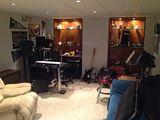
SONAR Platinum
Dell XPS17 / External 23" touch screen & 22" HP displays/Windows 10 64bit i5 processor/
8Gb ram/500GB (7200rpm SATA HD)/Roland VS-700 set/KRK rockit 6/KRK 10" sub and a bunch of cables
EZdrummer2 / EZmix2
|
clintmartin
Max Output Level: -36.5 dBFS
- Total Posts : 3893
- Joined: 2009/10/11 12:16:43
- Location: Fort Smith, AR
- Status: offline
Re: Looking for advice on converting to WAVE file
2014/10/17 23:49:59
(permalink)
I'm on one side of a bedroom...I'm shocked when I turn off ARC and hear how awful everything sounds. It has saved soooo many cdr's it has paid itself off.
|
Anderton
Max Output Level: 0 dBFS
- Total Posts : 14070
- Joined: 2003/11/06 14:02:03
- Status: offline
Re: Looking for advice on converting to WAVE file
2014/10/18 02:03:09
(permalink)
keneds
Room pic
Whoa! One speaker in a corner, one against the wall...that's a big problem right there. A speaker in a corner will boost bass significantly because ANYTHING radiated from the back, being a long wavelength, will bounce off the wall and reinforce what's coming off the front. The left side speaker with its back to the will have a similar problem but to a lesser degree. So right off the bat, you likely have too much bass, and your left and right channels are not symmetrical. If you move your mixing table to the left several feet so it's more in the middle of the room, and move the speakers at least a foot (preferably more) away from the wall, you'll be in better shape. I don't have a permanent studio yet since I relocated, but the mixing "deck" with the monitors etc. is about a third of the way toward the middle of the room, titled at a slight angle so the sound waves hit the wall at a slight angle; the speakers are in about 5 ft from the wall. If I don't turn them up too loud, there's not a lot of reflections. People who listen to what I've posted on my YouTube channel tell me the mixes translate well over just about anything, which of course is my primary goal. The ARC system is, IMHO, the best of the artificial room correction devices. But like any kind of correction, it is most effective in situations that don't need huge amounts of correction. Take care of the basics first, like speaker placement as noted above, deadening the wall behind the speakers, putting a cloud above you, and bass traps in the corners. That will make a huge difference. Then get a set of accurate (not sexy) headphones, like the KRK KNS-8400, and learn them so you have an alternate reality check. If there is a good mastering suite within driving distance, tell them you want to book half an hour to listen to your music over a really good system. They might even let you do it for free so they can pitch you on mastering your stuff Take note of how the music sounds different on your system compared to theirs so you have an idea of how you'll need to compensate in the future. I worked with a mastering engineer in Nashville named Randy Kling, he had these $10,000 speakers that were off the hook. I brought in a CD for mastering and knew I was doing okay when it sounded like it did in my studio in terms of overall accuracy, other than a deficiency below 40 Hz that showed up with orchestral bass drums. Of course, his sounded a lot sweeter! But whether a speaker sounds "good" or not is not as important as whether it is accurate.
|
clintmartin
Max Output Level: -36.5 dBFS
- Total Posts : 3893
- Joined: 2009/10/11 12:16:43
- Location: Fort Smith, AR
- Status: offline
Re: Looking for advice on converting to WAVE file
2014/10/18 10:49:24
(permalink)
Yep, as Anderton said...I have centered my speakers in my side of the room. They are away from the wall (not as far as I would like, but close) and I have a perfect triangle formed with my head and the speakers. I have also adjusted the hieght of the speakers so my ear is in between the tweeter and woofer (I use Roland DS8s). Any thing I could do I've done. Then I took great care in doing the 16 mic measurements with ARC2. Listen to him and do all you can first...for sure.
|
keneds
Max Output Level: -76 dBFS
- Total Posts : 725
- Joined: 2008/10/16 22:49:51
- Location: West Grove PA.
- Status: offline
Re: Looking for advice on converting to WAVE file
2014/10/18 11:12:05
(permalink)
Yes. Mr. Anderton's (and your) advice has my wheels turning. I'm putting together a little floor plan to post for some suggestions on room treatment suggestions, such as base trap placement or the foam block stuff. As well as scheming my next purchase of the ARC2 system.
SONAR Platinum
Dell XPS17 / External 23" touch screen & 22" HP displays/Windows 10 64bit i5 processor/
8Gb ram/500GB (7200rpm SATA HD)/Roland VS-700 set/KRK rockit 6/KRK 10" sub and a bunch of cables
EZdrummer2 / EZmix2
|
kennywtelejazz
Max Output Level: -3.5 dBFS

- Total Posts : 7151
- Joined: 2005/10/22 06:27:02
- Location: The Planet Tele..X..
- Status: offline
Re: Looking for advice on converting to WAVE file
2014/10/18 11:27:40
(permalink)
keneds, you are getting some very good advice and feedback in this thread…I'm learning from it Kenny
|
vanceen
Max Output Level: -74 dBFS

- Total Posts : 814
- Joined: 2003/11/08 08:55:56
- Status: offline
Re: Looking for advice on converting to WAVE file
2014/10/18 11:34:06
(permalink)
Just an anecdote to reinforce what Anderton said.
I've got a reasonably sized home studio (24' x 15' x 10'), and I've just put up a lot of rigid fiberglass panels in frames holding them about 2" from the wall, which improved things a lot with respect to ring and reverb. I had planned to put in even more of these, but I thought I would listen to some low frequency sound waves in Sound Forge to see whether I should go to the trouble of building some real bass traps.
Wow. Even though I'd read about it, I was not prepared for the result. Walking around the room with a 60 Hz tone playing, I found some large spots where you could barely hear the tone at all, and just as many where it was sickeningly loud. Sitting in my usual monitoring spot, I could hear the 60 Hz tone just fine, but if I lifted my head six to eight inches it practically disappeared!
Other frequencies behaved similarly, but of course the cancellations and reinforcements were at different places in the room. It's hard to see how I could mix anything in this room.
I'm going today to get some material for deep bass traps, and I plan to put up 16 2' x 4' panels. I hope that does it.
Anyone who's interested might check out ethanwiner.com.
SONAR Platinum Windows 10 ASUS X99E WE Core i7 5960X 32 GB Corsair DDR4 2133 C13 Fireface UFX USB driver 1.098 GeForce GTX 950
|
keneds
Max Output Level: -76 dBFS
- Total Posts : 725
- Joined: 2008/10/16 22:49:51
- Location: West Grove PA.
- Status: offline
Re: Looking for advice on converting to WAVE file
2014/10/18 14:13:30
(permalink)
A basic idea of what my room layout is... minus the amp, guitars, stands and nonsense. Not sure where to locate room treatment. Input? 😁 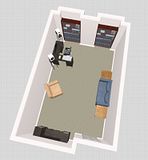
SONAR Platinum
Dell XPS17 / External 23" touch screen & 22" HP displays/Windows 10 64bit i5 processor/
8Gb ram/500GB (7200rpm SATA HD)/Roland VS-700 set/KRK rockit 6/KRK 10" sub and a bunch of cables
EZdrummer2 / EZmix2
|
clintmartin
Max Output Level: -36.5 dBFS
- Total Posts : 3893
- Joined: 2009/10/11 12:16:43
- Location: Fort Smith, AR
- Status: offline
Re: Looking for advice on converting to WAVE file
2014/10/18 14:21:58
(permalink)
I believe you'd want to be in the center of the shortest wall, If that's not an option the center of any wall would be best. I'll shutup now and let the guys who really know there stuff help you. Later if you need help with ARC2 (if you go that route) let me know...I have a lot of good advice saved here I can send you.
|
DrFrederico
Max Output Level: -90 dBFS

- Total Posts : 12
- Joined: 2014/10/18 15:06:11
- Status: offline
Re: Looking for advice on converting to WAVE file
2014/10/18 15:23:27
(permalink)
I mix to Sony Sound Forge. If I want it louder, I just raise the volume a few db in Sound Forge, after the wav is completed. I haven't noticed any additional noise. I believe I paid 50 bucks for sound forge.
|
Kalle Rantaaho
Max Output Level: -5 dBFS

- Total Posts : 7005
- Joined: 2006/01/09 13:07:59
- Location: Finland
- Status: offline
Re: Looking for advice on converting to WAVE file
2014/10/18 16:50:37
(permalink)
DrFrederico
I mix to Sony Sound Forge. If I want it louder, I just raise the volume a few db in Sound Forge, after the wav is completed. I haven't noticed any additional noise. I believe I paid 50 bucks for sound forge.
Well, lifting the volume slider is not the way to make a project louder, actually, in the sense of taking it to "close-to-commercial" loudness. Noise is never a problem in digital recording anymore. And you don't need Sound Forge to lift the volume a few dB, you can as well do it in SONAR.
SONAR PE 8.5.3, Asus P5B, 2,4 Ghz Dual Core, 4 Gb RAM, GF 7300, EMU 1820, Bluetube Pre - Kontakt4, Ozone, Addictive Drums, PSP Mixpack2, Melda Creative Pack, Melodyne Plugin etc. The benefit of being a middle aged amateur is the low number of years of frustration ahead of you.
|
Anderton
Max Output Level: 0 dBFS
- Total Posts : 14070
- Joined: 2003/11/06 14:02:03
- Status: offline
Re: Looking for advice on converting to WAVE file
2014/10/18 18:40:23
(permalink)
keneds
A basic idea of what my room layout is... minus the amp, guitars, stands and nonsense. Not sure where to locate room treatment. Input?
Keep that drawing handy! It could come in very handy for recording classes to show the absolute worst possible place to set up an area for mixing I'm not trying to give you a hard time, because it's GREAT you're giving us this kind of detail (as well as considerate), as it will improve the quality of the feedback. I just want you to know that the placement probably accounts for a lot of the issues you're experiencing. I would recommend turning your mixstation 90 degrees to the right. Center it with respect to left/right in the room, and back far enough from the wall with the shelves to access whatever is on that rear wall (looks like maybe you need 4 feet?). The hard surfaces in the shelves and the back wall could be problematic. A curtain in front of them would be awesome because it would trap sound in the air gap behind it created by the shelves. A side benefit of moving the mixstation somewhat away from that wall is it would be easy to get at the back of all your gear if you need to repatch or whatever. The opposite end is actually kind of helpful because of the recess to the left of the door. The sound waves will get confused and not be quite sure how to reflect. There are many ways to design a studio so this isn't gospel. I would recommend bass traps in each corner. In the back third of the room (the end by the door), I'd place heavy fabric on the walls to absorb as much as possible. It would be even better if you could have a false wall with a gap between that and the existing wall and then place heavy fabric over the false walls. If the false wall is slightly angled, even if it's only 1 or 2 degrees, that will help immensely. Non-parallel surfaces inhibit resonances. Acoustic treatment is something you can take as far as you want...some clouds above your mixing position wouldn't hurt. Primacoustic's Recoil Stabilizers are amazing in terms of making speakers image better. Try to avoid any way for the speakers to reflect off you mixing surface (not easy to do). In any event just moving the mixstation as suggested will, I think, make for a big improvement. Hiring John Storyk would make for an even bigger improvement! But the ARC thing is very helpful too.
|
keneds
Max Output Level: -76 dBFS
- Total Posts : 725
- Joined: 2008/10/16 22:49:51
- Location: West Grove PA.
- Status: offline
Re: Looking for advice on converting to WAVE file
2014/10/20 16:02:01
(permalink)
I was wondering.....after mixing and converting to a wave file. Can I convert that file so I can move it into iTunes? Is there a program for that? That way I can put the song on my iPhone and check out the mix elsewhere.
SONAR Platinum
Dell XPS17 / External 23" touch screen & 22" HP displays/Windows 10 64bit i5 processor/
8Gb ram/500GB (7200rpm SATA HD)/Roland VS-700 set/KRK rockit 6/KRK 10" sub and a bunch of cables
EZdrummer2 / EZmix2
|
johnnyV
Max Output Level: -48.5 dBFS
- Total Posts : 2677
- Joined: 2010/02/22 11:46:33
- Location: Here, in my chair
- Status: offline
Re: Looking for advice on converting to WAVE file
2014/10/20 16:39:17
(permalink)
You sort of using the wrong terms.
Exporting = you tell Sonar, which is in a multi track format, to mix down to a 2 track format. This can be any number of 2 track formats including Wave or MP3 formats (if you have the Lame encoder installed.)
Converting= You have an audio format and you convert it to another audio format. Example, A standard Wave file can be converted to a MP3. For that matter an MP3 can be converted to a wave. Wave and MP3 have all sorts of variations on bit length etc. You can convert a 48/ 32 Wave into a 44.1/ 16 for CD burning.
You should try a wave editor for this as they do batch conversions so you can do a whole album in one move. I use Gold Wave for MP3 convertion. Sonar does not come with the encoder anymore but you can purchase it or add it somehow. I just use Gold wave because it's way simpler.
Sonar works using standard wave files at what ever clock rate you chose , 44.1, 48 , 96 and so on, and at 32 bit floating point. So if your recording at 48 you can still export to a 2 track wave file but it will be 48 / 32 which might not play back on other software ( like Media player ) So Sonar sort of converts as it exports if you ask it to using the export options. I for example always export @ 44.1/ 16 bit.
I fine tune the song ( master) using WaveLab.
I burn CD with Nero
I then use Gold Wave to convert to MP3.
I then go off and listen to the CD in the car and the USB / MP3 on different systems.
Most fine tuning can be as simple as opening it in Wave Lab again for a little EQ or level adjustment.
PS: I agree with the others the minute I saw your picture and then the diagram. Those glass nick knack shelves have gotta go. I like the idea of hanging a quilt of nice looking fabric in front of them.
You want your listing environment to be as equal distant as possible. Lob Sided possition will result in lob Sided mixes.
Sonar X3e Studio - Waiting for Professional Scarlett 6i6Yamaha Gear= 01v - NSM 10 - DTX 400 - MG82cx Roland Gear= A 49- GR 50 - TR 505 - Boss pedalsTascam Gear= DR 40 - US1641 -Mackie Gear= Mix 8 - SRM 350's i5 Z97 3.2GHZ quad 16 Gig RAM W 8.1 home buildTaylor mini GS - G& L Tribute Tele - 72 Fender Princeton - TC BH 250 - Mooer and Outlaw Pedals Korg 05/RW
|
Anderton
Max Output Level: 0 dBFS
- Total Posts : 14070
- Joined: 2003/11/06 14:02:03
- Status: offline
Re: Looking for advice on converting to WAVE file
2014/10/20 16:44:45
(permalink)
keneds
I was wondering.....after mixing and converting to a wave file. Can I convert that file so I can move it into iTunes? Is there a program for that? That way I can put the song on my iPhone and check out the mix elsewhere.
You can convert WAV files to MP3 in iTunes. I wrote an article about it for Harmony Central. It's based on a somewhat older version of iTunes but I'm sure you can figure it out.
|
Sanderxpander
Max Output Level: -36.5 dBFS
- Total Posts : 3873
- Joined: 2013/09/30 10:08:24
- Status: offline
Re: Looking for advice on converting to WAVE file
2014/10/20 17:04:46
(permalink)
Your iPhone takes WAV as well as MP3, the WAVs just take up a little more space but really shouldn't present a problem if you do regular housekeeping. That said, MP3 can be handy and it's quite easy to convert using iTunes. iTunes also watches a folder called "automatically add to iTunes" in your library. If you export your WAV from Sonar there, it will end up in iTunes without any extra steps.
|
keneds
Max Output Level: -76 dBFS
- Total Posts : 725
- Joined: 2008/10/16 22:49:51
- Location: West Grove PA.
- Status: offline
Re: Looking for advice on converting to WAVE file
2014/10/20 17:40:05
(permalink)
You can convert WAV files to MP3 in iTunes. I wrote an article about it for Harmony Central. It's based on a somewhat older version of iTunes but I'm sure you can figure it out.
Wow, you are full of information. Thank you again.
SONAR Platinum
Dell XPS17 / External 23" touch screen & 22" HP displays/Windows 10 64bit i5 processor/
8Gb ram/500GB (7200rpm SATA HD)/Roland VS-700 set/KRK rockit 6/KRK 10" sub and a bunch of cables
EZdrummer2 / EZmix2
|
musiccontinuum
Max Output Level: -78 dBFS

- Total Posts : 636
- Joined: 2004/01/29 15:06:12
- Location: N. California
- Status: offline
Re: Looking for advice on converting to WAVE file
2014/10/21 23:27:37
(permalink)
My car was a huge help to capturing my bad mastering (and some additional mixing issues). I also watched the spectrum analyzer because my speaker (KRK 5) positioning and room are flat out wrong, but I have little options. I would take my pen and paper with me and sit in the car and write notes. I must have done this 20+ times per song and it did take forever to arrive at a complete CD. I can say for sure, that mastering is an art and hats off to those who do it well. I've used Audacity for a long time to convert wave to MP3, get's the job done without a lot of extra clicks.
Jon Platinum 2016 (latest patch) Windows 10 - x64 Tascam US-2x2 or Focusrite Scarlett DELL Inspiron 3000 (I3847-3846BK) Intel i3-4130 3.40GHz / 8GB Memory / Windows 10 64-bit http://www.joncoble.com
|
Atsuko
Max Output Level: -83 dBFS

- Total Posts : 365
- Joined: 2012/09/21 18:17:28
- Location: Rio de Janeiro, Brazil
- Status: offline
Re: Looking for advice on converting to WAVE file
2014/10/22 09:16:42
(permalink)
clintmartin
I believe you'd want to be in the center of the shortest wall, If that's not an option the center of any wall would be best. I'll shutup now and let the guys who really know there stuff help you. Later if you need help with ARC2 (if you go that route) let me know...I have a lot of good advice saved here I can send you.
Hi, Clint, I'm very interested in your ARC2 tips, if you have the time... I'm learning a lot from this thread! Thanks!
Desktop Intel I7 12GB RAM Win 10 64bit - Focusrite Scarlett 18i8 2nd gen - Roland A-300 PRO - Yamaha HS50M speakers - Sonar Platinum/CbB - Samplitude Pro X3 - Studio One 4 - Melodyne 4 Studio - Ozone 8 Adv - Neutron 2 Adv - RX7 Adv - ARC2 // Notebook Dell I7 8GB RAM Win 10 64bit
|
AT
Max Output Level: 0 dBFS
- Total Posts : 10654
- Joined: 2004/01/09 10:42:46
- Location: TeXaS
- Status: offline
Re: Looking for advice on converting to WAVE file
2014/10/22 10:12:56
(permalink)
Get the room sorted out first. The best thing to do is think balance - between walls, roof and you. I have my speakers at the end of the long walls, a little too close to the corners, but still well-placed. I work in one corner at the opposite end. It is about 12 ft from the speakers, but can easily roll out to the middle (between left right) to check the balance. With 8 inch speakers there is no problem w/ vol or bass. Since speakers don't move easily, it is easier for me to position myself. There is a bed between the speakers which absorb a lot of the bass build up - your couch can function similarly. Treatment is great, but getting the basic design and furniture is the first step. Surprisingly, my room sounds fairly neutral when I assume the mix check position even with the bed and chest etc. etc.
The room and speaker placement t is most likely the biggest problem w/ your mix not translating to your car CD. But you also have to learn the car player, too. The more systems you can check your CD on, the better idea you'll have about the flaws of your mix system (room, speakers). All systems have flaws, the good ones are just easier to compensate for. And a lot of it is training your ears to hear the differences and then learning to adjust your mixing. At some point you'll reach a happy medium - the song can sound damn near perfect on your system, good on the car stereo and when you play it in the living room on a home system and listen from the kitchen you can still distinguish the lead elements easily. Oh, and converting to mp3 (at a decent rate!) no longer turns you song into a flat, undistinguished unbreathing zombie. Each of those situations need input into your mixing.
Speaking of mp3s and conversion to other formats, Cake charges for the mp3 converter. Pick up Sony Sound Forge - the studio version if you want to say some money (SF comes w/ CD architect a great burning program and a collection of effects you already have many of in SONAR - that is what you get for the upgrade from Studio). SONY runs sales all the time. You'll get a great adjunct pro program and format conversion for a few dollars more.
Get the room right, you've got good speakers. Then put in the hours. Experience teaches you what works for you and your sound. You get faster (and better!) once you recognize what doesn't work for you when mixing. And then start applying the principles you do like to other instruments. but without a fairly flat environment to learn, you might not ever.
@
https://soundcloud.com/a-pleasure-dome
http://www.bnoir-film.com/ there came forth little children out of the city, and mocked him, and said unto him, Go up, thou bald head; go up, thou bald head. 24 And he turned back, and looked on them, and cursed them in the name of the Lord. And there came forth two she bears out of the wood, and tare forty and two children of them.
|