• SONAR
  • Cakewalk, Single Sign On and You - Migrating Your Forum Account
2014/07/28 12:53:41
Ryan Munnis [Cakewalk]
Greetings Friends!
 
For anyone who missed Willy's initial post regarding what Cakewalk Single Sign On is and what it means, please see this thread: http://forum.cakewalk.com...-and-You-m3071249.aspx
 
Our hamsters have completed their assignments and Cakewalk Single Sign On for the forum is now live! If you currently have an existing Forum account, you will need to "migrate" it to a Cakewalk SSO account. Migrating your existing forum account is very easy.
 
When you click Login in the forum software, you will be greeted with a new Login page. If you already have a forum account, click the "I have a Cakewalk Forum Login" button. Like below:
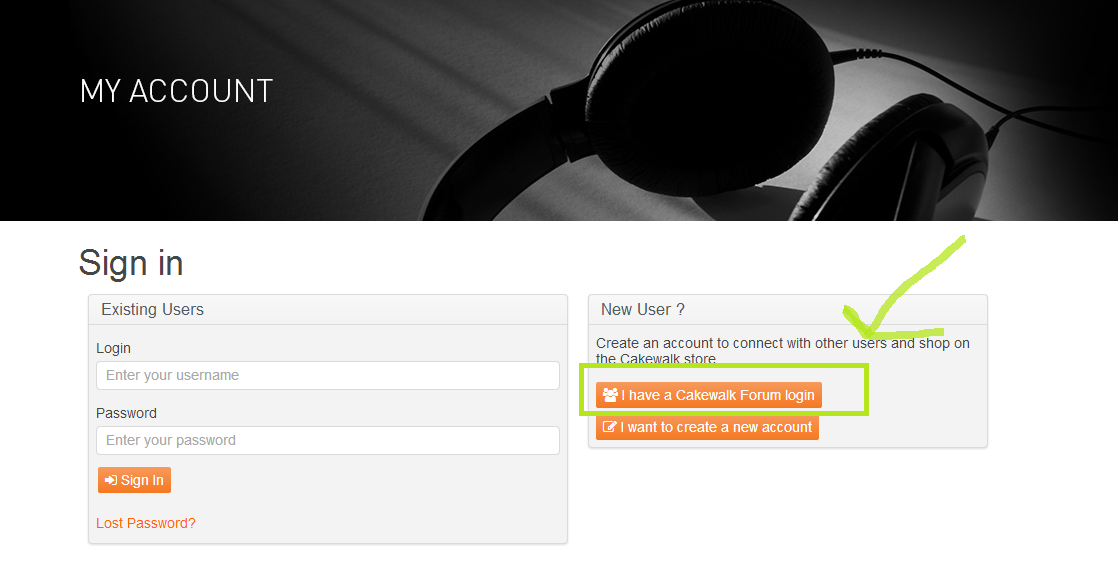


Afterwards, you will be met with a Migrate your Forum account form. Simply fill out the form.
 
After you have completed the form you will need to log in to your email account and click the magic verification link. If you are having difficulties with the link, try copying and pasting the entirety of it into your browser's address bar versus clicking it. Alternately, we have added a second code that is now sent with your verification email that can be entered at http://www.cakewalk.com/My-Account/Verify. Make sure you're thinking happy thoughts or you won't take flight properly.
 
After successfully verifying, you're done! You will now log in to the Forum with your Cakewalk Account. If you prefer to use a separate email address for your forum account, this option is still available under the "User Control Panel".
 
Please take the time to also check out the new My Account page and provide us with feedback. Please consider doing this, our hamsters are very hungry and ready for things to fix! This new My Account page will eventually be the new landing page for your product ownership (a place for you to see your serial numbers, registration codes and get downloads to your software). For the time being, you can also do this by logging into the Cakewalk Store.
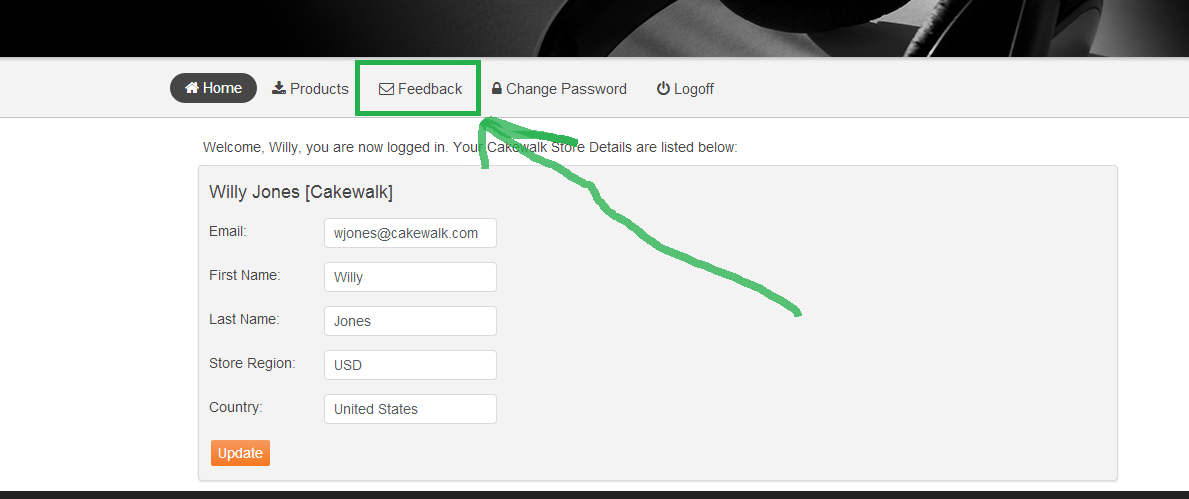


PLEASE NOTE: Your Cakewalk Store account has not been changed in any way yet. This new My Account page will eventually replace it. However your feedback would be extremely helpful in sorting out any hiccups and locating any hamsters that may have hidden in your walls.
 
Please keep any feedback or replies constructive and on topic. We'd like to focus on resolving issues specifically around making sure Single Sign On is working for everyone and that everyone's My Account is as accurate as possible.
 
We reserve the right to remove posts and change your avatar. :)
 
 
UPDATE 1:21 PM EST:
 
We had initially lost one of our hamsters with our first push. He has now been located and fed appropriately. If you tried merging your account while he was missing, you may have encountered an error. This has now been corrected. Please try again :)
2014/07/28 13:01:50
scook
The new account only shows downloads and serial numbers (a few very old ones missing, I used a feedback post to list them). The old account had a free section above the registration area containing things like the Gobbler access info and Quick Kit Project templates. There was also a section below the registration area with my order history. Will the data from those sections be added to the new account?
2014/07/28 13:20:58
Willy Jones [Cakewalk]
scook
The new account only shows downloads and serial numbers (a few very old ones missing, I used a feedback post to list them). The old account had a free section about the registration area containing things like the Goobler access info and Quick Kit Project templates. There was also a section below the registration area with my order history. Will the data from those sections be added to the new account?


Thanks for the feedback - we'll get it sorted. 
 
RE: Order History - that is not in this flavor of the My-Account page today you will need to continue going to the store for that. Once we are confident in registrations and downloads all being available we'll start looking into displaying order history.
2014/07/28 13:26:36
perfectprint
quick note: you have to have already gone through the sign in and migration process in order to read this post (at least i was forced to)
2014/07/28 13:30:27
Willy Jones [Cakewalk]
perfectprint
quick note: you have to have already gone through the sign in and migration process in order to read this post (at least i was forced to)


Thanks for the feedback - this probably happened because you hit the forum right after we turned it off to fix a few issues. You shouldn't need to be logged to browse/read any posts in the forum. Sorry for any confusion.
2014/07/28 13:31:31
Stone House Studios
perfectprint
quick note: you have to have already gone through the sign in and migration process in order to read this post (at least i was forced to)


Lol!
I was thinking the same thing!
2014/07/28 13:37:44
scook
Willy Jones [Cakewalk]
RE: Order History - that is not in this flavor of the My-Account page today you will need to continue going to the store for that. Once we are confident in registrations and downloads all being available we'll start looking into displaying order history.

OK, I did not know the old store account page was going to stay up.
 
Since serials are listed separately from links, it would be handy to have the serials split out from the download links. Or a sort by type and/or sort by name.
2014/07/28 13:38:45
azslow3
+1
No way I could get some information how to proceed before I have actually done that. All links to the forum are pointing to that login page. No info in FAQ, Blog, etc...
 
The whole page is confusing:
1) I am not a NEW USER!
2) I am not from USA, but this site is thought to be international, right? What "Create new account to connect with other users..." means? I do not want connect to someone else, I just want to login into MY account (forum/store/common, still it is MY account).
 
Fortunately I have seen the thread that is going to happened, but some other can make you responsible for broken keyboards and monitors 
 
PS. I see something is already fixed... at least the forum is readable without login.
2014/07/28 13:43:19
scook
Yeah, the new user thing was a little confusing. Would have been less so if there were something about existing users logging in for the first time. Still managed to stumble through the process.
2014/07/28 13:47:43
Beepster
I seem to still be alive... but where should I be seeing this "MyAccount" page? On the forum? I want to make sure that Beepster the forum droog does not have access to the man behind the curtain's goodies.
 
So far I cannot see a way to get at my store account from my forum account... which is exactly what I want.
 
And yeah... it's all been pretty confusing but I know it's a work in progress. Good job on the quick turnaround though, lads. Cheers.
© 2026 APG vNext Commercial Version 5.1

Use My Existing Forum Account

Use My Social Media Account