dewdman42
Max Output Level: -74 dBFS

- Total Posts : 839
- Joined: 2004/09/20 16:37:27
- Status: offline

RE: MIDI "Jitter" - It Does Exist
2007/10/20 19:10:48
(permalink)
Ok. The only reason I asked is because when I went to project options to send the built in audio metronome to a buss, Sonar was providing me a buss called "metronome" and I didn't set one up like that, so it almost seemed, at first glance, like it might be some kind of built in hidden buss. i didn't investigate further.
Anyway, I love your approach over all. Sample accurate metronome I think is absolutely key, and being able to setup some metronomes that swing, etc...could be beneficial as well. All that can also be done by using a midi track sent to Session Drummer2, but then you have to deal with paranoia about the timing of the midi track. Just make it with audio and then it will be sample locked. I like it.
|
Nick P
Max Output Level: -44 dBFS

- Total Posts : 3112
- Joined: 2006/09/01 18:08:09
- Location: Area code 392 - Arlington Hts, IL
- Status: offline
RE: MIDI "Jitter" - It Does Exist
2007/10/20 19:54:42
(permalink)
Jim Wright - Thanks for the great info. Next interface I get will have combined audio and MIDI and will be Firewire. I currently have the Presonus 1394 Firewire for audio, but a separate MIDI interface which is the M-Audio USB Midisport. I didn't know that about the MMA and Firewire.
If what you and others say about USB is true, then it's too bad almost all of the great MIDI controllers out there now are USB. Maybe in a couple of years they'll all be Firewire.
Cakewalk Forums - A Great Learning Resource For All Things Cakewalk!
|
Steve_Karl
Max Output Level: -50 dBFS

- Total Posts : 2534
- Joined: 2003/11/06 20:53:26
- Location: Pittsburgh, PA USA
- Status: offline
RE: MIDI "Jitter" - It Does Exist
2007/10/20 20:09:01
(permalink)
ORIGINAL: Nick P
... almost all of the great MIDI controllers out there now are USB. Maybe in a couple of years they'll all be Firewire.
What is a great Midi Controller that is USB? I would think they all have DIN also which makes it possible to get it connected to a PCI usb interface. I, personally, wouldn't go firewire, just because it's not going to be as good as pci. I'd bet an M-Audio 2496 is going to be better than any Firewire interface, for audio latency and also midi latency.
|
Nick P
Max Output Level: -44 dBFS
- Total Posts : 3112
- Joined: 2006/09/01 18:08:09
- Location: Area code 392 - Arlington Hts, IL
- Status: offline
RE: MIDI "Jitter" - It Does Exist
2007/10/20 22:15:22
(permalink)
Possibly true, but time and technology march on. Ultimately I think PCI will go the way of the floppy drive, where hi-speed, hi-bandwidth interfaces like Firewire will become even more pervasive. If I was buying a new interface, it wouldn't be a PCI, it would be Firewire. However, a cheap PCI midi interface might be in the cards just to test the "jitter" factor!
Cakewalk Forums - A Great Learning Resource For All Things Cakewalk!
|
dewdman42
Max Output Level: -74 dBFS
- Total Posts : 839
- Joined: 2004/09/20 16:37:27
- Status: offline
RE: MIDI "Jitter" - It Does Exist
2007/10/21 04:00:25
(permalink)
There are no "cheap" PCI midi cards that I am aware of. There are a few PCI audio cards which have midi added on them.
PCI is superior to Firewire. Firewire, however, is more convenient for some. PCI is not going anywhere, there is no reason to be paranoid about investing in it.
|
RTGraham
Max Output Level: -57 dBFS

- Total Posts : 1824
- Joined: 2004/03/29 20:17:13
- Location: New York
- Status: offline
RE: MIDI "Jitter" - It Does Exist
2007/10/21 04:20:24
(permalink)
ORIGINAL: dewdman42
PCI is not going anywhere, there is no reason to be paranoid about investing in it.
Especially as long as the Magma expansion chassis still exists... you can load up 13 PCI cards in a box, and connect it to another computer by PCI, PCI-Express, PCMCIA, ExpressCard/34, or ExpressCard/54.
|
John
Forum Host

- Total Posts : 30467
- Joined: 2003/11/06 11:53:17
- Status: offline
RE: MIDI "Jitter" - It Does Exist
2007/10/21 06:39:17
(permalink)
|
Nick P
Max Output Level: -44 dBFS
- Total Posts : 3112
- Joined: 2006/09/01 18:08:09
- Location: Area code 392 - Arlington Hts, IL
- Status: offline
RE: MIDI "Jitter" - It Does Exist
2007/10/21 06:44:43
(permalink)
Thanks John, these articles look great. It's becoming apparent that one could almost write an entire book just dedicated to computer-based recording and the inherent MIDI timing issues that accompany such activity, whether perceived or real.
Cakewalk Forums - A Great Learning Resource For All Things Cakewalk!
|
John
Forum Host
- Total Posts : 30467
- Joined: 2003/11/06 11:53:17
- Status: offline
RE: MIDI "Jitter" - It Does Exist
2007/10/21 08:01:26
(permalink)
I think you guys already wrote a book. There was an article in some mag about the AMT from Emagic and the MOTU MIDI time piece. It compared them and talked about how they work. The one thing that may be of interest here is only Digital performer and Logic support the methods used to tighten MIDI. DP for the MOTU and Logic for AMT. Sonar does not. Now the MOTU has a more universal type timing structure that can benefit any app but it will be best with DP. The AMT has to have Logic to use the time stamping. it has. I have not had a problem with the AMT 8 in Sonar though.
post edited by John - 2007/10/21 08:21:45
|
dewdman42
Max Output Level: -74 dBFS
- Total Posts : 839
- Joined: 2004/09/20 16:37:27
- Status: offline
RE: MIDI "Jitter" - It Does Exist
2007/10/21 15:35:32
(permalink)
For anyone interested, I set out to emulate the timing behavior of a 96ppqn hardware sequencer here: http://forum.cakewalk.com/fb.asp?m=1191696 Some interesting results, in light of the fact that Sonar is using a hardwired internal midi resolution of 960ppqn.
post edited by dewdman42 - 2007/10/21 16:28:59
|
Nick P
Max Output Level: -44 dBFS
- Total Posts : 3112
- Joined: 2006/09/01 18:08:09
- Location: Area code 392 - Arlington Hts, IL
- Status: offline
RE: MIDI "Jitter" - It Does Exist
2007/10/21 18:10:41
(permalink)
ORIGINAL: dewdman42
For anyone interested, I set out to emulate the timing behavior of a 96ppqn hardware sequencer here:
http://forum.cakewalk.com/fb.asp?m=1191696
Some interesting results, in light of the fact that Sonar is using a hardwired internal midi resolution of 960ppqn.
Cool, dewdman42. Thanks!
Cakewalk Forums - A Great Learning Resource For All Things Cakewalk!
|
brundlefly
Max Output Level: 0 dBFS

- Total Posts : 14250
- Joined: 2007/09/14 14:57:59
- Location: Manitou Spgs, Colorado
- Status: offline
RE: MIDI "Jitter" - It Does Exist
2007/10/21 18:49:11
(permalink)
For anyone interested, I set out to emulate the timing behavior of a 96ppqn hardware sequencer here:
http://forum.cakewalk.com/fb.asp?m=1191696
Some interesting results, in light of the fact that Sonar is using a hardwired internal midi resolution of 960ppqn. Interesting idea, using input quantize to emulate lower PPQ recording, but the result is the same as quantizing to that lower resolution after the fact, right?
|
dewdman42
Max Output Level: -74 dBFS
- Total Posts : 839
- Joined: 2004/09/20 16:37:27
- Status: offline
RE: MIDI "Jitter" - It Does Exist
2007/10/21 19:12:54
(permalink)
Exactly the same as quantizing after the fact, perhaps just a bit more convenient. The only real advantage I think to input quantize is that if you are doing loop record, the material will be quantized when it comes back around in the loop to play back what you had laid down in previous pass, it will already be quantized. In this example, it would be pseudo quantized to 96ppqn.
|
RTGraham
Max Output Level: -57 dBFS
- Total Posts : 1824
- Joined: 2004/03/29 20:17:13
- Location: New York
- Status: offline
RE: MIDI "Jitter" - It Does Exist
2007/10/22 16:03:11
(permalink)
ORIGINAL: dewdman42
For anyone interested, I set out to emulate the timing behavior of a 96ppqn hardware sequencer here:
http://forum.cakewalk.com/fb.asp?m=1191696
Some interesting results, in light of the fact that Sonar is using a hardwired internal midi resolution of 960ppqn.
Interesting... having skimmed the thread, I wonder to what extent incoming DIN and USB jitter might still place a note on the "wrong" tick. Or maybe not.
|
dewdman42
Max Output Level: -74 dBFS
- Total Posts : 839
- Joined: 2004/09/20 16:37:27
- Status: offline
RE: MIDI "Jitter" - It Does Exist
2007/10/22 16:10:29
(permalink)
Yea..definitely in terms of recording from a keyboard, the incoming jitter is going to round everything to the nearest tick from an unsynchronized millisecond timer, USB slop, DIN slop, etc. The "slop" is going to be there and there is not much we can do about it. However, the question is, will it round it to a tick that lands on a metrically even point in time based on 3/4, 4/4 or will it land on a point in time that is completely out of sync with the meter, or rather has no musically metrical timebase? This rounding that has to take place, is kind of like a very fine level of quantizing. Not just kind of. It is! The thing is, at certain PPQN's, like 960 for example, the divisions for that quantizing are not metrically musical at 3/4, 4/4. Get it? I have created an interesting spreadsheet related to PPQN's in Sonar, for a while it will be available at the following link: http://public.dewdman42.fastmail.fm/ppqn_map.xls Quick explanation. Blue is good. Yellow is bad. Bad meaning that the PPQN grid becomes un-musically-metrical at some point. Boldface lines are the PPQN's provided by Sonar. The rows with red indicate PPQN's which OUGHT to be provided. Across the top I also added some reference times in milliseconds based upon a tempo of 120bpm. Note also that nearly all of this is hypothetical since currently Sonar stores everything internally at 960ppqn. But also notice that 960 is not even close to being the best one for 3/4, 4/4 type music. With the current limitation of hardwired 960, you can emulate lower resolutions with quantizing, but there are really only a handful of resolutions you can emulate that way. I reckon 192 is the best option, related to this discussion, for metrically sound divisions down to the finest level of detail:
 quant     emulated
 ticks     PPQN
 ------    ------------
 10         96
 5         192
 4         240
 3         320
 2         480
post edited by dewdman42 - 2007/10/22 17:10:13
|
Nick P
Max Output Level: -44 dBFS
- Total Posts : 3112
- Joined: 2006/09/01 18:08:09
- Location: Area code 392 - Arlington Hts, IL
- Status: offline
RE: MIDI "Jitter" - It Does Exist
2007/10/23 03:26:58
(permalink)
dewdman42 - thanks for the great resources and input you've provided throughout this thread.
Cakewalk Forums - A Great Learning Resource For All Things Cakewalk!
|
dewdman42
Max Output Level: -74 dBFS
- Total Posts : 839
- Joined: 2004/09/20 16:37:27
- Status: offline
RE: MIDI "Jitter" - It Does Exist
2007/10/23 20:06:13
(permalink)
Thanks. This is a subject that has been irking me for a long time. The spreadsheet I did was very interesting I thought. In light of it, I find myself fundamentally wishing to record all of my midi tracks at 768ppqn. Its very unfortunate to me, in my mind that Sonar does not provide this resolution, which in my mind is the like the golden resolution for anything under 960. 1536ppqn would be even better, but I doubt we'll ever see that. To me, 1536ppqn would be the ultimate golden resolution for recording typical 3/4. 4/4, 6/8 midi tracks. But the fact that Sonar is hardwired to store and quantize midi events to a 960ppqn grid is very disappointing to me. I hope they will consider improvement in this area. I think with the midi slop we've been talking about, some of the imprecision we're talking about is blurred by that when recording live midi tracks. And really, at 960ppqn, we're talking about inaccuracies that are under mostly less than 0.5ms. But the big thing to me is that the 960ppqn grid pushes many events to non-musically metrical points in time much of the time. There is something in the back of my head screaming out loud that this may be contributing to a sense of looseness that people seem to have. Or I could just be asking for too much. Dunno. Nevertheless, there we are. Anyone know if any other sequencers also enforce an internal hardwired 960 grid for recording, quantizing and editing midi data? Or do people know if other sequencers handle things in another, perhaps better, way? What about some plugins which have their own internal sequencers, such as Guru, EZD and other rythmn oriented plugins? I'm very curious what happens if you run FruityLoops inside Sonar, or Ext or one of the other plugin sequencers out there...and wondering what kind of midi resolution they provide..perhaps providing one of the more musical resolutions.
post edited by dewdman42 - 2007/10/23 20:23:27
|
brundlefly
Max Output Level: 0 dBFS
- Total Posts : 14250
- Joined: 2007/09/14 14:57:59
- Location: Manitou Spgs, Colorado
- Status: offline
RE: MIDI "Jitter" - It Does Exist
2007/10/23 23:51:55
(permalink)
But the big thing to me is that the 960ppqn grid pushes many events to non-musically metrical points in time much of the time. I'm having trouble seeing what the big concern is in real terms, given that 960PPQ gives you precise whole-number intervals and durations down to a 256th triplet, leaving only resolutions of less than 10 ticks (5.2ms at 120BPM) getting "quantized" to "non-musical" values. I seriously doubt that there are a significant number of musicians working in MIDI that have the performance control and consistency to make this a concern. I know for certain it's not a problem for me. I don't think I've ever had a need for quantization values below a 32nd triplet, which accommodates quantizing mixed 16ths and 16th triplets, and won't do too much damage to a grace note, most of the time. One of the advantages of 960PPQ to me is that all the usual values end in 0, so it is easy to see what intervals were intended when looking at notes in an event list, and how far off the mark they are, so you can choose an appropriate quantizing value and percentage to tighten things up without stomping too hard on anything. This becomes significantly less intuitive at 384 or 768 PPQ. As an example, all the testing I just did in connection with this thread would have been made much more painful, trying to quickly record how far each event was from its target. As it was with errors mostly in the single digits, I could pretty much just read the last digit of the tick value, and that was the error. Imagine trying to do that with target values ending in any of 8, 6, 4, 2 or 0. No thanks. I still think that the people who are hearing or feeling something being significantly "off" from what the played are experiencing some sort of system-specific problem that is bigger than a tick of jitter, or a fraction of a tick of quantizing.
|
dewdman42
Max Output Level: -74 dBFS
- Total Posts : 839
- Joined: 2004/09/20 16:37:27
- Status: offline
RE: MIDI "Jitter" - It Does Exist
2007/10/24 02:21:04
(permalink)
Well you could be right. Or not. We can only speculate without having a system to try it on, or if someone knows about any scientific studies that might reveal something related to the human perception of metrical divisions at such a fine level of detail. Otherwise, we're only speculating either way. In any case, there is not much we can do about it. So I digress. I just thought it interesting and wish I had a way to try out true 768. Seems like I should have the option and it seems like the midi resolution setting in Sonar should mean something.
post edited by dewdman42 - 2007/10/24 02:41:53
|
brundlefly
Max Output Level: 0 dBFS
- Total Posts : 14250
- Joined: 2007/09/14 14:57:59
- Location: Manitou Spgs, Colorado
- Status: offline
RE: MIDI "Jitter" - It Does Exist
2007/10/24 03:10:48
(permalink)
Seems like I should have the option and it seems like the midi resolution setting in Sonar should mean something. I'm with you there. More options are always good, and they definitely fooled us all with the "placebo" clock setting dialogue. 
|
dewdman42
Max Output Level: -74 dBFS
- Total Posts : 839
- Joined: 2004/09/20 16:37:27
- Status: offline
RE: MIDI "Jitter" - It Does Exist
2007/10/24 04:36:22
(permalink)
Ok, I know I must be certifiably insane for taking it this far, but I just wanted to do this while its fresh in my mind and so that I have it documented for myself, and to visualize better what happens during say around 10ms. check out the following diagram(available for limited time): 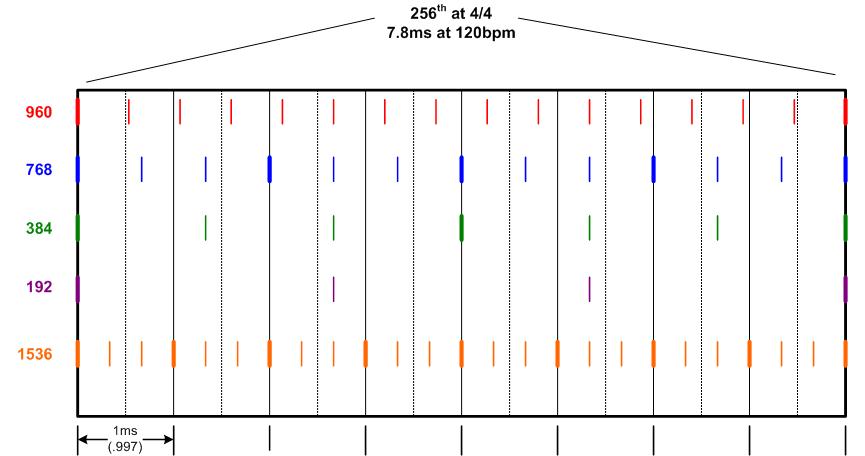 How to read this is that the big rectangle timeline represents one 256th note division of time, in 4/4 time at 120bpm, occurring over 7.8ms. The vertical lines in that big rectangle represent further metrical sub-divisions of a 256th note at 4/4, no triplets. The tick marks along the bottom more or less show approximately 1ms of time. This value is not exact and depends on the tempo. Also the MM timer is not perfect. However, in Sonar, at some foggy interval of about 1ms, the MM timer goes off, obtains midi events from the hardware interface, assumes that they all happened at the end of that ~1ms time period and then assigns them to the closest red notch, which is the 960ppqn grid. Notice that within the time that it takes for one 256th division, not a single one of those 960 ticks lines up on a metrical division. Only the ones lining up exactly on perfectly quantized 256th notes. Now observe 768, 384, 192 and 1536. Not only do they have a lot of ticks that line up exactly on metrical divisions, but the ones that don't line up are actually evenly spaced as thirds in between the ones that do line up. I don't really know what to make of all this other than to just say "interesting" and wonder what the effect would be if I could actually change the real midi resolution to some of these others. We are really talking about sub millisecond precision here in terms of where the resulting notes end up on the track. We are NOT talking about capturing accurately. That is not possible no matter what. There is no way around the 1ms of midi slop due to the MM timer + whatever the DIN and USB is doing. However, when the notes finally do end up on the track, the question is, does it matter if they end up somewhat randomly scattered within a 10ms window, or will things sound tighter if the notes tend to gravitate towards metrical locations when they are stored? Anyway, enough from me on this. Hope someone finds this interesting.
post edited by dewdman42 - 2007/10/24 22:38:23
|
Blades
Max Output Level: -43 dBFS

- Total Posts : 3246
- Joined: 2003/11/06 08:22:52
- Location: Georgia
- Status: offline
RE: MIDI "Jitter" - It Does Exist
2007/10/24 07:37:48
(permalink)
It's interesting, yes - but a little insane as well  What it made me think of, when Brundlefly pointed out the idea of quantization with less than 100% strength, means that all of the speculation about musical divisions and whatnot would be thrown right out the window, right?
|
dstrenz
Max Output Level: -69 dBFS

- Total Posts : 1067
- Joined: 2005/12/10 09:59:06
- Location: Rochester, NY
- Status: offline
RE: MIDI "Jitter" - It Does Exist
2007/10/24 08:13:38
(permalink)
I find it very interesting. Out of every x number of insane ideas comes one brilliant invention. Don't know if this is one or not, but your persistence is admirable and the chart is very pretty.  One question that's difficult to ask/explain because it's hard to follow some of the logic and math. With real data, is the big rectangle fixed in relation to the verticle tick marks? IOW, if the rectangle is moved a few pixels to the left and the tick marks remain fixed in position, does that represent reality? The reason I ask is that, if that is so, then all the 768 and ticks would be consistently off the mark and then the highest resolutions (960 and 1536) would get us closest to real time.
|
brundlefly
Max Output Level: 0 dBFS
- Total Posts : 14250
- Joined: 2007/09/14 14:57:59
- Location: Manitou Spgs, Colorado
- Status: offline
RE: MIDI "Jitter" - It Does Exist
2007/10/24 13:47:52
(permalink)
How to read this is that the big rectangle timeline represents one 256th note division of time, in 4/4 time at 120bpm, occurring over 7.8ms No big deal, but just to keep everything straight, 7.8 ms for 10 ticks at 960PPQ works out to 80 BPM. At 120 BPM, 10 ticks is only 5.2ms, and the max error caused by running at 960PPQ of half a tick is .26ms. Yup. You're certifiable.  Edit: Oops. My mistake I was thinking the min whole number resolution of a 256th triplet. But the error is still only .26ms.
post edited by brundlefly - 2007/10/24 13:54:23
|
dewdman42
Max Output Level: -74 dBFS
- Total Posts : 839
- Joined: 2004/09/20 16:37:27
- Status: offline
RE: MIDI "Jitter" - It Does Exist
2007/10/24 15:03:08
(permalink)
brunderfly: There are 15 red ticks above. Try your math again... ;-) 15 ticks per 256th note at 960BPM. You are right that we are only talking about a sub-millisecond discrepancy. I have been saying that too. I have no idea if it makes any difference and nor do you. Anyone know of any scientific studies? I'm only observing it right now. Don't get your pants on fire, I still love Sonar. The other thing to remember is that most notes are held for a longer duration, at least 32nd's or much longer...so we are only really talking about a discrepancy of when the attack of the note starts and when the note ends. Oh but wait, that is a double discrepancy, because of each end of the note being represented by a separate midi event. (shrug) dstrenz: The ticks are fixed to the rectangle. Absolutely. PPQN ticks are ticks per quarter note. They are based on the meter. Period. Otherwise quantize operations would be meaningless. Every downbeat has the first tick of the beat and 960 more should follow, exactly on time until the next beat. So the relationship between the colored PPQN ticks and the meter grid is absolutely the same every time. Or should be anyway. This only works out that they all start evenly on the front edge of the rectangle because 960,768,384, 192 and 1536ppqn all divide evenly into perfectly quantized 256th notes. On that rectangle, two vertical lines occur every 0.997ms at 120BPM. The ms reference is only to give people a general idea of the length of time we're talking about. What can drift all over the place is the ~1ms window of when the MM timer will fire off and collect midi events to add to the track. Doesn't much matter though. All it means is that whenever midi events are being added, they are going to be originating from a ~1ms wide area, but they will always fall onto one of the red notches on the midi track. Actually as a sidenote, this diagram does help to visualize the 1ms slop incurred by using the MM timer. Blades: The issue with <100% quantization strength makes this issue perhaps even MORE relevant. Midi notes can only land on the red notches in Sonar. They can't be in between them ever. That is it. So let's say you want to quantize a note to 32nd, with 100% strength. It will pull the note's start time to a 32nd note boundary which will land exactly on a red tick mark that happens to also land exactly right on a 32nd note spot. If you use less than 100% strength, it will land on a different red tick mark, one that is not 100% metrically sound, but always one of the red tick marks.
post edited by dewdman42 - 2007/10/24 18:35:16
|
Blades
Max Output Level: -43 dBFS
- Total Posts : 3246
- Joined: 2003/11/06 08:22:52
- Location: Georgia
- Status: offline
RE: MIDI "Jitter" - It Does Exist
2007/10/24 17:54:38
(permalink)
dewdman,
What I was getting at with the "less than 100% quantize" was more in the region of normal musical values. For example, from your other chart in the other thread, at 960PPQN, 32nd notes would land at 120 tick intervals, so quantized to 100% strength for 32nd notes, would land you on these round numbers at musically relavent timings. If you said to quantize to 90%, you'd be 90% towards that tick from whatever "wrong" location the note was at, so lets say, for easy math, I was 10 ticks late (I landed at tick 130), 90% back towards 120 would be 9 ticks back in the quantized version instead of 10 if it were at 100%. Now, I'd be at tick 121, which probably isn't a musical value regardless of the PPQN - it's going to be about 1ms late (at tempo=120, right?) becasue I chose to quantize "loosely". this, of course, is just the absolute placement of the note - when it REALLY plays back is yet another question in terms of when I'll hear it, etc.
I guess I'm just yammering, thinking that the only time these resolutions really have any bearing is when you DON'T quantize, in which case you are trying to capture that ebb and flow of a real performance, which as we've all agreed, if played back reliably, would be "close enough", but with unstable stuff entering in we don't know if it's exact, if we'd notice the difference with HOW exact, and if we did, would we further notice a difference (at some sub understanding human level) as to whether it was a musically divisible location.
I get why you are asking the question, but the scientific end is going to get harder and harder to prove whether or not your experiment "works"...really it's a subjective thing.
If you could record two things and double blind test them with a bunch of us and ask which sounds more "right"...I think you'd find that we couldn't reliably tell which was which.
Carry on...
|
dewdman42
Max Output Level: -74 dBFS
- Total Posts : 839
- Joined: 2004/09/20 16:37:27
- Status: offline
RE: MIDI "Jitter" - It Does Exist
2007/10/24 18:09:01
(permalink)
Regardless of whether you quantize or not, the notes all must land on the red 960 ticks. If you want the note on tick 121, because you used less than 100% of quantization..that is fine..it would not be exactly on a 32nd note boundary. But where it ends up being will not be in a metrically balanced location at finer level of meter detail. I don't think I can explain this concept any better than I have already tried. If people still aren't getting it, then I give up. Do you get it? If you want the note to be slightly behind the beat by one tick, it can be one or two 960 ticks, which have no musical relevance whatsoever, or it can be a 768 or 1536 tick which would place the note in a location that has metrical balance in the sub-millisecond range. I'm not sold that its irrelevant that deep down. capturing the fine nuance of a midi realtime performance is fundamentally flawed because of all the reasons we have discussed, but again, do you care if the notes end up on metrically balanced ticks or scattered non-musical random ones? You aren't controlling their exact location by your playing, the 960 grid is.
post edited by dewdman42 - 2007/10/24 18:13:55
|
Blades
Max Output Level: -43 dBFS
- Total Posts : 3246
- Joined: 2003/11/06 08:22:52
- Location: Georgia
- Status: offline
RE: MIDI "Jitter" - It Does Exist
2007/10/24 20:46:51
(permalink)
dewdman,
I feel like you think I don't get it. I get it. Maybe I just can't describe what I mean. I really don't want to do some of the math, so the example I gave was merely an example. Can you show me that the 90%, if given the exact situation that I described wouldn't be one of those "1/3 split" remaining items in the 768 time frame. If it does, then it's no more metrically accurate than 960. And in that case would be further away from the closest metrical subdivision.
So, at 960, for each 256th note of time, there are only 2 ticks that are on, one at the start and one at the end, where at 758, there are 5 that line up. So far, 768 "wins" for being more musical, but I feel like the scale gets tipped when I look at how much closer to the smaller subdivisions about half or more of the remaining ticks at 960 are - compared to the remaining, fewer ticks at 768 which are further from the metrical subdivisions. This is one of the areas that really would come down to a wierd answer when asking "which one has more accurate metrical breakdown?". If you happen to land on the even 768 ones or are quantizing, then fine, but if just recording freeform, it seems like there is likely a chance that you are going to be closer to metrical locations more often on average.
Some of it is theoretical, some may be subjective when it really comes down to it, but in this example with this model, it seems like there's not an actual answer.
Not trying to be argumentative here - since we're this deep into the unknown and possibly not usefully measureable, it's all conjecture.
|
dewdman42
Max Output Level: -74 dBFS
- Total Posts : 839
- Joined: 2004/09/20 16:37:27
- Status: offline
RE: MIDI "Jitter" - It Does Exist
2007/10/24 21:51:59
(permalink)
I don't wish to debate with you Blade. Believe what you want. I'm only presenting the current situation that exists for whatever its worth. My diagram is accurate. Take that information and do whatever you want with it. As I said some posts ago, there is no way for us to know either way without either (A) a way to try it out, which we don't have or (B) some scientific evidence about human perception in this area or on what top players actually do when they play, which we also don't have that information right now. By the way 1536 is the resolution I am wishing for right now as an alternative to 960, though 768 is still interesting. The interesting thing about 768, is that if Sonar provided it, you could quantize to 3 tick resolution, which would essentially force a type of 1024th division resolution with no out of time events... That is the same as using a 256ppqn sequencer with no "out-of-time" ticks. 1024ths, all exactly on meter boundaries is a good deal better for many people than 960, taking into consideration the midi slop eliminates the possibility for a musician to control absolutely where they want a midi event to land anyway. 960 can't represent 1024th divisions accurately that way, the best you can do to ensure no un-metrical events is to quantize to 15 ticks, which is the equivalent of a 96ppqn sequencer with no "out-of-time" ticks. 1536ppqn can actually represent 2048th divisions correctly with a 3 tick quantize and no out-of-time events, which is the equivalent of a 512ppqn sequencer that has no out-of-time ticks. Also, the division by thirds that you mentioned is still more musical than the randomness and un-symmetricalness of 960. This is all about tightening up the track and having options to do it metrically instead of somewhat randomly below a 256th division at 960. Anyway, just observations...questions... Just explaining what I see and asking some unanswerable questions that should make all of us simply go "hmmmmm, I wonder". I don't see a need for you to discount what I'm saying. Nothing I have pointed out is actually debateble except for the question I still pose about whether a more musically metrical tick timebase would sound in some way tighter or more "musical"......a concept we are probably not ever going to find out the answer to. People have complained about timing and jitter and looseness and I am merely digging deep deep deep to try to find possible explanations. Believe whatever you want that makes you happy.
post edited by dewdman42 - 2007/10/25 15:21:14
|
pianodano
Max Output Level: -67 dBFS

- Total Posts : 1160
- Joined: 2004/01/11 18:54:38
- Location: Va Beach Virginia
- Status: offline
RE: MIDI "Jitter" - It Does Exist
2007/10/24 22:11:24
(permalink)
Dewdman42, If it counts for anything at all, I'll give you an A+ for tenacity. Since I seriously doubt these issues will be solved (or even agreed upon) before I kick the bucket, if ever, I'm going to solve it for myself in a retro sorta way. I'm going to find a reliable old MCI JH24 to sync with my DTRS machines and retire the MS16. 48 tracks will do what I need just fine. Also, maybe I'll retire the music computer to internet only use just so I can keep up with the latest batch of bugs. Carry on.
post edited by pianodano - 2007/10/24 22:23:17
Best, Danny Core I7, win XP pro, 3 gig ram, 3 drives- Lynx Aurora firewire- Roll around 27 inch monitor, 42 inch console monitor- Motif xs controller - Networked P4's and FX Teleport for samples- Muse Receptor VIA Uniwire for samples and plugs- UAD QUAD Neve - UAD 1- Sonar X1 but favor 8.5 GUI - Toft ATB 32 - Vintage hardware - Tascam MS-16 synched via Timeline Microlynx -Toft ATB32 console
|